
1. Johdanto
The Zapco Z-OTG-BT C is a high-resolution audio converter designed to enhance your audio experience by converting digital audio signals to high-quality analog and digital outputs. This device supports various input and output formats, ensuring compatibility with a wide range of audio systems. It features a high-performance DAC and OP-amp for superior sound reproduction.
2. Turvallisuustiedot
Lue ja ymmärrä kaikki turvallisuusohjeet ennen laitteen käyttöä. Säilytä tämä käyttöohje myöhempää tarvetta varten.
- Virtalähde: Use only the specified DC 9-16V power supply. Using an incorrect power adapter may damage the device and void the warranty.
- Kosteus: Do not expose the device to water, moisture, or extreme humidity. This can cause electric shock or fire.
- Ilmanvaihto: Ensure adequate ventilation around the unit. Do not block ventilation openings. Overheating can lead to malfunction.
- Sijoitus: Aseta laite vakaalle ja tasaiselle alustalle. Vältä sijoittamasta sitä lämmönlähteiden lähelle tai suoraan auringonvaloon.
- Huolto: Älä yritä avata tai huoltaa laitetta itse. Jätä kaikki huoltotyöt pätevän henkilöstön tehtäväksi.
- Puhdistus: Katkaise virta ennen puhdistamista. Käytä pehmeää, kuivaa liinaa. Älä käytä nestemäisiä tai aerosolipuhdistusaineita.
3. Pakkauksen sisältö
Varmista, että pakkauksessa on kaikki tarvittavat osat:
- Zapco Z-OTG-BT C Audio Converter Unit
- Virtasovitin (9–16 V tasavirta)
- Käyttöopas (tämä asiakirja)
4. Asennus
Follow these steps to set up your Zapco Z-OTG-BT C audio converter:
- Liitä äänilähde: Connect your digital audio source device (e.g., smartphone, tablet, computer) to the OTG input port on the Zapco Z-OTG-BT C. This input supports 192KHz/32bit audio and also supports a charging function for the connected device.
- Yhdistä äänilähtö: Choose your desired audio output method:
- RCA-lähdöt: Connect the Left and Right RCA outputs (1.5V RMS) to your amplifier or receiver's analog audio inputs.
- Digital Outputs (Optical/Coaxial): Connect either the Optical or Coaxial digital output to a compatible digital input on your external DAC or amplifier. These outputs support 48/96/192KHz digital inputs.
- Liitä virta: Connect the provided power adapter to the DC 9-16V power input on the Zapco Z-OTG-BT C, then plug the adapter into a suitable power outlet.
- Virta päälle: The device will power on automatically once connected to power. Ensure all connections are secure before playing audio.
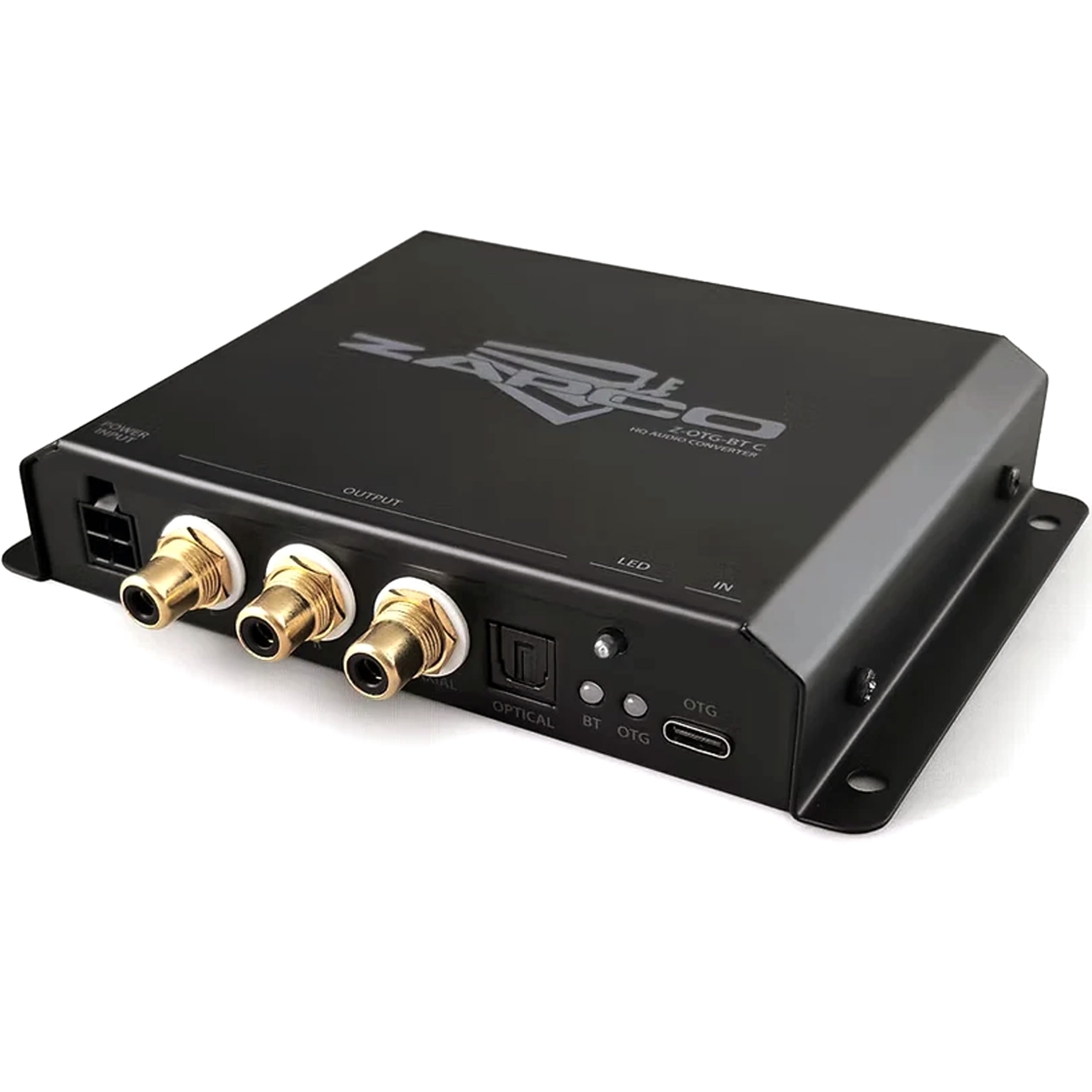
Kuva 1: Edessä view of the Zapco Z-OTG-BT C Hi-Res HQ Audio Converter, showing its various input and output ports.
5. Käyttö
Once the Zapco Z-OTG-BT C is set up and powered on, it operates automatically:
- Ensure your audio source device is playing audio.
- The Z-OTG-BT C will convert the incoming digital audio signal from the OTG input to the selected analog (RCA) or digital (Optical/Coaxial) outputs.
- Säädä äänenvoimakkuutta liitetyssä laitteessa amplifier or receiver. The Z-OTG-BT C does not have its own volume control.
6. Huolto
Oikea huolto varmistaa laitteesi pitkän käyttöiän ja optimaalisen suorituskyvyn:
- Puhdistus: Use a soft, dry, lint-free cloth to clean the exterior of the unit. Do not use abrasive cleaners, solvents, or chemical sprays.
- Varastointi: Jos laitetta säilytetään pitkään, irrota se virtalähteestä ja säilytä sitä viileässä, kuivassa paikassa, poissa suorasta auringonvalosta ja äärimmäisistä lämpötiloista.
- Kaapelin hallinta: Ensure all cables are routed neatly and are not under strain or bent sharply, which can damage them over time.
7. Vianmääritys
If you encounter issues with your Zapco Z-OTG-BT C, refer to the following troubleshooting guide:
| Ongelma | Mahdollinen syy | Ratkaisu |
|---|---|---|
| Ei äänilähtöä |
|
|
| Huono äänenlaatu / Vääristymä |
|
|
| Device not recognized by source (OTG) |
|
|
8. Tekniset tiedot
Detailed technical specifications for the Zapco Z-OTG-BT C:
- Tyyppi: Audio Converter
- Malli: Z-OTG-BT C
- OTG-tulo: 192KHz/32bit (Supports Charging function)
- OP-Amp: JRC 5532 (High Performance Low-Noise Dual OP)
- DAC: TI PCM5102A 384KHz/32bit
- Digitaalilähdöt: Optical and Coaxial (for connection with 48/96/192KHz Digital Inputs)
- RCA-lähdöt: Left + Right (1.5V RMS)
- Virtalähde: DC 9-16V
- Minimitarjonta Voltage: 9 volttia_tasavirtaa
- Suurin tarjonta Voltage: 16 volttia_tasavirtaa
- Liitäntätyyppi: Coaxial, Optical, RCA
- Kanavien määrä: 2
- Äänilähtötila: Stereot
- Yksikön mitat (mm): 140 x 23 x 96
- Tuotteen paino: 3 kiloa
9. Takuu
The Zapco Z-OTG-BT C Hi-Res HQ Audio Converter comes with a 1 vuoden takuu ostopäivästä lukien. Tämä takuu kattaa valmistusvirheet ja normaalissa käytössä esiintyvät toimintahäiriöt. Se ei kata väärinkäytöstä, onnettomuuksista, luvattomista muutoksista tai virheellisestä asennuksesta aiheutuneita vahinkoja. Säilytä ostokuitti takuuvaatimuksia varten.
10. Tukea
For technical assistance, warranty claims, or further inquiries regarding your Zapco Z-OTG-BT C, please contact Zapco customer support through their official website or the retailer from whom you purchased the product. Please have your model number (Z-OTG-BT C) and proof of purchase ready when contacting support.
