
1. Johdanto
Kiitos ostoksestasiasing the Audizio Laredo Bluetooth Turntable. This manual provides essential information for the safe and correct operation of your device. Please read it thoroughly before use and keep it for future reference.
Tärkeimmät ominaisuudet:
- Integrated HiFi speakers with 160W total power output.
- Bidirectional Bluetooth for wireless audio streaming (in and out).
- High-quality Audio Technica cartridge for precise playback.
- Supports 7, 10, and 12-inch vinyl records at 33 and 45 RPM.
- Adjustable counterweight on the aluminum tonearm.
- RCA Line Out for external ampnostin/kaiuttimet.
- AUX Input for connecting external audio sources.
- Elegant bamboo finish.
Mitä laatikossa on:
- Audizio Laredo Turntable Unit
- Käyttöohje
- Virtalähde
- 45 RPM Adapter for singles
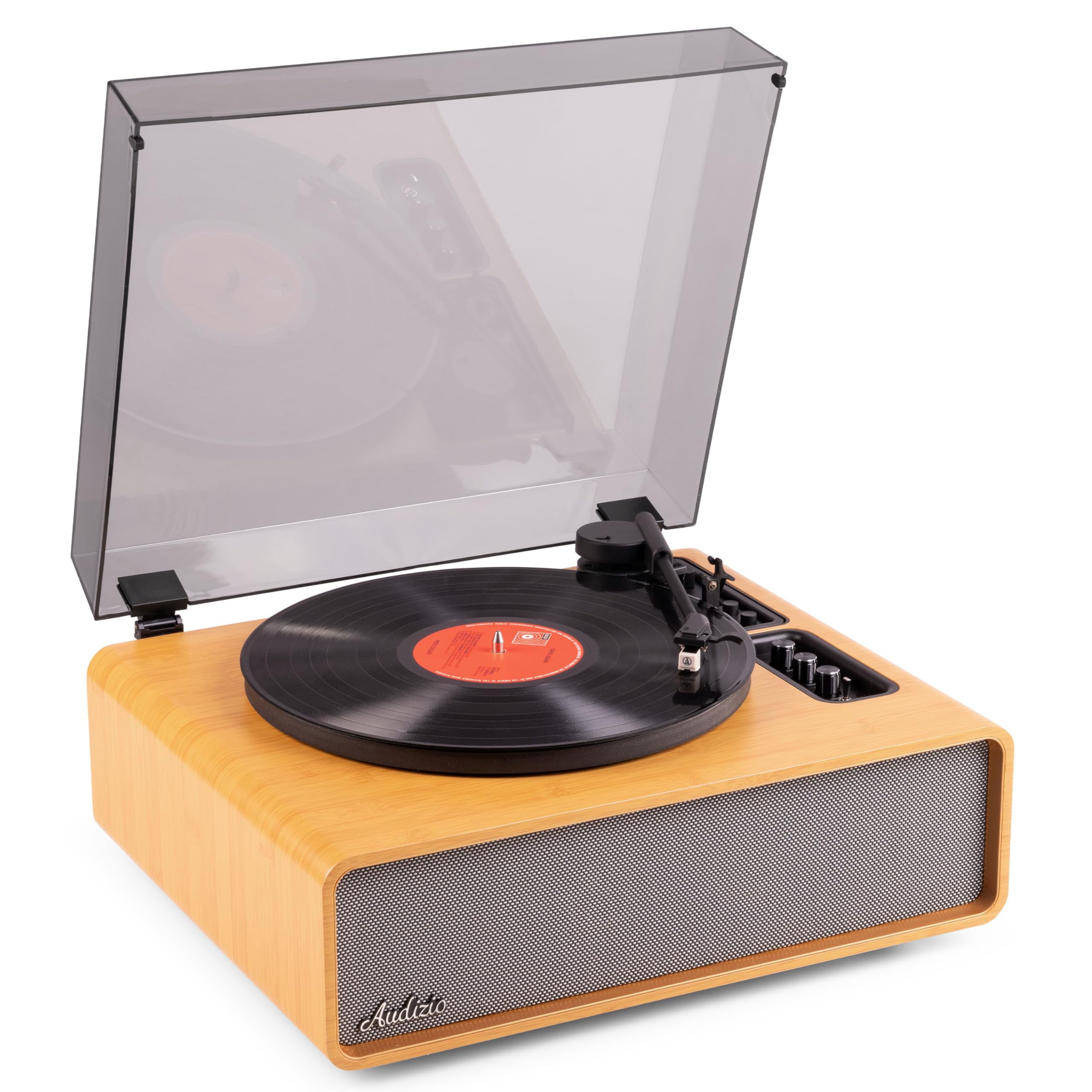
Figure 1.1: Audizio Laredo Turntable, overall view.
2. Turvallisuusohjeet
Please read and follow these safety instructions carefully to prevent damage to the unit and ensure your safety.
- Älä altista laitetta sateelle tai kosteudelle tulipalon tai sähköiskun välttämiseksi.
- Älä avaa c:täasing. Laitteen sisällä ei ole käyttäjän huollettavia osia. Jätä kaikki huoltotoimenpiteet pätevän henkilöstön tehtäväksi.
- Place the unit on a stable, level surface to prevent it from falling.
- Pidä laite poissa suorasta auringonvalosta, lämmönlähteistä ja liiallisesta pölystä.
- Varmista laitteen ympärillä oleva asianmukainen ilmanvaihto. Älä tuki tuuletusaukkoja.
- Käytä vain mukana toimitettua virtalähdettä.
- Irrota laite verkkovirrasta ukkosmyrskyjen aikana tai kun sitä ei käytetä pitkään aikaan.
3. Tuote ohiview
Familiarize yourself with the components and controls of your Audizio Laredo turntable.
Pääkomponentit:
- Vati: Tukee vinyylilevyjä.
- Äänivarsi: Pitää kasetin ja kynän.
- Äänirasia ja kynä: Reads the grooves of the record. (Audio Technica ATN-3600)
- Pölysuoja: Suojaa levylautasta ja äänivartta pölyltä.
- Integroidut kaiuttimet: Suoraan äänen toistoon.
- Ohjauspaneeli: For power, volume, tone, and mode selection.
- Takaosan liitännät: RCA Line Out, AUX In, Power Input.

Kuva 3.1: Yläosa view of the turntable with key components visible.

Figure 3.2: Control Panel for volume, bass, and treble adjustments.

Figure 3.3: Audio Technica ATN-3600 Cartridge and Stylus.

Figure 3.4: Tonearm base with speed and auto-stop controls.

Figure 3.5: Rear connection panel.
4. Asennus
4.1 Pakkauksesta purkaminen
- Poista levysoitin varovasti pakkauksestaan.
- Remove all protective materials, including the stylus guard.
- Säilytä pakkaus tulevaa kuljetusta tai säilytystä varten.
4.2 Sijoitus
- Place the turntable on a stable, level surface to prevent vibrations and ensure proper playback.
- Avoid placing the unit near strong magnetic fields, heat sources, or areas with high humidity.
4.3 Pölysuojuksen asennus
- Align the hinges of the dust cover with the slots on the back of the turntable.
- Gently push down until the cover is securely in place.
- The dust cover can be removed for playback if desired.

Figure 4.1: Turntable with dust cover.
4.4 Virtaliitäntä
- Connect the power adapter to the DC IN port on the rear of the turntable.
- Plug the adapter into a suitable wall outlet (220V).
4.5 Äänivarren ja äänirasian asennus
- The Audio Technica cartridge is pre-installed.
- The tonearm features an adjustable counterweight. Refer to the detailed instructions in the included manual for precise counterweight adjustment to optimize tracking force.
5. Käyttöohjeet
5.1 Levyn soittaminen
- Place a vinyl record on the platter. If playing a 7-inch single, use the included 45 RPM adapter.
- Select the appropriate speed (33 or 45 RPM) using the speed selector switch near the tonearm base.
- Nosta äänivartta varovasti äänivarren säätövivulla.
- Aseta äänivarsi levyn haluamasi raidan päälle.
- Laske äänivarsi hitaasti alas äänivarren vivun avulla. Neula osuu levyyn ja toisto alkaa.
- Levyn lopussa automaattinen pysäytystoiminto pysäyttää levylautasen pyörimisen automaattisesti. Nosta äänivarsi ja palauta se lepotilaan.

Figure 5.1: Playing a vinyl record.
5.2 Bluetooth Operation (Bidirectional)
The Laredo turntable supports both Bluetooth input (receiving audio from a device) and Bluetooth output (sending audio to a Bluetooth speaker/headphones).
Bluetooth Input (BT IN):
- Press the MODE/POWER button to select Bluetooth mode. The LED indicator will flash.
- On your smartphone or tablet, enable Bluetooth and search for 'Audizio Laredo'.
- Select the turntable to pair. Once connected, the LED will glow solid.
- You can now stream audio from your device to the turntable's integrated speakers.
Bluetooth Output (BT OUT):
- Varmista, että Bluetooth-kuulokkeet tai -kaiutin ovat pariliitostilassa.
- Set the BT OUT switch (located near the tonearm base) to 'ON'.
- The turntable will automatically search for and connect to the nearest Bluetooth audio device.
- Once connected, the audio from your vinyl record will be transmitted to your Bluetooth device.

Figure 5.2: Bidirectional Bluetooth functionality.
5.3 AUX-tulo
- Connect an external audio device (e.g., MP3 player, CD player) to the AUX IN port on the rear of the turntable using a 3.5mm audio cable.
- Press the MODE/POWER button to select AUX mode.
- Audio from the external device will play through the turntable's speakers.
5.4 RCA-linjalähtö
- Levysoittimen liittäminen ulkoiseen laitteeseen amplifier or powered speakers, use an RCA cable (not included) to connect the LINE OUT ports on the rear of the turntable to the corresponding input on your audio system.
- Ensure the 'Speaker ON/OFF' switch on the rear is set to 'OFF' if you only want sound from external speakers.
5.5 Äänenvoimakkuuden ja sävyn säätö
- Use the VOLUME knob on the control panel to adjust the overall playback volume.
- Adjust the BASS and TREBLE knobs to fine-tune the audio output to your preference.
6. Huolto
6.1 Laitteen puhdistaminen
- Pyyhi pölysuoja ja kotelo pehmeällä, kuivalla liinalla.
- Älä käytä hankaavia puhdistusaineita, vahoja tai liuottimia.
- For the platter, use a slightly damp liinalla ja kuivaa huolellisesti.
6.2 Kynän hoito ja vaihto
- The stylus is a delicate component. Handle it with care.
- Clean the stylus regularly using a soft brush designed for stylus cleaning, brushing from back to front.
- A stylus typically lasts for approximately 300-500 hours of playback. If you notice a decrease in sound quality or increased skipping, it may be time to replace the stylus.
- Replacement styli (e.g., Audio Technica ATN-3600L or compatible) can be purchased from authorized dealers. Refer to the detailed instructions provided with the replacement stylus for installation.
7. Vianmääritys
Jos levysoittimessasi on ongelmia, katso seuraavaa taulukkoa ennen kuin otat yhteyttä tukeen.
| Ongelma | Mahdollinen syy | Ratkaisu |
|---|---|---|
| Ei virtaa | Power adapter not connected; Power outlet not working. | Varmista, että virtalähde on kytketty kunnolla laitteeseen ja toimivaan pistorasiaan. |
| Kaiuttimista ei kuulu ääntä | Volume too low; Speaker ON/OFF switch is OFF; Incorrect mode selected. | Increase volume; Set 'Speaker ON/OFF' switch to ON; Select correct input mode (Phono, BT IN, AUX). |
| Skipping records | Record is dirty or damaged; Stylus is worn or dirty; Turntable not level; Tracking force incorrect. | Clean record; Clean or replace stylus; Place turntable on a level surface; Adjust tonearm counterweight. |
| Bluetooth-pariliitosongelmat | Laite liian kaukana; Levysoitin ei ole pariliitostilassa; Häiriö. | Ensure devices are within range; Re-enter pairing mode; Turn off other Bluetooth devices. |
| Äänen vääristymä | Volume too high; Stylus worn; Record damaged. | Reduce volume; Replace stylus; Try a different record. |
8. Tekniset tiedot
Technical specifications for the Audizio Laredo Turntable.
| Ominaisuus | Erittely |
|---|---|
| Mallin nimi | Laredo (101.537) |
| Mitat (P x L x K) | 43.2 x 43.2 x 21 cm (17 x 17 x 8.3 tuumaa) |
| Tuotteen paino | 7.65 kg (16.86 lbs) |
| Materiaali | Wood (Bamboo finish) |
| Pyörimisnopeudet | 33 RPM, 45 RPM |
| Värikasetin tyyppi | Audio Technica (ATN-3600) |
| Moottorin tyyppi | Hihnakäyttö |
| Signaalin muoto | Analoginen |
| Integroidut kaiuttimet | Yes, 160W total output |
| Bluetooth-versio | 5.4 (kaksisuuntainen) |
| Yhteydet | Bluetooth (In/Out), RCA Line Out, AUX In |
| Virtalähde | Langallinen sähkö |
| Voitage | 220 volttia |
| Yhteensopivat laitteet | Kaiuttimet, Kuulokkeet, Älypuhelin, Tabletti |
9. Takuu ja tuki
9.1 Takuutiedot
This Audizio Laredo Turntable comes with a 2 vuoden takuu from the date of purchase. This warranty covers manufacturing defects and faults under normal use. It does not cover damage caused by misuse, accidents, unauthorized modifications, or normal wear and tear (e.g., stylus wear).
Säilytä ostokuitti takuuvaatimuksia varten.
9.2 Asiakastuki
If you have any questions, require technical assistance, or need to make a warranty claim, please contact your retailer or visit the official Audizio websivusto tukiresursseja ja yhteystietoja varten.
Official Audizio Websivusto: www.audizio.com