
Johdanto
This manual provides detailed instructions for the safe and proper installation, operation, and maintenance of your PERLESMITH PSAT3B Tilting TV Wall Mount. Please read this manual thoroughly before beginning installation and retain it for future reference. This wall mount is designed for televisions ranging from 42 to 100 inches and supports a maximum weight of 160 lbs.
Turvallisuustiedot
VAROITUS: Improper installation may result in serious personal injury and property damage. If you do not understand these instructions or have doubts about the safety of the installation, please contact a qualified installer.
- This product is intended for installation on wood studs (16"-24" spacing), solid concrete, or brick walls only. Do not install on drywall alone.
- Ensure the mounting surface can safely support the combined weight of the mount and your television.
- Älä ylitä suurinta sallittua painokapasiteettia, joka on 72.5 kg (160 lbs).
- Verify your TV's VESA pattern (mounting hole spacing) is compatible with the mount (200x200mm to 600x600mm).
- Käytä aina puupalkkien etsintälaitetta puupalkkien tarkkaan paikantamiseen.
- Käytä asennuksen aikana asianmukaisia suojavarusteita, mukaan lukien silmäsuojaimia.
- Pidä lapset ja lemmikit poissa työalueelta asennuksen aikana.

The PERLESMITH PSAT3B Tilting TV Wall Mount provides a secure and flexible viewing solution for large televisions.
Pakkauksen sisältö
Please check to ensure all components are present and undamaged before installation. Refer to the included hardware bags for specific screw sizes and quantities.
- Seinälevyn kokoonpano
- TV-kiinnikkeet (2)
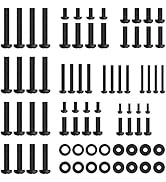
- Kiinnityssarja (erilaisia ruuveja, aluslevyjä, välikappaleita, ankkureita)
- Taso
- Käyttöohje
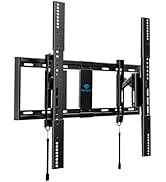
Yliview of the PERLESMITH PSAT3B wall mount components and included hardware.
Tekniset tiedot
| Ominaisuus | Erittely |
|---|---|
| Mallinumero | PSAT3B |
| Asennustyyppi | Seinäteline |
| Liikkeen tyyppi | Kääntyvä, kallistettava |
| Materiaali | Seosteräs |
| Väri | Musta |
| Yhteensopivat laitteet | Televisio |
| Maximum Supported Screen Size | 100 tuumaa |
| Minimum Supported Screen Size | 42 tuumaa |
| Suurin kuormituskapasiteetti | 160 lbs (72.5 kg) |
| VESA-yhteensopivuus | 200x200mm - 600x600mm |
| Kallistuskulma | +5°/-15° |
| Kääntökulma | ±5° |
| Jatko seinästä | 3" (sisäänvedettynä) - 6.5" (levitettynä) |

This diagram illustrates the available VESA patterns and compatible wall types for the mount. Do not install on drywall alone.
Asennus ja asennus
Follow these steps carefully to ensure a secure installation. It is recommended to have two people for TV mounting.
Vaihe 1: Asennusta edeltävä tarkistus
- Vahvista seinän tyyppi: Ensure your wall is suitable for mounting (16"-24" wood studs, concrete, or brick).
- Check TV Size: Confirm your TV is between 42-100 inches.
- Tarkista VESA-kuvio: Measure the horizontal and vertical distance between the mounting holes on the back of your TV. This must be between 200x200mm and 600x600mm.
Always perform these checks before beginning the installation process.
Vaihe 2: Kiinnitä kiinnikkeet television takaosaan
- Aseta televisio varovasti kuvaruutu alaspäin pehmeälle ja puhtaalle alustalle, jotta näyttö ei vaurioidu.
- Kohdista television kiinnikkeet television takana oleviin kiinnitysreikiin.
- Valitse laitteistopakkauksesta televisiosi VESA-reikiin sopivat ruuvit, aluslevyt ja välikappaleet.
- Securely fasten the brackets to the TV using a screwdriver, ensuring they are centered and tight. Do not overtighten.
Vaihe 3: Asenna seinälevy
- Determine the desired height for your TV. Use a pencil to mark the center of the desired location on the wall.
- Use a stud finder to locate the center of two adjacent wood studs (for wood stud installation) or mark drill points for concrete/brick.
- Hold the wall plate against the wall, aligning the center with your mark and ensuring it is level using the included bubble level. Mark the drill holes.
- Drill pilot holes at the marked locations. For wood studs, drill 7/32" (5.5mm) holes. For concrete/brick, drill 3/8" (10mm) holes and insert concrete anchors.
- Attach the wall plate to the wall using the lag bolts and washers. Tighten securely.
Vaihe 4: Ripusta televisio seinälevyyn
- Nosta televisiota varovasti kiinnitettyjen kiinnikkeiden avulla avustajan avulla.
- Kiinnitä TV-kiinnikkeet seinälevyn yläreunaan.
- Laske televisiota varovasti, kunnes kiinnikkeet ovat kokonaan kiinni seinälevyssä.
- Engage the safety latches located at the bottom of the TV brackets to secure the TV to the wall plate. The magnetic pull tabs can be used to lock or release the TV.

Simplified three-step installation process for the PERLESMITH TV mount.

The mount extends 6.5 inches from the wall for easy cable access and retracts to 3 inches for a low-profile Katso.
Video demonstrating the ease of installation and functionality of the PERLESMITH Tilting TV Wall Mount.
Käyttöohjeet
Kallistuksen säätö
The PERLESMITH PSAT3B mount allows for a tilt range of +5° to -15°. To adjust the tilt, loosen the tilt knobs on the side of the TV brackets, adjust the TV to your desired angle, and then tighten the knobs securely. This helps reduce glare and optimize viewkulmat.
Kääntyvä säätö
The mount offers a ±5° swivel adjustment. This feature allows for minor horizontal adjustments to achieve a perfectly level screen after installation. Simply grasp the sides of the TV and gently rotate it to the desired position.
Tasauksen säätö
After installation, you can fine-tune your TV's alignment with a ±2° leveling adjustment. This ensures your TV is perfectly horizontal, even if the wall plate was not installed perfectly level.

The mount offers a ±5° swivel for optimal viewjoustavuutta.

Achieve a perfectly level TV with the ±2° leveling adjustment feature.

The secure latch system with magnetic pull tabs allows for quick and tool-free locking and unlocking of the TV.
Videoesitysasing the tilting functionality of the PERLESMITH TV Wall Mount.
Huolto
Säännöllinen huolto varmistaa TV-seinätelineesi pitkän käyttöiän ja turvallisen toiminnan.
- Puhdistus: Pyyhi teline pehmeällä, kuivalla liinalla. Vältä hankaavia puhdistusaineita tai liuottimia.
- Säännölliset tarkastukset: Tarkista säännöllisesti kaikkien ruuvien ja pulttien kireys. Kiristä tarvittaessa.
- Tarkista vauriot: Regularly inspect the mount for any signs of wear, damage, or corrosion. If any issues are found, discontinue use and contact customer support.
Vianetsintä
If you encounter issues during or after installation, refer to the following common solutions.
- TV ei ole vaakasuorassa: Use the ±2° leveling adjustment feature to fine-tune the TV's horizontal position. Ensure the wall plate was installed as level as possible.
- Vaikeusaste kallistuksessa: Ensure the tilt knobs on the TV brackets are sufficiently loosened before attempting to adjust the tilt. Tighten them firmly after adjustment.
- TV Feels Loose: Double-check that all mounting bolts to the wall and screws to the TV are securely tightened. Ensure the safety latches are engaged.
- Mounting Holes Don't Align: Verify your TV's VESA pattern against the mount's specifications. If incompatible, the mount cannot be used.
- Puuttuvat osat: If any parts are missing from the package, contact PERLESMITH customer support immediately.
Video review highlighting the features and installation process, which may assist with troubleshooting common issues.
Takuu ja tuki
This PERLESMITH product comes with a 5-year warranty. For warranty claims or technical assistance, please contact PERLESMITH customer support. You can typically find contact information on the product packaging or the official PERLESMITH websivusto.
For additional support, you may visit the PERLESMITH store on Amazon: PERLESMITH Store