
1. Tuote ohiview
The Edifier CC300 is a professional Bluetooth 6.0 communicator headset designed for reliable and high-quality audio communication in various professional environments. It features AI-enhanced dual-microphone noise filtering, a 30mm dynamic driver for clear sound, and multiple connectivity options for versatile use.
2. Pakkauksen sisältö
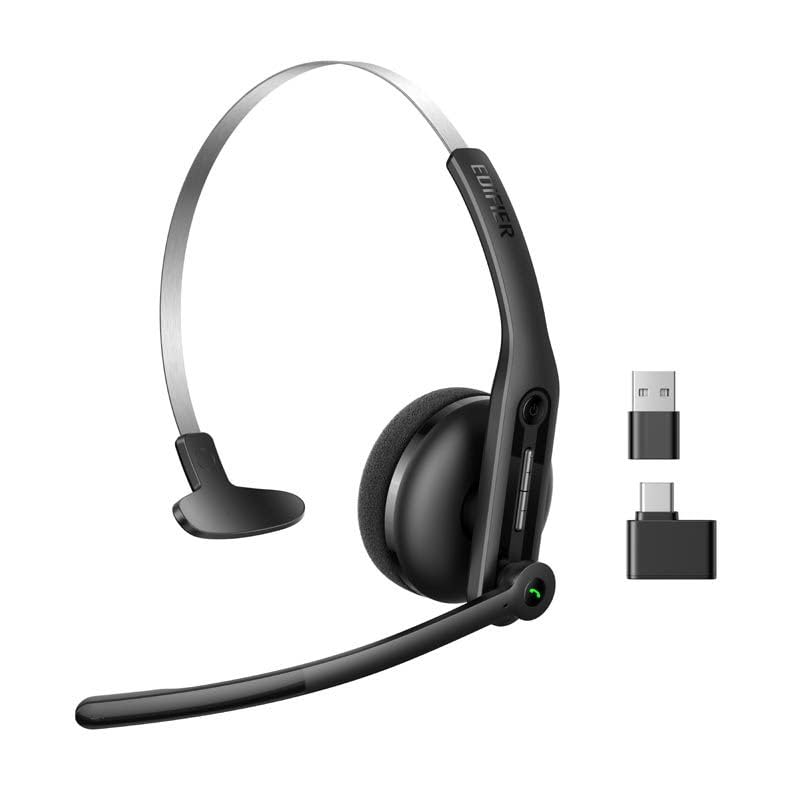
- Edifier CC300 Headset
- USB-C Dongle
- USB-A-USB-C-latauskaapeli
- Käyttöopas
3. Tuotteen ominaisuudet
The Edifier CC300 headset is engineered for comfort and performance, featuring a lightweight design and a flexible microphone arm.

Kuva 3.1: Edifier CC300 Headset with included USB-C dongle and charging cable.

Kuva 3.2: Sivu view of the Edifier CC300 Headset with the microphone arm extended.

Kuva 3.3: The microphone arm can rotate 240 degrees for flexible positioning on either the left or right side.
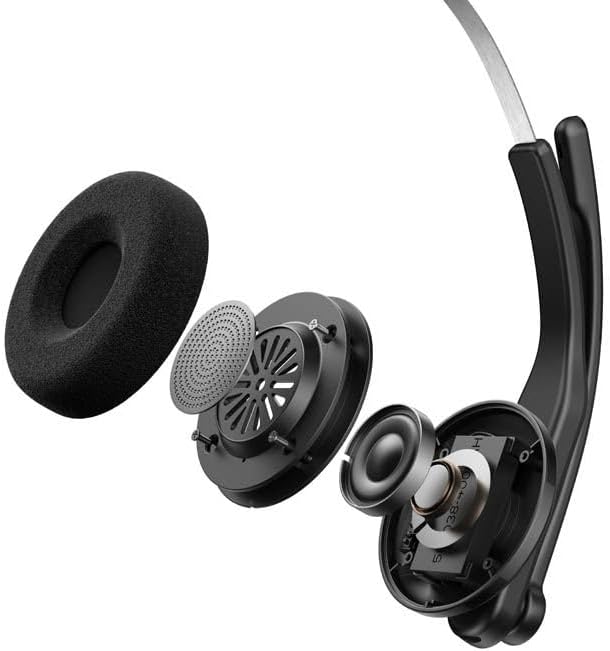
Kuva 3.4: Räjähtänyt view showing the internal components of the earcup, including the 30mm dynamic driver.
4. Asennus
4.1 Ensimmäinen lataus
Before first use, fully charge the headset using the provided USB-A to USB-C cable. Connect the USB-C end to the headset and the USB-A end to a power source (e.g., computer USB port or wall adapter). The charging indicator light will show the charging status.
4.2 Virran kytkeminen päälle/pois
- Virran kytkeminen: Paina virtapainiketta ja pidä sitä painettuna, kunnes merkkivalo syttyy.
- Virran sammuttaminen: Pidä virtapainiketta painettuna, kunnes merkkivalo sammuu.
4.3 Kuulokkeiden käyttö
Adjust the headband for a comfortable fit. The microphone arm can be rotated 240 degrees to be positioned on either the left or right side of your face. Position the microphone approximately 2-3 cm from your mouth for optimal voice pickup.
5. Käyttöohjeet
The Edifier CC300 features intuitive controls for managing calls and audio playback.

Kuva 5.1: Diagram illustrating the control buttons and their functions on the Edifier CC300 Headset.
5.1 Painikkeiden toiminnot
| Toiminta | Toiminto |
|---|---|
| Press and hold (Power Button) | Virta päälle/pois |
| Press 1x (Mute Button) | Activate/Deactivate Mute (during calls) |
| Press 1x (Volume Up) | Lisää äänenvoimakkuutta |
| Press and hold (Volume Up) | Seuraava kappale |
| Press and hold (Volume Down) | Vähennä äänenvoimakkuutta |
| Press 1x (Volume Down) | Edellinen kappale |
| Press 1x (Call Button) | Play/Pause Audio; Answer/End Call |
| Press and hold (Call Button) | Hylkää puhelu |
| Press 2x (Call Button) | Soita viimeinen numero uudelleen |
6. Yhteysasetukset
The Edifier CC300 offers three versatile connection methods:
Kuva 6.1: Visual representation of the three connectivity options: Bluetooth, USB-C dongle, and wired USB-A.
6.1 Bluetooth-yhteys
- Varmista, että kuulokkeisiin on kytketty virta ja ne ovat pariliitostilassa (merkkivalo vilkkuu).
- On your device (smartphone, laptop), enable Bluetooth and search for "EDIFIER CC300".
- Select the headset to pair. Once connected, the indicator light will turn solid blue.
6.2 USB-C Dongle Connection
- Plug the provided USB-C dongle into an available USB-C port on your computer.
- Power on the headset. It will automatically connect to the dongle for a stable, low-latency connection.
6.3 Wired USB-A Connection
- Connect the headset to your computer using the provided USB-A to USB-C cable.
- The headset will function as a wired audio device, providing zero interference.
7. Akku ja lataus
The CC300 headset is designed for extended use with a long-lasting battery.
- Akun kesto: Up to 72 hours for audio playback, or 36 hours for talk time.
- Latausaika: Noin 1.5 tuntia täydellä latauksella.
- Latausilmaisin: Refer to the LED indicator on the headset for charging status.
To charge, connect the headset to a power source using the USB-A to USB-C cable.
8. Huolto
- Puhdistus: Puhdista kuulokkeet pehmeällä, kuivalla liinalla. Älä käytä nestemäisiä puhdistusaineita tai aerosoleja.
- Varastointi: Säilytä kuulokkeita viileässä, kuivassa paikassa, poissa suorasta auringonvalosta ja äärimmäisistä lämpötiloista.
- Vältä kosteutta: Keep the headset away from water and high humidity to prevent damage.
- Käsittele varovasti: Vältä kuulokkeiden pudottamista tai voimakkaiden iskujen kohteeksi altistamista.
9. Vianmääritys
9.1 No Sound or Poor Audio Quality
- Ensure the headset is powered on and properly connected (Bluetooth, dongle, or wired).
- Tarkista sekä kuulokkeiden että yhdistetyn laitteen äänenvoimakkuustasot.
- If using Bluetooth, ensure the headset is within range of your device.
- Kokeile käynnistää sekä kuulokkeet että yhdistetty laite uudelleen.
9.2 Mikrofoni ei toimi
- Varmista, että mikrofoni ei ole mykistetty (tarkista mykistyspainike).
- Varmista, että kuulokkeet on valittu syöttölaitteeksi tietokoneen tai laitteen ääniasetuksissa.
- Ensure the microphone arm is positioned correctly near your mouth.
9.3 Headset Not Pairing via Bluetooth
- Varmista, että kuulokkeet ovat pariliitostilassa (merkkivalo vilkkuu).
- Vältä häiriöt poistamalla Bluetooth käytöstä muissa lähellä olevissa laitteissa.
- Unohda laite laitteesi Bluetooth-luettelosta ja yritä pariliitosta uudelleen.
10. Tekniset tiedot
| Ominaisuus | Yksityiskohta |
|---|---|
| Merkki | Edifier |
| Mallin nimi | CC300 |
| Väri | Musta |
| Yhteystekniikka | Wireless (Bluetooth), Wired (USB-A), USB-C Dongle |
| Bluetooth-versio | 6.0 |
| Bluetooth-protokollat | A2DP, AVRCP, HFP |
| Äänikoodekki | SBC |
| Kuljettajan tyyppi | 30mm dynaaminen ohjain |
| Taajuusvaste | 20Hz - 20KHz |
| Äänenpainetaso | 94 ± 3dB(A) |
| Akun kapasiteetti | 400 mAh |
| Musiikin toistoaika | Noin 72 tuntia |
| Puheaika | Noin 36 tuntia |
| Latausaika | Noin 1.5 tuntia |
| Virransyöttö | 5V/500mAh |
| Paino | 70 grammaa |
| Erikoisominaisuudet | AI-enhanced Dual-Mic Noise Cancellation |
| Yhteensopivat laitteet | Mobile Phones, Desktops, Laptops |
11. Takuu ja tuki
11.1 Takuutiedot
The Edifier CC300 Headset comes with a 1 vuoden takuu from the date of purchase, covering manufacturing defects. Please retain your proof of purchase for warranty claims. The warranty does not cover damage caused by misuse, accidents, unauthorized modifications, or normal wear and tear.
11.2 Asiakastuki
For technical assistance, troubleshooting, or warranty inquiries, please contact Edifier customer support through their official website or the contact information provided with your product packaging. You may also visit the Edifier-kauppa Amazonissa saadaksesi lisätietoja.