
1. Tuote ohiview
The G-Shock Casio GD010 digital watch is engineered for durability and functionality, designed to withstand demanding conditions while providing essential timekeeping features. This timepiece incorporates bio-based resin components and a CORDURA re/cor band, reflecting a commitment to environmental considerations.
This manual provides detailed instructions for setting up, operating, maintaining, and troubleshooting your GD010 watch.
Tärkeimmät ominaisuudet
- Shock Resistant Construction: Designed to endure impacts and vibrations.
- Hiilikuituinen ydinsuojarakenne: Enhances durability and protection for the internal module.
- 200 metrin vesitiiviys: Suitable for swimming, snorkeling, and diving (non-SCUBA).
- Pitkä akun käyttöikä: Approximately 10 years on a CR2025 battery.
- Bio-based Resin Components: Case and bezel made with environmentally conscious materials.
- CORDURA re/cor Band: Durable strap made from recycled PET plastic fiber.
- Digitaalinen näyttö: Clear and easy-to-read time and function information.
- Useita toimintoja: Includes alarm, chronograph (stopwatch), and timer.

Image 1.1: The G-Shock GD010 watch, showcasing its core features including shock resistance, Carbon Core Guard structure, and a 10-year battery life.
2. Aloittaminen: Asennus
Painikkeiden toiminnot
Your GD010 watch features several buttons for navigation and function control. Familiarize yourself with their locations and primary roles.

Kuva 2.1: Sivu view of the G-Shock GD010, illustrating the location of the control buttons.
- SÄÄDÄ (vasen yläkulma): Käytetään asetustiloihin siirtymiseen ja niistä poistumiseen sekä asetusten vahvistamiseen.
- TILA (vasen alakulma): Cycles through the watch's various modes (Timekeeping, Stopwatch, Timer, Alarm).
- KÄÄNTÖPUOLI (Yläoikea): Used to decrease values or move backward through options during setting.
- FORWARD / START (Bottom Right): Used to increase values or move forward through options during setting. Also used to start/stop stopwatch or timer.
- LIGHT (Center Bottom): Aktivoi taustavalon valaistuksen käyttöön.
Alkuperäinen kellonajan ja päivämäärän asetus
- Kellonaikatilassa paina ja pidä pohjassa SÄÄTÄÄ button until the city code starts to flash, indicating the setting mode.
- Käytä KÄÄNTÄ ja ETEENPÄIN buttons to select your desired Home City Code. This will automatically set the correct time zone.
- Paina MODE -painiketta selataksesi asetuksia: DST (kesäaika) → 12/24-tunnin muoto → Sekunnit → Tunnit → Minuutit → Vuosi → Kuukausi → Päivä.
- Käytä jokaiselle asetukselle KÄÄNTÄ ja ETEENPÄIN painikkeita muuttaaksesi arvoa.
- Kun kaikki asetukset on määritetty, paina SÄÄTÄÄ -painiketta poistuaksesi asetustilasta.
3. Kellon käyttö
The GD010 offers various modes for different functions. Press the MODE -painiketta selataksesi niitä.
Ajanottotila
Tämä on oletustila, joka näyttää nykyisen kellonajan, viikonpäivän ja päivämäärän.
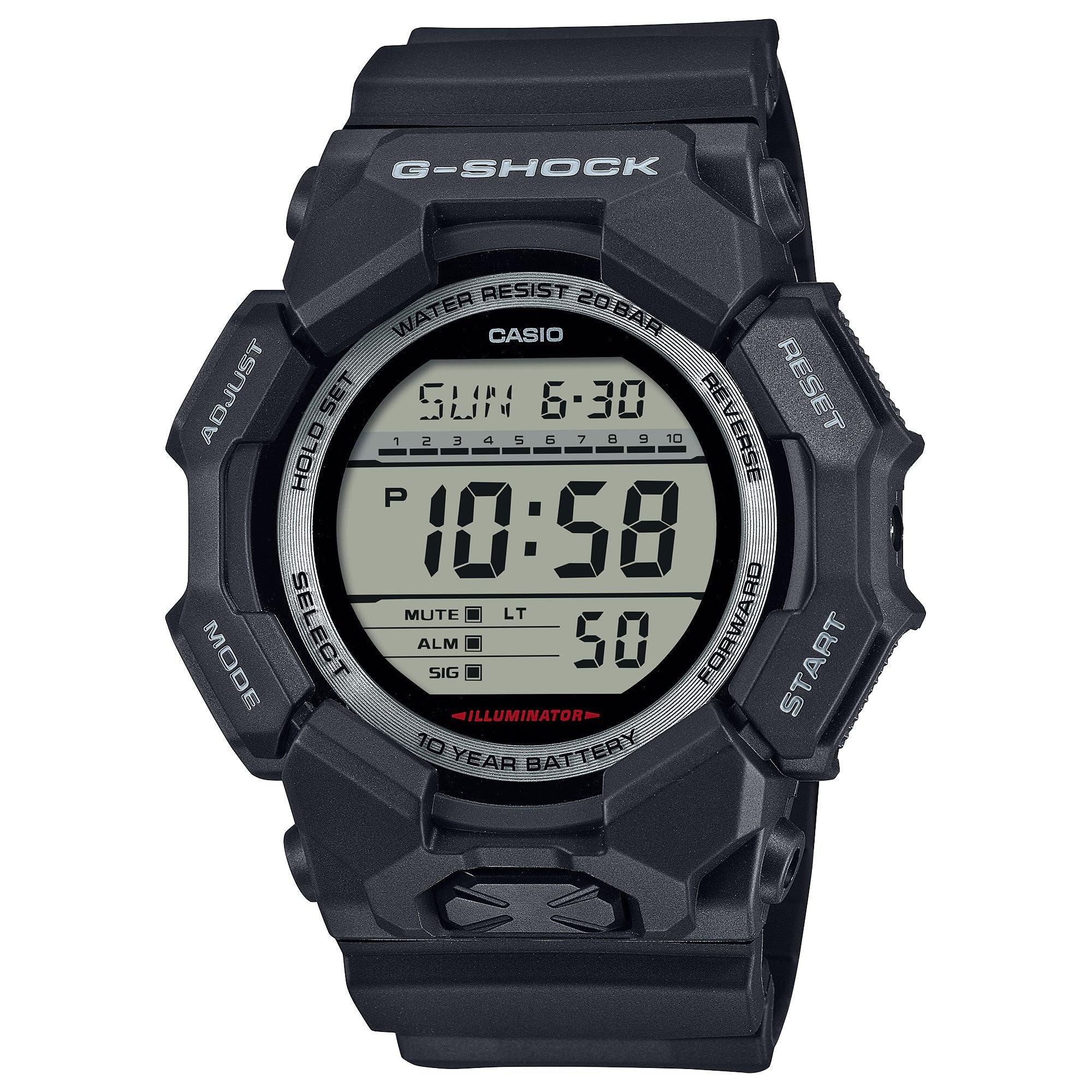
Image 3.1: The G-Shock GD010 watch face in Timekeeping Mode.
Sekuntikellon (kronografin) käyttö
- Paina kellonaikatilassa MODE -painiketta, kunnes näytössä näkyy "STW" tai "STOPWATCH".
- Paina FORWARD / START -painiketta käynnistääksesi sekuntikellon.
- Paina FORWARD / START -painiketta uudelleen pysäyttääksesi sekuntikellon.
- Voit nollata sekuntikellon painamalla KÄÄNTÄ -painiketta sekuntikello on pysäytettynä.
Ajastimen asettaminen
- Paina kellonaikatilassa MODE -painiketta, kunnes näyttöön tulee "TMR" tai "TIMER".
- Paina ja pidä painettuna SÄÄTÄÄ button until the current timer setting starts to flash.
- Käytä MODE painiketta valitaksesi tunti- tai minuuttiasetuksen.
- Käytä KÄÄNTÄ ja ETEENPÄIN -painikkeita halutun lähtölaskenta-ajan asettamiseksi.
- Paina SÄÄTÄÄ -painiketta poistuaksesi asetustilasta.
- Paina FORWARD / START button to start the countdown. An alarm will sound when the timer reaches zero.
Hälytystoiminnot
- Paina kellonaikatilassa MODE -painiketta, kunnes näyttöön tulee "ALM" tai "ALARM".
- Paina ja pidä painettuna SÄÄTÄÄ -painiketta, kunnes hälytysaika alkaa vilkkua.
- Käytä MODE painiketta valitaksesi tunti- tai minuuttiasetuksen.
- Käytä KÄÄNTÄ ja ETEENPÄIN painikkeita halutun hälytysajan asettamiseksi.
- Paina SÄÄTÄÄ -painiketta poistuaksesi asetustilasta.
- Voit kytkeä hälytyksen päälle/pois painamalla FORWARD / START button while in Alarm Mode (without holding ADJUST).
Vedenkestävyysohjeet
Your GD010 watch is rated for 200-meter water resistance. This means it is suitable for recreational diving (excluding saturation diving), swimming, snorkeling, and water sports.
- Älä käytä painikkeita, kun kello on uponnut veteen tai märkä.
- Avoid exposing the watch to hot water, steam, or extreme temperature changes, as this can compromise water resistance.
- After exposure to saltwater, rinse the watch thoroughly with fresh water and wipe it dry.
4. Hoito ja huolto
Yleinen hoito
- Pyyhi kello säännöllisesti pehmeällä, kuivalla liinalla lian ja kosteuden poistamiseksi.
- Avoid exposing the watch to strong chemicals, solvents, or detergents, as these can damage the resin materials.
- Säilytä kelloa viileässä, kuivassa paikassa, poissa suorasta auringonvalosta ja äärimmäisistä lämpötiloista, kun sitä ei käytetä.
- The watch's resin components and band are designed for durability, but prolonged exposure to UV light may cause discoloration over time.
Akun vaihto
The GD010 watch is equipped with a CR2025 battery, providing an approximate battery life of 10 years. When the display becomes dim or functions become erratic, it may be time for a battery replacement.
Battery replacement should ideally be performed by a qualified watch technician to ensure proper sealing and maintain water resistance. Attempting to replace the battery yourself may void the warranty and compromise the watch's water resistance.
Puhdistus
To clean your watch, use a soft cloth dampened with mild soap and water. Gently wipe the case and band. For stubborn dirt, a soft brush can be used. Rinse thoroughly with fresh water and dry completely with a soft cloth.
5. Vianetsintäopas
If you encounter issues with your GD010 watch, refer to the following common problems and their solutions.
| Ongelma | Mahdollinen syy | Ratkaisu |
|---|---|---|
| Näyttö on tyhjä tai himmeä. | Akku vähissä. | Vaihda paristo (CR2025). Ota yhteyttä ammattitaitoiseen kelloasentajaan. |
| Aika on väärä. | Incorrect time zone or manual setting error. | Re-adjust the time and date settings as described in Section 2. |
| Painikkeet eivät reagoi. | Watch is wet, or internal module error. | Ensure the watch is dry. If the problem persists, a reset may be required (consult support), or professional service. |
| Hälytys ei soi. | Alarm is turned off or volume is too low (if adjustable). | Verify the alarm is set to ON in Alarm Mode. Check watch settings for alarm volume if applicable. |
If the problem persists after attempting these solutions, please contact G-Shock customer support for further assistance.
6. Tuotteen tekniset tiedot
| Mallin nimi | GD010 |
| Mallinumero | GD010-1 |
| Case Size (L× W× H) | 54.9 × 51.9 × 16.1 mm |
| Paino | 73 g (noin 2.57 unssia) |
| Case and Bezel Material | Bio-based Carbon / Bio-based Resin |
| Nauhan materiaalityyppi | Resin (CORDURA re/cor) |
| Rakentaminen | Shock Resistant, Carbon Core Guard structure |
| Vedenkestävyys | 200 metrin vesitiiviys |
| Virtalähde | CR2025 (1 Lithium Metal battery, included) |
| Arvioitu akunkesto | 10 vuotta |
| Kristalli | Mineraalilasi |
| Näytön tyyppi | Digitaalinen |
| Liikkeen tyyppi | Japanilainen kvartsi |
| Lisäominaisuudet | Alarm, Chronograph, Timer |
| Kiinnikkeen tyyppi | Solki |
| Band väri | Musta |
| Kellotaulun väri | Musta |
7. Takuu ja asiakastuki
Takuutiedot
Your G-Shock GD010 watch comes with a Rajoitettu takuu. The terms and conditions of this warranty cover manufacturing defects under normal use. Please refer to the warranty card included with your purchase for specific details regarding coverage duration, exclusions, and how to make a claim. Keep your proof of purchase for warranty validation.
Yhteydenotto asiakastukeen
For technical assistance, warranty service, or any other inquiries regarding your G-Shock GD010 watch, please contact G-Shock customer support.
- Visit the official G-Shock website for support contact information, FAQs, and service center locations.
- Have your watch model number (GD010-1) and proof of purchase ready when contacting support.