
1. Johdanto
This manual provides essential information for setting up, operating, and maintaining your iFFALCON 50U95A 50-inch 4K QD-Mini LED Smart Google TV. Please read it thoroughly before using the product to ensure safe and optimal performance. Keep this manual for future reference.
The iFFALCON 50U95A combines advanced QD-Mini LED display technology with a 144Hz native refresh rate, HDR 1000nit peak brightness, and an ONKYO 2.1 Hi-Fi audio system to deliver an immersive viewing and listening experience. Powered by Google TV, it offers a wide range of smart features and content.
2. Tärkeitä turvallisuustietoja
Noudata aina televisiota käyttäessäsi perusturvallisuusohjeita tulipalon, sähköiskun ja loukkaantumisen riskin vähentämiseksi.
- Älä altista televisiota sateelle tai kosteudelle.
- Älä avaa kaappia; anna kaikki huoltotoimenpiteet pätevän henkilöstön tehtäväksi.
- Varmista asianmukainen ilmanvaihto äläkä tuki tuuletusaukkoja.
- Use only the power adapter and cable supplied with the unit.
- Aseta televisio vakaalle ja tasaiselle alustalle, jotta se ei putoa.
- Pidä televisio poissa suorasta auringonvalosta, lämmönlähteistä ja äärimmäisistä lämpötiloista.
- Irrota televisio pistorasiasta ukkosmyrskyjen aikana tai jos sitä ei käytetä pitkään aikaan.
3. Sisältö
Varmista, että pakkauksessa on kaikki osat:
- iFFALCON 50U95A 50-inch 4K QD-Mini LED Smart Google TV
- Virtalähde
- Virtakaapeli
- Kaukosäädin
- TV-taso (2 kpl)
- Käyttöopas (tämä asiakirja)

Kuva: Edessä view of the iFFALCON 50U95A 50-inch TV. This image shows the television from the front, highlighting its slim bezels and stand.
4. Asennus
4.1 Jalustan kiinnitys
- Aseta televisio varovasti kuvaruutu alaspäin pehmeälle ja tasaiselle alustalle, jotta kuvaruutu ei vaurioidu.
- Kohdista jalustan osat television pohjassa oleviin ruuvinreikiin.
- Kiinnitä telineet mukana toimitetuilla ruuveilla. Varmista, että ne ovat tiukasti kiinni.

Kuva: Sivu view of the iFFALCON 50U95A TV with stand. This image illustrates the television's profile ja miten teline sitä tukee.
4.2 Oheislaitteiden liittäminen
Televisiossa on useita liitäntävaihtoehtoja:
- HDMI-portit (x4): Connect Blu-ray players, gaming consoles, and other HDMI-enabled devices.
- USB-portti (x1): Liitä USB-tallennuslaitteet median toistoa varten.
- Wi-Fi ja Bluetooth: Langattomaan verkkoon ja lisälaitteiden liitäntöihin.
Kuva: Takaosa view of the iFFALCON 50U95A TV showing ports. This image displays the back panel of the television, indicating the location of various input and output ports.
4.3 Virran kytkeminen päälle
- Liitä virtajohto televisioon ja sitten pistorasiaan.
- Paina kaukosäätimen tai itse television virtapainiketta.
- Noudata näytön ohjeita alkuasennuksen tekemiseksi, mukaan lukien verkkoyhteyden muodostaminen ja Google TV -tilin kirjautuminen.
5. Käyttöohjeet
5.1 Kaukosäätimen toiminnot
The remote control allows you to navigate the TV's interface, adjust settings, and access smart features. Refer to the remote control diagram in the separate quick start guide for button layout.
5.2 Google TV -käyttöliittymä
Your iFFALCON TV runs on Google TV, providing a personalized experience with content recommendations, access to streaming apps, and Google Assistant voice control.
- Aloitusnäyttö: Access your favorite apps, movies, and shows.
- Google Assistant: Paina kaukosäätimen Google Assistant -painiketta käyttääksesi äänikomentoja sisällön hakemiseen, älykotilaitteiden ohjaamiseen ja muuhun.
- Sovellukset: Lataa ja hallinnoi sovelluksia Google Play Kaupasta.
5.3 Kuva- ja ääniasetukset
Käytä asetusvalikkoa mukauttaaksesi viewkuuntelu- ja kuuntelukokemus:
- Kuvatilat: Choose from various presets (e.g., Standard, Vivid, Movie, Game) or customize brightness, contrast, color, and sharpness.
- Äänitilat: Select audio presets (e.g., Standard, Music, Movie) or adjust equalizer settings.
- HDR-asetukset: The TV supports HDR10, HDR10+, Dolby Vision, and HLG. Ensure your content source is HDR compatible for optimal performance.
- Pelin mestari: Activate Game Master mode for reduced input lag and optimized gaming performance.
6. Tärkeimmät ominaisuudet
6.1 QD-Mini LED Display Technology
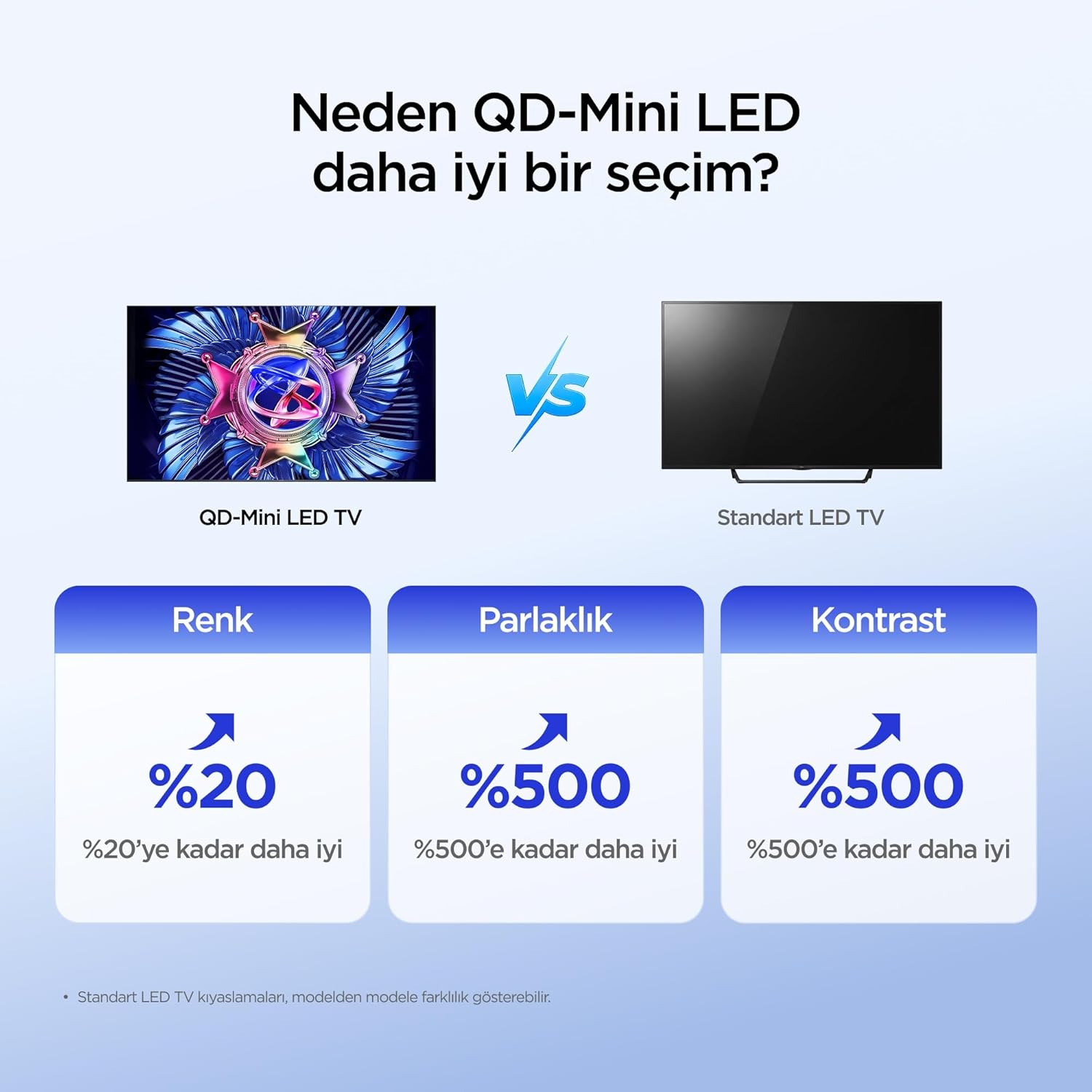
The iFFALCON 50U95A utilizes QD-Mini LED technology, combining Quantum Dot color with Mini LED backlighting. This results in superior brightness, contrast, and color accuracy compared to traditional LED TVs.

Image: Comparison illustrating the benefits of QD-Mini LED over standard LED TVs in terms of color, brightness, and contrast.
With over 500 local dimming zones, the TV provides precise light control at a pixel level, enhancing detail in both bright and dark scenes. It achieves a peak brightness of 1000 nits, ensuring vibrant images even in well-lit environments.

Image: A vibrant image demonstrating the 1000 nits peak brightness capability of the TV.
6.2 144Hz Native Refresh Rate
Experience smoother motion and clearer images with the 144Hz native refresh rate. This is particularly beneficial for fast-paced action movies and gaming, reducing motion blur and ghosting.

Image: A dynamic image of a race car, illustrating the smooth motion provided by the 144Hz native refresh rate.
6.3 ONKYO 2.1 Hi-Fi Audio System with Dolby Atmos
The integrated ONKYO 2.1 channel speaker system delivers rich, immersive stereo sound with deep bass. Combined with Dolby Atmos, it creates a cinematic audio experience, bringing sound to life with incredible clarity and depth.

Image: A living room scene depicting sound waves emanating from the TV, illustrating the immersive audio experience of the 2.1 speaker system.
6.4 AI PQ Pro Processor
The AI PQ Pro Processor intelligently analyzes and optimizes content pixel by pixel. This advanced processor enhances picture quality, delivering sharper details, improved contrast, and more vibrant colors for an overall superior viewkokemusta.

Image: A visual representation of the AI PQ Pro Processor chip, highlighting its role in optimizing image quality.
6.5 Matte HVA Panel & Ultra Slim Design
The Matte HVA Panel reduces glare and reflections, providing a comfortable viewing experience even in bright rooms. Its ultra-slim design allows for seamless integration into any living space, whether on a stand or wall-mounted.

Image: A comparison showing the reduced reflections and improved viewing experience of a Matte HVA Panel compared to a standard panel.

Image: A visual representation of the TV's ultra-slim design, highlighting its sleek profile.
7. Huolto
7.1 Näytön puhdistaminen
- Sammuta televisio ja irrota virtajohto pistorasiasta.
- Pyyhi näyttö varovasti pehmeällä, nukkaamattomalla liinalla.
- Pinttyneisiin tahroihin, dörzsöi kevyestiampKostuta liina vedellä tai erikoisnäytönpuhdistusaineella (älä suihkuta suoraan näytölle).
- Vältä voimakkaiden kemikaalien, hankaavien aineiden tai alkoholipohjaisten puhdistusaineiden käyttöä.
7.2 Kaapin puhdistus
- Pyyhi kaappi pehmeällä, kuivalla liinalla.
- Do not use liquid or aerosol cleaners directly on the cabinet.
8. Vianmääritys
| Ongelma | Mahdollinen syy | Ratkaisu |
|---|---|---|
| Ei virtaa | Virtajohto ei ole kytketty; pistorasia ei toimi. | Varmista, että virtajohto on kytketty kunnolla. Testaa pistorasiaa toisella laitteella. |
| Ei kuvaa, mutta ääni kuuluu | Incorrect input source selected; backlight off. | Valitse oikea lähde painamalla kaukosäätimen "Input"-painiketta. Tarkista kuva-asetukset. |
| Ei ääntä, mutta kuva näkyy | Volume muted or too low; incorrect audio output selected. | Unmute volume or increase level. Check audio output settings (e.g., TV speakers, external soundbar). |
| Kaukosäädin ei toimi | Paristot ovat tyhjät tai väärin asennettu; kaukosäätimen ja television välissä on este. | Vaihda paristot. Varmista, että television infrapunavastaanottimeen on esteetön näköyhteys. |
| Wi-Fi-yhteysongelmia | Väärä salasana; reititinongelmat; TV liian kaukana reitittimestä. | Re-enter Wi-Fi password. Restart router. Move TV closer to router or use a Wi-Fi extender. |
If the problem persists after trying these solutions, please contact iFFALCON customer support.
9. Tekniset tiedot
| Ominaisuus | Yksityiskohta |
|---|---|
| Malli | 50U95A |
| Näytön koko | 50 tuumaa |
| Näyttötekniikka | QD-Mini LED |
| Resoluutio | 4K (3840 2160 x XNUMX XNUMX) |
| Päivitystaajuus | 144 Hz (alkuperäinen) |
| Huippukirkkaus | 1000 nittiä |
| HDR-tuki | HDR10, HDR10+, Dolby Vision, HLG |
| Äänijärjestelmä | ONKYO 2.1 Channel Speakers, Dolby Atmos, DTS Virtual:X |
| Käyttöjärjestelmä | Google TV |
| Prosessori | AI PQ Pro Processor |
| Yhteydet | 4x HDMI, 1x USB, Wi-Fi, Bluetooth |
| Mitat (S x L x K) | 6.9 S x 111.1 L x 64.6 K cm |
| Paino | 13 kg |
10. Takuu ja tuki
Your iFFALCON 50U95A TV comes with a 2 vuoden valmistajan takuu. This warranty covers defects in materials and workmanship under normal use. For warranty claims or technical support, please contact iFFALCON customer service through their official websivustolla tai tuotedokumentaatiossa annetuissa yhteystiedoissa.
For the latest support information, FAQs, and software updates, visit the official iFFALCON support websivusto: www.iffalcon.com