
1. Johdanto
This manual provides detailed instructions for the setup, operation, and maintenance of your Urageuxy 14-in-1 Wi-Fi Weather Station. This device is designed to provide comprehensive real-time weather data for your home, garden, or backyard, including temperature, humidity, wind speed and direction, rainfall, UV index, light intensity, wind chill, dew point, and barometric pressure. It also offers reliable weather forecasts and lunar phases.
2. Pakkauksen sisältö
Varmista, että pakkauksessa on kaikki tarvittavat osat:
- 1 x näyttökonsoli
- 1 x Integrated 7-in-1 Outdoor Sensor
- 1 x Remote Thermo-hygrometer Transmitter
- 1 x Jalkakiinnitys (tangon sisäkkeellä)
- 1 x Kiinnitystelineen takalevy (tankokiinnitys)
- 1 x Kiinnitystanko
- 2 x Tangon kiinnitysmutterit (M3) / pultit (Ø3)
- 4 x Tangon kiinnitysmutterit (M5) / pultit (Ø5)
- 4 x Kierreruuvit
- 1 x käyttöohje

Image: Contents of the Urageuxy 14-in-1 Wi-Fi Weather Station package, including the display console, outdoor sensor, remote sensor, mounting hardware, and manual.
3. Komponentit ohiview
3.1 Näyttökonsoli
The display console features an 8.07-inch HD screen, providing clear and intuitive visuals of all weather data. It includes adjustable backlight with three brightness levels (High, Medium, Low, Off) for optimal vieweri valaistusolosuhteissa.

Kuva: Edessä view of the 8.07-inch display console, showing various weather parameters and its dimensions compared to a smaller display.

Image: Illustration of the display console with three adjustable backlight levels (High, Medium, Low) and an off setting.

Kuva: Yksityiskohtainen view of the display console, highlighting various data points like outdoor temperature, humidity, rainfall, wind data, pressure, UV index, sunlight, and moon phase. Also shows the back with hanging holes, battery compartment, desktop stand, and DC jack.
3.2 Integrated 7-in-1 Outdoor Sensor
The outdoor sensor unit combines multiple sensors for comprehensive data collection. It is designed for durability and weatherproof performance.
- Sateenkerääjä: Mittaa sademäärää.
- UV and Light Sensor: Havaitsee UV-indeksin ja valon voimakkuuden.
- Tuulikupit: Mittaa tuulen nopeutta.
- Tuuliviiri: Määrittää tuulen suunnan.
- Lämpö- ja kosteusmittarin säteilysuoja: Protects temperature and humidity sensors from direct sunlight and rain for accurate readings.
- Aurinkopaneeli: Provides power to the outdoor sensor.
- Tason ilmaisin: Assists in proper installation.
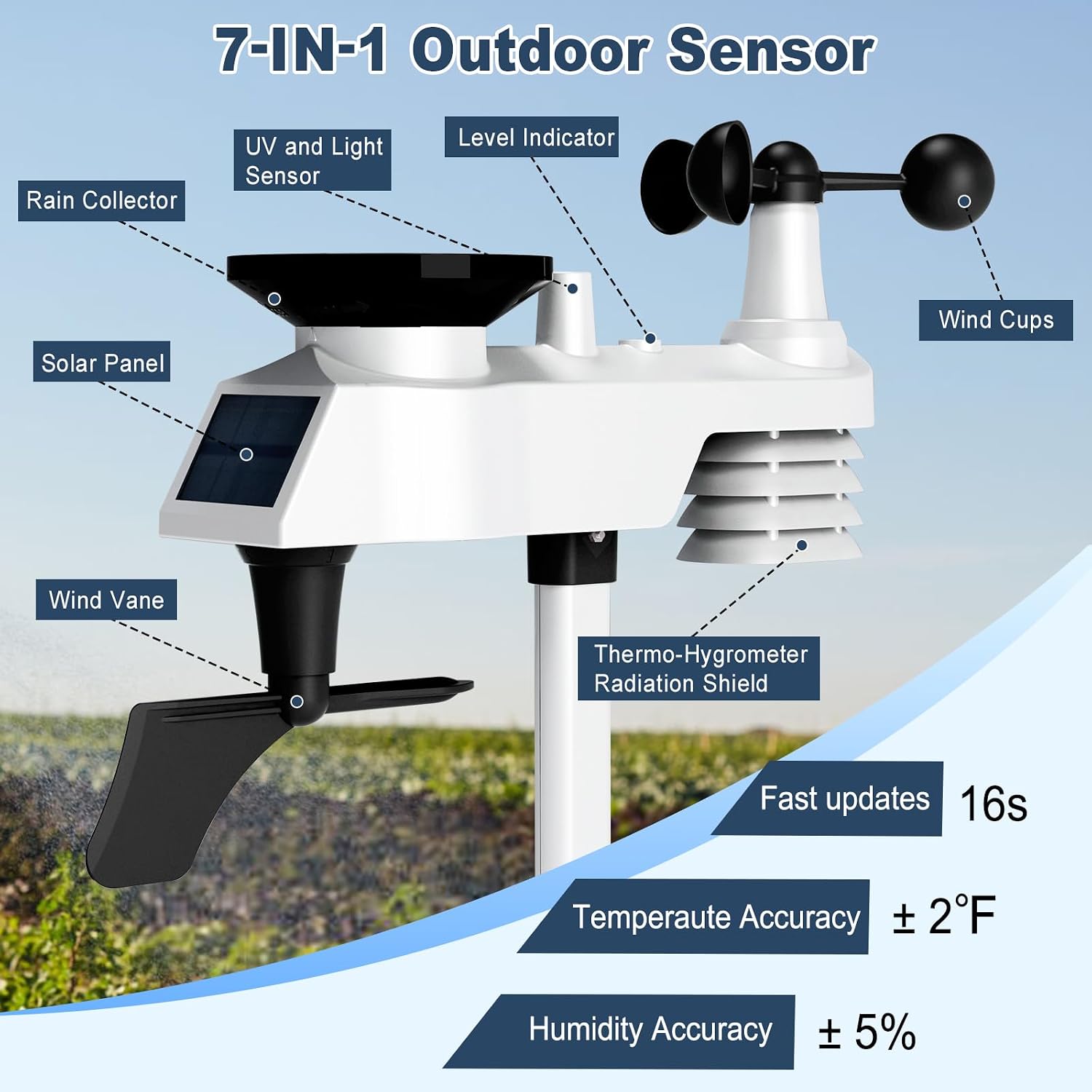
Image: Diagram illustrating the various components of the 7-in-1 outdoor sensor, including the rain collector, UV and light sensor, wind cups, wind vane, solar panel, level indicator, and thermo-hygrometer radiation shield.

Image: Another diagram of the 7-in-1 outdoor sensor, clearly labeling its parts like wind cups, level indicator, thermo-hygrometer radiation shield, wind vane, solar panel, rain collector, and UV and light sensor.
4. Asennus
4.1 Virtalähde
The display console requires a power adapter (included) and can use 3 AAA batteries (not included) for backup. The outdoor sensor is powered by a solar panel and uses 3 AA batteries (not included) as backup. Ensure batteries are inserted correctly according to polarity markings.

Image: Diagram showing the power supply methods for both the monitor (power adapter and AAA batteries) and the sensor (solar panel and AA batteries).
4.2 Ulkoanturin asennus
Mount the outdoor sensor in an open area, away from obstructions, to ensure accurate readings for wind, rain, and sunlight. The sensor transmits signals up to 328 feet (100 meters) wirelessly. Use the included mounting hardware to secure it to a pole or suitable surface. Ensure the level indicator shows the sensor is perfectly horizontal for accurate rain and wind measurements.

Image: Depicts the outdoor sensor and display console, illustrating the strong and stable signal transmission range of up to 328 feet (100 meters).
4.3 Wi-Fi-yhteys
The weather station can connect to your 2.4G Wi-Fi network to upload data to online weather services like Weather Underground, Weather Cloud, and PWS Weather. This allows you to monitor real-time conditions and historical data from your smartphone, tablet, or computer.
- Ensure the console's Wi-Fi icon is flashing.
- Connect your laptop or smartphone to the "WeatherHome" WLAN network broadcast by the console.
- Follow the on-screen instructions or manual to configure Wi-Fi settings and connect to your home router.
- Create an account on Weather Underground or Weather Cloud, or use an existing one. Obtain your Station ID and Key.
- Enter the Station ID and Key into the weather station's web interface (accessed via the "WeatherHome" network) to enable data upload.

Image: Shows the display console connected to a smartphone app, demonstrating live weather data access via Wi-Fi and integration with Weather Cloud and Weather Underground.

Image: A step-by-step diagram illustrating the process of uploading weather data from the console to online services via a 2.4G Wi-Fi router, including creating accounts on Weather Underground or Weather Cloud.
5. Käyttö
5.1 Displaying Weather Data
The 8.07-inch display console provides a comprehensive overview of 14 different weather parameters:
- Sisä-/ulkolämpötila
- Sisä-/ulkonäön kosteus
- Sääennuste
- Tuulen nopeus ja suunta
- Dew Point & Feels Like Temperature
- Barometrinen paine
- Sademäärä
- Aika ja päivämäärä
- Sunlight & UV Index
- Sensor Temperature & Humidity
- Hälytykset
- Kuun vaihe

Image: The display console showing all 14 weather parameters, including indoor/outdoor temperature, humidity, wind speed/direction, rainfall, UV index, sunlight, pressure, dew point, time, date, and moon phase.
5.2 Sääennustetoiminto
The weather station provides a hyperlocal weather forecast based on data collected directly from your location and barometric pressure trends. The forecast symbols indicate weather fluctuations over the next 24-48 hours, not current conditions.

Image: Displays the weather forecast function with symbols for Sunny, Partly Cloudy, Cloudy, and Rainy conditions, indicating future weather trends.
5.3 Älykkäät hälytykset
The weather station offers customizable alerts for critical weather changes. You can set alarms for sudden temperature drops, high winds, or freezing conditions to receive timely notifications.
5.4 Taustavalon säätäminen
Paina SNOOZE / VALO button on the display console to cycle through the three brightness levels (High, Medium, Low) or turn the backlight off.

Image: Shows the display console in both tabletop stand and wall-mounted configurations, demonstrating the adjustable backlight with High (100%), Medium (60%), Low (30%), and Off (0%) settings controlled by the SNOOZE/LIGHT button.
6. Huolto
6.1 Outdoor Sensor Care
- Puhdistus: Periodically clean the rain collector funnel and wind cups to prevent debris buildup, which can affect accuracy. Use a soft, damp kangas.
- Akun vaihto: While the outdoor sensor has a solar panel, it relies on AA batteries for continuous operation, especially during periods of low sunlight. Replace the AA batteries when indicated by the display console or if readings become inconsistent. Access the battery compartment on the underside of the sensor.
- Asennuksen vakaus: Regularly check the mounting of the outdoor sensor to ensure it remains secure and level, especially after strong winds.
6.2 Display Console Care
- Puhdistus: Wipe the display screen and console casinpehmeällä, kuivalla liinalla. Vältä hankaavia puhdistusaineita tai liuottimia.
- Sijoitus: Keep the console in a dry environment, away from direct sunlight and extreme temperatures, to prolong its lifespan.
7. Vianmääritys
| Ongelma | Mahdollinen syy | Ratkaisu |
|---|---|---|
| Ulkotietoja ei näytetä | Outdoor sensor not powered or out of range. | Check outdoor sensor batteries. Ensure sensor is within 328ft (100m) of the console and free from major obstructions. Re-pair the sensor if necessary (refer to full manual for pairing instructions). |
| Epätarkat sademäärälukemat | Sadekeräin tukossa tai anturi ei ole vaakasuorassa. | Clear any debris from the rain collector. Ensure the outdoor sensor is mounted perfectly level using the built-in level indicator. |
| Inaccurate wind direction/speed | Wind vane/cups obstructed or sensor not oriented correctly. | Ensure wind cups and vane spin freely. Mount the sensor in an open area, away from buildings or trees. Ensure the wind vane is pointing North during installation. |
| Wi-Fi-yhteysongelmia | Incorrect Wi-Fi password, 5G network, or router too far. | Ensure you are connecting to a 2.4G Wi-Fi network. Double-check the Wi-Fi password. Move the console closer to the router. Restart the console and router. |
| Näyttö on himmeä tai tyhjä | Power adapter disconnected or batteries low. | Check power adapter connection. Replace AAA batteries in the console. Adjust backlight brightness using the SNOOZE/LIGHT button. |
8. Tekniset tiedot

Image: A table summarizing the measurement specifications for indoor temperature, outdoor temperature, indoor humidity, outdoor humidity, UV index, rain, wind direction, wind speed, barometric pressure, and sunlight.
| Ominaisuus | Yksityiskohta |
|---|---|
| Merkki | Urageuxy |
| Malli | WS0320 |
| Näytön tyyppi | LCD |
| Yhteystekniikka | Wi-Fi (2.4G) |
| Tuotteen mitat | 0.87" S x 8.47" L x 6.22" K |
| Tuotteen paino | 4.2 puntaa |
| Materiaali | Akryylinitriilibutadieenistyreeni (ABS) |
| Sisälämpötila-alue | 0 - 60 °C (32 - 140 °F) |
| Ulkolämpötila-alue | -40 - 60 °C (-40 - 140 °F) |
| Lämpötilan tarkkuus | ±1 °C (±2 °F) |
| Kosteusalue | 10 - 99 % RH |
| Kosteuden tarkkuus | ±5% (Indoor), ±3% (Outdoor, between 20-90%) |
| Sademääräalue | 0–9999 mm (0–396 tuumaa) |
| Tuulen nopeusalue | 0 - 50 m/s (0 - 112 mph) |
| Barometrinen painealue | 300 to 1100 hpa (8.85 to 32.48 inHg) |
| UV Index Range | 1-15+ |
| Sunlight Range | 0 - 200 klux |
9. Takuu ja tuki
For warranty information and technical support, please refer to the contact details provided in the product packaging or visit the official Urageuxy websivusto. Säilytä ostokuitti takuuvaatimuksia varten.
10. Virallinen tuotevideo
Video: Virallinen tuote ohiview of the Urageuxy 14-in-1 Wi-Fi Weather Station, demonstrating its features and functionality. This video is provided by the seller, Urageuxy.