
1. Johdanto
This manual provides essential information for setting up, operating, maintaining, and troubleshooting your Lenovo IdeaCentre AIO 3 23.8" FHD All-in-One Desktop. Please read this manual thoroughly before using your device to ensure proper functionality and to prevent damage.
The Lenovo IdeaCentre AIO 3 is designed for everyday computing tasks, office productivity, and light creative projects, offering a streamlined experience with its integrated display and components.
2. Mitä laatikossa on
Varmista, että pakkauksessa on kaikki tarvittavat osat:
- Lenovo IdeaCentre AIO 3 -monitoimitietokone
- Langaton näppäimistö
- Langaton hiiri
- Virtalähde
- 7-in-1 Docking Station with 1TB Storage
- 32GB MicroSD-kortti sovittimella
- Type-C datakaapeli
- 3-in-1 latauskaapeli
- Suede Cleaning Cloth
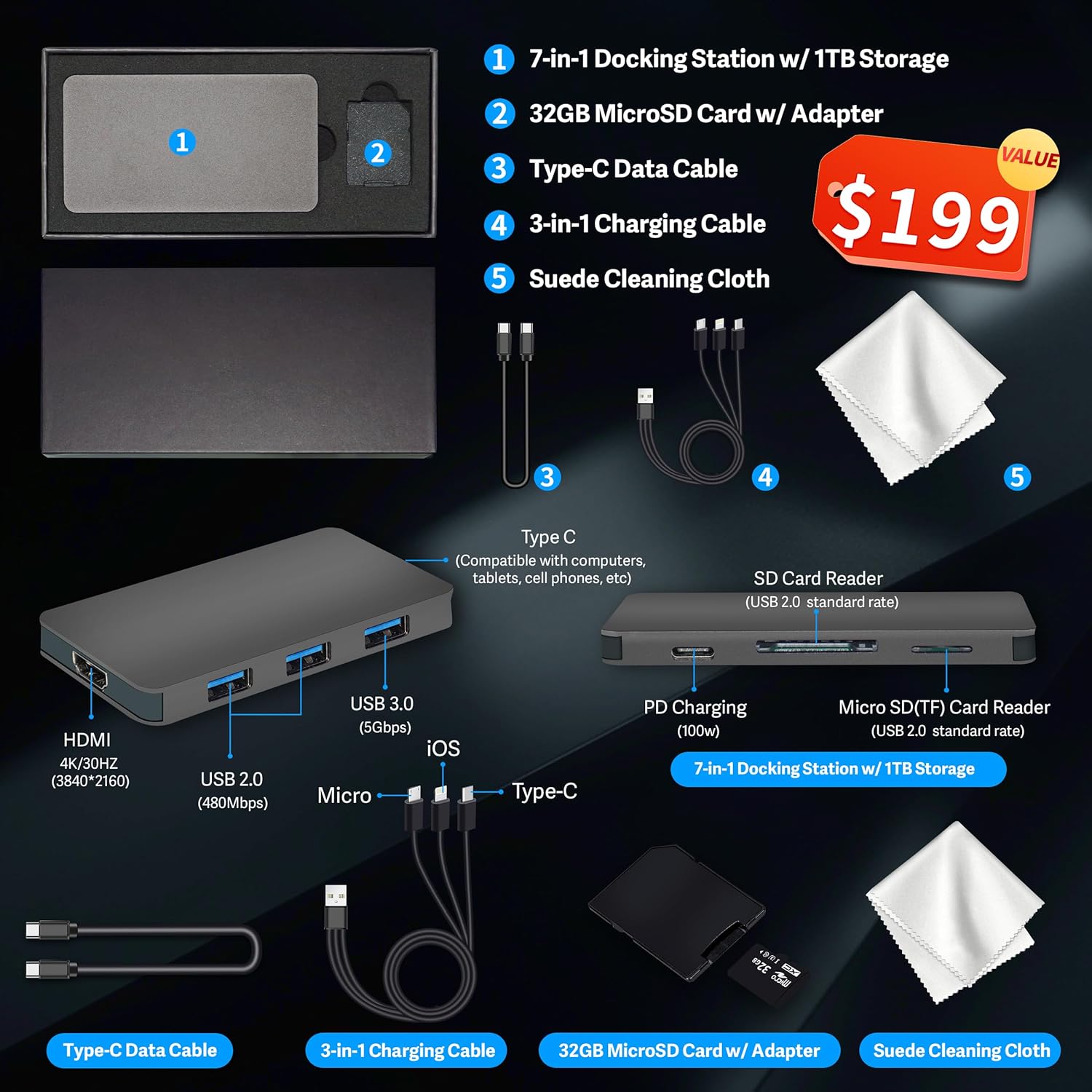
Kuva 2.1: Included accessories, featuring the 7-in-1 docking station, cables, MicroSD card, and cleaning cloth.
3. Asennusohjeet
3.1 Pakkauksesta purkaminen ja sijoittaminen
- Carefully remove the All-in-One desktop and all accessories from the packaging.
- Place the desktop on a stable, flat surface, ensuring adequate ventilation around the unit.
3.2 Virran kytkeminen
- Connect the power adapter cable to the DC-in port on the rear of the All-in-One desktop.
- Liitä verkkolaite maadoitettuun pistorasiaan.
3.3 Oheislaitteiden liittäminen
Connect the wireless keyboard and mouse. Typically, a single USB receiver is used for both. Insert the USB receiver into an available USB port on the desktop.
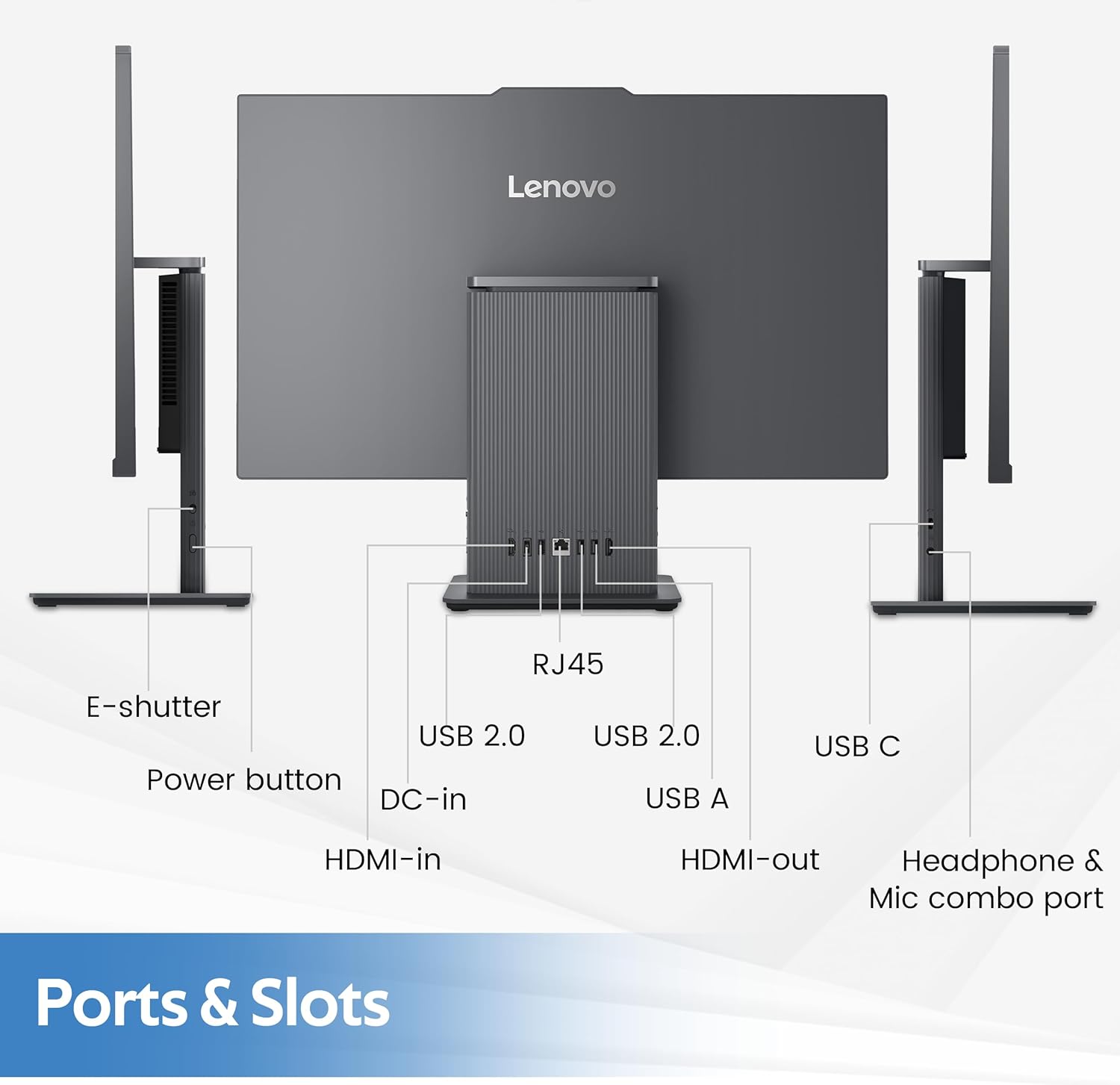
Kuva 3.1: Yliview of the rear and left-side ports, including USB, HDMI, RJ-45, and audio connections.
3.4 Initial Boot-Up and Windows 11 Setup
- Press the power button located on the rear of the desktop.
- Suorita Windows 11:n alkuasennus loppuun noudattamalla näytön ohjeita, mukaan lukien kielen valinta, verkkoyhteyden muodostaminen ja käyttäjätilin luominen.
4. Käyttöohjeet
4.1 Näytön ominaisuudet
The IdeaCentre AIO 3 features a 23.8-inch Full HD (1920x1080) IPS display with a 100Hz refresh rate. It includes an anti-glare coating for comfortable viewing and covers 99% sRGB for accurate color reproduction.

Kuva 4.1: The 23.8-inch Full HD display provides clear and vibrant visuals.
4.2 Järjestelmän suorituskyky
Your AIO desktop is equipped with an AMD Ryzen 5 7535HS processor, 16GB DDR5 RAM, and AMD Radeon 660M Graphics. This configuration supports smooth multitasking and efficient handling of daily computing tasks.
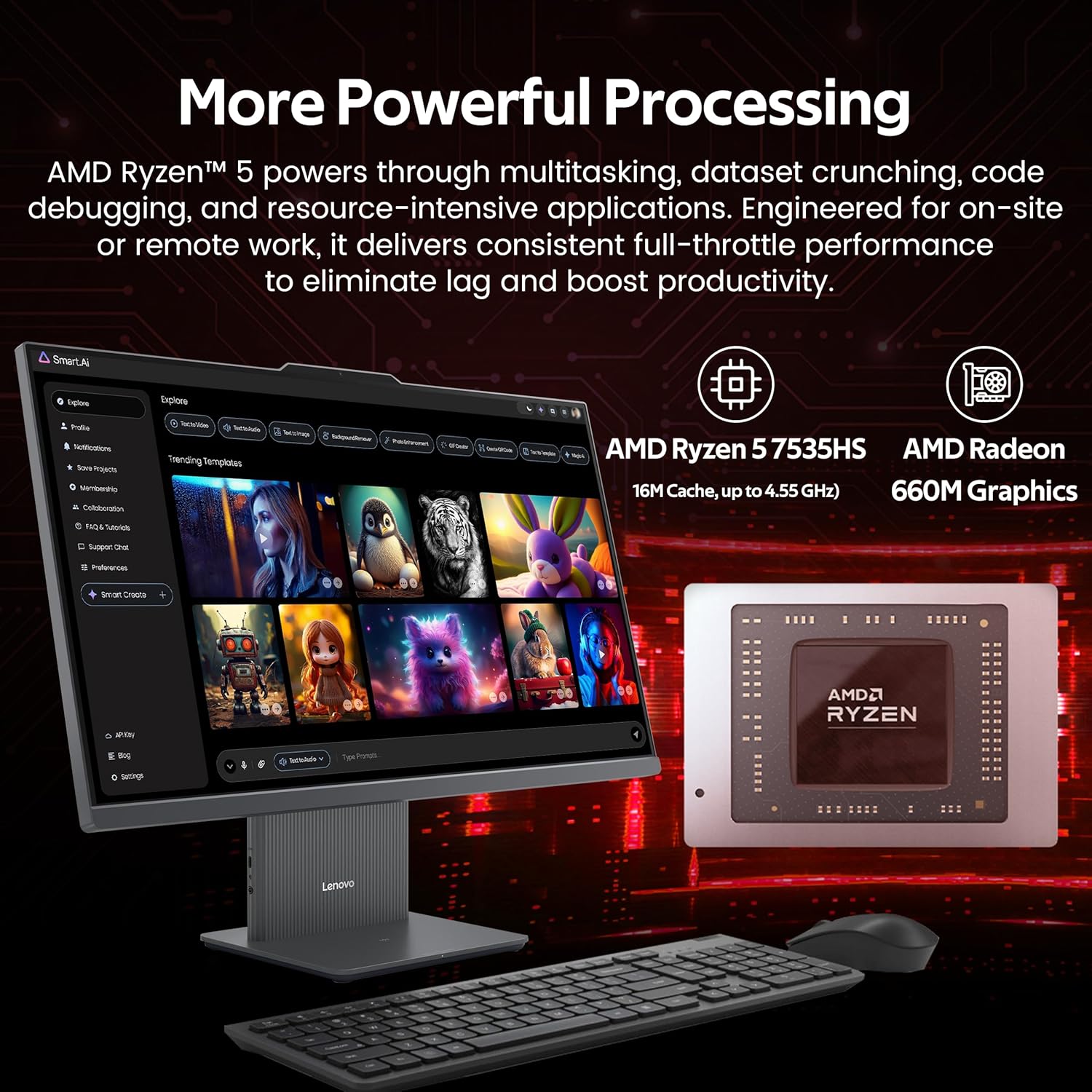
Kuva 4.2: Illustration of the AMD Ryzen 5 7535HS processor and AMD Radeon 660M Graphics for powerful processing.
4.3 Varastointi
The system includes a 512GB SSD for fast operating system and application loading, complemented by a 1TB docking station for additional storage capacity, totaling 1.5TB.

Kuva 4.3: The All-in-One desktop highlighting its 16GB RAM and 1.5TB storage capabilities.
4.4 Yhteydet
The IdeaCentre AIO 3 supports Wi-Fi 6 for high-speed wireless internet and Bluetooth 5.3 for connecting wireless peripherals. It also features an RJ-45 Ethernet port for wired network connections.

Kuva 4.4: Features such as wireless charging, Wi-Fi 6, Bluetooth 5.2, and integrated stereo speakers.
4.5 Portit ja liitännät
The desktop includes various ports for connectivity:
- Takaportit: 1x USB-A (USB 10Gbps / USB 3.2 Gen 2), 2x USB-A (Hi-Speed USB / USB 2.0), 1x HDMI-in 1.4, 1x HDMI-out 2.1 TMDS, 1x RJ-45 (Ethernet), 1x Power Connector.
- Vasemmanpuoleiset portit: 1x USB-C, 1x Headphone / Microphone Combo Jack.
4.6 Moniajo
The system is designed to handle multiple applications and browser tabs simultaneously, providing a smooth user experience for various tasks.

Kuva 4.5: A user demonstrating the ability to manage multiple applications and tasks on the desktop.
5. Huolto
5.1 Laitteen puhdistaminen
- Sammuta laite aina ja irrota se pistorasiasta ennen puhdistamista.
- Use a soft, lint-free cloth (such as the provided suede cleaning cloth) to gently wipe the screen and exterior surfaces.
- Vältä voimakkaiden kemikaalien, hankaavien puhdistusaineiden tai aerosolisuihkeiden käyttöä suoraan laitteessa.
- Use compressed air to clear dust from vents and ports periodically.
5.2 Ohjelmistopäivitykset
Tarkista säännöllisesti käyttöjärjestelmän päivitykset (Windows Update) ja ohjainpäivitykset (Lenovo Vantage tai Lenovon tuki websivusto) optimaalisen suorituskyvyn ja turvallisuuden varmistamiseksi.
5.3 Tietojen varmuuskopiointi
Varmuuskopioi tärkeät tietosi säännöllisesti ulkoiselle asemalle tai pilvitallennustilaan tietojen menetyksen estämiseksi.
6. Vianmääritys
6.1 Ei virtaa
- Varmista, että virtajohto on kytketty kunnolla sekä pöytätietokoneeseen että pistorasiaan.
- Varmista pistorasian toiminta kytkemällä siihen toinen laite.
- Tarkista virtalähteestä näkyvät vauriot.
6.2 Näyttöongelmat
- If the screen is blank, ensure the device is powered on and not in sleep mode.
- Adjust display brightness settings.
- Jos ulkoinen näyttö on kytketty, varmista, että oikea näyttölähtö on valittuna Windowsin asetuksissa.
6.3 Wireless Connectivity Problems
- Wi-Fi: Check if Wi-Fi is enabled in Windows settings. Restart your router and the desktop. Ensure you are connecting to the correct network and entering the password correctly.
- Bluetooth: Ensure Bluetooth is enabled. Re-pair your Bluetooth devices. Check device batteries.
6.4 Näppäimistö tai hiiri ei vastaa
- Ensure the USB receiver is properly inserted into a USB port.
- Check the batteries in the wireless keyboard and mouse and replace if necessary.
- Try inserting the USB receiver into a different USB port.
7. Tekniset tiedot
| Ominaisuus | Erittely |
|---|---|
| Merkki | Lenovo |
| Mallin nimi | IdeaCentre AIO 3 |
| Käyttöjärjestelmä | Windows 11 |
| CPU malli | AMD Ryzen 5 7535HS |
| Prosessorin nopeus | 3.3 GHz (up to 4.55 GHz boost) |
| Asennettu RAM-muisti | 16 Gt:n DDR5-muisti (4800 MHz) |
| Varastointi | 512 GB SSD + 1 TB Docking Station (Total 1.5 TB) |
| Grafiikka rinnakkaisprosessori | AMD Radeon 660M -näytönohjain |
| Näytön koko | 23.8 tuumaa |
| Näytön resoluutio maksimi | 1920x1080 pikseliä (FHD) |
| Yhteystekniikka | Ethernet, HDMI, USB, Wi-Fi 6, Bluetooth 5.3 |
| Portit | 1x USB-A (3.2 Gen 2), 2x USB-A (2.0), 1x USB-C, 1x HDMI-in 1.4, 1x HDMI-out 2.1 TMDS, 1x RJ-45, 1x Headphone/Mic Combo, 1x Power Connector |
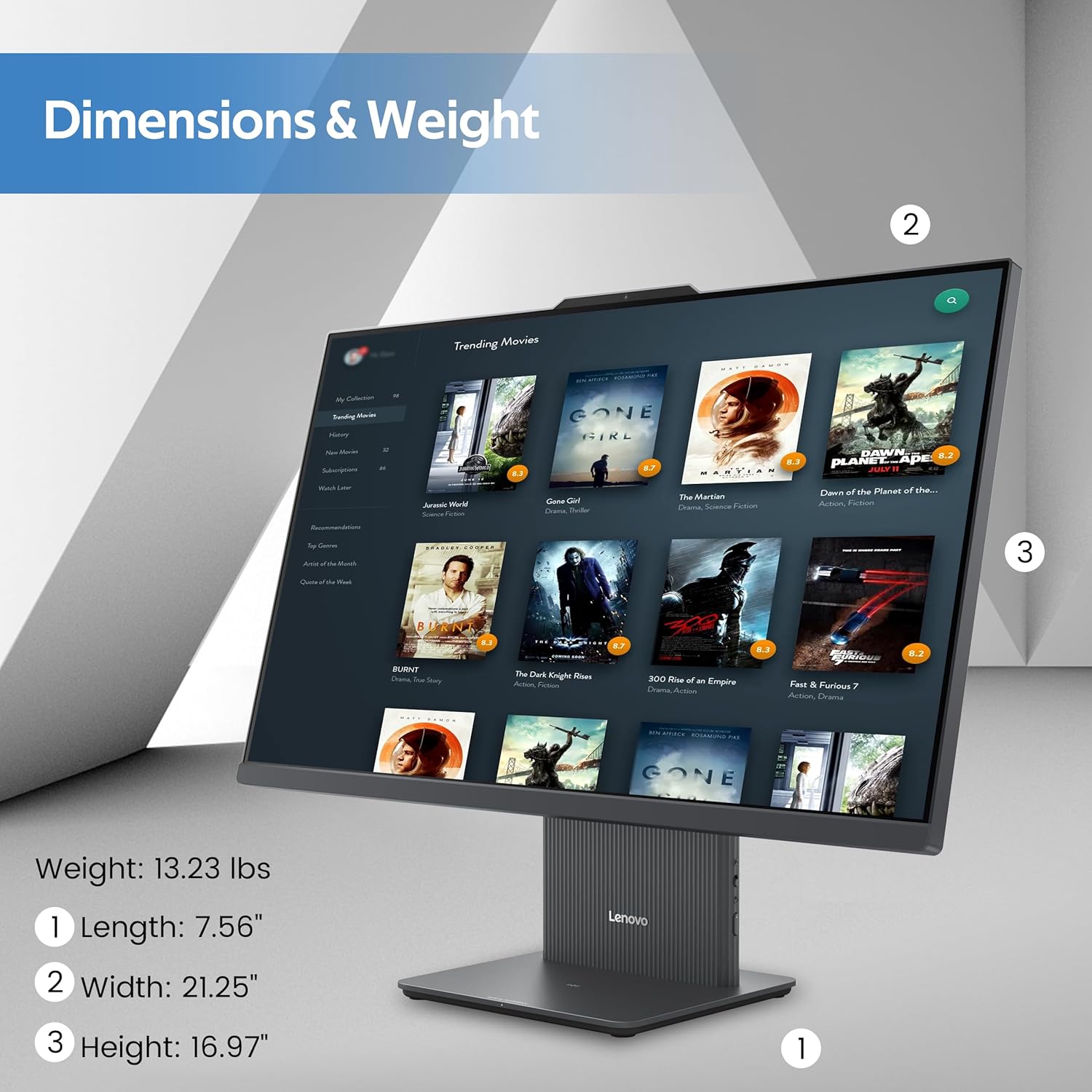
| Tuotteen mitat (P x L x K) | 26 x 21.5 x 9 tuumaa (arvioitu) |
| Tuotteen paino | 21 paunaa (noin) |
Kuva 7.1: Physical dimensions and weight of the Lenovo IdeaCentre AIO 3 desktop.
8. Takuu ja tuki
8.1 Takuutiedot
Your Lenovo IdeaCentre AIO 3 desktop comes with a standard manufacturer's warranty. Please refer to the warranty card included with your product for specific terms, conditions, and duration. Keep your proof of purchase for warranty claims.
8.2 Tekninen tuki
Jos tarvitset teknistä apua, ajurilatauksia tai muuta tukea, käy Lenovon virallisella tukisivustolla. website or contact Lenovo customer service. You can find contact information and support resources at support.lenovo.com.