
Tuote loppuview
The BTMETER BT-881W is a versatile digital instrument designed to measure various environmental parameters, including wind speed, ambient temperature, humidity, and Wet Bulb Globe Temperature (WBGT). It serves as both a digital anemometer and a heat stress monitor, suitable for indoor and outdoor applications.
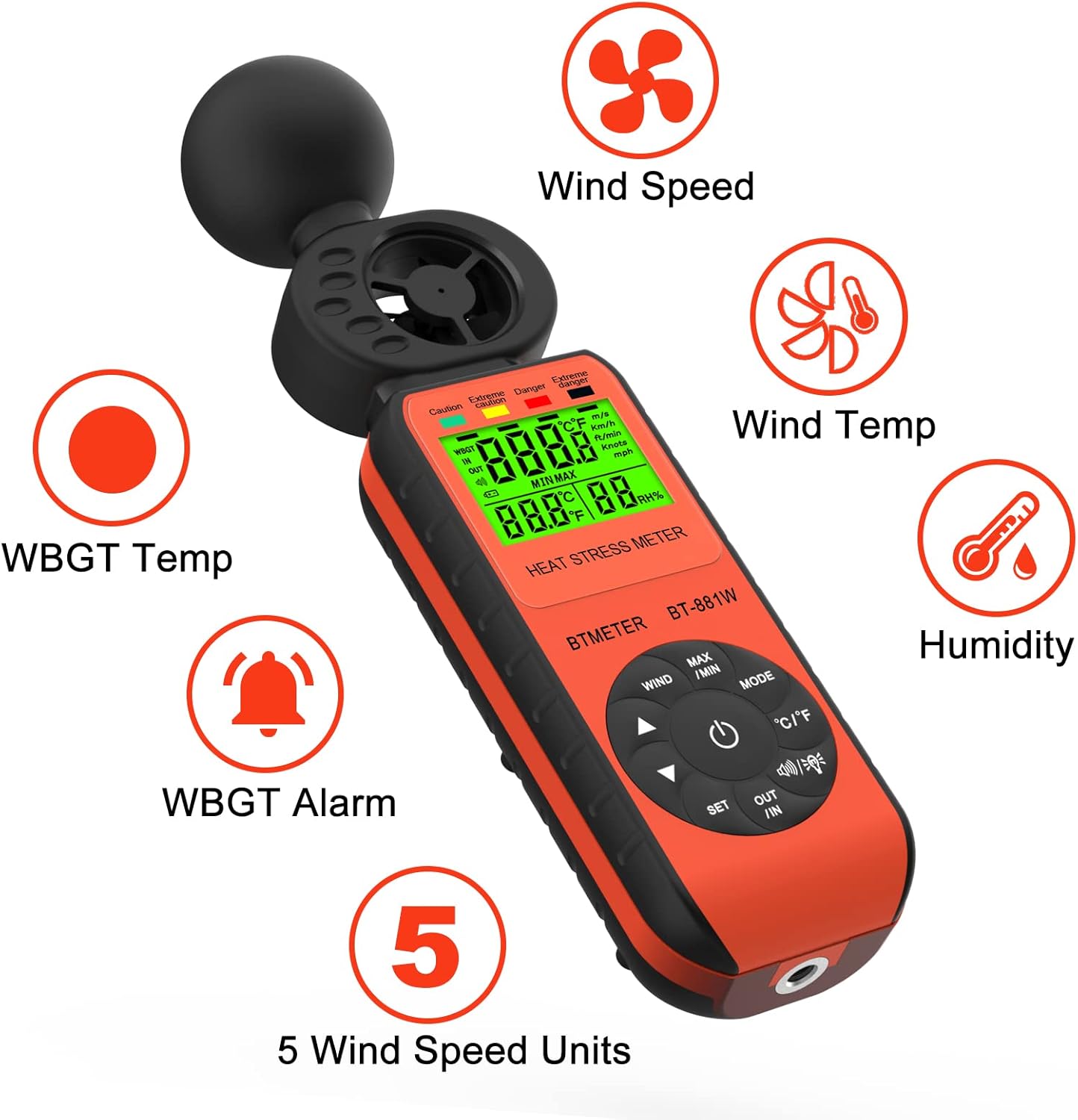
Figure 1: BTMETER BT-881W Heat Stress Meter Anemometer with its primary functions: Wind Speed, Wind Temperature, WBGT Temperature, Humidity, WBGT Alarms, and 5 Wind Speed Units.
Tärkeimmät ominaisuudet:
- Monitoiminen mittaus: Measures wind speed, ambient temperature, humidity, and WBGT.
- Suuri tarkkuus: Features upgraded wind and temperature sensors for precise readings.
- WBGT Monitoring: Includes WBGT alarms and supports indoor/outdoor WBGT measurement modes.
- Käyttäjäystävällinen: Offers 5 air velocity units, 2 temperature units, data hold, backlit LCD, and auto power-off.
- Kiinnitettävä kolmijalka: Equipped with a 1/4" screw hole for tripod installation.
Asennus
Akun asennus:
The BT-881W requires one 9V battery (not included). To install the battery:
- Paikanna laitteen takaosassa oleva paristolokeron kansi.
- Avaa kansi.
- Aseta 9 V:n paristo paikalleen varmistaen oikean napaisuuden.
- Sulje paristolokeron kansi kunnolla.
Kolmijalan kiinnitys (valinnainen):
For stable measurements, the device can be mounted on a tripod. A 1/4" screw hole is located at the bottom of the unit.
- Locate the 1/4" screw hole at the base of the meter.
- Align the meter with your tripod's mounting screw.
- Gently twist the meter onto the tripod until it is secure.

Kuva 2: Takaosa view of the BT-881W showing the battery compartment and dimensions.
Käyttöohjeet
Virta päälle/pois:
- Paina Tehoa painiketta kytkeäksesi laitteen päälle.
- Laitteessa on automaattinen virrankatkaisutoiminto akun säästämiseksi.
Mode Switching (Wind Speed / WBGT):
Paina MODE button to switch between wind speed measurement and WBGT (Wet Bulb Globe Temperature) measurement.
Wind Speed Unit Selection:
In wind speed mode, press the TUULI button to cycle through the 5 available air velocity units: m/s, Ft/min, Knots, Km/h, Mph.

Figure 3: Display showing various wind speed units and the tripod mounting option.
Temperature Unit Switching (°C / °F):
Paina ° C / ° F -painiketta vaihtaaksesi Celsius- ja Fahrenheit-lämpötilayksiköiden välillä.
Indoor/Outdoor WBGT Mode:
In WBGT display mode, press the OUT / IN button to switch between indoor and outdoor WBGT measurement modes. This helps account for differences in temperature, humidity, and direct or radiant sunlight.
Tietojen säilytystoiminto:
Paina MAX/MIN button briefly to activate the data hold function, which freezes the current measurement on the display. Press again to release.
WBGT Alarm Settings:
The device can alert you when the black globe temperature (TG) level reaches a set threshold (20~50°C).
- Paina SARJA -painiketta siirtyäksesi hälytyksen asetustilaan.
- Käytä nuolinäppäimiä (▲ / ▼) to adjust the alarm temperature value.
- When WBGT alarms are triggered, the backlight color changes to red.

Figure 4: WBGT alarm levels and corresponding temperature ranges (Caution, Extreme Caution, Danger, Extreme Danger).
Videoesittely:
Video 1: Official BTMETER 881W Heat Stress Meter Anemometer demonstration, covering unboxing, basic operation, and feature highlights.
Huolto
- Pidä laite puhtaana ja kuivana. Käytä pehmeää, damp puhdistukseen tarkoitettua liinaa; älä käytä hankaavia puhdistusaineita tai liuottimia.
- Store the device in its protective pouch when not in use to prevent damage.
- Remove the battery if the device will not be used for an extended period to prevent battery leakage.
- Vältä altistamasta laitetta äärimmäisille lämpötiloille, suoralle auringonvalolle tai korkealle kosteudelle.
Vianetsintä
If you encounter issues with your BTMETER BT-881W, consider the following common troubleshooting steps:
- Laite ei käynnisty: Tarkista, että 9 V:n paristo on asennettu oikein ja että siinä on riittävästi virtaa. Vaihda paristo tarvittaessa.
- Epätarkat lukemat: Ensure the sensors are clean and unobstructed. Allow the device to equilibrate to the environment for several minutes, especially for WBGT measurements.
- Näyttöongelmat: Jos näyttö on himmeä tai vilkkuu, vaihda paristo.
- WBGT alarm not working: Verify that the alarm temperature is set correctly in WBGT mode.
Lisätietoja on saatavilla Tuki-osiosta.
Tekniset tiedot
| Mallinumero | BT-881W |
| Tuotteen mitat | 2.05 x 1.57 x 8.19 tuumaa (5.2 x 4.0 x 20.8 cm) |
| Tuotteen paino | 4.96 unssia (0.31 puntaa) |
| Virtalähde | Paristokäyttöinen (vaatii 1 x 9 V pariston, ei sisälly toimitukseen) |
| Näytön tyyppi | LCD |
| Sensor Technology | Ultraääni |
| Tuulen nopeusalue | 0-30 m/s |
| Ympäristön lämpötila-alue | 0 ~ 50 ° C (32 ~ 122 ° F) |
| Lämpötilan tarkkuus | ±0.6°C (±2°C overall) |
| Kosteusalue | 0.1 % ~ 99.9 % RH |
| WBGT Temperature Range | 32~122°F (Celsius/Fahrenheit Switchable) |
| Materiaalityyppi | Muovi |
| Mukana olevat komponentit | 1*Heat Stress Meter, 1* User manual |
Takuu ja tuki
Takuutiedot:
The BTMETER BT-881W comes with a 1 vuoden valmistajan takuu. All BTMETER electrical products are strictly calibrated before shipment.
Tekninen tuki:
BTMETER provides lifetime technical support for this product. For any technical inquiries, troubleshooting assistance, or warranty claims, please contact BTMETER customer service directly. Refer to the contact information provided with your purchase or visit the official BTMETER websivusto tukitietojen saamiseksi.