
Johdanto
This manual provides detailed instructions for the setup, operation, and maintenance of your AT&T DECT 6.0 Cordless Phone, model BL108-3. Please read this guide thoroughly to ensure proper use and to take full advantage of all features, including Smart Call Blocker, Bluetooth Connect to Cell, and the digital answering machine.
Pakkauksen sisältö
Varmista, että paketti sisältää seuraavat kohteet:
- Perusyksikkö
- 3 langatonta puhelinta
- 3 virtalähdettä
- 2 Chargers (for additional handsets)
- Puhelinlinjan johto
- 6 akkukennoa
- Pika-aloitusopas
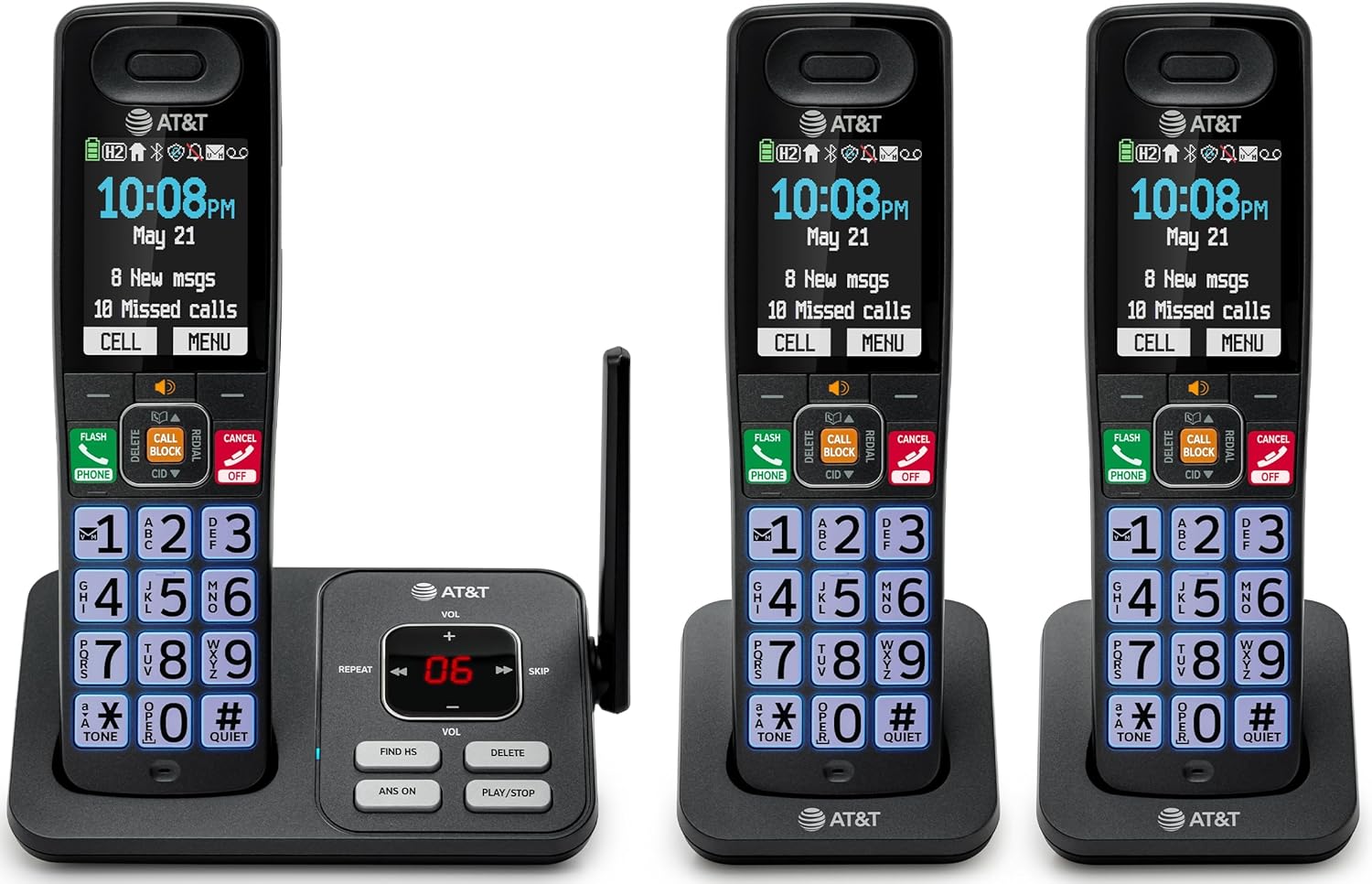
Image: The complete AT&T BL108-3 cordless phone system, showing the base unit and three handsets.
Asennus
1. Base Unit and Power Connection
- Aseta perusyksikkö tasaiselle, vakaalle alustalle.
- Kytke puhelinjohdon toinen pää tukiaseman TEL LINE -liitäntään.
- Kytke puhelinjohdon toinen pää puhelinpistorasiaan.
- Plug one power adapter into the POWER jack on the base unit.
- Kytke virtalähteen toinen pää pistorasiaan, jota ei ohjata seinäkytkimellä.
2. Luurin akun asennus ja lataaminen
- Avaa kunkin luurin takana oleva akkulokeron kansi.
- Insert the provided battery cells, ensuring correct polarity (+ and -).
- Sulje paristolokeron kansi.
- Place each handset in its respective charger or the base unit cradle. The CHARGE light on the handset will illuminate.
- Allow the handsets to charge for at least 10 hours before initial use.
3. Additional Charger Setup
- Plug the power adapters for the additional chargers into electrical outlets not controlled by a wall switch.
- Place the additional handsets into these chargers to charge.
Käyttöohjeet
Puhelujen soittaminen ja vastaanottaminen
- Soittaaksesi puhelun: Paina PUHELINja soita sitten numeroon.
- Puheluun vastaaminen: Paina PUHELIN tai mikä tahansa valintanäppäin.
- Puhelun lopettaminen: Paina POIS/PERUUTA or place the handset in the cradle.
Älykäs puhelun esto
The Smart Call Blocker feature automatically filters out robocalls. You can also manually block unwanted numbers.
- To block a number during a call: Press the dedicated Soita estoon avain.
- The block directory can store up to 1,000 entries.

Image: A close-up of the handset displaying the "Smart Call Block" screen, with the "CALL BLOCK" button highlighted on the base unit.
Bluetooth-yhteys matkapuhelinverkkoon
Pair your smartphone with the BL108-3 system to make and receive mobile calls through any of the cordless handsets.
- Paina tukiasemassa MENU, then navigate to "Bluetooth" and select "Pair Cell".
- Ota Bluetooth käyttöön älypuhelimellasi ja etsi saatavilla olevia laitteita.
- Select the AT&T phone from the list on your smartphone to pair.
- Once paired, mobile calls can be made and received using the cordless handsets.

Image: A visual representation of the "Connect to Cell" feature, showing a handset on a nightstand wirelessly connected to a smartphone.
Video: Demonstrates the seamless Bluetooth connection to a cell phone, allowing calls to be made and received through the AT&T cordless handset.
Digitaalinen puhelinvastaaja
The integrated digital answering system records up to 22 minutes of messages.
- To play messages: Press PLAY/STOP tukiasemassa tai luurissa.
- To skip messages: Press OHITA.
- To delete messages: Press POISTAA.

Image: The phone's base unit and handset displaying an incoming message on the answering system, with a visual of a message being left.
Soittajan tunnuksen ilmoittaminen
The handset speaks the caller's name aloud, allowing you to screen calls without picking up the phone.
- Varmista, että olet tilannut soittajan tunnus -palvelun puhelinpalveluntarjoajaltasi.
- The feature is active by default.

Image: The handset and base unit showing a call coming in, with a speech bubble indicating "Call from Johnson" to illustrate the Caller ID Announce feature.
Sisäpuhelin luurien välillä
You can use the handsets to communicate with each other, or transfer calls.
- Aloita sisäpuhelu seuraavasti: Paina SISÄPUHELIN on a handset, then select the desired handset number.
- To transfer a call: During an external call, press SISÄPUHELIN, select the handset, and then hang up after the other handset answers.

Image: Two handsets, one on the base and one on a charger, with arrows indicating communication between them, illustrating the intercom feature.
Puhelinluettelo
Tallenna puhelinmuistioon jopa 1500 nimeä ja numeroa nopeaa soittamista varten.
- Merkinnän lisääminen: Paina MENU, navigate to "Phonebook", then "Add New Entry".
- Soittaaksesi puhelinluettelosta: Paina PUHELIN, sitten OHJ, select the entry, and press PUHELIN uudelleen.

Image: The handset screen showing a phonebook list with alphabetical navigation, demonstrating the phonebook directory feature.
Täysin kaksisuuntainen luurin kaiutinpuhelin
Allows both parties to speak and be heard simultaneously during a speakerphone call.
- To activate speakerphone during a call: Press KAIUTTIMET.
- To switch back to handset mode: Press PUHELIN.

Image: A person using the handset in speakerphone mode while working on a laptop, with speech bubbles indicating a two-way conversation.
Hiljainen tila
Temporarily silences all handset and base unit ringers for a set period.
- To activate: Press and hold #HILJAINEN luurissa.
- Poistaminen käytöstä: Paina ja pidä painettuna #HILJAINEN uudelleen.

Image: The handset screen showing "Quiet mode on" with a sleeping person in the background, illustrating the Quiet Mode feature.
ECO-tila
Reduces power consumption for optimal battery performance.
- ECO mode is typically enabled by default to conserve energy.
- Refer to the full user manual for options to adjust or disable this feature if needed.

Image: The handset and base unit in a setting with wind turbines in the background, and the screen showing "ECO mode", symbolizing energy efficiency.
Sisäänrakennettu taskulamppu
For safety at night or in emergencies, the handset includes a built-in flashlight.
- To activate the flashlight: Locate the flashlight button on the side of the handset and press it.

Image: A close-up of the handset's side, showing the flashlight beam and the "FLASHLIGHT" label, indicating its location and function.
Huolto
- Puhdistus: Puhdista puhelin ja tukiasema pehmeällä,amp liinalla. Älä käytä puhdistussuihkeita tai voimakkaita kemikaaleja.
- Akun hoito: For optimal battery life, fully charge the handsets for 10 hours before first use. If the phone will be unused for an extended period, remove the batteries.
- Ympäristöolosuhteet: Vältä puhelimen altistamista äärimmäisille lämpötiloille, suoralle auringonvalolle tai kosteudelle.
Vianetsintä
| Ongelma | Ratkaisu |
|---|---|
| Ei valintaääntä |
|
| Luuri ei lataudu |
|
| Huono puhelun laatu tai staattinen ääni |
|
| Cannot make/receive Bluetooth calls |
|
Tekniset tiedot
| Ominaisuus | Yksityiskohta |
|---|---|
| Merkki | AT&T |
| Mallinumero | BL108-3 |
| Puhelintyyppi | Langaton (DECT 6.0) |
| Väri | Musta |
| Mukana tulevat luurit | 3 |
| Näyttö | 2.4" Color Backlit Display |
| Vastausjärjestelmän tyyppi | Digitaalinen (jopa 22 minuutin tallennusaika) |
| Soita esto | Smart Call Blocker (up to 1,000 entries) |
| Bluetooth | Connect to Cell (smartphone pairing) |
| Puhelimen valmiusaika | 6 päivää |
| Soittajan tunnus | Yes, with Announce feature |
| Puhelinmuistion kapasiteetti | Jopa 1500 nimeä ja numeroa |
| Kaiutinpuhelin | Täysin kaksisuuntainen luurin kaiutinpuhelin |
| Mitat (perusyksikkö) | 5.63 x 2.99 x 7.4 tuumaa (L x L x K) |
| Virtalähde | Johdollinen sähkö |
| Materiaali | Muovi |
| UPC | 650530034121 |

Image: Diagram showing the dimensions of the AT&T BL108-3 base unit and a handset.
Takuutiedot
Your AT&T BL108-3 Cordless Phone comes with a 1 vuoden rajoitettu takuu. Please retain your purchase receipt as proof of purchase. For detailed warranty terms and conditions, refer to the full user manual or contact AT&T customer support.
Tukea
For further assistance, technical support, or to order replacement parts, please visit the official AT&T support website or contact their customer service. You can often find FAQs and additional resources online.
- Online-tuki: Vierailla AT&T Wireless Support (or search for AT&T Landline Phone Support).
- Asiakaspalvelu: Refer to your Quick Start Guide for specific contact numbers.