
1. Johdanto
Thank you for choosing the RUPA Android TV Box 14.0, Model 2025. This device transforms your television into a smart entertainment hub, offering access to a wide range of streaming services, applications, and media content. Featuring Android 14.0, 4K/8K resolution support, Wi-Fi 6, and a powerful RK3518pro chipset, this TV box delivers a high-performance and user-friendly experience. This manual provides detailed instructions for setup, operation, maintenance, and troubleshooting to ensure you get the most out of your device.
2. Mitä laatikossa on
Tarkista pakkauksesi sisältö. Jos jokin puuttuu tai on vaurioitunut, ota yhteyttä asiakaspalveluun.
- RUPA Android TV Box 14.0 (Model 2025)
- Äänikaukosäädin
- Virtalähde
- HDMI kaapeli
- Käyttöopas (tämä asiakirja)
3. Tuote ohiview
Familiarize yourself with the ports and components of your RUPA Android TV Box.
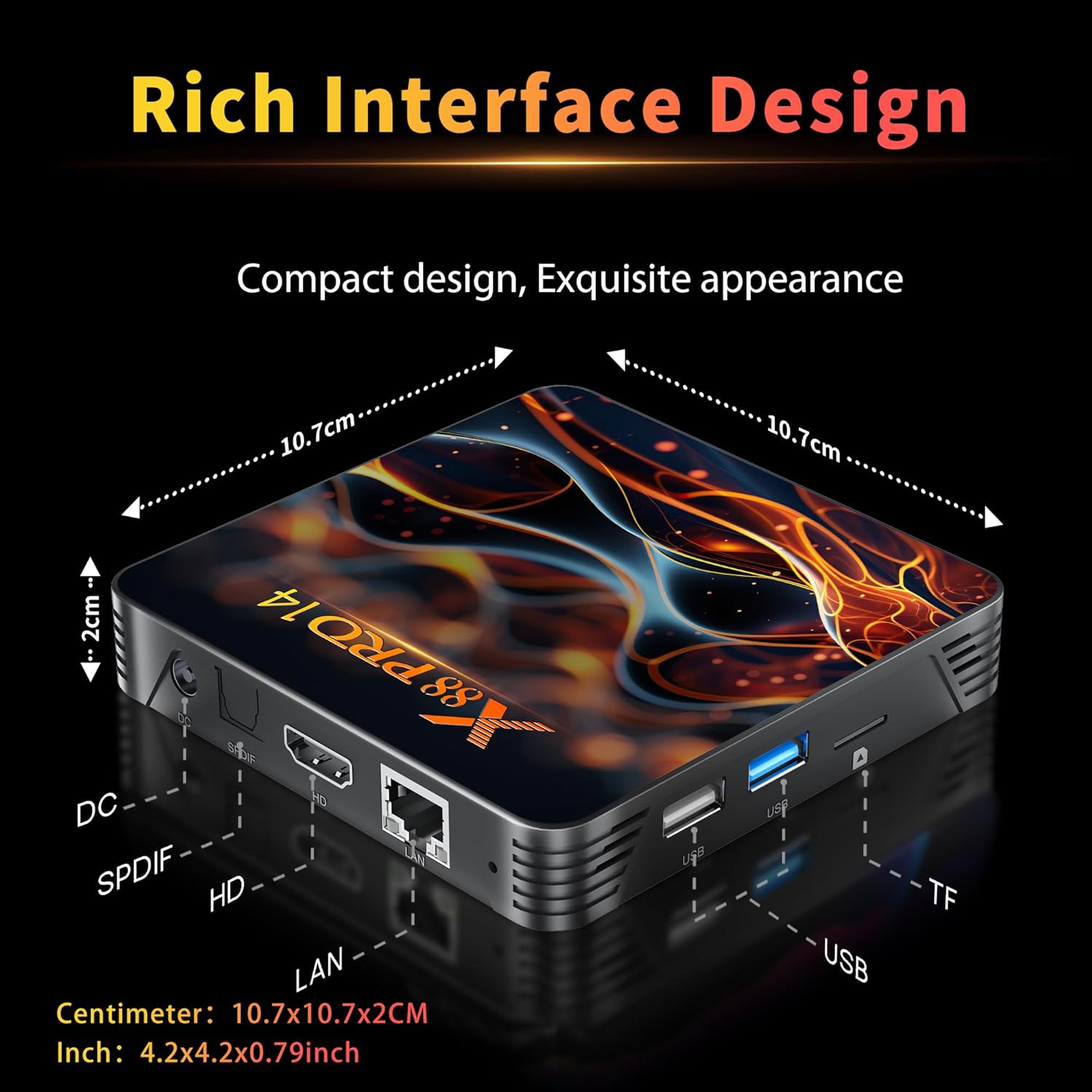
Kuva 3.1: Rear and Side Panel Ports of the RUPA Android TV Box.
This image displays the various connectivity options available on the RUPA Android TV Box. On the rear, from left to right, are the DC power input, SPDIF audio output, HDMI port for video and audio, and a LAN (Ethernet) port. On the side, there are multiple USB ports (including USB 3.0) and a TF (MicroSD) card slot for expandable storage.
- DC-sisääntulo: Liitä toimitettu virtalähde tähän.
- SPDIF: Digitaalinen äänilähtö ulkoisten äänijärjestelmien liittämistä varten.
- HDMI: Connect to your TV or display for video and audio output.
- LAN: Ethernet-portti langallista internetyhteyttä varten.
- USB-portit: For connecting external devices such as USB drives, keyboards, or mice. Includes USB 3.0 for faster data transfer.
- TF-korttipaikka: Insert a MicroSD card for additional storage.
4. Asennusopas
Follow these steps to set up your RUPA Android TV Box for the first time.

Kuva 4.1: Basic Setup Steps.
This image visually guides the user through the initial setup process. Step 1 shows connecting the TV box to a television using an HDMI cable. Step 2 depicts connecting the TV box to a power outlet using the power adapter. Step 3 illustrates connecting to the internet via Ethernet or Wi-Fi, and using the remote control to navigate the interface.
- Liitä televisioon: Use the provided HDMI cable to connect the HDMI port on the TV box to an available HDMI input on your television.
- Liitä virta: Plug the power adapter into the DC input port on the TV box, then plug the adapter into a wall outlet. The device should power on automatically or can be turned on using the remote control.
- Valitse syöttö: Turn on your TV and select the correct HDMI input source using your TV's remote control.
- Ohjattu alkuasetustoiminto: Suorita alkuasetukset, mukaan lukien kielen valinta, aikavyöhyke ja verkkoyhteys, noudattamalla näytön ohjeita.
- Verkkoyhteys:
- Wi-Fi: Select your Wi-Fi network from the list, enter the password, and connect. The device supports Wi-Fi 6 (2.4G/5.8G Dual-Band).
- Ethernet: If using a wired connection, connect an Ethernet cable from your router to the LAN port on the TV box. The connection should be established automatically.
- Google-tili: Kirjaudu sisään Google-tililläsi käyttääksesi Google Play Kauppaa ja muita Googlen palveluita.
5. Käyttöohjeet
5.1. Using the Voice Remote Control
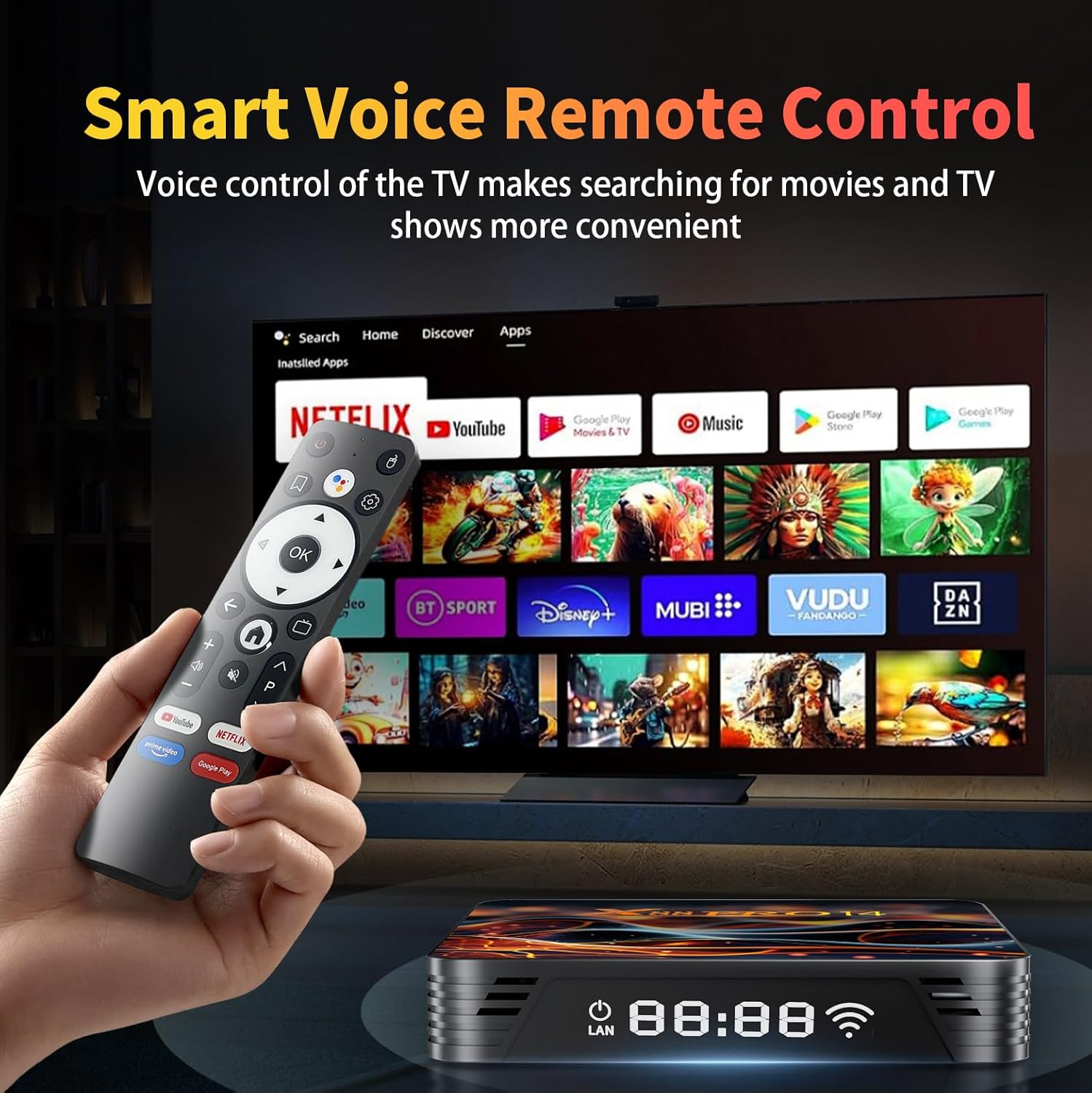
Kuva 5.1: Voice Remote Control and User Interface.
This image shows the RUPA Android TV Box alongside its voice-enabled remote control. The TV screen in the background displays the Android TV interface with various streaming app icons like Netflix, YouTube, Disney+, and more, highlighting the ease of navigation and content access.
The included voice remote control allows for intuitive navigation and voice commands.
- Virtapainike: Kytkee laitteen päälle tai pois päältä.
- Navigation Pad (Directional Buttons): Käytä valikoissa liikkumiseen ja kohteiden valitsemiseen.
- OK -painike: Vahvistaa valinnat.
- Takaisin-painike: Palaa edelliseen näyttöön.
- Koti näppäin: Palaa pääaloitusnäyttöön.
- Ääniavustajapainike: Press and hold to activate voice commands for searching content, opening apps, or controlling the device.
- Äänenvoimakkuuspainikkeet: Säädä äänenvoimakkuutta.
- Sovelluksen pikanäppäimet: Dedicated buttons for popular streaming services (e.g., YouTube, Netflix).
5.2. Android TV:n käyttöliittymän käyttö
The Android 14.0 interface is designed for easy access to your favorite content.
- Aloitusnäyttö: Displays recommended content, recently used apps, and customizable app shortcuts.
- Sovellukset: Käytä kaikkia asennettuja sovelluksia. Voit ladata lisää Google Play Kaupasta.
- Asetukset: Configure network settings, display options, sound, storage, and other system preferences.
5.3. Screen Mirroring (DLNA)
The RUPA Android TV Box supports screen mirroring, allowing you to display content from your mobile phone or tablet on your TV.
Kuva 5.2: Screen Mirroring Functionality.
This image illustrates the screen mirroring capability of the RUPA Android TV Box, showing content from a smartphone being displayed on a large television screen. This feature allows users to share photos, videos, or other media from their mobile devices directly to their TV.
- Ensure your mobile device and the TV box are connected to the same Wi-Fi network.
- On your mobile device, open the screen mirroring or cast feature (often found in quick settings or display settings).
- Select the RUPA Android TV Box from the list of available devices.
- Your mobile device's screen will now be displayed on your TV.
6. Keskeisten ominaisuuksien selitys
6.1. 4K 8K Ultra HD Resolution

Kuva 6.1: 4K HDR10 Visual Quality.
This image demonstrates the superior visual quality of 4K Ultra HD and HDR10 compared to 1080p Full HD. The 4K side shows significantly sharper details, richer colors, and higher contrast, providing a more immersive viewkokemusta.
The RUPA Android TV Box supports video resolutions up to 4K and 8K, delivering exceptional visual clarity and detail. With HDR10+ support, you can experience super bright colors, sharper contrast, and richer details in compatible content, creating a cinematic viewkokemusta.
6.2. RK3518pro Chipset and Performance

Kuva 6.2: RK3518pro Chipset Performance.
This image highlights the RK3518 Quad-Core Cortex-A53 chipset, emphasizing its low power consumption and good performance. It includes bar graphs indicating significant improvements in multicore computing and response speed compared to previous generations, ensuring smooth operation and multitasking.
Equipped with the powerful RK3518pro Quad-Core Cortex-A53 chipset, 2GB RAM, and 16GB/32GB internal storage, this TV box ensures smooth and responsive operation. It efficiently handles multitasking, allowing you to switch between applications, stream high-definition content, and play games without lag.
6.3. Wi-Fi 6 Dual-Band and Bluetooth 5.0

Kuva 6.3: Wi-Fi 6 Performance Comparison.
This image visually compares the performance of Wi-Fi 6 against Wi-Fi 5, illustrating that Wi-Fi 6 offers a significantly higher transmission rate and average network speed. This translates to an ultra-fast and stable internet experience, especially beneficial in crowded network environments and for high-bandwidth streaming.
Enjoy stable and fast internet access with dual-band Wi-Fi 6 (2.4 GHz and 5.8 GHz). Wi-Fi 6 provides higher speeds, lower latency, and improved performance in crowded network environments. Bluetooth 5.0 allows for seamless connection of wireless accessories such as headphones, speakers, keyboards, and game controllers.
6.4. Android 14.0 -käyttöjärjestelmä
The TV box runs on the latest Android 14.0 system, offering enhanced security features, optimized performance, and access to a vast library of applications through the Google Play Store. The 64-bit Android operating system ensures compatibility with a wide range of powerful apps for endless entertainment options.
7. Huolto
- Puhdistus: Use a soft, dry cloth to clean the exterior of the TV box. Do not use liquid cleaners or abrasive materials.
- Ilmanvaihto: Ensure the TV box is placed in a well-ventilated area to prevent overheating. Do not block the ventilation holes.
- Ohjelmistopäivitykset: Periodically check for system updates in the settings menu to ensure optimal performance and access to the latest features and security patches.
- Tallennuksen hallinta: Regularly clear cache and uninstall unused apps to free up storage space and maintain performance.

Kuva 7.1: Efficient Heat Dissipation System.
This image highlights the powerful exhaust heat dissipation design of the RUPA Android TV Box. It shows a comparison between an efficient cooling air group and an ordinary cooling unit, indicating that the TV box's design significantly improves heat dissipation and stability, protecting hardware and ensuring stable operation.
8. Vianmääritys
| Ongelma | Mahdollinen syy | Ratkaisu |
|---|---|---|
| Ei virtaa | Virtasovitin ei ole kytketty tai on viallinen. | Ensure the power adapter is securely connected to the TV box and a working power outlet. Try a different outlet. |
| Ei kuvaa televisiossa | Incorrect HDMI input selected or faulty HDMI cable. | Check that your TV is set to the correct HDMI input. Try a different HDMI port on your TV or a different HDMI cable. |
| Ei Wi-Fi-yhteyttä | Incorrect Wi-Fi password, router issue, or out of range. | Verify the Wi-Fi password. Restart your router. Ensure the TV box is within range of your Wi-Fi router. Try a wired Ethernet connection if available. |
| Kaukosäädin ei toimi | Paristojen varaus on heikko tai tai jokin estynyt. | Replace the batteries in the remote control. Ensure there are no obstructions between the remote and the TV box. |
| Sovellukset ovat hitaita tai kaatuvat | Too many apps running, low storage, or outdated app version. | Close unused apps. Clear app cache (Settings > Apps > [App Name] > Clear Cache). Update apps from the Google Play Store. Consider a factory reset if issues persist (backup data first). |
9. Tekniset tiedot
| Ominaisuus | Yksityiskohta |
|---|---|
| Mallin nimi | 2025 |
| Käyttöjärjestelmä | Android 14.0 |
| Prosessori | RK3518pro Quad-Core Cortex-A53 |
| RAM | 2 Gt |
| Sisäinen tallennustila | 16 GB / 32 GB (depending on variant) |
| Videolähdön tarkkuus | Up to 4K (3840x2160 pixels), 8K (7680x4320 pixels) |
| Video Codec | H.265/HEVC |
| Wi-Fi | Wi-Fi 6 (2.4G/5.8G Dual-Band) |
| Bluetooth | Bluetooth 5.0 |
| Ethernet | 10/100 milj |
| Yhteysportit | HDMI, USB 2.0/3.0, LAN, SPDIF, TF Card Slot, DC Power |
| Erikoisominaisuudet | HDR10+, DLNA (Screen Mirroring), Voice Remote Control |
| Mitat (P x L x K) | 10.7 x 10.7 x 2 cm (P x L x K 7.2 cm) |
10. Takuu ja tuki
The RUPA Android TV Box 14.0 (Model 2025) comes with a standard manufacturer's warranty. Please refer to the warranty card included in your package for specific terms and conditions.
For technical support, troubleshooting assistance, or warranty claims, please contact RUPA customer service through the retailer where you purchased the product or visit the official RUPA websivustolta yhteystiedot.
Verkkoresurssit:
- Lisätietoja ja usein kysyttyjä kysymyksiä on osoitteessa RUPA Store on Amazon.