
1. Johdanto
Kiitos ostoksestasiasing the Sharp PS-916 Bluetooth Party Speaker System. This system includes two identical portable Bluetooth speakers designed to deliver powerful audio with versatile connectivity options. Please read this manual carefully before using the product to ensure proper operation and to maximize your listening experience.
Paketin sisältö:
- 2 x Sharp PS-916 Party Speakers
- 1 x latauskaapeli
- 1 x kaukosäädin
- 1 x Käyttöohje

Image: The Sharp PS-916 system includes two speakers for a complete stereo experience.
2. Asennus
2.1 Kaiuttimien lataaminen
The PS-916 speakers are equipped with rechargeable batteries, providing up to 12 hours of playback. Before initial use, fully charge both speakers.
- Connect the charging cable to the DC IN port on the rear of each speaker.
- Plug the other end of the charging cable into a suitable power adapter (not included) or USB power source.
- The charging indicator light will illuminate. It will change color or turn off once charging is complete.
2.2 Virran kytkeminen päälle/pois
To power on or off each speaker, press and hold the ON/STAND BY INPUT -painiketta, joka sijaitsee ohjauspaneelissa.
2.3 Bluetooth-pariliitos (yksi kaiutin)
- Ensure the speaker is powered on and in Bluetooth mode. The Bluetooth indicator will flash, indicating it is ready for pairing.
- Ota Bluetooth käyttöön mobiililaitteellasi ja etsi käytettävissä olevia laitteita.
- Select "Sharp PS-916" from the list of devices.
- Kun yhteys on muodostettu, Bluetooth-merkkivalo lakkaa vilkkumasta ja jää palamaan tasaisesti.
2.4 True Wireless Stereo (TWS) -pariliitos (kaksi kaiutinta)
TWS allows you to connect two PS-916 speakers wirelessly for a stereo sound experience.
- Power on both PS-916 speakers.
- Ensure neither speaker is currently connected to a Bluetooth device.
- Paina yhden kaiuttimen (tämä on ensisijainen kaiutin) -painiketta TWS -painiketta. Kaiutin siirtyy TWS-pariliitostilaan.
- The primary speaker will automatically search for the secondary speaker. Once connected, you will hear an audible confirmation, and the TWS indicator lights on both speakers will illuminate.
- Yhdistä nyt mobiililaitteesi ensisijaiseen kaiuttimeen Bluetoothin kautta osiossa 2.3 kuvatulla tavalla. Ääni toistetaan molemmista kaiuttimista stereona.
3. Käyttö
3.1 Ohjauspaneeli ohiview

Image: Main control panel for the Sharp PS-916 speaker.
- ON/STAND BY INPUT: Power on/off, switch input modes (Bluetooth, USB, TF, AUX, FM).
- PLAY/PAUSE (►/∕∕): Toista tai keskeytä äänen toisto.
- EDELLINEN (◀◀): Siirry edelliseen kappaleeseen.
- NEXT (▶▶): Siirry seuraavaan kappaleeseen.
- ÄÄNENVOIMAKKUUDEN NUPPI: Säädä pää-äänenvoimakkuutta kiertämällä.
- TWS: Initiate or disconnect True Wireless Stereo pairing.
- TAAJUUSKORJAIN: Cycle through preset equalizer modes.
- BASSO: Activate or deactivate bass boost.
- VALO: Change or turn off the LED light effects.
- MIC CONTROL: Adjust microphone volume or echo (if applicable).
3.2 tuloporttia
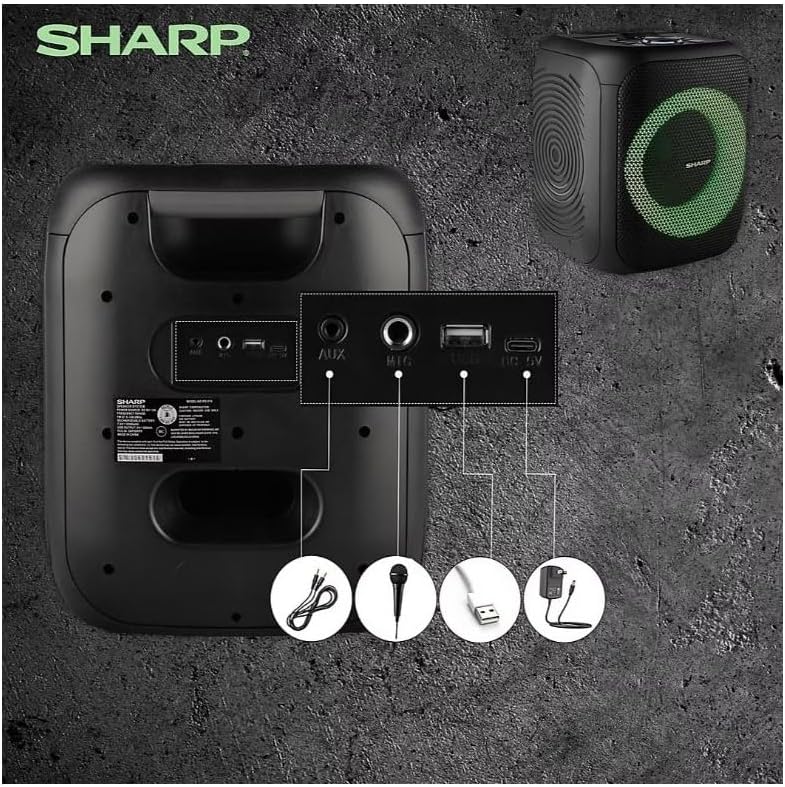
Image: Rear panel with various input and charging ports.
- AUX IN: Liitä ulkoiset äänilaitteet 3.5 mm:n äänikaapelilla.
- MIKROFONI SISÄÄN: Connect a microphone (sold separately) for karaoke or announcements.
- USB: Aseta USB-muistitikku äänen toistoa varten.
- TF-KORTTI: Insert a TF (microSD) card for audio playback.
- DC IN: Connect the charging cable to power and charge the speaker.
3.3 Playing Audio from USB/TF Card
- Insert a USB flash drive or TF card into the corresponding port.
- Paina ON/STAND BY INPUT button repeatedly until the display shows the USB or TF mode.
- Toisto alkaa automaattisesti. Käytä TOISTA/TAUKO, EDELLINEN, ja SEURAAVA painikkeita toiston ohjaamiseen.
3.4 AUX-tulon käyttö
- Connect one end of a 3.5mm audio cable to the AUX IN port on the speaker.
- Liitä toinen pää ulkoisen laitteen kuulokeliitäntään tai äänilähtöön.
- Paina ON/STAND BY INPUT button repeatedly until the display shows AUX mode.
- Ohjaa toistoa ja äänenvoimakkuutta ulkoisesta laitteestasi.
3.5 FM-radion käyttö

Image: The PS-916 features an integrated FM Tuner.
- Paina ON/STAND BY INPUT button repeatedly until the display shows FM mode.
- Paina ja pidä painettuna TOISTA/TAUKO -painiketta, joka skannaa ja tallentaa saatavilla olevat FM-asemat automaattisesti.
- Käytä EDELLINEN ja SEURAAVA painikkeita selataksesi tallennettuja asemia.
3.6 LED-valotehosteet
Paina VALOA button to cycle through different LED light modes or to turn the lights off.
4. Huolto
4.1 Puhdistus
- Katkaise aina kaiuttimen virta ja irrota se virtalähteestä ennen puhdistamista.
- Pyyhi ulkopinnat pehmeällä, kuivalla liinalla.
- Älä käytä nestemäisiä puhdistusaineita, aerosoleja tai liuottimia, sillä ne voivat vahingoittaa pintaa tai sisäisiä osia.
4.2 Varastointi
- Säilytä kaiuttimia viileässä, kuivassa paikassa, poissa suorasta auringonvalosta ja äärimmäisistä lämpötiloista.
- Jos akkua säilytetään pitkään, lataa se noin 50-prosenttisesti muutaman kuukauden välein akun kunnon ylläpitämiseksi.
5. Vianmääritys
If you encounter issues with your Sharp PS-916 speakers, please refer to the following common problems and solutions:
| Ongelma | Mahdollinen ratkaisu |
|---|---|
| Kaiutin ei käynnisty. | Varmista, että akku on ladattu. Liitä latauskaapeli ja yritä uudelleen. |
| Kaiuttimesta ei kuulu ääntä. | Tarkista sekä kaiuttimen että liitetyn laitteen äänenvoimakkuus. Varmista, että oikea tulosignaali on valittu. |
| Bluetooth-laite ei voi muodostaa pariliitosta. | Ensure the speaker is in Bluetooth pairing mode (indicator flashing). Move your device closer to the speaker. Disconnect from other Bluetooth devices. |
| TWS-pariliitos epäonnistuu. | Ensure both speakers are powered on and not connected to any other Bluetooth devices. Try initiating TWS pairing again. |
| Vääristynyt ääni. | Vähennä sekä kaiuttimen että liitetyn laitteen äänenvoimakkuutta. Varmista, että äänilähde ei ole säröinen. |
6. Tekniset tiedot
| Ominaisuus | Yksityiskohta |
|---|---|
| Merkki | Terävä |
| Mallin nimi | PS-916 |
| Kaiuttimen asetukset | 8" Woofer, 1" Tweeter (per speaker) |
| Huippulähtöteho | 400 wattia (kaiutinta kohden) |
| RMS-lähtöteho | 40 wattia (kaiutinta kohden) |
| Yhteystekniikka | Bluetooth |
| Lisäsisääntulot | USB, TF Card, 3.5mm AUX, Microphone Input |
| Akun kesto | Jopa 12 tuntia |
| Erikoisominaisuudet | True Wireless Stereo (TWS) Pairing, Bass Boost, LED Light Effects, FM Tuner |
| Väri | Musta |
| Tuotteen paino | 6.5 paunaa (kaiutinta kohden) |
| UPC | 728434122111 |
| GTIN | 728434122111 |
7. Takuu ja tuki
7.1 Takuutiedot
This Sharp PS-916 product comes with a 90-day limited warranty. This warranty covers manufacturing defects under normal use. It does not cover damage caused by misuse, accidents, unauthorized modifications, or normal wear and tear.
7.2 Asiakastuki
For technical assistance, warranty claims, or further inquiries, please refer to the contact information provided with your purchase documentation or visit the official Sharp support websivusto.