
toocki Wi-Fi 6 USB Adapter
Toocki Wi-Fi 6 USB Adapter Instruction Manual
Model: Wi-Fi 6 USB Adapter
Johdanto
This manual provides detailed instructions for the installation, operation, and maintenance of your Toocki Wi-Fi 6 USB Adapter. This device is designed to provide high-speed wireless internet connectivity and Bluetooth 5.4 functionality to your desktop or laptop computer. Please read this manual thoroughly before using the product to ensure proper setup and optimal performance.
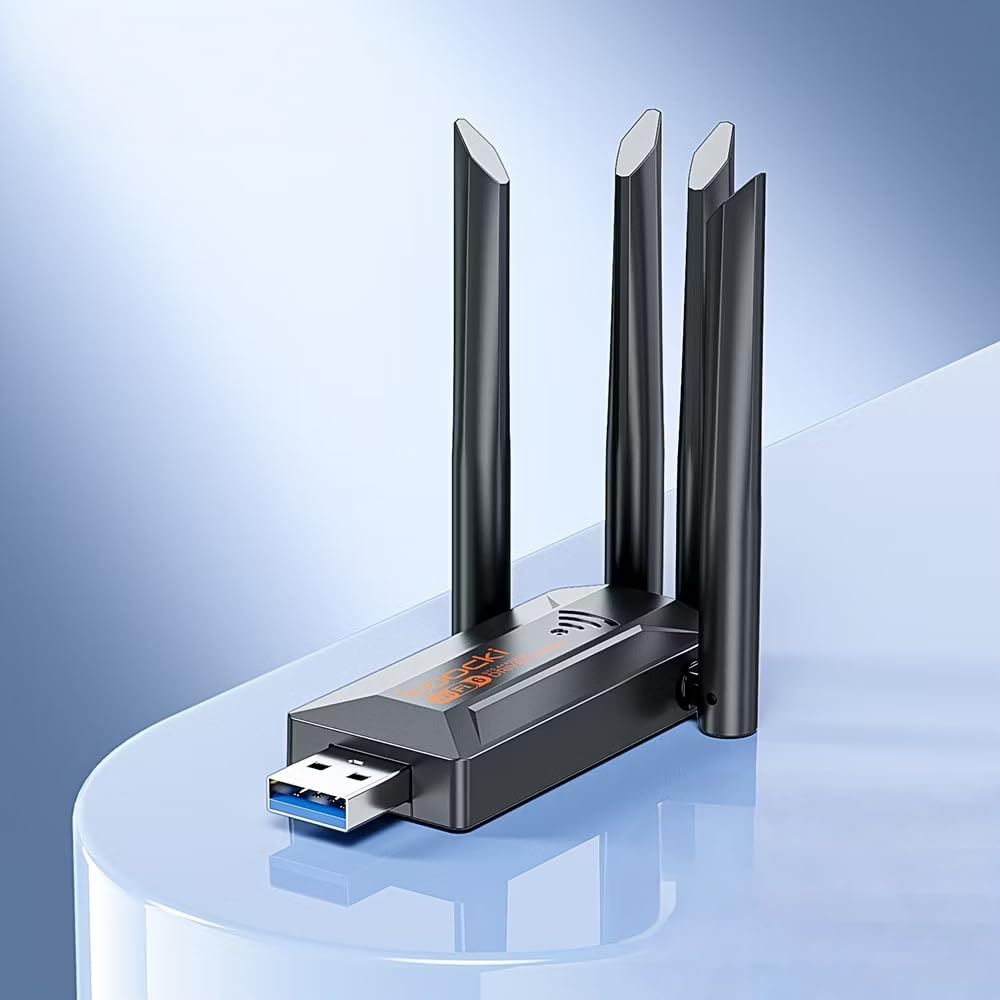
Image: The Toocki Wi-Fi 6 USB Adapter, showcasing its compact design and four adjustable antennas.
Turvallisuustiedot
- Pidä laite poissa vedestä, tulesta, korkeasta kosteudesta tai kuumista ympäristöistä.
- Älä yritä purkaa, korjata tai muokata laitetta.
- Vältä laitteen altistamista suoralle auringonvalolle tai lämmönlähteille.
- Use only with compatible USB ports (USB 3.0 recommended for optimal performance).
- Pidä poissa lasten ulottuvilta.
Pakkauksen sisältö
Varmista, että pakkauksessasi on kaikki tarvittavat osat:
- Toocki Wi-Fi 6 USB Adapter (1 unit)
- Käyttöopas (tämä asiakirja)
Note: The product is designed for driver-free installation on Windows 10/11. No separate driver CD is included.
Tuote loppuview
The Toocki Wi-Fi 6 USB Adapter integrates advanced Wi-Fi 6 technology and Bluetooth 5.4 into a compact USB device. It features four high-gain external antennas for improved signal reception and transmission.

Kuva: Sisäinen view highlighting the Wi-Fi 6 smart algorithm chip, indicating enhanced signal stability and wider coverage.
Tärkeimmät ominaisuudet:
- Wi-Fi 6 (802.11ax) -tuki: Provides stronger signal stability and wider coverage.
- Kaksikaistainen yhteys: Supports both 2.4GHz and 5GHz frequencies for flexible network options and speeds up to 900Mbps.
- Bluetooth 5.4: Enables stable, multi-device connections for peripherals like mice, keyboards, and headphones.
- Neljä tehokasta antennia: Enhances signal strength and extends wireless range.
- USB 3.0 -liitäntä: Ensures rapid data transfer speeds.
- Asennus ilman ajureita: Plug-and-play compatibility for Windows 10/11.
- Kaksoistoiminto: Acts as a Wi-Fi receiver and an AP/Hotspot.
Asennusohjeet
1. Liitä sovitin
- Varmista, että tietokoneeseen on kytketty virta.
- Locate an available USB 3.0 port on your desktop or laptop. For optimal performance, use a USB 3.0 port (typically blue inside).
- Carefully insert the Toocki Wi-Fi 6 USB Adapter into the USB port.
- The operating system (Windows 10/11) should automatically detect and install the necessary drivers. A notification may appear indicating successful installation.
2. Adjust Antennas
The adapter features four adjustable antennas. For best signal reception and transmission, position the antennas vertically or at an angle that provides the strongest signal in your environment. Experiment with different orientations to find the optimal setup.

Image: The Toocki Wi-Fi 6 USB Adapter with its four antennas fully extended, ready for use.
Käyttöohjeet
1. Connecting to Wi-Fi (Receiver Mode)
- After successful driver installation, click on the Wi-Fi icon in your computer's system tray (usually bottom-right corner for Windows).
- Näkyviin tulee luettelo käytettävissä olevista langattomista verkoista.
- Select your desired Wi-Fi network (either 2.4GHz or 5GHz band, if both are available).
- Anna verkon suojausavain (salasana), jos sitä pyydetään.
- Click "Connect". Your computer should now be connected to the internet wirelessly.

Image: Illustration of the adapter functioning as a Wi-Fi receiver, enabling a desktop PC to connect to a wireless network without cables.
2. Using as an AP/Hotspot (Transmission Mode)
The adapter can also create a Wi-Fi hotspot, allowing other devices (phones, tablets) to connect to your computer's internet connection.
- Ensure your computer is connected to the internet via an Ethernet cable or another Wi-Fi adapter.
- On Windows 10/11, go to Settings > Network & Internet > Mobile hotspot.
- Toggle the "Share my Internet connection with other devices" switch to On.
- You can customize the network name (SSID) and password under "Edit".
- Other devices can now search for and connect to this hotspot.

Image: Illustration demonstrating the adapter's Wi-Fi transmission function, creating a hotspot from a connected PC to share internet with mobile devices.
3. Bluetooth 5.4 -yhteys
The integrated Bluetooth 5.4 allows for stable connections with multiple Bluetooth-enabled devices.
- On Windows 10/11, go to Asetukset > Laitteet > Bluetooth ja muut laitteet.
- Varmista, että Bluetooth on kytketty päälle On.
- Napsauta "Lisää Bluetooth- tai muu laite" ja valitse "Bluetooth".
- Put your Bluetooth device (e.g., headphones, mouse, keyboard) into pairing mode.
- Valitse laitteesi luettelosta ja seuraa näytön ohjeita pariliitoksen muodostamiseksi.

Image: The Toocki Wi-Fi 6 USB Adapter connected to a laptop, symbolizing its Bluetooth 5.4 capability for multiple device connections.
Huolto
- Pidä sovitin puhtaana pyyhkimällä se pehmeällä, kuivalla liinalla.
- Vältä nestemäisten puhdistusaineiden tai liuottimien käyttöä.
- Ensure the adapter is not obstructed to allow for proper heat dissipation.
- Kun laitetta ei käytetä pitkään aikaan, on suositeltavaa irrottaa sovitin turvallisesti USB-portista.
Vianetsintä
Ei Wi-Fi-yhteyttä:
- Tarkista USB-portti: Ensure the adapter is firmly inserted into a working USB port. Try a different USB port, preferably a USB 3.0 port.
- Ohjaimen asennus: For Windows 10/11, the driver should install automatically. Verify in Device Manager (search "Device Manager" in Windows) under "Network adapters" that the Toocki adapter is listed and has no error symbols. If not, try restarting your computer.
- Antennin asento: Säädä antenneja optimaalisen signaalin vastaanoton saavuttamiseksi.
- Reitittimen asetukset: Ensure your Wi-Fi router is powered on and broadcasting a signal. Check if other devices can connect to the same network.
- Network Profile: Forget the network and try reconnecting.
Hidas Wi-Fi-nopeus:
- USB 3.0 -portti: Ensure the adapter is connected to a USB 3.0 port for maximum speed. USB 2.0 ports will limit performance.
- Signaalin voimakkuus: Check your Wi-Fi signal strength. A weak signal can lead to slower speeds. Move closer to the router or adjust antennas.
- Verkon ruuhkat: Too many devices on the same network or channel can cause slowdowns. Try switching to the 5GHz band if available and less congested.
- Häiriöt: Other electronic devices (microwaves, cordless phones) can interfere with Wi-Fi signals.
Bluetooth ei toimi:
- Bluetooth päällä: Verify Bluetooth is enabled in Windows Settings.
- Laitteen pariliitos: Ensure your Bluetooth device is in pairing mode and within range.
- Häiriöt: Reduce distance between devices and remove any obstructions.
- Käynnistä uudelleen: Try restarting your computer and re-pairing the device.
Tekniset tiedot

Image: Visual representation emphasizing the 900Mbps dual-band Wi-Fi 6 features for faster, more stable connections.
| Ominaisuus | Yksityiskohta |
|---|---|
| Merkki | Toocki |
| Malli | Wi-Fi 6 USB-sovitin |
| Laitteistorajapinta | USB 3.0 |
| Langaton standardi | Wi-Fi 6 (IEEE 802.11ax), IEEE 802.11ac, IEEE 802.11n, IEEE 802.11g, IEEE 802.11b, IEEE 802.11a |
| Tiedonsiirtonopeus | Jopa 900 megabittiä sekunnissa |
| Taajuuskaistat | 2.4 GHz, 5 GHz |
| Bluetooth-versio | Bluetooth 5.4 |
| Antennit | 4 ulkoista tehokasta antennia |
| Yhteensopivat laitteet | Pöytätietokone, kannettava tietokone |
| Käyttöjärjestelmän tuki | Windows 10/11 (Driver-Free) |
| Tuotteen mitat | 30L x 20W x 60H Millimeters (approx. 3 x 2 x 6 cm) |
| Tuotteen paino | 30 grammaa |
| Väri | Musta |
Takuutiedot
This Toocki Wi-Fi 6 USB Adapter comes with a 6 kuukauden takuu from the date of purchase. This warranty covers manufacturing defects and malfunctions under normal use. It does not cover damage caused by misuse, accidents, unauthorized modifications, or external factors. Please retain your proof of purchase for warranty claims.
Asiakastuki
If you encounter any issues or have questions regarding your Toocki Wi-Fi 6 USB Adapter that are not addressed in this manual, please contact your retailer or the manufacturer's customer support.
For support inquiries, please refer to the contact information provided with your purchase documentation or visit the official Toocki websivusto.