
1. Johdanto
Thank you for choosing the GOCHIFIX Auto Hat Heat Press Machine. This manual provides essential information for the safe and efficient operation of your new heat press. Please read all instructions carefully before use and retain this manual for future reference.
Tärkeimmät ominaisuudet:
- Automaattinen toiminta: Features automatic open/release and pressure adjustment for hands-free operation.
- Precise Temperature & Timer Control: Digital panel for setting temperature (46-400℉/8-200℃) and time (0-999 seconds).
- 4 Memory Modes: Save frequently used settings for efficient workflow.
- 2-in-1 monipuolisuus: Equipped with a 6.54"x3.84" curved heat plate and two interchangeable hat pads for various hat styles and small items.
- Wrinkle-Free Results: Adjustable hat stretcher and molded silicone lower platen ensure smooth transfers.
- Parannettu turvallisuus: Includes a 'Stop' button, anti-slip pads, built-in fuse with spares, and high-temperature gloves.
2. Turvallisuusohjeet
Noudata aina sähkölaitteita käyttäessäsi perusturvallisuusohjeita tulipalon, sähköiskun ja henkilövahinkojen riskin vähentämiseksi.
- Lue kaikki ohjeet ennen koneen käyttöä.
- Keep the machine away from water or wet environments.
- Do not touch the heating plate during or immediately after operation as it will be hot. Use the provided high-temperature gloves.
- Varmista, että laite on asetettu vakaalle, kuumuutta kestävälle alustalle.
- Irrota kone pistorasiasta, kun sitä ei käytetä tai ennen puhdistusta.
- Älä käytä konetta, jos johto tai pistoke on vaurioitunut.
- Pidä lapset ja lemmikkieläimet poissa koneen luota käytön aikana.
- Use the emergency 'STOP' button to interrupt operation if necessary.
3. Pakkauksen sisältö
Varmista, että pakkauksessa on kaikki tarvittavat osat:
- GOCHIFIX Auto Hat Heat Press Machine
- Power Cord (Wire length 59.06")
- 1 Pair Silicone Heat-Resistant Gloves
- Children's Hat Pad (4.94" x 2.95")
- Adult Hat Pad (5.59" x 3.78")
- Spare Fuses (2 included)
- Käyttöohje

Figure 3.1: Included accessories with the heat press machine.
4. Asennusopas
Follow these steps to prepare your heat press machine for first use:
- Pura pakkauksesta: Poista kaikki osat varovasti pakkauksesta.
- Sijoitus: Place the heat press machine on a stable, flat, and heat-resistant surface. Ensure adequate ventilation around the machine.
- Virtaliitäntä: Connect the power cord to the machine's power interface and then plug it into a standard 110V electrical outlet.
- Hat Pad Installation: The machine comes with two interchangeable hat pads. Select the appropriate size for your project. To install, align the pad with the lower platen and secure it.
- Virta päälle: Flip the power switch to the 'ON' position. The digital display will illuminate.

Figure 4.1: Initial setup showing power connection and hat placement.
5. Käyttöohjeet
This section details how to operate your GOCHIFIX Auto Hat Heat Press Machine.
5.1. Lämpötilan ja ajan asettaminen
- Virta päälle: Kytke kone päälle virtakytkimestä.
- Käyttöasetukset: Paina 'SARJA' button once. The temperature display will flash.
- Säädä lämpötilaa: Käytä '+' ja '-' buttons to set the desired temperature (range: 46-400℉ / 8-200℃).
- Confirm Temperature: Paina 'SARJA' again. The time display will flash.
- Säädä aika: Käytä '+' ja '-' buttons to set the desired time (range: 0-999 seconds).
- Vahvista aika: Paina 'SARJA' one more time to save the settings and exit the setting mode.
- Lämpötilayksikön muunnos: To switch between Fahrenheit (℉) and Celsius (℃), press and hold the 'SARJA' button to enter the password screen. Press and hold the '+' button to adjust the display value to 88, then click 'SARJA' to enter 'CF' mode. Continuously click 'SARJA' until you exit the setup page to complete the settings.

Kuva 5.1: Yksityiskohtainen view of the control panel for setting temperature and time.
5.2. Using Memory Modes
The machine features 4 memory modes to store your preferred temperature and time settings for different materials or projects.
- Valitse tila: Paina 'MODE' button to cycle through the 4 available memory modes (P1, P2, P3, P4).
- Tallenna asetukset: After setting your desired temperature and time (as described in 5.1), the machine will automatically save these settings to the currently selected mode.
- Palautusasetukset: Simply select the desired mode using the 'MODE' button to recall its saved temperature and time settings.
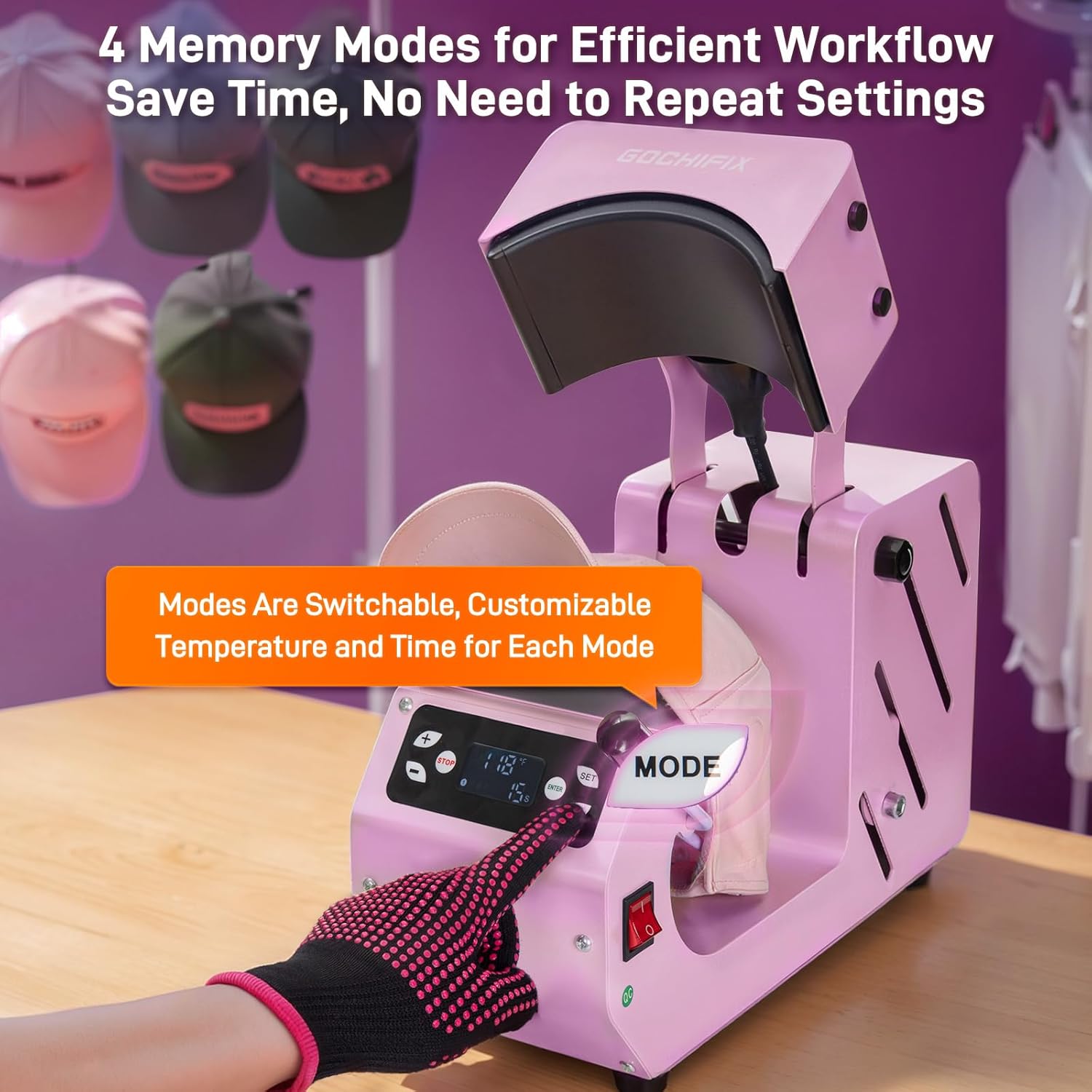
Figure 5.2: The control panel with memory mode selection.
5.3. Lämmönsiirron suorittaminen
- Valmistele kohde: Place the hat or item onto the lower platen, ensuring it is smooth and centered. Use the adjustable hat stretcher to secure the cap and prevent wrinkles.
- Sijainnin siirto: Place your transfer material (sublimation paper, vinyl, etc.) onto the hat in the desired position.
- Wait for Temperature: Allow the machine to reach the set temperature. The display will show the current temperature.
- Aloita painaminen: Once the set temperature is reached, press the 'ENTER' button. The heating plate will automatically lower and apply pressure. The timer will begin counting down.
- Automaattinen vapautus: When the countdown finishes, a buzzer will sound, and the heating plate will automatically rise, releasing paine.
- Poista kohde: Carefully remove the transferred item using the heat-resistant gloves.

Figure 5.3: Starting the heat press operation.

Figure 5.4: Automatic opening and buzzer alert after transfer.
5.4. Monipuoliset sovellukset
The GOCHIFIX Auto Hat Heat Press Machine is suitable for various heat transfer processes and items:
- Hat Styles: Ideal for basketball caps, trucker hats, bucket hats, children's hats, adult size hats, and berets.
- Other Small Items: Can also be used for designs on canvas bags, shirt sleeves, neck tags, wrist straps, handkerchiefs, and pet clothing.

Kuva 5.5: Esimamples of items that can be customized with the heat press.
Virallinen tuotevideo: Operaatio ohiview
This video demonstrates the general operation and features of the GOCHIFIX Auto Hat Heat Press Machine, including setup, temperature/time settings, and the automatic pressing process.
Official Product Video: Hands-Free Operation
This video highlights the hands-free capabilities of the GOCHIFIX heat press, showcasing its automatic open/release function and how it streamlines the heat transfer process.
6. Huolto
Oikea huolto varmistaa lämpöpuristimen pitkän käyttöiän ja optimaalisen suorituskyvyn.
- Puhdistus: After each use, ensure the machine is unplugged and completely cooled. Wipe the heating plate and other surfaces with a soft, dry cloth. For stubborn residue, use a mild cleaner specifically designed for non-stick surfaces. Avoid abrasive cleaners or harsh chemicals.
- Varastointi: Säilytä konetta kuivassa, pölyttömässä ympäristössä, kun sitä ei käytetä.
- Sulakkeen vaihto: If the machine overheats and the built-in fuse blows, replace it with one of the provided spare fuses. Refer to the fuse compartment for instructions on replacement.
7. Vianmääritys
Jos kohtaat ongelmia lämpöpuristimesi kanssa, katso seuraavat yleiset ongelmat ja ratkaisut:
| Ongelma | Mahdollinen syy | Ratkaisu |
|---|---|---|
| Kone ei käynnisty | Power cord not properly connected; Power switch off; Blown fuse. | Check power cord connection; Ensure power switch is ON; Replace fuse if blown. |
| Lämmityslevy ei lämmitä | Incorrect temperature setting; Heating element malfunction. | Verify temperature settings; Contact customer support if issue persists. |
| Transfer results are poor (fading, incomplete) | Incorrect temperature or time settings; Uneven pressure; Material incompatibility. | Adjust temperature/time according to transfer material guidelines; Ensure hat is securely placed; Use appropriate materials. |
| Machine does not open automatically | Mechanism obstruction; Sensor issue. | Check for any obstructions; Contact customer support. |
8. Tekniset tiedot
| Ominaisuus | Yksityiskohta |
|---|---|
| Merkki | GOCHIFIX |
| Malli | B0G4FGPZ9P |
| Materiaali | Alumiini, metalli, silikoni |
| Väri | Vaaleanpunainen |
| Tuotteen mitat (P x L x K) | 15.35 cm x 7.13 cm x 11.1 cm |
| Suositellut käyttötavat | Hattu |
| Ylempi lämpötila | 400 Fahrenheit-astetta (200 Celsius-astetta) |
| Voitage | 110 volttia |
| Wattage | 500 wattia |
| Curved Heat Plate Size | 6.54 cm x 3.84 cm |
| Interchangeable Hat Pad Sizes | 5.59" x 3.78" (Adult), 4.94" x 2.95" (Children) |
9. Takuu ja tuki
The GOCHIFIX Auto Hat Heat Press Machine comes with a 1 vuoden takuu. For warranty claims, technical support, or any inquiries, please contact GOCHIFIX customer service through the retailer where the product was purchased. Please have your model number (B0G4FGPZ9P) and purchase date available when contacting support.