
YOSEC E-816C
YOSEC Fireproof Gun Safe Lock Replacement E-816C
Käyttöohje
Tuote loppuview
This manual provides instructions for the installation, operation, and maintenance of your YOSEC E-816C Electronic Digital Keypad Lock. This lock is designed as a replacement for gun safes and DIY safe boxes, featuring a chrome finish and robust security features.
Key features include a 1-8 digit programmable code, a 3-error code lockout mechanism, and a low battery warning. The keypad diameter is 100mm (3.74 inches).
Turvallisuustiedot
- Always ensure the safe is empty and unlocked before performing any installation or maintenance.
- Pidä kaikki osat, erityisesti pienet osat ja paristot, poissa lasten ulottuvilta.
- Use only a 9V lithium cell battery (not included) for operation. Do not mix old and new batteries, or different types of batteries.
- Do not attempt to modify the lock mechanism or electronic components, as this may compromise security and void the warranty.
- Ensure the keypad size matches your safe box before installation.
Pakkauksen sisältö
Varmista, että pakkauksessa on kaikki osat:
- Näppäimistö
- Painettu piirilevy (PCB)
- Reset-painike
- Solenoidi
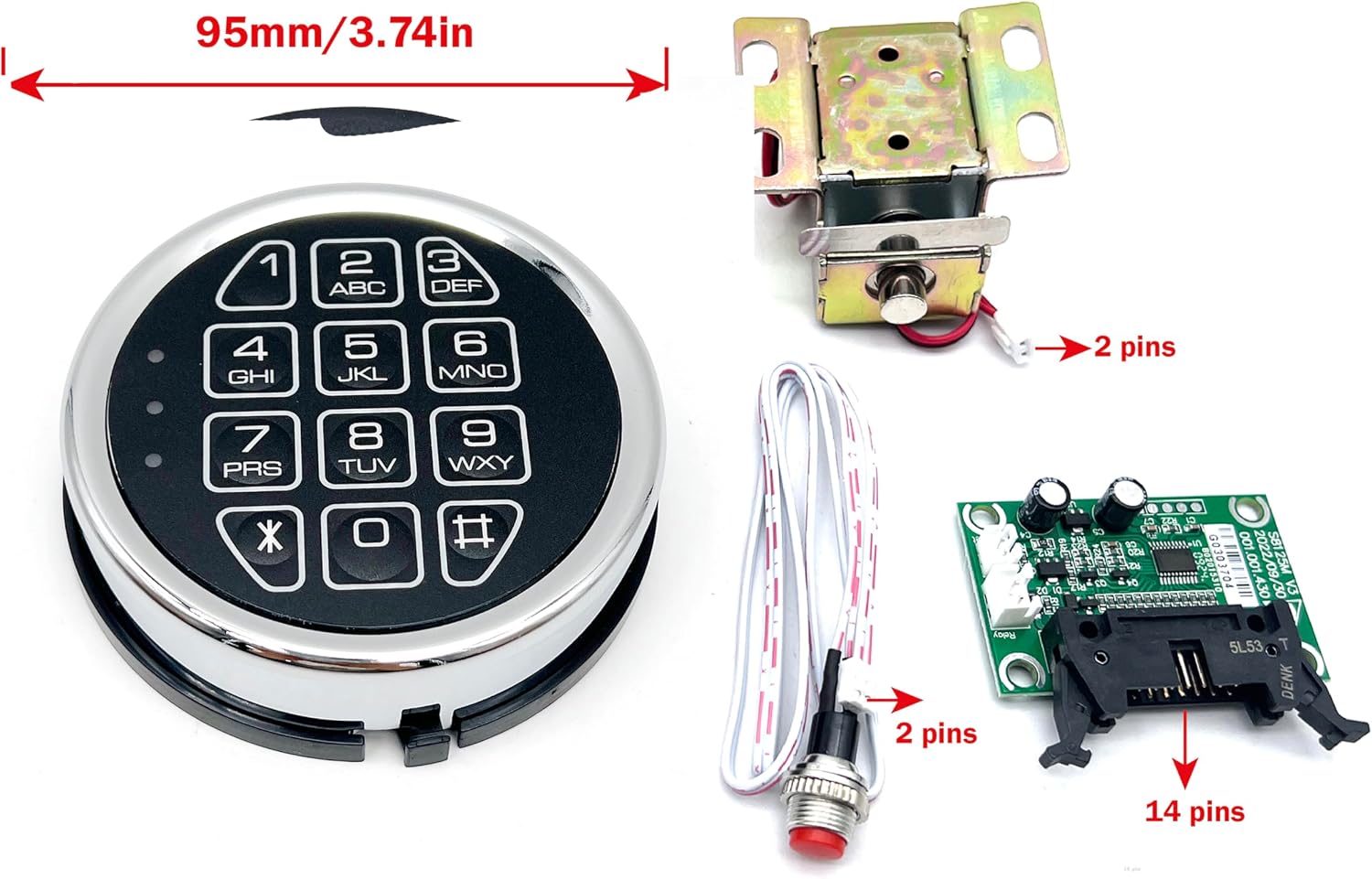
Kuva: Yliview of the YOSEC E-816C lock components, showing the keypad, solenoid, PCB, and reset button. The keypad measures 95mm (3.74 inches) in diameter.
Tekniset tiedot
| Merkki | YOSEC |
| Mallinumero | E-816C |
| Lukon tyyppi | Electronic Digital Keypad |
| Materiaali | Metalli |
| Valmis | Kromi |
| Keypad Diameter | 100 mm (3.74 tuumaa) |
| Virtalähde | One 9V Lithium Cell Battery (not included) |
| Koodin pituus | 1-8 numeroa |
| Lukitusominaisuus | After 3 incorrect code entries |
| Erikoisominaisuus | Anti-Peeping Password, Sound/Silent Operation |
Asennus ja asennus
1. Akun asennus
- Locate the battery compartment on the back of the keypad or the designated battery holder.
- Insert one 9V lithium cell battery, ensuring correct polarity (+/-).
- Sulje paristolokero kunnolla.

Kuva: Purettuna view of the lock, illustrating the internal components and where the battery connects.
2. Physical Installation (General Guidelines)
This lock is a replacement unit. Installation typically involves:
- Removing the existing lock mechanism from your safe door.
- Mounting the new YOSEC E-816C keypad to the exterior of the safe door.
- Connecting the solenoid and PCB to the internal locking mechanism of your safe.
- Ensuring all wires are properly routed and secured to prevent pinching or damage.
- Test the lock operation before closing the safe door completely.
Note: Specific installation steps may vary depending on your safe model. Consult your safe's manual for detailed instructions on lock replacement.
Käyttöohjeet
1. Opening the Lock
To open the lock, enter your 1-8 digit code followed by the '#' key. The factory default code is typically 159. If the code is correct, the lock will emit a sound (if sound is enabled) and the solenoid will retract, allowing you to open the safe door.

Kuva: Yksityiskohtainen view of the electronic keypad, showing the numerical buttons and special function keys.
2. Käyttäjäkoodin vaihtaminen
Detailed instructions for changing the user code are typically provided with the lock's internal PCB or a separate quick guide. Generally, the process involves:
- Entering the current code to open the lock.
- Pressing a designated programming button (often on the PCB) or a specific key sequence on the keypad.
- Entering the new 1-8 digit code.
- Confirming the new code.
- Always test the new code multiple times with the safe door open before closing it.
3. Silent Mode Operation
The lock can be programmed for silent operation, disabling the buzzer sound. Refer to the specific instructions provided with your lock's PCB for the key sequence to toggle sound on/off.
4. Akun heikon varauksen varoitus
The lock features a low battery warning. When the battery is low, the keypad may emit a series of beeps or a specific light indicator will flash after entering a code. Replace the battery promptly when this warning occurs.
5. Lockout Feature
If 3 incorrect codes are entered consecutively, the lock will enter a lockout mode for 20 seconds, preventing further attempts. Wait for the lockout period to expire before trying again.
Video: How to Operate the Lock
Video: This video demonstrates the basic operation of the YOSEC E-816C lock, including how to use the factory code (159) to open it. It shows the keypad interaction and the lock's response.
Huolto
1. Pariston vaihto
To replace the 9V battery:
- Ensure the safe is open.
- Carefully remove the keypad face by pressing the tab counterclockwise or following the specific instructions for your model to access the battery compartment.
- Poista vanha 9 V:n paristo.
- Insert a new 9V lithium cell battery, observing polarity.
- Reattach the keypad face.
- Testaa lukon toiminta.
2. Puhdistus
Wipe the keypad surface with a soft, dry cloth. Do not use abrasive cleaners or solvents, as these can damage the finish or electronic components.
Vianetsintä
| Ongelma | Mahdollinen syy | Ratkaisu |
|---|---|---|
| Näppäimistö ei reagoi. | Dead or low battery. Incorrect battery installation. Loose connection. | Replace the 9V battery. Check battery polarity. Ensure all wiring connections are secure. |
| Lock does not open after entering code. | Incorrect code entered. Lockout mode active. Solenoid malfunction. | Verify the correct code. Wait 20 seconds if in lockout mode. Check solenoid connection and function. |
| Low battery warning (beeping/flashing light). | Akku on vähissä. | Vaihda 9 V:n paristo välittömästi. |
| Cannot change code. | Väärä ohjelmointijärjestys. | Refer to the specific programming instructions for your lock's PCB. Ensure the safe is open during code change. |
Takuu ja tuki
For warranty information or technical support, please contact the seller, hongon, or the manufacturer, YOSEC. Retain your purchase receipt for warranty claims.
Myyjän yhteyshenkilö: hongon on Amazon
Ask a question about this manual
Ask about setup, troubleshooting, compatibility, parts, safety, or missing instructions. Manuals+ will review the question and use this page’s manual context to help answer it.