
1. Johdanto
This manual provides detailed instructions for the safe and efficient operation of your TOOLTOP TT-Yihua-8858-I Portable Hot Air Station. This device is designed for various electronic repair tasks, including PCB SMD repair and BGA rework, offering precise temperature and airflow control. Please read this manual thoroughly before using the product and retain it for future reference.
2. Turvallisuusohjeet
Noudata aina seuraavia turvaohjeita välttääksesi loukkaantumiset tai laitteen vaurioitumisen:
- Korkean lämpötilan vaara: The hot air nozzle and emitted air reach very high temperatures. Avoid direct contact with skin or flammable materials.
- Ilmanvaihto: Use the hot air station in a well-ventilated area to disperse fumes generated during soldering or desoldering.
- Virtalähde: Varmista virtalähteen voltage matches the specifications of the device. Do not use if the power cord is damaged.
- Children and Unauthorized Users: Keep the device out of reach of children and individuals not trained in its use.
- Jäähtyä: Anna laitteen jäähtyä täysin ennen sen varastointia.
- Huolto: Älä yritä korjata laitetta itse. Jätä kaikki huoltotyöt pätevän henkilöstön tehtäväksi.
- Oikea käyttö: Käytä laitetta vain sen aiottuun tarkoitukseen.
3. Pakkauksen sisältö
Varmista, että pakkauksessasi on kaikki alla luetellut tuotteet:
- TOOLTOP TT-Yihua-8858-I Portable Hot Air Station (Main Unit)
- Hot Air Nozzles (Various sizes)
- Virtajohto
- Käyttöopas (tämä asiakirja)

Image 3.1: The TOOLTOP TT-Yihua-8858-I Portable Hot Air Station shown with three included nozzles.
4. Tuote ohiview
Familiarize yourself with the components and controls of your hot air station.
4.1 Pääkomponentit
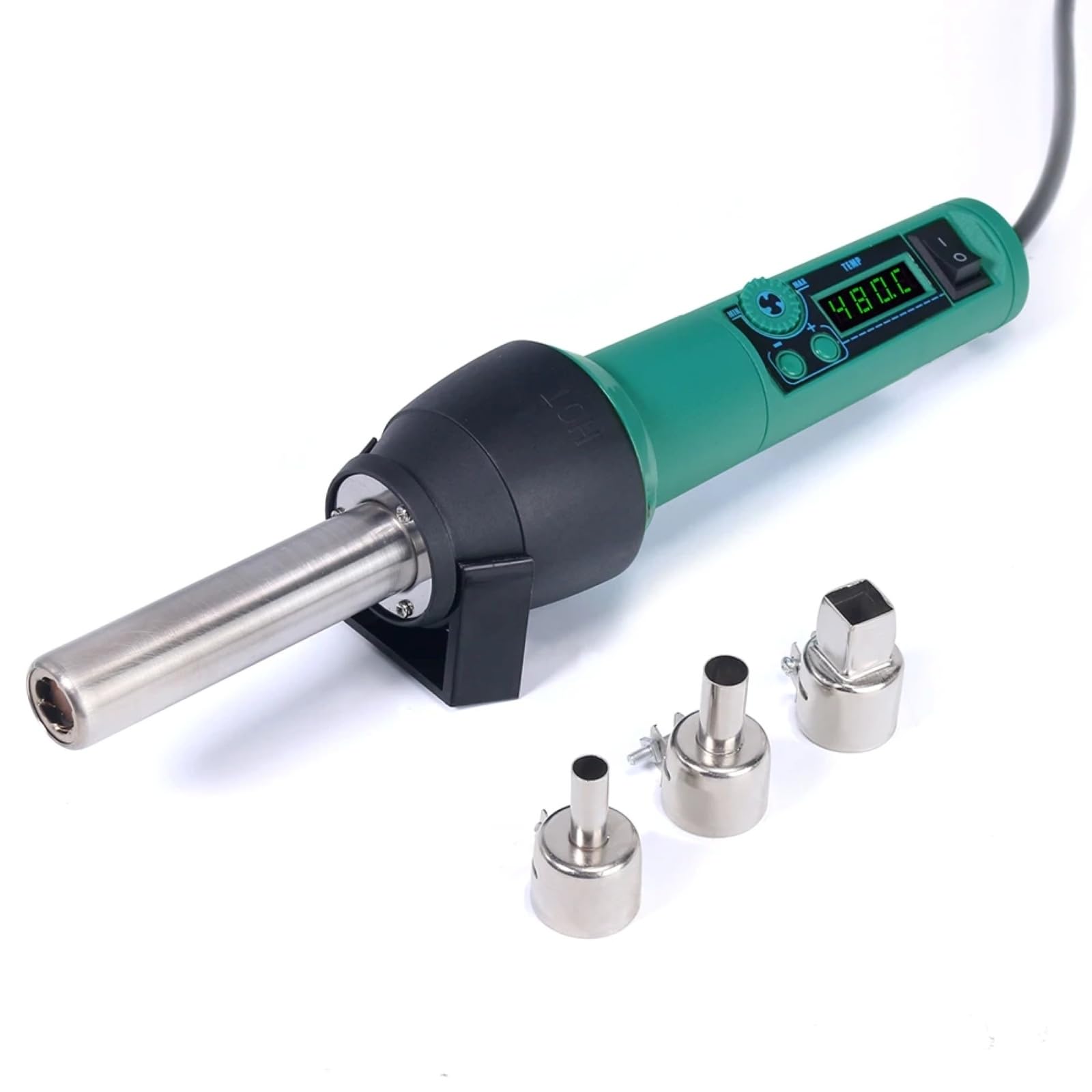
Image 4.1: The main unit of the hot air station, displaying the digital temperature display and control buttons.
4.2 Airflow System
The hot air station features a spiral wind airflow design for efficient and even heat distribution.

Image 4.2: Detail of the nozzle interior, illustrating the spiral wind air flow mechanism.
4.3 Ilmanottoaukko
The air inlet is located at the rear of the unit, ensuring proper air circulation for heating.

Image 4.3: The air inlet grille, essential for the device's cooling and heating functions.
4.4 Säätimet
The device features intuitive controls for adjusting air volume and temperature.

Image 4.4: The control panel showing buttons for adjusting air volume (MIN/MAX) and temperature (up/down arrows).
4.5 Hot Air Gun Holder
A dismountable holder is provided for safe placement of the hot air gun when not in use or during cool-down.
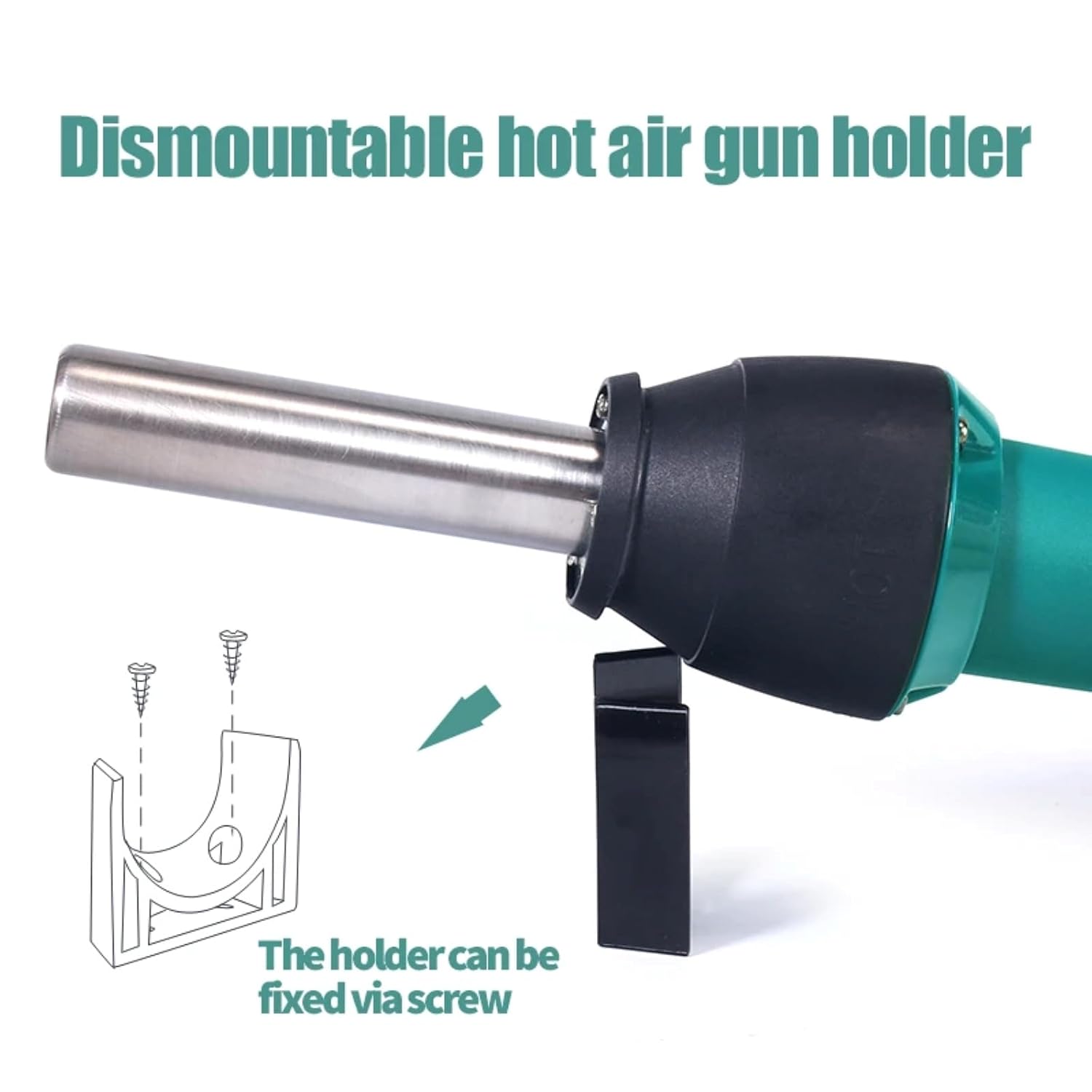
Image 4.5: The hot air gun holder, which can be fixed via screw for stability.
5. Asennus
- Pura pakkauksesta: Poista kaikki osat varovasti pakkauksesta.
- Tarkastaa: Tarkista laite ja lisävarusteet mahdollisten vaurioiden varalta. Älä käytä laitetta, jos se on vaurioitunut.
- Sijoitus: Place the hot air station on a stable, heat-resistant surface in a well-ventilated area. Ensure there is sufficient space around the air inlet and outlet for proper airflow.
- Kiinnitä suutin: Select the appropriate nozzle for your task and securely attach it to the hot air gun.
- Liitä virta: Plug the power cord into the hot air station and then into a suitable power outlet.
- Install Holder (Optional): If desired, attach the dismountable hot air gun holder to a workbench using screws for convenient and safe storage during operation.
6. Käyttöohjeet
- Virta päälle: Flip the power switch to the "ON" position. The LED digital display will illuminate, showing the current temperature.
- Säädä lämpötilaa: Use the temperature adjustment buttons (up/down arrows) to set the desired temperature. The adjustable range is typically 100°C to 480°C. The display will show the set temperature and then the actual temperature as it heats up.
- Ilmamäärän säätö: Use the air volume adjustment buttons (MIN/MAX) to set the desired airflow. Start with a lower setting and increase as needed for your application.
- Esilämmitys: Allow the unit to reach the set temperature before beginning work. This usually takes a few seconds.
- Toiminta: Direct the hot air nozzle towards the component or area you wish to work on. Maintain a safe distance to avoid overheating or damaging surrounding components.
- Jäähtyä: After use, place the hot air gun back into its holder. The unit will automatically enter a cool-down mode, blowing cool air until the temperature drops to a safe level. Do not switch off the power until the cool-down cycle is complete, as this protects the heating element.
- Virta pois: Once the unit has cooled down and the display indicates a safe temperature, you can switch off the power.
7. Huolto
Regular maintenance ensures the longevity and optimal performance of your hot air station.
- Puhdistus: Ensure the device is unplugged and completely cool before cleaning. Wipe the exterior with a soft, damp kangas. Älä käytä hankaavia puhdistusaineita tai liuottimia.
- Ilman tulo/poistoaukko: Periodically check the air inlet and nozzle for any obstructions (dust, debris). Clean gently with a soft brush if necessary to maintain proper airflow.
- Suuttimet: Clean the nozzles regularly to prevent solder or flux buildup, which can affect airflow and heat distribution.
- Varastointi: Store the hot air station in a dry, dust-free environment when not in use.
8. Vianmääritys
If you encounter issues with your hot air station, refer to the table below for common problems and solutions.
| Ongelma | Mahdollinen syy | Ratkaisu |
|---|---|---|
| Laite ei käynnisty. | Ei virtaa; virtajohto on vaurioitunut; virtakytkin pois päältä. | Check power connection; inspect power cord; ensure power switch is ON. |
| Ei lämmintä ilmaa tai riittämätön lämpö. | Heating element failure; air inlet/outlet blocked; incorrect temperature setting. | Contact customer support; clean air inlets/outlets; verify temperature setting. |
| Ilmavirtaus on heikko tai epätasainen. | Air volume set too low; fan malfunction; air path obstruction. | Increase air volume setting; clean air inlets/outlets; contact customer support. |
| Temperature display error. | Anturin toimintahäiriö. | Power cycle the device; if error persists, contact customer support. |
Jos ongelma jatkuu näiden ratkaisujen kokeilemisen jälkeen, ota yhteyttä asiakastukeen.
9. Tekniset tiedot
| Mallinumero | TT-Yihua-8858-I |
| Merkki | TOOLTOP |
| Virrankulutus | 700W |
| Lämpötila-alue | 100–480 °C (212–896 °F) |
| Näytön tyyppi | LED digitaalinen näyttö |
| Ilmavirran tyyppi | Spiral Wind |
| Mukana olevat komponentit | Hot Air Station, Nozzles, Power Cord |
10. Takuu ja tuki
The TOOLTOP TT-Yihua-8858-I Portable Hot Air Station comes with a 1 vuoden valmistajan takuu ostopäivästä alkaen. Tämä takuu kattaa materiaali- ja valmistusvirheet normaalikäytössä.
For warranty claims, technical support, or any inquiries regarding your product, please contact TOOLTOP customer service through your retailer or the official TOOLTOP websivusto. Pidä mallinumero ja ostopäivämäärä saatavilla, kun otat yhteyttä tukeen.