
1. Johdanto
Thank you for choosing the GOLOZA Digital Alarm Clock. This manual provides detailed instructions for setting up and operating your new alarm clock. Please read it thoroughly to ensure proper use and to enjoy all the features this product offers.
This digital alarm clock features a large, clear display, customizable brightness and night mode, multiple alarm tones and volume levels, a convenient snooze function, and a USB charging port. Its modern curved design makes it a stylish addition to any bedroom.
2. Mitä laatikossa on
Pura pakkausta varmistaessasi, että kaikki alla luetellut osat ovat mukana ja hyvässä kunnossa:
- GOLOZA Digital Alarm Clock
- USB Charging Cable (71in/1.8m)
- Virtalähde
- Käyttöopas

Image: Contents of the product packaging, showing the digital alarm clock, charging cable, adapter, and user manual.
3. Asennus
3.1 Ensimmäinen käynnistys
- Remove the insulating paper from the battery compartment on the back of the clock. This battery provides power-off memory for settings.
- Connect the USB charging cable to the clock's USB port.
- Plug the power adapter into a standard wall outlet. The clock display will light up.

Image: A person removing the insulating paper from the battery compartment and plugging in the USB cable to power the clock.
4. Käyttöohjeet
4.1 Time Setting and 12/24H Switch
- Paina pitkään DST -painiketta siirtyäksesi ajan asetustilaan. Tunnit vilkkuvat.
- Paina +/- button to switch between 12-hour and 24-hour format.
- Paina DST button again to confirm the format. The hour digits will flash.
- Paina +/- button to adjust the hour. Long press for quick adjustment.
- Paina DST button to confirm the hour. The minute digits will flash.
- Paina +/- button to adjust the minute. Long press for quick adjustment.
- Paina DST button to confirm the minute and exit time setting.
Video: Instructions on how to set the time and switch between 12-hour and 24-hour display formats on the GOLOZA Digital Alarm Clock.

Image: The alarm clock displaying time in 12-hour, 24-hour, and DST formats.
4.2 DST (Daylight Saving Time) Switch
- Paina DST button to enter DST switch mode. The display will show "ON" or "OFF".
- Paina +/- button to toggle between "ON" and "OFF".
- Paina DST button to confirm your selection and exit.
Video: Demonstration of how to set the DST (Daylight Saving Time) mode on the digital alarm clock.
4.3 Hälytysasetus
- Paina pitkään Alarm (bell icon) -painiketta siirtyäksesi hälytyksen asetustilaan. Tuntinumerot vilkkuvat.
- Paina +/- button to adjust the alarm hour. Long press for quick adjustment.
- Paina Hälytys button to confirm the hour. The minute digits will flash.
- Paina +/- button to adjust the alarm minute. Long press for quick adjustment.
- Paina Hälytys button to confirm the minute and exit alarm time setting.
Video: Step-by-step guide on how to set the alarm time on the GOLOZA Digital Alarm Clock.
4.4 Alarm Tones and Volume
- To change the alarm volume, press the Äänenvoimakkuus (-/+) button. There are 2 levels of alarm volume (75-85dB). The last selected volume will be saved automatically.
- To change the alarm ringtone, press the Ringtone (-/+) button. Choose from 3 fixed ringing music sounds: Birdsongs, Beep, and Chording. The last selected ringtone will be saved automatically.

Image: The alarm clock showing two alarm volume levels (75dB and 85dB) and the snooze button.

Image: Icons illustrating the three available alarm sounds: Beep, Chording, and Bird Song.
5. Ominaisuudet
5.1 Kirkkauden säätö
The clock offers 5 adjustable brightness levels (including OFF) to suit your preference.
- Paina Snooze/Light (Zzz/sun icon) button to cycle through the 5 brightness levels.
- The display can be set from sleep-friendly dim to a soothing glow, or completely off.
Video: Demonstration of how to adjust the display brightness of the GOLOZA Digital Alarm Clock through its five levels.

Image: The alarm clock on a nightstand, showing its adjustable brightness for peaceful sleep.
5.2 Customizable Night Mode
The Night Mode feature allows you to set specific times for the display brightness to automatically adjust to a lower level.
- Paina pitkään Snooze/Light (Zzz/sun icon) button to enter Night Mode setting. The start hour will flash.
- Paina +/- button to adjust the start hour for Night Mode.
- Paina Torkku/Kevyt button to confirm the start hour. The start minute will flash.
- Paina +/- button to adjust the start minute.
- Paina Torkku/Kevyt button to confirm the start minute. The end hour will flash.
- Repeat the steps to set the end hour and minute for Night Mode.
- Once set, the clock will automatically dim during the specified period.
Video: Guide on how to set the customizable night mode, allowing the clock to automatically adjust brightness during specific hours.

Image: The alarm clock demonstrating its customizable night mode, with a visual representation of time-based brightness adjustment.
5.3 Torkku -toiminto
When the alarm rings, press the raised Snooze (Zzz) button to activate the 9-minute snooze function. The alarm will ring again after 9 minutes. To turn off the alarm completely for the day, press any other button except the Snooze button.
5.4 USB-latausporttia
The clock includes a USB charging port (Type-C) for convenient charging of your mobile devices. Simply connect your device's charging cable to the USB port on the back of the alarm clock.
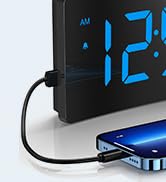
Image: The digital alarm clock with a smartphone connected to its USB port for charging.
6. Huolto
- Puhdista kello pehmeällä, kuivalla liinalla. Älä käytä hankaavia puhdistusaineita tai liuottimia.
- Keep the clock away from direct sunlight, high temperatures, and humid environments.
- Vältä kellon pudottamista tai sen altistamista voimakkaille iskuille.
- Ensure the non-slip rubber sticker at the bottom is clean and intact for stability.

Image: The alarm clock on a surface, showing its non-slip design with a bottom rubber sticker.
7. Vianmääritys
| Ongelma | Ratkaisu |
|---|---|
| Clock display is blank | Ensure the USB cable is securely connected and the power adapter is plugged into a working outlet. Check if the display brightness is set to OFF. |
| Hälytys ei soi | Verify the alarm is set and activated (bell icon visible). Check alarm volume settings. |
| Aika/asetukset katoavat virrankatkoksen jälkeentage | Ensure the insulating paper has been removed from the backup battery compartment. The battery retains settings but does not power the display or alarm during an outage. |
| Näyttö liian kirkas/himmeä | Adjust brightness using the Snooze/Light button. Check Night Mode settings if applicable. |
8. Tekniset tiedot
| Ominaisuus | Yksityiskohta |
|---|---|
| Merkki | GOLOZA |
| Mallinumero | TCA-245 |
| Näytön tyyppi | LED |
| Kirkkaustasot | 5 (including OFF) |
| Hälytysäänet | 3 (Birdsongs, Beep, Chording) |
| Hälytyksen äänenvoimakkuus | 2 tasoa (75–85 dB) |
| Torkkuajan kesto | 9 minuuttia |
| Aikamuoto | 12H/24H/DST |
| Virtalähde | Johdollinen sähkö (USB) |
| Muistitoiminto | Yes (battery backup for settings) |
| Tuotteen mitat | 5.05 cm L x 3.03 cm K |
| Tuotteen paino | 0.28 kiloa |
9. Takuu ja tuki
GOLOZA provides a 24-month safeguard and 24-hour fast support for this product.
If you have any questions or require assistance, please contact us via the following path:
- Your Account > Orders > Order Detail > Sold by: GOLOZA > Ask a question
Image: GOLOZA Support information, highlighting 24-month warranty and contact method.