
DWVO MADWVJ0Wtz
DWVO Computer Desk with Drawers & Hutch Instruction Manual
Model: MADWVJ0Wtz
1. Tärkeitä turvallisuustietoja
Lue kaikki ohjeet huolellisesti ennen kokoamista ja käyttöä. Säilytä tämä käyttöohje myöhempää tarvetta varten.
- Ensure the desk is properly assembled and placed on a stable surface to prevent tipping.
- Adjustable foot pads are included to stabilize the desk on uneven ground.
- Always use the included anti-tip kit to secure the desk to a wall, especially if children are present.

Kuva 1.1: Illustration of potential injury from tipping and the use of an anti-tip strap to prevent falling danger.
2. Tuote ohiview
The DWVO Computer Desk with Drawers & Hutch is designed for home office and gaming environments, offering ample storage and integrated features for enhanced productivity and convenience.
Tärkeimmät ominaisuudet:
- LED-valonauhat: Customizable RGB LED lighting controlled via phone app or switch, with music sync and timer functions.
- Kätevä latausasema: Integrated with 2 USB ports and 4 power outlets, featuring a 6.56ft power cord.
- Detachable Top Hutch & Monitor Shelf: Maximizes desktop space and provides elevated display options.
- Suuri säilytyskapasiteetti: Includes 3 drawers (one with lock), side storage shelves, and a full monitor stand.
- Tukeva ja kestävä rakenne: Made from 0.79" metal frame and 0.59" high-grade P2 particle board with adjustable foot pads.
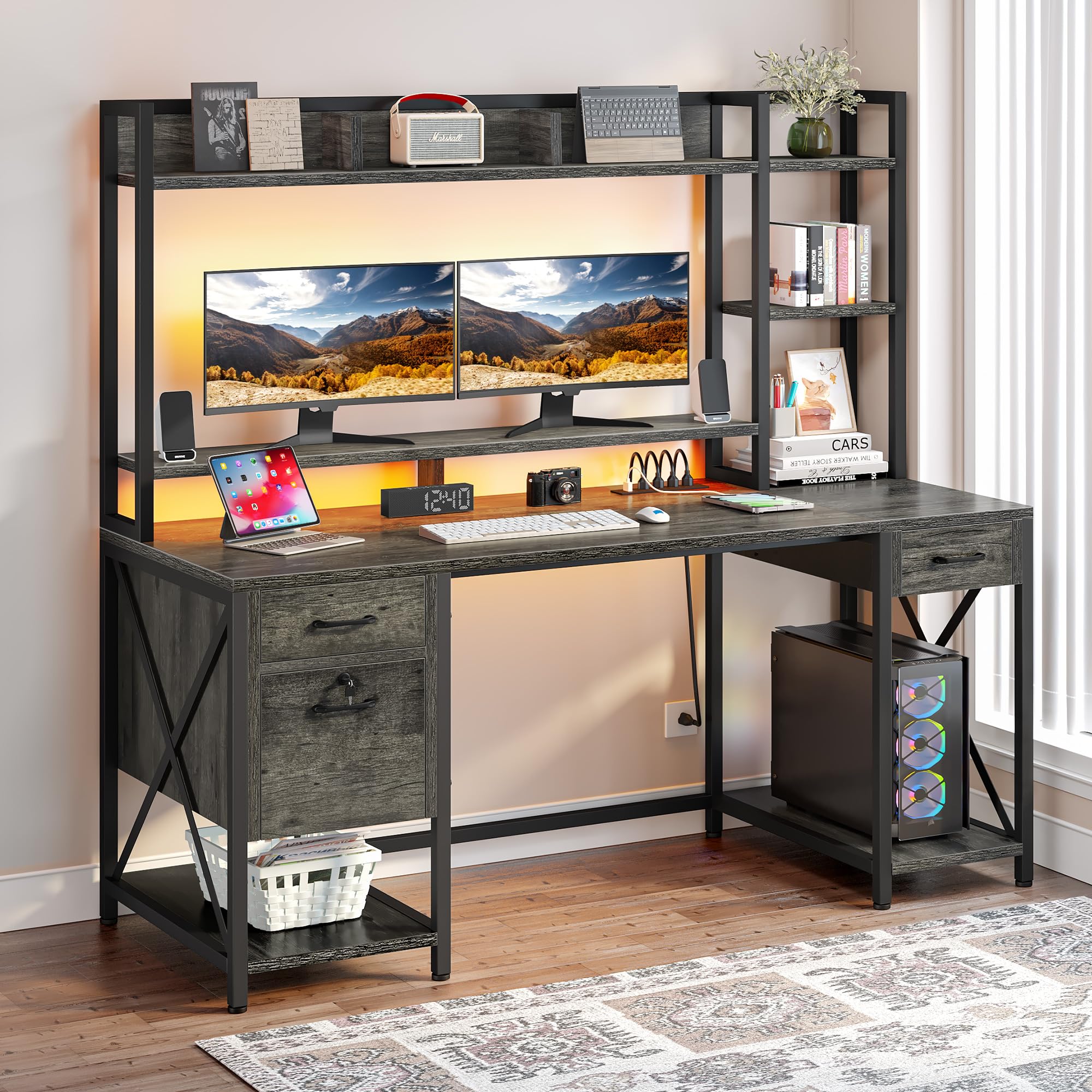
Kuva 2.1: The DWVO Computer Desk with Drawers & Hutch.

Kuva 2.2: Product dimensions for planning your space.
Video 2.1: Virkamies yliview of the DWVO Computer Desk with Drawers & Hutch, showcasinsen ominaisuudet ja muotoilu.
3. Pakkauksen sisältö
Varmista, että kaikki osat ovat mukana ennen kokoamisen aloittamista. Jos osia puuttuu tai on vaurioitunut, ota yhteyttä asiakastukeen.
- 1 x Tietokonepöytä (kaikki pöytäpaneelit ja rungon osat)
- 1 x Packet of Fittings (screws, bolts, connectors, anti-tip kit)
- 1 x Käyttöohje (tämä asiakirja)
- 1 x LED Light Strip with controller
- 1 x Power Outlet & USB Hub
4. Asennus ja kokoonpano
Assembly is required for this product. It is recommended that two people assemble the desk to ensure stability and ease of construction. All necessary tools for assembly are included.
Yleiskokouksen vaiheet:
- Pura pakkaus ja tunnista osat: Carefully unpack all components and lay them out. Refer to the included parts list to identify each piece.
- Kokoa kehys: Begin by connecting the metal frame components according to the diagrams in the separate assembly manual. Ensure all screws are tightened securely but do not overtighten until the entire frame is assembled.
- Kiinnitä pöytäpaneelit: Secure the main desktop and hutch panels to the assembled frame.
- Asenna laatikot: Assemble the drawer boxes and install the drawer slides onto both the drawers and the desk frame. Ensure the slides are aligned correctly for smooth operation.
- Integroi pistorasiat ja LED-valot: Install the power outlet strip into its designated slot. Attach the LED light strip to the underside of the hutch or monitor stand as indicated in the assembly manual.
- Lopulliset säädöt: Once fully assembled, tighten all screws. Adjust the foot pads to level the desk on uneven surfaces.
- Asenna kaatumisestepakkaus: Secure the desk to a wall using the provided anti-tip kit to prevent accidental tipping.
For detailed, step-by-step instructions and diagrams, please refer to the separate assembly manual included in your package.
5. Käyttöohjeet
5.1. LED-valonauhat
The desk features an RGB LED light strip for customizable ambiance.
- Ohjaus: The LED lights can be controlled via a dedicated light strip switch or a smartphone application.
- Räätälöinti: Use the app to select any color, adjust brightness, and choose from various dynamic modes.
- Musiikin synkronointi: The lights can synchronize with music played through a built-in microphone.
- Ajastintoiminto: Aseta aikataulut valojen automaattiselle syttymiselle tai sammumiselle.

Kuva 5.1: LED light strip in operation, showing color customization.
5.2. Latausasema
Integroitu latausasema tarjoaa kätevän virransyötön.
- Pistorasiat: Use the 4 AC outlets to power your computer, monitors, and other devices.
- USB-portit: The 2 USB ports (5V/2A) are suitable for charging smartphones, tablets, and other USB-powered accessories.
- Virtajohto: The charging station is connected via a 6.56ft power cord. Plug it into a standard wall outlet.

Kuva 5.2: Integrated power outlets and USB ports.
5.3. Drawers and Storage
Utilize the various storage options to keep your workspace organized.
- Laatikot: The desk includes three drawers. The bottom drawer is designed as a file drawer, accommodating A4/Letter-sized documents and features a lock for security.
- Säilytyslaatikko ja hyllyt: Use the top hutch and side shelves for displaying items, storing books, or organizing office supplies.
- Näytön teline: Korotettu näyttöteline tarjoaa ergonomisen viewing and additional storage underneath.

Kuva 5.3: File drawer with lock and adjustable file telineet.
6. Huolto
Säännöllinen huolto varmistaa työpöytäsi pitkän käyttöiän ja optimaalisen suorituskyvyn.
- Puhdistus: Pyyhi pinnat pehmeällä, damp liinalla. Vältä voimakkaita kemikaaleja tai hankaavia puhdistusaineita, jotka voivat vahingoittaa pintaa.
- Laitteiston tarkistus: Tarkista säännöllisesti kaikkien ruuvien ja kiinnittimien tiukka kiinnitys. Kiristä tarvittaessa vakauden säilyttämiseksi.
- LED-nauhan tarttuvuus: If the LED light strip begins to detach, re-secure it using additional adhesive tape or a suitable wood glue for a more permanent fix.
- Laatikon diat: Keep drawer slides free of dust and debris for smooth operation. Lubricate with a silicone-based spray if needed.
7. Vianmääritys
Tässä osiossa käsitellään yleisiä ongelmia, joita saatat kohdata.
| Ongelma | Mahdollinen syy | Ratkaisu |
|---|---|---|
| LED light strip does not stick or falls down. | Original adhesive may be insufficient or surface not clean. | Clean the surface thoroughly. Apply additional strong adhesive tape or a small amount of wood glue to secure the strip. |
| Drawers do not align or close completely. | Screws on drawer tracks are not flush, or tracks are misaligned. | Ensure all screws securing the drawer tracks are tightened completely and are flush with the surface. Recheck track alignment according to the assembly manual. |
| Missing or mismatched parts during assembly. | Pakkausvirhe tai valmistusvirhe. | Double-check all packaging for small parts. Contact DWVO customer service with your model number and a description of the missing/mismatched parts. |
| Desk feels unstable or wobbly. | Löysät kiinnikkeet tai epätasainen lattia. | Tighten all assembly screws. Adjust the leveling foot pads at the bottom of the desk legs to compensate for uneven flooring. |
8. Tekniset tiedot
Detailed specifications for the DWVO Computer Desk with Drawers & Hutch.
| Ominaisuus | Yksityiskohta |
|---|---|
| Merkki | DWVO |
| Mallinumero | MADWVJ0Wtz |
| Tuotteen mitat (S x L x K) | 19.68 cm x 59.1 cm x 59.1 cm |
| Tuotteen paino | 92.9 puntaa |
| Väri | Harmaa |
| Materiaalityyppi | Suunniteltu puu, metalli |
| Laatikoiden lukumäärä | 3 |
| Hyllyjen määrä | Multi-shelves |
| Erikoisominaisuudet | Power Outlets, USB Outlets, LED Lights, Drawers, Lock, Hutch |
| Vaadittu kokoonpano | Kyllä |
| Suositellut henkilöt kokoonpanoon | 2 |
| Mukana kokoonpanotyökalut | Kyllä |
| GTIN | 199449407010 |
9. Takuu ja tuki
This DWVO product comes with a limited warranty.
- Takuutyyppi: Limited Warranty. Specific terms and duration may vary. Please refer to your purchase documentation or contact DWVO customer service for details.
- Asiakastuki: For assembly assistance, missing parts, or any product-related inquiries, please contact DWVO customer service. Refer to the contact information provided with your purchase or visit the official DWVO websivusto.
Ask a question about this manual
Ask about setup, troubleshooting, compatibility, parts, safety, or missing instructions. Manuals+ will review the question and use this page’s manual context to help answer it.