
1. Johdanto
The Audizio Desio is a versatile digital radio that combines classic aesthetics with modern audio technology. It features DAB, DAB+, and FM tuning for clear radio reception, along with Bluetooth 5.0 for wireless streaming, a USB port for media playback, and a 3.5mm AUX input for wired connections. The radio is equipped with a 2.4-inch color LCD display and integrated stereo speakers, making it suitable for various environments such as living rooms, kitchens, or bedrooms.
This manual provides detailed instructions for setting up, operating, and maintaining your Audizio Desio radio. Please read it thoroughly before use to ensure proper functionality and to maximize your listening experience.
2. Turvallisuustiedot
- Varmista, että virtalähteen äänenvoimakkuus ontagvastaa paikallista virtalähdettä ennen kytkentää.
- Älä altista laitetta sateelle, kosteudelle tai äärimmäisille lämpötiloille.
- Vältä laitteen sijoittamista lämmönlähteiden lähelle tai suoraan auringonvaloon.
- Älä avaa c:täasing; anna kaikki huoltotoimenpiteet pätevän henkilöstön tehtäväksi.
- Pidä laite poissa vahvoista magneettikentistä.
- Puhdista laite vain pehmeällä, kuivalla liinalla.
3. Pakkauksen sisältö
Tarkista pakkauksesta purkamisen yhteydessä, että kaikki osat ovat mukana:
- Audizio Desio DAB/DAB+/FM Radio
- Virtalähde (DC 5V)
- Kaukosäädin
- Käyttöopas
4. Ohjaimet ja liitännät
Etupaneelin säätimet
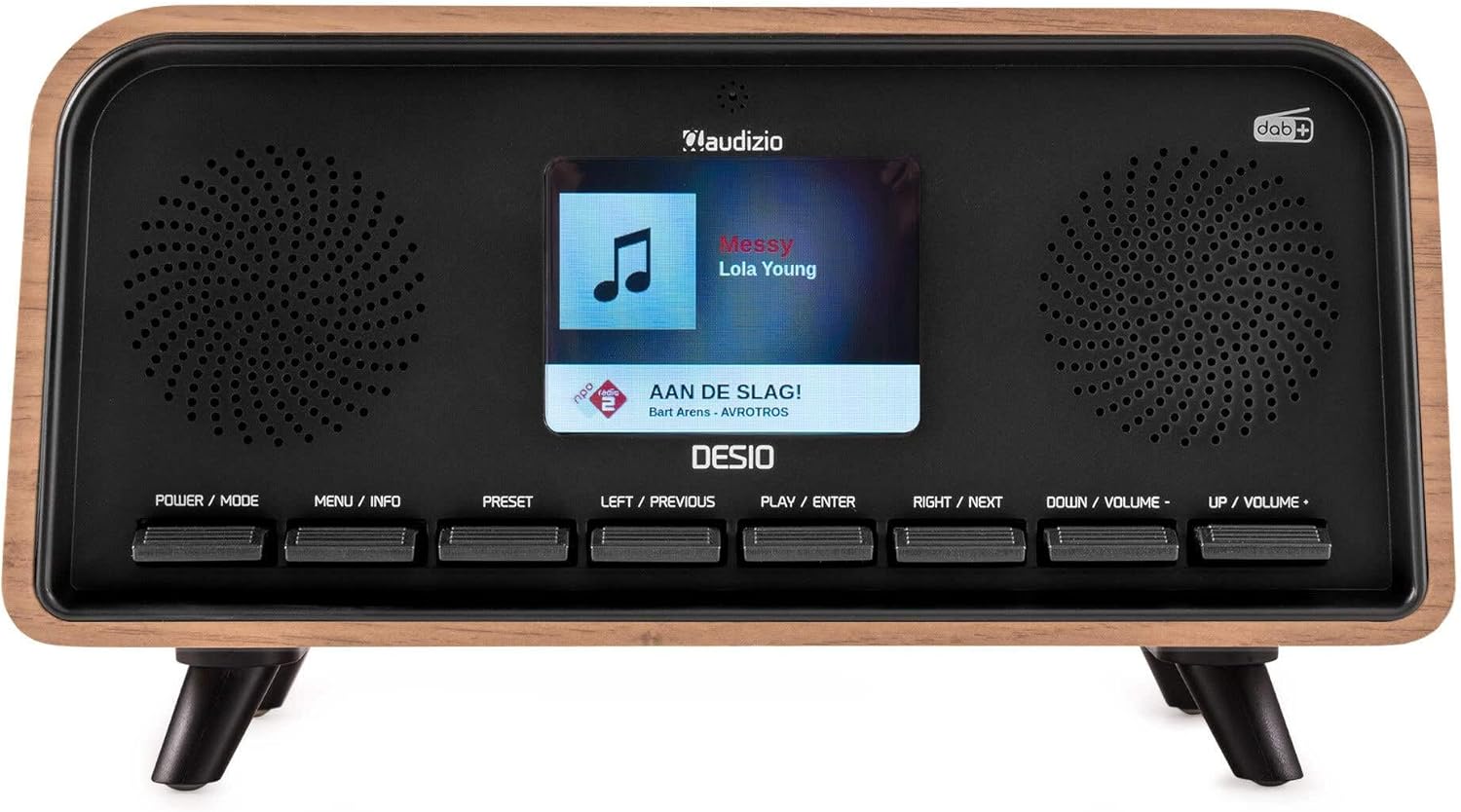
Edessä view of the Audizio Desio radio, showing the display playing music with artist and track information. The control buttons are visible below the screen.
- POWER / MODE: Press to turn on/off. Press and hold to switch between DAB, FM, Bluetooth, USB, and AUX modes.
- MENU / INFO: Press to access menu options. In playback mode, press to cycle through information display.
- ESIASETUS: Press to recall saved stations. Press and hold to save current station.
- LEFT / PREVIOUS: Navigate left in menus, or skip to previous track/station.
- PLAY / ENTER: Confirm selection in menus, or play/pause media.
- RIGHT / NEXT: Navigate right in menus, or skip to next track/station.
- DOWN / VOLUME -: Decrease volume, or navigate down in menus.
- UP / VOLUME +: Increase volume, or navigate up in menus.
Takapaneelin liitännät
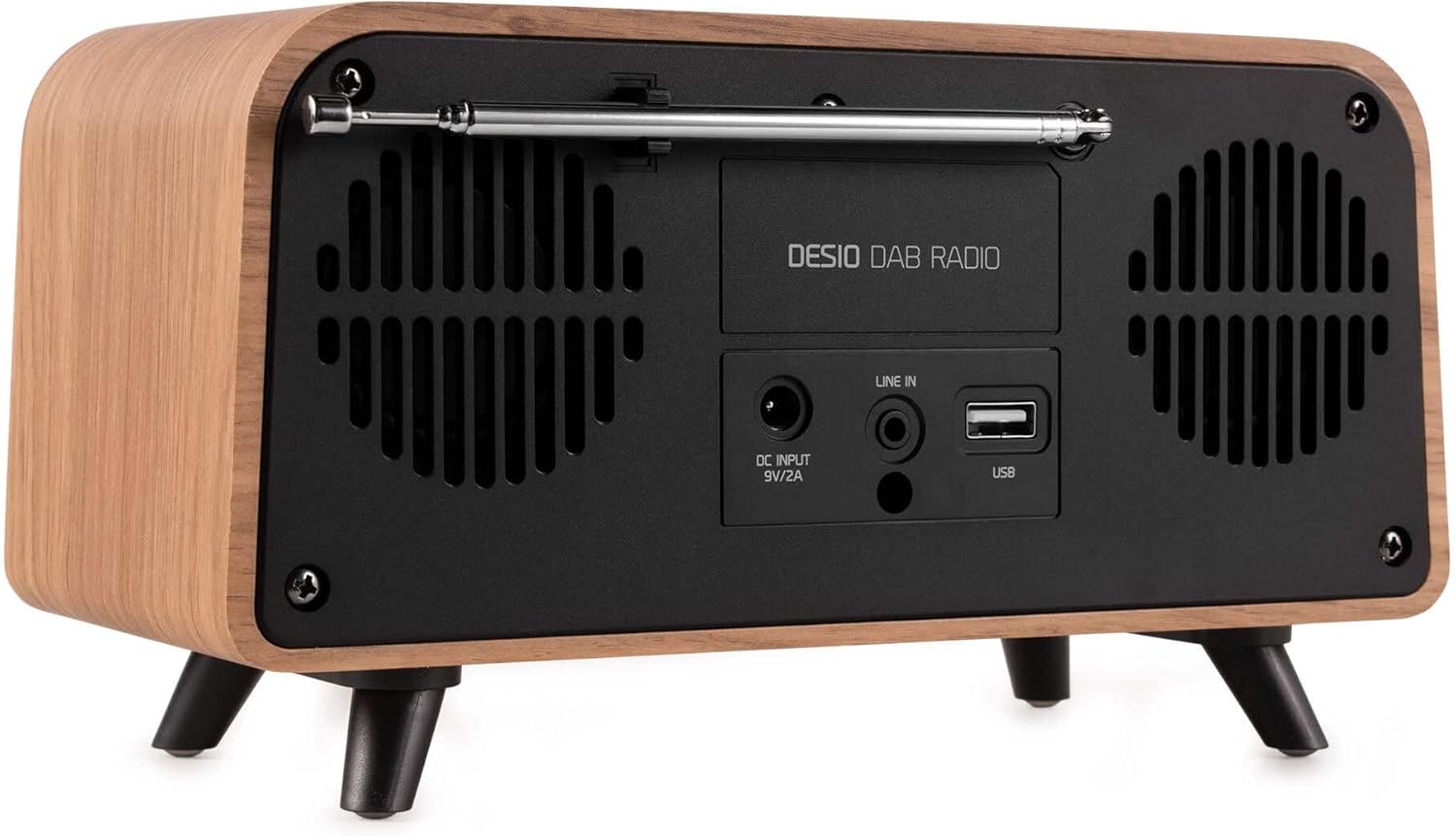
Takaosa view of the Audizio Desio radio, highlighting the DC INPUT 9V/2A, LINE IN (3.5mm AUX), and USB ports. The telescopic antenna is extended.
- DC INPUT 9V/2A: Liitä toimitettu virtalähde tähän.
- LINE IN (3.5mm AUX): Liitä ulkoiset äänilaitteet 3.5 mm:n äänikaapelilla.
- USB: Aseta USB-muistitikku MP3-toistoa varten.
- Teleskooppiantenni: Extend fully for optimal DAB/DAB+ and FM reception.
5. Alkuasetukset
- Liitä virta: Plug the provided DC 5V power adapter into the DC INPUT port on the rear of the radio, then plug the adapter into a wall outlet.
- Pidennä antennia: Fully extend the telescopic antenna located on the rear of the unit for best reception.
- Virta päälle: Paina POWER / MODE painiketta radion käynnistämiseksi.
- First-time DAB Scan: Upon first power-on, the radio will automatically perform a full scan for DAB/DAB+ stations. This may take a few minutes. The display will show the scanning progress.
- Aseta aika/päivämäärä: The time and date will usually be set automatically via DAB signal. If not, you can manually set them via the menu.
6. Käyttöohjeet
6.1 DAB/DAB+ -radion käyttö

Edessä view of the Audizio Desio radio, displaying a DAB radio station ('NPO Klassiek') and current time.
- Valitse DAB-tila: Paina POWER / MODE -painiketta toistuvasti, kunnes näytössä näkyy 'DAB'.
- Asemien skannaus: If no stations are found or you wish to rescan, press VALIKKO / INFO, käytä sitten LEFT / PREVIOUS or OIKEA SEURAAVAKSI to select 'Full Scan' and press PLAY / ENTER.
- Valitse asema: Käytä LEFT / PREVIOUS or OIKEA SEURAAVAKSI -painikkeita selataksesi saatavilla olevia asemia. Paina PLAY / ENTER aseman valitsemiseksi.
- Tallenna esiasetus: Tallennaaksesi aseman, pidä painettuna PRESET -painiketta. Käyttää LEFT / PREVIOUS or OIKEA SEURAAVAKSI valitaksesi esiasetetun numeron (1–50) ja paina sitten PLAY / ENTER vahvistaaksesi.
- Hae esiasetus: Voit hakea tallennetun aseman painamalla PRESET button (do not hold). Use LEFT / PREVIOUS or OIKEA SEURAAVAKSI valitaksesi haluamasi esiasetuksen ja paina sitten PLAY / ENTER.

Edessä view of the Audizio Desio radio, showing the 'Preset Recall' menu on the display, indicating empty preset slots.
6.2 FM-radion käyttö
- Valitse FM-tila: Paina POWER / MODE -painiketta toistuvasti, kunnes näytössä näkyy 'FM'.
- Automaattinen skannaus: Paina ja pidä painettuna PLAY / ENTER to automatically scan for and save available FM stations.
- Manuaalinen viritys: Käyttää LEFT / PREVIOUS or OIKEA SEURAAVAKSI taajuuden hienosäätöön.
- Save/Recall Presets: Follow the same procedure as for DAB radio (Section 6.1).
6.3 Bluetoothin (BT) käyttö

Edessä view of the Audizio Desio radio, with the display showing 'BT' (Bluetooth) mode and 'Connected' status.
- Select BT Mode: Paina POWER / MODE button repeatedly until 'BT' is displayed. The radio will enter pairing mode, indicated by a flashing Bluetooth icon.
- Laitepari: On your smartphone, tablet, or laptop, enable Bluetooth and search for available devices. Select 'Audizio Desio' from the list.
- Yhdistä: Once paired, the display will show 'Connected'. You can now stream audio from your device to the radio.
- Toiston ohjaus: Use your connected device or the radio's PLAY / ENTER, LEFT / PREVIOUS, ja OIKEA SEURAAVAKSI painikkeita toiston ohjaamiseen.
6.4 USB-toisto

Edessä view of the Audizio Desio radio, with the display showing 'USB' mode, current time, and details of an MP3 file pelataan.
- Aseta USB-muistitikku: Aseta USB-muistitikku (alustettu FAT32-muotoon), joka sisältää MP3-tiedostoja. fileradion takana olevaan USB-porttiin.
- Valitse USB-tila: Paina POWER / MODE button repeatedly until 'USB' is displayed. The radio will automatically start playing the first compatible audio file.
- Navigoida Files: Käyttää LEFT / PREVIOUS or OIKEA SEURAAVAKSI to skip tracks. Press PLAY / ENTER keskeyttää/jatkaa toistoa.
6.5 AUX-tulo
- Yhdistä laite: Connect an external audio device (e.g., MP3 player, smartphone) to the 'LINE IN' (3.5mm AUX) port on the rear of the radio using a 3.5mm audio cable (not included).
- Valitse AUX-tila: Paina POWER / MODE button repeatedly until 'AUX' is displayed.
- Toiston hallinta: Playback is controlled directly from your connected external device. Adjust volume using the radio's volume controls.
6.6 Hälytys- ja ajastintoiminnot
- Hälytysten asettaminen: Siirry hälytysasetuksiin näppäimellä VALIKKO / INFO button. You can set multiple alarms with customizable sources (DAB, FM, Buzzer), volume, and recurrence (daily, weekdays, weekends).
- Uniajastin: The sleep timer allows the radio to turn off automatically after a set period. Access this function via the VALIKKO / INFO button and select the desired duration.
- Torkkutoiminto: When an alarm sounds, press any button (except Power) to activate the snooze function for a short period.
7. Huolto
- Puhdistus: Puhdista radion pinta pehmeällä, kuivalla ja nukkaamattomalla liinalla. Älä käytä hankaavia puhdistusaineita, vahoja tai liuottimia.
- Antennihoito: Käsittele teleskooppiantennia varovasti, jotta se ei taivu tai katkea.
- Varastointi: Jos radiota säilytetään pitkään, irrota se virtalähteestä ja säilytä sitä viileässä ja kuivassa paikassa.
8. Vianmääritys
| Ongelma | Mahdollinen syy | Ratkaisu |
|---|---|---|
| Ei virtaa | Virtasovitin ei ole kytketty tai pistorasia on viallinen. | Tarkista virtalähteen liitäntä ja kokeile toista pistorasiaa. |
| Huono DAB/FM-vastaanotto | Antenni ei ole täysin ulkona tai signaalialue on heikko. | Fully extend the antenna. Try repositioning the radio. Perform a full scan. |
| Bluetooth ei muodosta yhteyttä | Radio not in BT mode, device not in pairing mode, or too far away. | Ensure radio is in BT mode. Put your device in pairing mode. Move device closer to the radio (within 10m). |
| USB-toisto ei toimi | USB drive not inserted correctly, unsupported file format, or drive not FAT32. | Aseta USB-asema takaisin paikalleen. Varmista, että files are MP3. Check USB drive format (FAT32). |
| Ei ääntä AUX-liitännästä | Radio not in AUX mode, cable faulty, or external device volume low. | Select AUX mode. Check 3.5mm cable. Increase volume on both radio and external device. |
9. Tekniset tiedot
- Merkki: Audizio
- Malli: Desio
- Viritintekniikka: FM, DAB+
- Bluetooth: Version 5.0 (Range: 10m)
- Toistovaihtoehdot: Bluetooth, USB, 3.5mm AUX input
- Esiasetetut asemat: 50
- Näyttö: 2.4 tuuman värillinen nestekidenäyttö
- Toiminnot: Alarm, Sleep Timer, Snooze, Dimming, Week/Weekend Alarm
- Max Speaker Power: 30 wattia
- Virtalähde: DC 5V (Power Adapter)
- Tuotteen mitat (K x L x S): 32 x 16 x 18 cm
- Paino: 1.66 kg
10. Takuu ja tuki
This product comes with a standard manufacturer's warranty. For detailed warranty terms and conditions, please refer to the documentation provided at the time of purchase or contact your retailer.
For technical support, troubleshooting assistance, or service inquiries, please contact the Audizio customer support team or your local dealer. Please have your product model number (Desio) and purchase information ready when contacting support.