
1. Johdanto
This manual provides essential information for the safe and efficient use of your Haier H55C95EUX 55-inch OLED 4K HDR Smart TV. Please read these instructions thoroughly before operating your television and retain them for future reference.
The Haier H55C95EUX features a 55-inch OLED display for deep blacks and vibrant colors, 4K HDR resolution, a 144Hz refresh rate for smooth motion, integrated Harman Kardon sound, and the Google TV operating system for smart functionality and voice control.

Kuva 1.1: ohiview of Haier C95 Series OLED TV features, highlighting Harman Kardon audio, 144Hz gaming, Dolby Vision IQ, Dolby Atmos, HDR10+, Google TV, and 3GB RAM with 32GB storage.
2. Turvallisuustiedot
Noudata aina televisiota käyttäessäsi perusturvallisuusohjeita tulipalon, sähköiskun ja loukkaantumisen riskin vähentämiseksi.
- Virtalähde: Liitä televisio ainoastaan 220–240 V:n vaihtovirtalähteeseen, jonka taajuus on 50/60 Hz.
- Ilmanvaihto: Varmista riittävä ilmanvaihto television ympärillä. Älä tuki tuuletusaukkoja.
- Vesi ja kosteus: Älä altista televisiota sateelle tai kosteudelle. Älä aseta television päälle nesteitä sisältäviä esineitä, kuten maljakoita.
- Puhdistus: Irrota televisio pistorasiasta ennen puhdistamista. Käytä pehmeää, kuivaa liinaa. Älä käytä nestemäisiä puhdistusaineita tai aerosolipuhdistusaineita.
- Asennus: If wall-mounting, ensure the wall mount is compatible with the VESA standard (100 x 100 mm) and can support the TV's weight.
- Lapset: Supervise children to ensure they do not play with the television.
3. Mitä laatikossa on
Pura laatikko varovasti pakkauksesta ja varmista, että kaikki osat ovat mukana ja vahingoittumattomia.
- Haier H55C95EUX 55-inch OLED 4K HDR Smart TV
- Kaukosäädin
- Käyttöopas (tämä asiakirja)
- Virtakaapeli
- TV-tason osat (jos sovellettavissa)
4. Asennus
4.1 Fyysinen asennus
Before installation, consider the TV's dimensions to ensure proper placement.

Kuva 4.1: Edessä view dimensions of the 55-inch Haier TV, indicating a width of 1225mm and a height of 749mm.

Image 4.2: Detailed dimensions of the Haier 55-inch TV, showing measurements with and without the stand.
Jalustan asennus
- Aseta televisio kuvaruutu alaspäin pehmeälle ja tasaiselle alustalle, jotta näyttö ei vaurioidu.
- Attach the stand components to the designated slots on the bottom of the TV using the provided screws.
- Varmista, että jalusta on tukevasti kiinnitetty ennen kuin asetat television pystyasentoon.
Seinäasennus
If wall-mounting, use a VESA-compatible mount (100 x 100 mm) and follow the mount manufacturer's instructions. Ensure the wall can support the TV's weight.
4.2 Laitteiden liittäminen
Televisiossasi on useita portteja ulkoisten laitteiden kytkemistä varten.
- HDMI: Connect Blu-ray players, game consoles, or set-top boxes to the HDMI 2.1 ports for high-quality audio and video.
- USB: Liitä USB-tallennuslaitteet median toistoa varten.
- Ethernet: Vakaan langallisen internetyhteyden saamiseksi.
- Bluetooth: Yhdistä langattomat kuulokkeet tai muut Bluetooth-laitteet.
4.3 Ensimmäinen käynnistys ja asennus
- Liitä virtajohto televisioon ja pistorasiaan.
- Paina kaukosäätimen tai television virtapainiketta.
- Follow the on-screen instructions to complete the initial setup, including language selection, network connection (Wi-Fi or Ethernet), and Google TV account login.
5. Television käyttäminen
5.1 Kaukosäädin
The included remote control allows you to navigate the TV's features. It may feature a solar cell for eco-friendly charging and USB-C for backup charging.

Image 5.1: The Haier TV remote control, featuring navigation, volume, and app access buttons.
5.2 Google TV -käyttöliittymä
Your TV runs on Google TV, providing access to a wide range of streaming services, apps, and personalized content.

Image 5.2: The Google TV home screen, showcasing erilaisia suoratoistosovelluksia ja sisältösuosituksia.
Ääniohjaus
Use the built-in voice control feature to search for content, launch apps, and control your TV hands-free. Simply say "Hey Google" or press the voice assistant button on your remote.

Image 5.3: Demonstrating voice control functionality with the Haier TV and Google TV.
5.3 Kuva- ja ääniasetukset
OLED-tekniikka
The OLED display provides absolute blacks and infinite contrast for a lifelike viewkokemusta.

Image 5.4: Visual representation of OLED technology, showcasing deep blacks and vibrant colors.
Harman Kardon Sound
Experience immersive audio with clear dialogues and cinematic depth, delivered by the integrated Harman Kardon sound system.

Image 5.5: Depiction of the Harman Kardon sound system, emphasizing clear and powerful audio.
Dolby Atmos
Enjoy three-dimensional, immersive sound that moves around you, enhancing your audio experience.
144 Hz: n virkistystaajuus
The 144Hz refresh rate ensures smooth and fluid motion, ideal for fast-paced content like gaming and sports.

Image 5.6: Visual comparison illustrating the fluidity of 144Hz motion compared to 60Hz, particularly beneficial for gaming.
6. Huolto
6.1 Television puhdistaminen
- Irrota aina televisio pistorasiasta ennen puhdistamista.
- Pyyhi näyttö ja kotelo pehmeällä, kuivalla ja nukkaamattomalla liinalla.
- Pinttyneisiin tahroihin, dörzsöi kevyestiampKostuta liina vedellä tai erikoisnäytönpuhdistusaineella. Älä koskaan suihkuta puhdistusainetta suoraan näytölle.
- Vältä hankaavien puhdistusaineiden, vahojen tai liuottimien käyttöä.
6.2 Ohjelmistopäivitykset
Your Haier TV may receive software updates to improve performance and add new features. Ensure your TV is connected to the internet to receive these updates automatically or check for them manually through the settings menu.
7. Vianmääritys
Jos televisiossasi on ongelmia, katso seuraavia yleisiä ratkaisuja:
| Ongelma | Mahdollinen ratkaisu |
|---|---|
| Ei Virtaa | Check if the power cable is securely connected to the TV and the wall outlet. Ensure the outlet is functioning. Try pressing the power button on the TV itself. |
| Ei kuvaa, mutta ääni kuuluu | Tarkista tulolähde. Varmista, että liitetty laite on päällä ja toimii oikein. Kokeile toista HDMI-kaapelia tai -porttia. |
| Ei ääntä, mutta kuva näkyy | Check the volume level. Ensure the TV is not muted. Verify audio output settings (e.g., internal speakers, external sound system). Check audio cables if using external speakers. |
| Kaukosäädin ei toimi | Check the remote control's battery level. Ensure there are no obstructions between the remote and the TV's IR sensor. If it's a solar remote, ensure it has sufficient light exposure. |
| Verkkoyhteysongelmat | Restart your router and modem. Check Wi-Fi password. If using Ethernet, ensure the cable is connected properly. Try connecting to a different network if available. |
8. Tekniset tiedot
| Ominaisuus | Yksityiskohta |
|---|---|
| Mallin nimi | H55C95EUX |
| Näytön koko | 55 tuumaa |
| Näyttötekniikka | OLED |
| Resoluutio | 4K (3840 2160 x XNUMX XNUMX) |
| Päivitystaajuus | 120 Hz (Motion Enhancement: 144Hz) |
| Tuettu HDR-muotoa | Dolby Vision |
| Käyttöjärjestelmä | Google TV |
| Sisäinen tallennustila | 32 Gt |
| Äänijärjestelmä | Harman Kardon 2.1 Sound System |
| Surround Sound Format | Dolby Atmos |
| Yhteydet | Bluetooth, Ethernet, HDMI (x4), USB (x1) |
| Langaton tekniikka | Bluetooth, WiFi |
| Valvontamenetelmä | Remote Control, Voice |
| Tuotteen mitat (SxLxK) | 29.5P x 122.5l x 76.8H cm (with stand) |
| VESA-asennusstandardi | 100 x 100 mm |
| Energiatehokkuusluokka (SDR) | F (77 kWh/1000h) |
| Energiatehokkuusluokka (HDR) | G (70 kWh/1000h) |
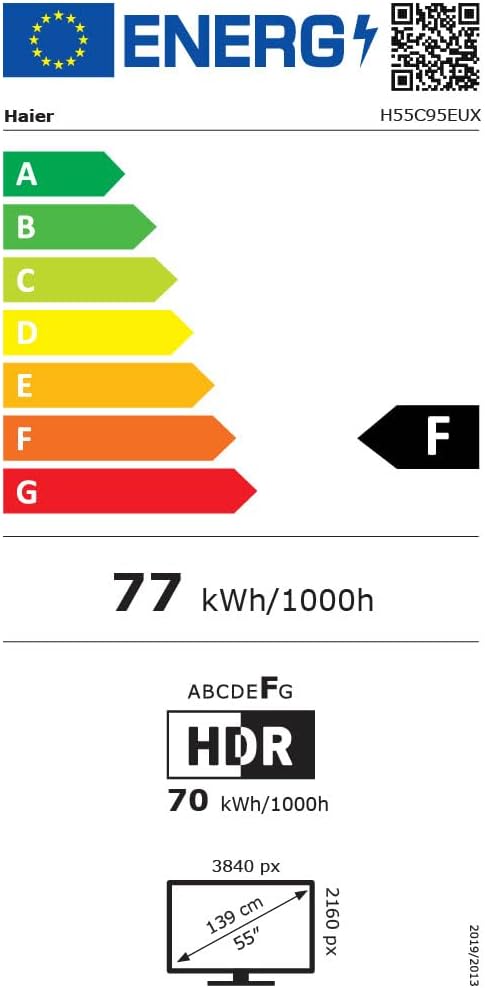
Image 8.1: EU Energy Label for the Haier H55C95EUX TV. For more details, visit the EPREL -tietokanta.
9. Takuu ja tuki
Your Haier H55C95EUX television comes with a 2 vuoden valmistajan takuuSäilytä ostokuittisi takuuvaatimuksia varten.
For technical support, service, or further inquiries, please refer to the contact information provided on the official Haier websivustolta tai paikallisesta valtuutetusta huoltoliikkeestä.