
Johdanto
This manual provides detailed instructions for the safe and efficient assembly, operation, and maintenance of your XINLEI Universal TV Stand ML3286. This stand is designed to support most flat and curved screen televisions from 24 to 86 inches, with a maximum load capacity of 68 kg (150 lbs) and VESA compatibility up to 800x600mm. Please read all instructions carefully before proceeding with installation.

Image: The XINLEI Universal TV Stand ML3286 in a living room setting, supporting a large television.
Turvallisuustiedot
- Read all instructions carefully before assembly and retain this manual for future reference.
- Älä ylitä laitteen enimmäispainokapasiteettia 68 kg (150 lbs). Exceeding this limit may result in serious injury or product damage.
- Ensure the TV stand is placed on a stable, level, and sturdy surface.
- Do not allow children to climb on the stand or television.
- Use only the hardware provided with the stand. Using incompatible hardware may compromise stability.
- Tarkista säännöllisesti kaikki ruuvit ja liitokset varmistaaksesi, että ne ovat tiukasti kiinni.
- Pidä kaikki pakkausmateriaalit poissa lasten ulottuvilta.
Pakkauksen sisältö
Verify that all components are present and undamaged before beginning assembly. If any parts are missing or damaged, contact customer service.
- Main Support Columns (2)
- Base Feet (2)
- TV-kiinnikkeet (2)
- Hardware Kit (various screws, washers, spacers, Allen key)
- Johdinsiteet (2)
- Non-slip Pads for base
- EVA Pads for soundbar placement
Tekniset tiedot
| Malli | ML3286 |
| Merkki | XINLEI |
| Näytön koon yhteensopivuus | 24 - 86 inches (flat or curved) |
| VESA-yhteensopivuus | 100x100mm - 800x600mm |
| Suurin kuormituskapasiteetti | 68 kg (150 lbs) |
| Korkeuden säätö | 12 levels, from 41.1 cm (16.18 inches) to 96.7 cm (38.09 inches) |
| Materiaali | Korkean lujuuden omaava seosteräs |
| Väri | Musta |
| Asennustyyppi | Pöytäkiinnitys |
| Liikkeen tyyppi | kallistettava |

Kuva: Yhteensopivuus yliview for TV sizes and maximum load capacity.

Image: Detailed VESA compatibility chart to determine if the stand fits your TV.
Asennus ja asennus
Follow these steps for quick and easy assembly. It is recommended to have a second person assist with mounting the TV.
- Assemble the Base Feet and Support Columns: Attach the base feet to the bottom of the main support columns using the provided screws. Ensure they are securely fastened.
- Kiinnitä television kiinnitystelineet: Carefully place your TV face down on a soft, clean surface. Attach the TV mounting brackets to the VESA holes on the back of your TV using the appropriate screws, washers, and spacers from the hardware kit. Ensure the brackets are centered and securely tightened.
- Mount the TV onto the Support Columns: With assistance, carefully lift the TV and hook the attached mounting brackets onto the main support columns. Slide the brackets down into the desired height slots. Secure the brackets to the columns using the provided locking screws.
- Säädä korkeutta (valinnainen): The stand offers 12 levels of height adjustment. To change the height, loosen the locking screws, carefully lift the TV, reposition the brackets to the desired height, and re-tighten the screws. Ensure both columns are adjusted to the same height for a level display.
- Kaapelin hallinta: Use the included cable ties to organize and secure any cables along the back of the support columns, maintaining a tidy appearance.
- Liukuestetyynyjen käyttö: Attach the non-slip pads to the bottom of the base feet to prevent scratching surfaces and enhance stability. If using a soundbar, place the EVA pads under it for stability and vibration absorption.

Kuva: Visuaalinen opas 3-vaiheiseen kokoamisprosessiin.

Image: Illustration of the 12 adjustable height levels for optimal viewing.
Toiminta
The primary operation of the XINLEI Universal TV Stand ML3286 involves adjusting the height of your television for an optimal viewing experience. The stand also allows for slight tilting of the TV.
- Korkeuden säätö: As described in the setup section, the stand offers 12 distinct height settings. To adjust, ensure the TV is safely supported, loosen the locking screws on the mounting brackets, slide the TV to the desired height, and re-tighten the screws firmly. Always ensure both sides are at the same height.
- Kallistus: The design allows for a degree of tilt. To adjust the tilt, loosen the screws connecting the TV mounting brackets to the VESA holes on the TV, adjust to the desired angle, and re-tighten securely.
Huolto
Proper maintenance ensures the longevity and safety of your TV stand.
- Säännöllinen tarkastus: Periodically (e.g., every 3-6 months) inspect all screws, bolts, and connections to ensure they are tight. Loose connections can compromise stability.
- Puhdistus: Clean the stand with a soft, dry, or slightly damp liinaa. Vältä voimakkaiden kemikaalien, hankaavien puhdistusaineiden tai liuottimien käyttöä, sillä ne voivat vahingoittaa pintaa.
- Painon tarkistus: Always ensure that the weight of your television and any accessories placed on the stand does not exceed the maximum load capacity.
Vianetsintä
If you encounter any issues with your XINLEI Universal TV Stand ML3286, refer to the following common problems and solutions:
- Televisio ei ole vaakasuorassa:
- Ensure both support columns are adjusted to the exact same height setting.
- Verify that the surface on which the stand is placed is completely level.
- Stand feels unstable or wobbly:
- Double-check that all assembly screws are fully tightened.
- Confirm that the weight of your TV does not exceed the maximum load capacity of 68 kg (150 lbs).
- Ensure the non-slip pads are correctly applied to the base feet.
- Cables are disorganized:
- Utilize the provided cable ties to neatly bundle and secure cables along the back of the support columns.
- TV does not fit the stand:
- Verify your TV's screen size is within the 24-86 inch range.
- Check your TV's VESA mounting pattern against the stand's compatibility (100x100mm to 800x600mm).
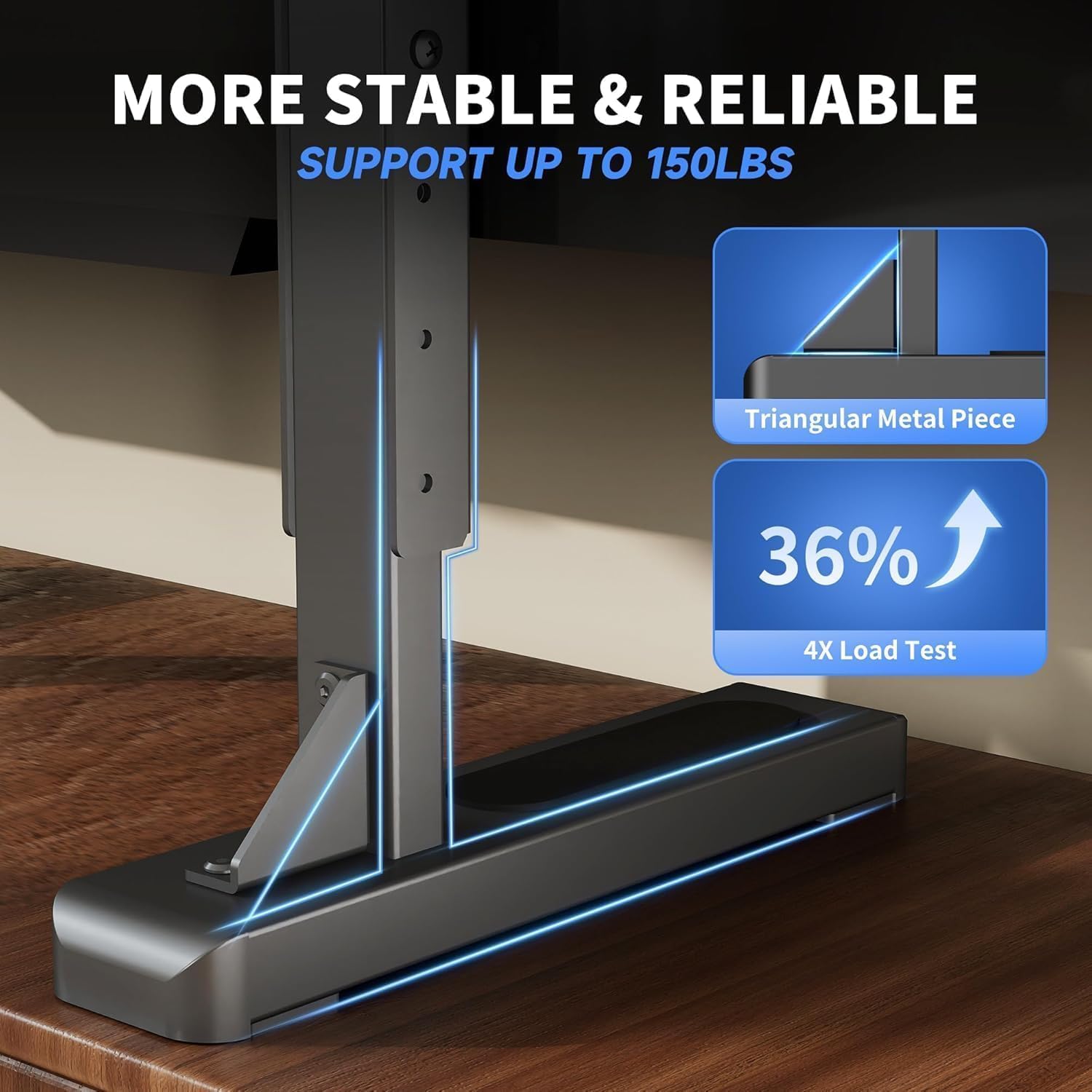
Image: Detail of the stable and reliable triangular support structure.
Takuu ja tuki
For specific warranty details, product registration, or technical assistance, please refer to the warranty card included with your purchase or visit the official XINLEI website. You may also contact XINLEI customer service through the platform where you purchased the product.