
1. Johdanto
Thank you for choosing the Hama Usedom Weather Station. This device provides digital display of indoor and outdoor temperature, humidity, time, date, and a weather forecast. It features a DCF radio-controlled clock for automatic time adjustment and a frost alarm. Please read this instruction manual carefully before initial use to ensure proper operation and safety.
2. Turvallisuusohjeet
- Suojaa tuotetta lialta, kosteudelta ja ylikuumenemiselta.
- Älä pudota tuotetta äläkä altista sitä voimakkaille iskuille.
- Älä avaa laitetta tai jatka sen käyttöä, jos se vaurioituu.
- Pidä tämä tuote, kuten kaikki sähkölaitteet, poissa lasten ulottuvilta.
- Hävitä pakkausmateriaali välittömästi paikallisten määräysten mukaisesti.
- Älä muokkaa tuotetta millään tavalla. Tämä mitätöi takuun.
- Käytä tuotetta vain sen aiottuun tarkoitukseen.
- Älä käytä tuotetta lämmittimien tai muiden lämmönlähteiden välittömässä läheisyydessä tai suorassa auringonpaisteessa.
3. Pakkauksen sisältö
Tarkista, että pakkaus sisältää seuraavat tuotteet:
- 1x Hama Usedom Weather Station (Main Unit)
- 1x Outdoor Sensor
- 1x virtalähde
- 2x AA Mignon Batteries (for sensor)
- 1x käyttöohje

Image: The main weather station unit, the outdoor sensor, and the power adapter included in the package.
4. Tuote ohiview
4.1 pääyksikkö

Image: Front display of the weather station, showing various readings and icons.
- Ajan näyttö
- Date and Day display
- Sääennustekuvakkeet
- Sisälämpötilan ja kosteuden näyttö
- Ulkolämpötilan ja -kosteuden näyttö
- Frost alarm indicator
- DCF radio signal indicator
4.2 Takapaneelin säätimet
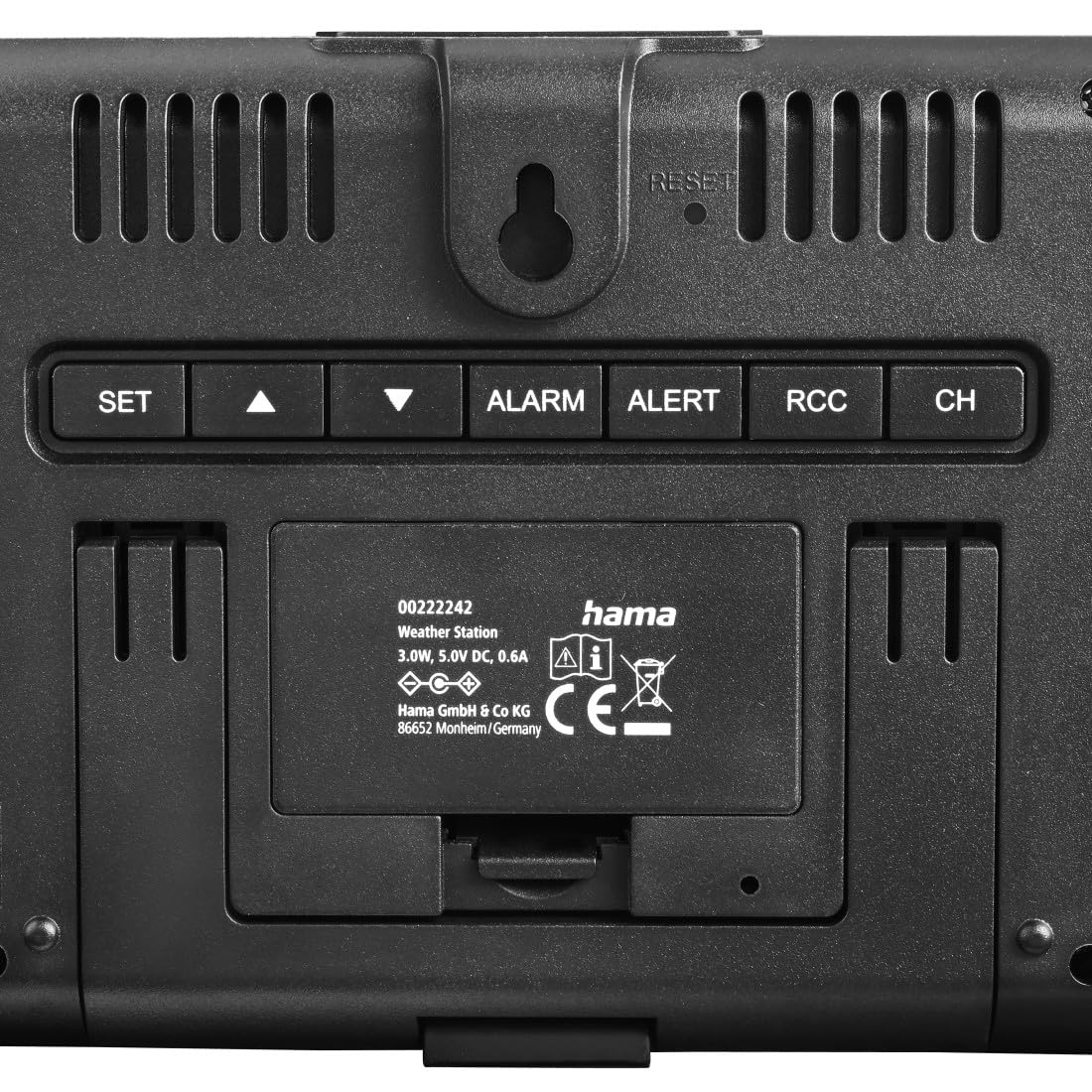
Kuva: Takaosa view of the main unit, highlighting the control buttons and power input.
- SARJA button: Enters setting mode.
- ▲ (UP) button: Increases values, navigates menus.
- ▼ (DOWN) button: Decreases values, navigates menus.
- HÄLYTYS button: Sets or activates/deactivates alarm.
- VAROITUS button: Sets temperature alerts.
- RCC button: Manually initiates DCF signal reception.
- CH button: Switches between outdoor sensor channels.
- RESET button: Resets the device to factory settings (use a thin object to press).
- SNOOZE / VALO button (top): Activates backlight, snoozes alarm.

Image: Close-up of the SNOOZE/LIGHT button on top of the main unit.
4.3 Ulkoanturi
The outdoor sensor measures external temperature and humidity and transmits data wirelessly to the main unit.

Image: The outdoor sensor positioned on a window sill.
5. Asennus
5.1 Battery Installation (Outdoor Sensor)
- Avaa ulkoanturin takana oleva paristolokero.
- Insert the two AA Mignon batteries, ensuring correct polarity (+/-).
- Sulje paristolokero kunnolla.
5.2 Pääyksikön virran kytkeminen
The main unit can be powered via the included power supply unit.
- Connect the power supply unit to the main unit's power input.
- Kytke virtalähde sopivaan pistorasiaan.
- The display will light up, and the unit will begin searching for the DCF signal and outdoor sensor.
Huomautus: The main unit can also use 2x AA batteries (not included) for backup power, but it is primarily designed to be powered by the adapter for continuous display illumination.
5.3 Alkuperäinen synkronointi
After powering on, the weather station will automatically attempt to synchronize with the DCF radio signal and connect to the outdoor sensor.
- Place the main unit and outdoor sensor close to each other during initial setup.
- The DCF signal icon will flash during reception. Once successful, the icon will appear solid, and the correct time will be displayed. This process may take several minutes.
- The outdoor temperature and humidity will appear on the display once the sensor connects.
5.4 Ulkoanturin sijoittelu
For accurate outdoor readings, consider the following:
- Mount the outdoor sensor in a shaded, dry location, protected from direct sunlight and rain.
- Avoid placing it near heat sources (e.g., vents, windows that get direct sun) or large metal objects that could interfere with the signal.
- Ensure the sensor is within the effective transmission range (typically up to 30 meters in open areas) of the main unit.
6. Sääaseman käyttö
6.1 Näytön tiedot
The main display shows:
- Aika ja päivämäärä: Automatically set by the DCF signal.
- Sisälämpötila/kosteus: Pääyksikön mittaamana.
- Ulkolämpötila/kosteus: Received from the outdoor sensor.
- Sääennuste: Based on atmospheric pressure changes, displayed with icons (sunny, partly cloudy, cloudy, rainy).
- Pakkashälytys: An icon will appear when the outdoor temperature is between -1°C and +1°C.
6.2 Ajan ja päivämäärän manuaalinen asettaminen
If the DCF signal is not available or you wish to set the time manually:
- Paina ja pidä painettuna SARJA -painiketta noin 3 sekunnin ajan siirtyäksesi asetustilaan.
- The setting value will flash. Use the ▲ or ▼ painikkeita säätääksesi arvoa.
- Paina SARJA again to confirm the setting and move to the next parameter (e.g., 12/24 hour format, hour, minute, year, month, day, temperature unit °C/°F).
- Kun olet asettanut kaikki parametrit, paina SARJA poistuaksesi asetustilasta.
6.3 Hälytysasetus
- Paina HÄLYTYS -painiketta kerran, niin hälytysaika tulee näkyviin.
- Paina ja pidä painettuna HÄLYTYS button for approximately 3 seconds to enter alarm setting mode.
- Käytä ▲ or ▼ painikkeita tuntien ja minuuttien säätämiseksi.
- Paina HÄLYTYS jokaisen asetuksen vahvistamiseksi.
- Voit aktivoida/deaktivoida hälytyksen painamalla HÄLYTYS button repeatedly until the alarm icon appears/disappears.
6.4 Snooze and Backlight
Paina SNOOZE / VALO button on the top of the unit:
- When an alarm sounds, press this button to activate the snooze function (alarm will sound again after a few minutes).
- At any other time, press this button to temporarily illuminate the display backlight.
6.5 Lämpötilahälytysasetus
The device allows setting alerts for specific outdoor temperatures.
- Paina VAROITUS button to cycle through alert settings (e.g., high temperature alert, low temperature alert).
- Paina ja pidä painettuna VAROITUS -painiketta siirtyäksesi hälytysten asetustilaan.
- Käyttää ▲ or ▼ to adjust the desired temperature threshold.
- Paina VAROITUS vahvistaaksesi ja siirtyäksesi seuraavaan asetukseen.
- To activate/deactivate an alert, press VAROITUS repeatedly until the alert icon appears/disappears.
7. Huolto
- Puhdista tämä tuote vain kevyellä damp, nukkaamaton liina äläkä käytä aggressiivisia puhdistusaineita.
- Varmista, ettei tuotteen sisään pääse vettä.
- Replace batteries in the outdoor sensor when the low battery indicator appears on the main unit.
- Jos tuotetta ei käytetä pitkään aikaan, poista paristot.
8. Vianmääritys
| Ongelma | Mahdollinen syy | Ratkaisu |
|---|---|---|
| Ei näyttöä pääyksikössä. | Ei virtaa tai paristot tyhjentyneet. | Ensure power adapter is connected or replace backup batteries. |
| Outdoor readings not displayed or incorrect. | Sensor out of range, low sensor batteries, or interference. | Move sensor closer, replace sensor batteries, or reposition to avoid interference. Press CH button to re-sync. |
| DCF time not synchronizing. | Heikko signaali, häiriö tai väärä aikavyöhykeasetus. | Move unit to a window, away from electronics. Manually initiate DCF search with RCC button. Set time manually if necessary. |
| Sääennuste vaikuttaa epätarkalta. | Weather forecasts are based on atmospheric pressure changes and are estimates. | This is normal. The forecast is a prediction based on local pressure trends, not a satellite forecast. |
9. Tekniset tiedot
| Mallinumero | 00222242 |
| Näytön tyyppi | LED (VA Display) |
| Virtalähde (pääyksikkö) | Power Adapter (5.0V DC, 0.6A), 2x AA Mignon Batteries (backup) |
| Virtalähde (anturi) | 2x AA Mignon Batteries (included) |
| Yhteystekniikka | Radio Frequency (433 MHz) |
| Lämpötilan tarkkuus | ±0.5 °C |
| Erikoisominaisuudet | DCF Radio Controlled Clock, Frost Alarm, Adjustable Brightness, Large Display |
| Mitat (pääyksikkö) | Noin 15.6 cm (L) x 11.4 cm (K) x 3.1 cm (S) |
| Mitat (anturi) | Noin 4.4 cm (L) x 10.2 cm (K) x 3 cm (S) |

Image: Dimensional drawing of the main unit and outdoor sensor.
10. Takuu ja tuki
Hama GmbH & Co KG provides a manufacturer's warranty for this product. For detailed warranty conditions, please refer to the warranty card included with your product or visit the official Hama websivusto.
For technical support or service inquiries, please contact your local Hama customer service or visit www.hama.com lisätietoja.