
Johdanto
The Fender Mustang LTX50 is a versatile 50-watt modeling combo amplifier designed for guitarists seeking a wide range of authentic Fender tones and modern features. Equipped with a 12-inch Celestion G12P-80 speaker, it delivers dynamic sound suitable for practice, rehearsal, and performance. This amplifier offers 25 amp models and 25 effects, covering various musical styles from clean to high-gain. Its intuitive color display, onboard tuner, and 100 user preset slots provide easy customization and quick access to your preferred sounds. The Mustang LTX50 also features Bluetooth audio streaming for playing along with tracks and USB-C connectivity for direct recording and monitoring.
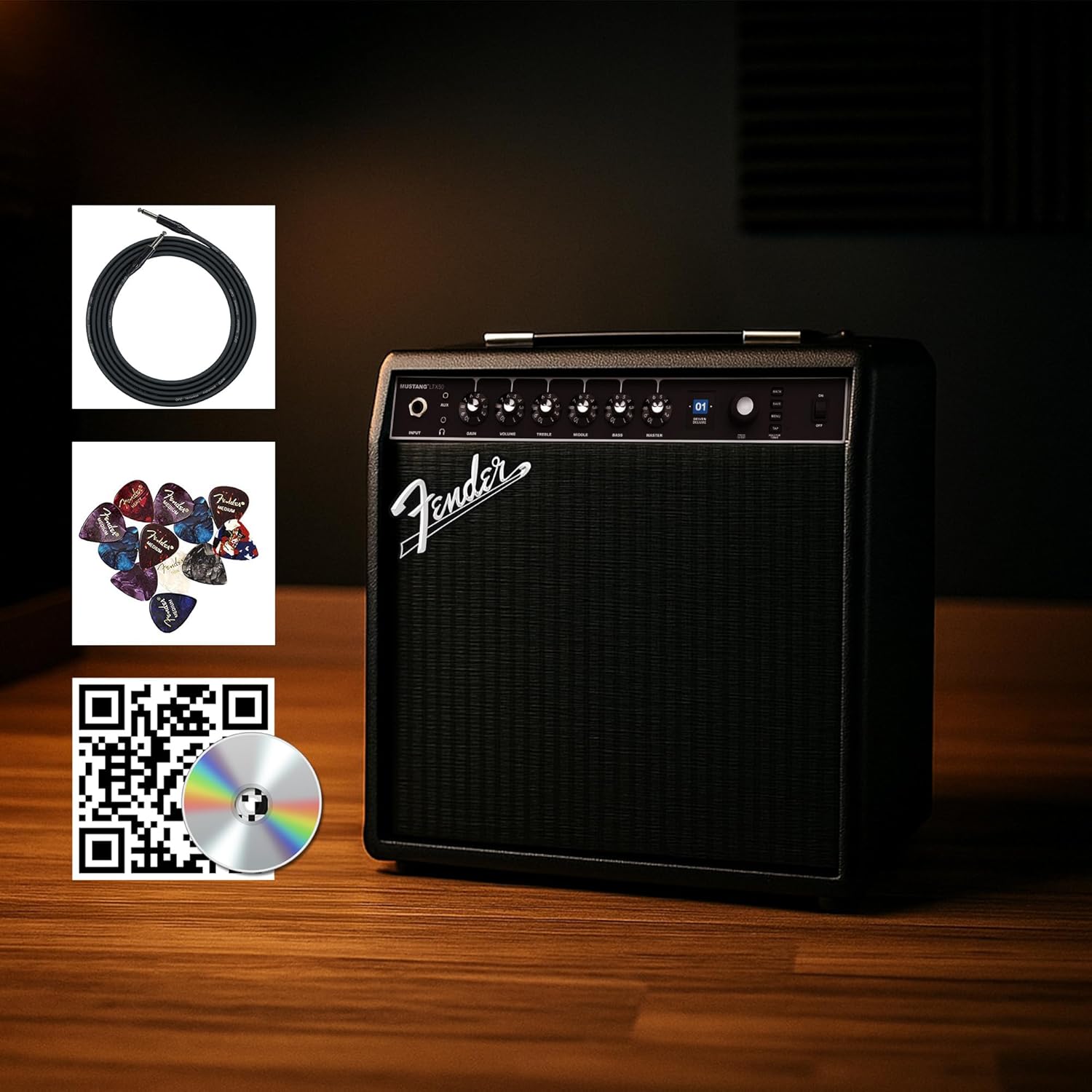
Figure 1: Fender Mustang LTX50 Guitar Combo AmpLifeeri mukana tulevilla lisävarusteilla.
Asennus
1. Pakkauksen purkaminen ja alkutarkastus
- Poista varovasti amppakkauksesta life-lifter ja kaikki lisävarusteet.
- Tarkista amplifier for any signs of damage that may have occurred during shipping.
- Confirm all included items are present: Mustang LTX50 amplifier, power cord, instrument cable, 12-pack guitar picks, and instructional DVD.
2. Virran kytkeminen
- Varmista, että ampLifierin virtakytkin on OFF-asennossa.
- Connect the included power cord to the AC input on the rear panel of the ampelävämpi.
- Liitä virtajohdon toinen pää maadoitettuun pistorasiaan.
3. Kitaran kytkeminen
- Use the included instrument cable to connect your guitar to the INPUT jack on the front panel of the ampelävämpi.
4. Perussäädötview
Familiarize yourself with the front panel controls before powering on the ampelävämpi.
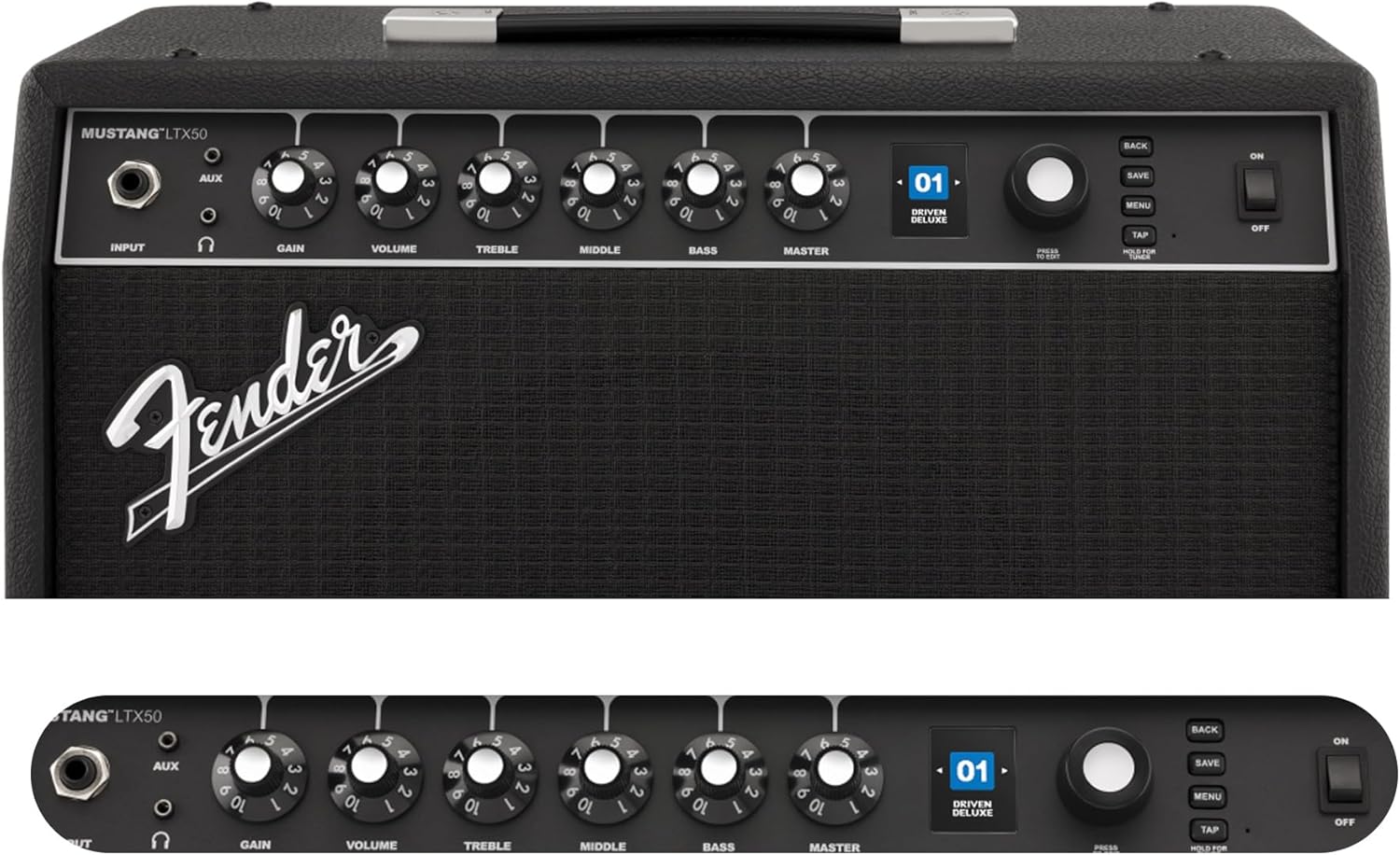
Figure 2: Front Panel Controls of the Mustang LTX50.
Käyttöohjeet
1. Virta päälle / pois
- To power on, ensure all volume controls are set to minimum, then flip the POWER kytkin ON-asentoon.
- Sammuta virta kääntämällä POWER kytkin OFF-asentoon.
2. Esiasetusten selaaminen
- Käytä Kooderi knob (large rotary knob) to scroll through the 100 available presets (70 factory, 30 user).
- Paina Kooderi knob to select a preset.
- The color LCD displays the current preset number and name.
3. Säätäminen Amp Mallit ja tehosteet
- Paina MENU -painikkeella pääset amplifier's settings.
- Navigate through options like AMP, STOMP, MOD, DELAY, REVERB using the Kooderi.
- Select an option and use the Kooderi to choose different amp malleja tai tehosteita.
- Adjust parameters for each effect using the smaller control knobs (GAIN, VOLUME, TREBLE, MIDDLE, BASS, MASTER) or by selecting parameters on the display.
- Paina TALLENTAA to store your customized preset.
4. Using the Built-in Tuner
- Paina ja pidä painettuna TAP button to activate the chromatic tuner.
- Play a single note on your guitar; the display will show the note and indicate if it is sharp, flat, or in tune.
- Press any button or play for a few seconds to exit tuner mode.
5. Fender Tone 3.0 App Control
- Download the Fender Tone 3.0 app from your device's app store (iOS/Android).
- Ota Bluetooth käyttöön mobiililaitteellasi.
- Käytössä ampelevaattori, paina MENU button, navigate to "Bluetooth," and select "Pair."
- Select "Mustang LTX50" from your device's Bluetooth settings to connect.
- Use the app to wirelessly create, edit, save, and share presets, and to manage your ampnostimen asetukset.
6. Playing Along with Audio (Bluetooth)
- Once paired via Bluetooth, you can stream audio from your mobile device directly to the ampelävämpi.
- Adjust the volume of the streamed audio from your mobile device.
- Alternatively, connect an external audio source to the AUX IN jack on the front panel using a 3.5mm stereo cable.
7. Recording via USB-C
- Connect a USB-C cable from the amplifier's USB-C port to your computer (Mac or PC).
- The amplifier functions as a bidirectional audio interface, allowing direct recording and monitoring.
- Refer to your Digital Audio Workstation (DAW) software's manual for specific setup instructions.
Huolto
1. Puhdistus
- Irrota amplifier from power before cleaning.
- Pyyhi ulkopinnat pehmeällä, kuivalla liinalla.
- Pinttyneeseen likaan, hieman damp voidaan käyttää miedolla saippualla kostutettua liinaa ja sen jälkeen kuivaa liinaa.
- Vältä hankaavien puhdistusaineiden, liuottimien tai vahojen käyttöä, sillä ne voivat vahingoittaa pintaa.
2. Varastointi
- Säilytä ampviileässä, kuivassa paikassa, poissa suorasta auringonvalosta ja äärimmäisistä lämpötiloista.
- Vältä varastointia tiloissa, joissa on korkea kosteus.
- If storing for extended periods, cover the ampsuojaa sitä pölyltä.
3. Safety Warnings (Proposition 65)
Tämä tuote saattaa sisältää kemikaaleja, joiden Kalifornian osavaltio tietää aiheuttavan syöpää, synnynnäisiä epämuodostumia tai muita lisääntymisterveydellisiä haittoja. Lisätietoja on osoitteessa www.P65Warnings.ca.gov.
Vianetsintä
Ei ääntä
- Varmista, että amplifier on päällä ja virtajohto on kytketty kunnolla.
- Check that your guitar is properly connected to the INPUT Jack.
- Varmista, että HALLITA volume and individual preset volume controls are not set to zero.
- Test with a different instrument cable and guitar to rule out faulty equipment.
- If using headphones, ensure they are fully plugged into the headphone jack and that the main speaker is not muted.
Vääristynyt tai ei-toivottu kohina
- Tarkista kitarasi äänenvoimakkuuden ja sävyn säätimet.
- Vähennä SAADA asetus ampelävämpi.
- Ensure your instrument cable is not damaged or poorly shielded.
- Kokeile toista pistorasiaa sulkeaksesi pois sähköiset häiriöt.
- If using high-gain amp models, some distortion is inherent. Adjust settings accordingly.
Bluetooth-yhteysongelmat
- Ensure Bluetooth is enabled on both your mobile device and the ampelävämpi.
- Varmista, että amplifier is in pairing mode (refer to "Fender Tone 3.0 App Control" section).
- Move your mobile device closer to the ampelävämpi.
- Kokeile laitteiden pariliitoksen purkamista ja pariliitoksen muodostamista uudelleen.
- Käynnistä molemmat uudelleen amplifier and your mobile device.
Amplifier Not Responding
- Käynnistä virta amplifier by turning it off, waiting 10 seconds, and turning it back on.
- If the issue persists, a factory reset may be necessary. Consult the Fender support website for instructions on performing a factory reset for the Mustang LTX50.
Tekniset tiedot
| Mallin nimi | MUSTANG LTX50 |
| Mallinumero | 2311700000 |
| Merkki | Lokasuoja |
| Ampelävämpi tyyppi | Digitaalinen mallinnus |
| Teholähtö | 50 wattia |
| Kaiutin | 1 x 12" Celestion G12P-80 |
| Amp Mallit | 25 |
| Tehosteet | 25 (distortion, overdrive, compression, modulation, reverb, delay, octave, etc.) |
| Esiasetukset | 70 factory + 100 user slots |
| Näyttö | Color LCD with onboard chromatic tuner |
| Yhteydet | Bluetooth audio, USB-C bidirectional audio |
| Lähdöt | XLR line out, Headphone out |
| Sovelluksen tuki | Fender Tone 3.0 app (iOS/Android) |
| Kotelon materiaali | Metalli |
| Tuotteen mitat (S x L x K) | 22.3" S x 19.9" L x 12.3" K |
| Tuotteen paino | 26.4 puntaa |
| UPC | 840262259088 |

Figure 3: Rear Panel Connections of the Mustang LTX50.
Takuutiedot
The Fender Mustang LTX50 Guitar Combo Amplifier is covered by a 2 vuoden rajoitettu takuu. This warranty covers defects in materials and workmanship under normal use. For full terms and conditions, please refer to the warranty documentation included with your product or visit the official Fender websivusto.
Tukea
For further assistance, technical support, or service inquiries regarding your Fender Mustang LTX50 amplifier, please visit the official Fender support websivusto:
You may also find additional resources, FAQs, and software updates on the Fender websivusto.