
Johdanto
Thank you for choosing the Surfans F20 Pro Android Hi-Res Music Player. This manual provides essential information for setting up, operating, and maintaining your device. Please read it thoroughly to ensure optimal performance and longevity of your music player.
1. Asennus
1.1 Laatikon avaaminen ja pakkauksen sisältö
Carefully unpack your Surfans F20 Pro. Ensure all components are present.
Paketin tulee sisältää:
- 1 x Surfans F20 Pro Music Player
- (Other accessories like USB cable, protective case, etc., may be included depending on the specific package.)
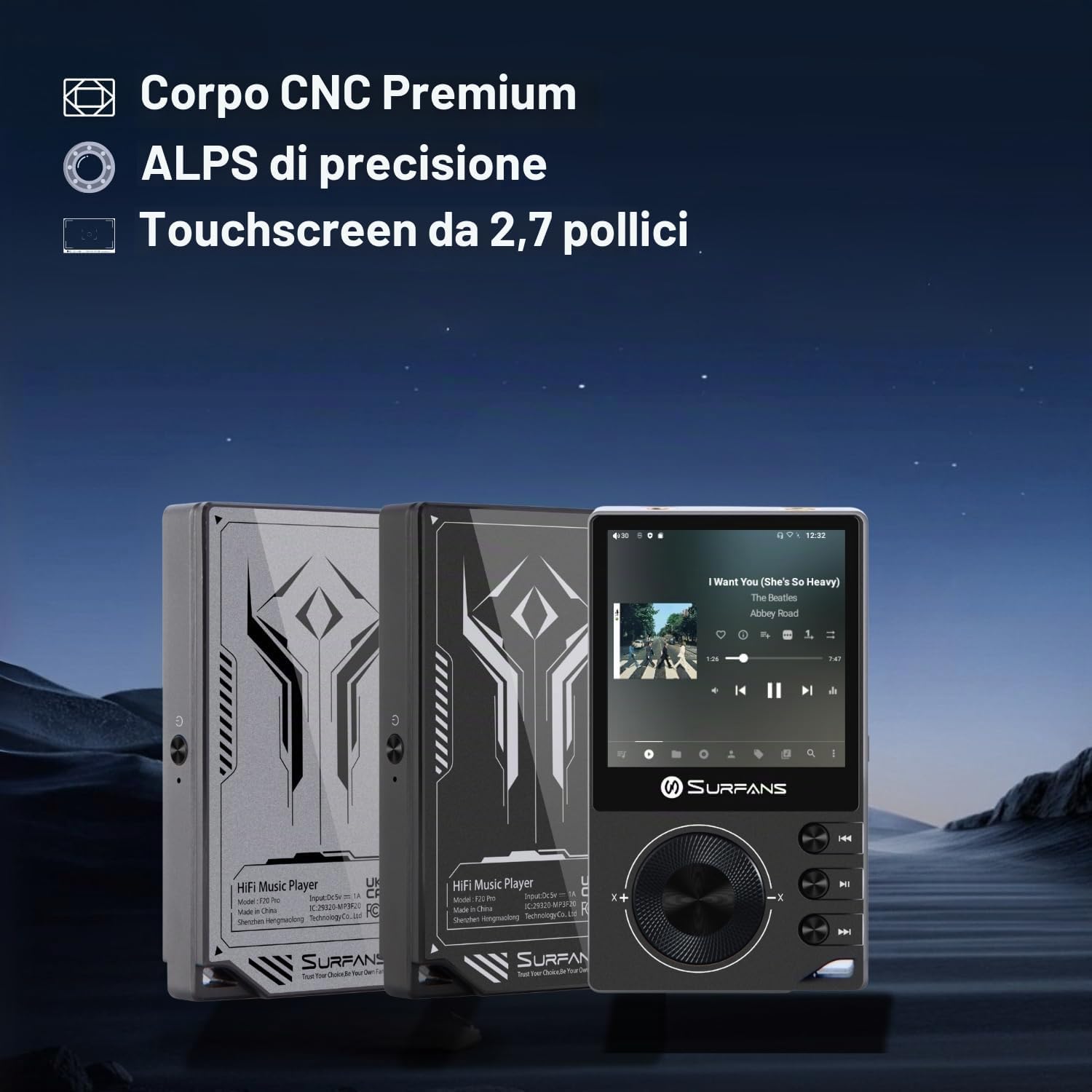
The Surfans F20 Pro features a premium CNC body for durability and aesthetics.
1.2 Laitteen lataaminen
Before first use, fully charge the device. Connect the included USB cable to the player's charging port and to a USB power adapter (not included) or a computer's USB port. The charging indicator will show the charging status. A full charge typically takes approximately 3 hours.
The Surfans F20 Pro features a 1450mAh rechargeable battery, providing up to 15 hours of music playback on a full charge.
1.3 Virran kytkeminen päälle/pois
- Virran kytkeminen: Press and hold the Power button located on the side of the device until the screen lights up.
- Virran sammuttaminen: Press and hold the Power button until a power-off menu appears on the screen. Select "Power Off" to shut down the device. A short press will turn the screen on/off.
1.4 Alkukokoonpano
Upon first power-on, you may be guided through an initial setup process. This typically includes:
- Kielen valinta: Valitse haluamasi kieli.
- Wi-Fi-asetukset: Connect to a Wi-Fi network to enable streaming services and software updates. Navigate to Settings > Network & Internet > Wi-Fi.
- Google-tili: Kirjaudu sisään Google-tililläsi käyttääksesi Google Play Kauppaa ja muita Googlen palveluita.
1.5 Tallennustilan laajentaminen
The Surfans F20 Pro comes with 32GB of internal memory. You can expand the storage up to 1TB using a Micro SD card. Insert the Micro SD card into the designated slot on the device.
2. Käyttöohjeet
2.1 Laite ohiview ja Navigointi
The F20 Pro features a 2.73-inch touchscreen for primary interaction and physical buttons for quick control.

The Surfans F20 Pro features a touchscreen interface for easy navigation and access to various applications.
- Kosketusnäyttö: Tap, swipe, and pinch to navigate menus, select options, and control playback.
- Fyysiset painikkeet: Use the side buttons for power, volume control, and playback (play/pause, skip tracks). The scroll wheel provides tactile navigation.
2.2 Musiikin toisto
The F20 Pro supports various audio formats including MP3, AAC, FLAC, WAV, and DSD. You can play music stored on the device's internal memory or Micro SD card, or stream from online services.
- Paikallinen toisto: Use the pre-installed music player app to browse and play your local audio files.
- Suoratoisto: Install and use streaming applications like Spotify, Apple Music, Tidal, or YouTube from the Google Play Store.
2.3 Audiolaitteiden liittäminen
The player offers both wired and wireless audio output options.

The F20 Pro features both 3.5mm single-ended and 4.4mm balanced audio output ports for versatile headphone connectivity.
- Langalliset kuulokkeet:
- 3.5 mm:n yksipäinen: Connect standard headphones to the 3.5mm port.
- 4.4 mm tasapainotettu: For enhanced audio quality and power, connect compatible balanced headphones to the 4.4mm port. This port provides 500mW of power.
- Bluetooth-kuulokkeet/kaiuttimet:
- The F20 Pro supports Bluetooth 5.0 with LDAC for high-fidelity wireless audio.
- To pair: Go to Settings > Connected devices > Pair new device. Ensure your Bluetooth device is in pairing mode.

The F20 Pro supports Bluetooth 5.0 with LDAC for high-quality wireless audio streaming.
This video demonstrates the process of pairing a Bluetooth device with a music player. The steps shown are generally applicable to the Surfans F20 Pro.
2.4 Wi-Fi-yhteys
The device supports dual-band Wi-Fi (2.4GHz and 5GHz) for fast downloads and smooth streaming.

The Surfans F20 Pro supports dual-band Wi-Fi for reliable internet connection and streaming.
- To connect: Go to Settings > Network & Internet > Wi-Fi. Select your network and enter the password.
- Once connected, you can use pre-installed or downloaded streaming apps.
2.5 Liittäminen tietokoneeseen
You can connect the F20 Pro to a computer via USB to transfer files or use it as a USB DAC.
This video illustrates how to easily connect a music player to a PC for file transfer or other functions. The process is similar for the Surfans F20 Pro.
- Liitä soitin tietokoneeseen USB-kaapelilla.
- On the player, swipe down from the top of the screen to access notifications. Tap on the USB connection notification and select "File transfer" or "USB DAC" mode as needed.
3. Huolto
3.1 Laitteen puhdistaminen
To keep your F20 Pro in optimal condition:
- Use a soft, dry, lint-free cloth to wipe the screen and body.
- Avoid using abrasive cleaners, solvents, or aerosol sprays, which can damage the finish.
- Älä altista laitetta liialliselle kosteudelle.
3.2 Akun hoito
Akun käyttöiän ja suorituskyvyn maksimoimiseksi:
- Vältä äärimmäisiä lämpötiloja.
- Älä jätä laitetta täysin tyhjäksi pitkiksi ajoiksi.
- Pitkäaikaissailytystä varten lataa akku noin 50 %:iin ja säilytä viileässä ja kuivassa paikassa.
3.3 Ohjelmistopäivitykset
The F20 Pro runs on Android 12. Periodically check for software updates to ensure the best performance and access to new features. Connect to Wi-Fi and go to Settings > System > System update.
4. Vianmääritys
4.1 Laite ei käynnisty
- Varmista, että akku on ladattu. Liitä laite laturiin vähintään 30 minuutiksi.
- Try pressing and holding the Power button for 10-15 seconds to force a restart.
4.2 Ei ääntä
- Check headphone connections (3.5mm or 4.4mm). Ensure they are fully inserted.
- Verify volume levels on the device and any connected Bluetooth audio devices.
- Jos käytät Bluetoothia, varmista, että laite on paritettu ja yhdistetty oikein.
- Test with different headphones or speakers to rule out a faulty audio accessory.
4.3 Wi-Fi or Bluetooth Connection Issues
- Varmista, että Wi-Fi tai Bluetooth on käytössä asetuksissa.
- Restart the F20 Pro and your router/Bluetooth device.
- Unohda verkko/laite asetuksista ja yritä muodostaa yhteys uudelleen.
- Varmista, että olet Wi-Fi-verkon tai Bluetooth-laitteen kantaman sisällä.
4.4 Hidas suorituskyky tai sovellusten kaatumiset
While the F20 Pro has an Octa-Core processor and 3GB RAM, some apps or heavy multitasking might affect performance.
- Sulje käyttämättömät taustasovellukset.
- Clear app caches (Settings > Apps > [App Name] > Storage & cache > Clear cache).
- Varmista, että laitteen ohjelmisto on ajan tasalla.
- If issues persist, consider a factory reset (Settings > System > Reset options > Erase all data), but back up your data first.
5. Tekniset tiedot
Below are the key technical specifications for the Surfans F20 Pro Music Player:
| Ominaisuus | Yksityiskohta |
|---|---|
| Mallin nimi | F20 Pro |
| Merkki | Surfans |
| Käyttöjärjestelmä | Android 12 |
| Prosessori | Kahdeksanytiminen |
| RAM | 3GB |
| Sisäinen tallennustila | 32GB |
| Laajennettava tallennustila | Jopa 1 Tt Micro SD -kortin kautta |
| DAC | Dual ESS9018 |
| Korkean resoluution äänen tuki | DSD512 |
| Yhteydet | AUX, Bluetooth 5.0 (LDAC), USB, Dual-Band Wi-Fi (2.4GHz & 5GHz) |
| Näytön koko | 2.73 tuumaa |
| Näyttötekniikka | Kosketusnäyttö |
| Tuetut äänimuodot | MP3, AAC, FLAC, WAV, DSD |
| Tasapainotettu lähtö | 4.4mm (500mW) |
| Akun kapasiteetti | 1450 mAh |
| Akun kesto | Jopa 15 tuntia musiikin toistoa |

The Surfans F20 Pro features dual ESS9018 DACs for superior audio decoding.

Internal audio architecture showing dual DACs and multi-stage amplifier design for both single-ended and balanced outputs.
6. Takuu ja tuki
For warranty information and technical support, please refer to the documentation provided with your purchase or contact the seller directly. The seller for this product is SurfansAudio.
Säilytä ostokuittisi mahdollisten takuuvaatimusten varalta.


