
1. Johdanto
This manual provides detailed instructions for the safe and efficient use of your Surfans F20 Pro Android Hi-Res Music Player. Please read this manual thoroughly before operating the device and retain it for future reference.
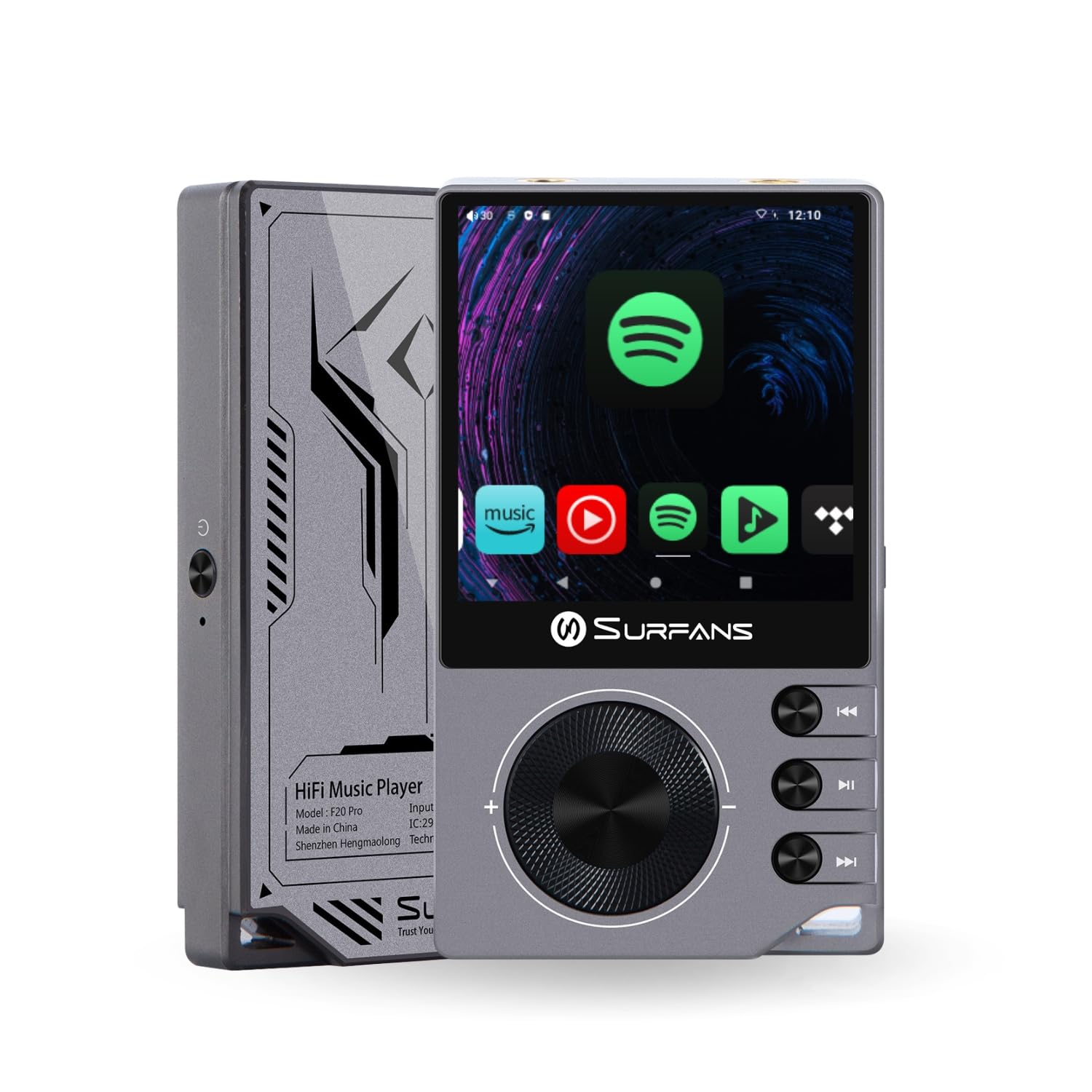
The Surfans F20 Pro Hi-Res Music Player, showcasing its compact design and touchscreen interface.
2. Pakkauksen sisältö
Varmista, että pakkauksessa on kaikki tarvittavat osat:
- Surfans F20 Pro Hi-Res Music Player
- C-tyypin USB-kaapeli
- 32 GB MicroSD Memory Card (pre-installed or separate)
- Suojakotelo
- Käyttöopas (tämä asiakirja)
3. Laite loppuview
Familiarize yourself with the physical components and ports of your F20 Pro player.

Edessä ja takana view of the Surfans F20 Pro, highlighting its robust CNC metal chassis and button layout.
3.1. Tärkeimmät ominaisuudet
- Dual ESS9018Q2M DACs: For high-fidelity audio processing.
- Octa-Core Android 12 System: Enables streaming app compatibility and smooth operation.
- 3.5mm Single-Ended & 4.4mm Balanced Outputs: Versatile headphone connectivity.
- Bluetooth 5.0 ja LDAC: High-quality wireless audio transmission.
- Dual-Band Wi-Fi (2.4GHz & 5GHz): For stable internet connectivity.
- Laajennettava tallennustila: Supports up to 1TB via MicroSD card.
- 2.7 tuuman kosketusnäyttö: Intuitiivinen käyttöliittymä.
4. Asennus
4.1. Laitteen lataaminen
Before first use, fully charge the F20 Pro. Connect the included USB Type-C cable to the device's charging port and a compatible USB power adapter (not included) or computer USB port. The charging indicator will show the charging status.
4.2. MicroSD-kortin asettaminen
The F20 Pro supports MicroSD cards up to 1TB for expanded storage. Locate the MicroSD card slot on the side of the device. Gently insert the card until it clicks into place. To remove, push the card in again until it springs out.
4.3. Ensimmäinen käynnistys
Press and hold the power button until the screen illuminates. Follow the on-screen prompts to complete the initial setup, including language selection and Wi-Fi connection.
4.4. Wi-Fi-yhteyden muodostaminen
Navigoi kohteeseen Asetukset > Verkko ja internet > Wi-Fi. Select your desired network and enter the password if prompted. The F20 Pro supports both 2.4GHz and 5GHz Wi-Fi bands.

The Surfans F20 Pro demonstrating its dual-band Wi-Fi capability for fast and stable connections.
4.5. Bluetooth-pariliitos
Bluetooth-kuulokkeiden tai -kaiuttimien yhdistäminen:
- Varmista, että Bluetooth-laitteesi on pariliitostilassa.
- On the F20 Pro, go to Asetukset > Yhdistetyt laitteet > Yhdistä uusi laite.
- Select your device from the list and confirm pairing.

An illustration of the Bluetooth 5.0 chip, indicating support for high-resolution wireless audio codecs like LDAC.
5. Laitteen käyttö
5.1. Perusnavigointi
The F20 Pro features a 2.7-inch touchscreen for navigation. Swipe to scroll, tap to select, and use the physical buttons for quick controls:
- Virtapainike: Virta päälle/pois, näyttö päälle/pois.
- Äänenvoimakkuuspyörä: Säätää äänenvoimakkuutta.
- Toiston ohjauspainikkeet: Toista/tauko, Seuraava kappale, Edellinen kappale.
5.2. Musiikin toisto
The F20 Pro supports various audio formats including DSD512, 192kHz/24bit, FLAC, WAV, WMA, M4A, MP3, MP2, and AAC.
5.2.1. Paikallinen Files
Siirrä musiikkia files to the device's internal storage or MicroSD card via USB connection to a computer. Use the pre-installed music player application to browse and play your library.
5.2.2. Suoratoistosovellukset
The Android 12 operating system allows installation of streaming apps like Spotify, Apple Music, Tidal, or YouTube. Connect to Wi-Fi and download apps from the Google Play Store or other compatible sources.

The Surfans F20 Pro's screen showing various streaming application icons, demonstrating its Android capabilities.
5.3. Kuulokeliitännät
The device offers both single-ended and balanced audio outputs.
- 3.5 mm:n yksipäinen lähtö: Standard headphone jack (125mW/32Ω).
- 4.4mm tasapainotettu lähtö: For enhanced audio performance with compatible headphones (500mW/32Ω).

Lähikuva view of the 3.5mm single-ended and 4.4mm balanced audio output ports on the Surfans F20 Pro.
6. Huolto
6.1. Puhdistus
Use a soft, dry, lint-free cloth to clean the device. Avoid using abrasive cleaners or solvents, which may damage the surface.
6.2. Ohjelmistopäivitykset
Periodically check for software updates to ensure optimal performance and access to new features. Updates can typically be found in Asetukset > Järjestelmä > Järjestelmäpäivitys.
6.3. Akun hoito
Akun käyttöiän pidentämiseksi vältä laitteen usein tapahtuvaa täydellistä purkamista. Säilytä laitetta viileässä ja kuivassa paikassa, kun sitä ei käytetä pitkään aikaan.

Sisäinen view of battery cells, representing the long-lasting battery capacity of the F20 Pro.
7. Vianmääritys
If you encounter issues with your F20 Pro, refer to the following common problems and solutions:
| Ongelma | Mahdollinen syy | Ratkaisu |
|---|---|---|
| Laite ei käynnisty | Akun varaus vähissä; Järjestelmän kaatuminen | Charge the device; Press and hold the power button for 10-15 seconds to force restart. |
| Ei äänilähtöä | Volume too low; Incorrect output selected; Faulty headphones | Increase volume; Check headphone connection; Test with different headphones. |
| Ei voi muodostaa yhteyttä Wi-Fi-verkkoon | Väärä salasana; Kantaman ulkopuolella; Reititinongelma | Verify password; Move closer to router; Restart router. |
| Slow performance/App crashes | Liikaa sovelluksia käynnissä; Tallennustila vähissä; Vanhentunut ohjelmisto | Close background apps; Free up storage; Check for system updates. |
8. Tekniset tiedot
Detailed technical specifications for the Surfans F20 Pro:
| Ominaisuus | Yksityiskohta |
|---|---|
| Merkki | Surfans |
| Mallin nimi | F20 PRO |
| DAC-sirut | Dual ESS9018Q2M |
| Op-Amps | Dual OPA1612 |
| Käyttöjärjestelmä | Android 12 |
| RAM | 3GB |
| Sisäinen tallennustila | 32GB |
| Laajennettava tallennustila | Jopa 1 Tt MicroSD-kortin kautta |
| Näytön koko | 2.73 tuumaa |
| Yhteydet | Aux, Bluetooth 5.0 (LDAC), USB Type-C, Wi-Fi (2.4GHz & 5GHz) |
| Äänilähdöt | 3.5mm Single-Ended (125mW/32Ω), 4.4mm Balanced (500mW/32Ω) |
| Tuetut äänimuodot | DSD512, 192kHz/24bit, FLAC, WAV, WMA, M4A, MP3, MP2, AAC |
| Väri | Harmaa |

An illustration of the dual ESS9018K2M DAC chips, central to the F20 Pro's high-resolution audio capabilities.
9. Takuutiedot
The Surfans F20 Pro comes with a 1 vuoden takuu ostopäivästä lukien. Tämä takuu kattaa valmistusvirheet ja työn laadun normaalissa käytössä. Se ei kata väärinkäytöstä, onnettomuuksista, luvattomista muutoksista tai normaalista kulumisesta aiheutuneita vahinkoja. Säilytä ostokuitti takuuvaatimuksia varten.
10. Asiakastuki
For further assistance, technical support, or warranty inquiries, please contact Surfans customer service through the official website or your retailer. You may also find additional resources and FAQs online.