
Johdanto
This manual provides comprehensive instructions for the installation, operation, and maintenance of your Hodozzy 1 DIN Car Stereo. This unit features a 10.1-inch rotatable touchscreen, wireless CarPlay and Android Auto compatibility, MirrorLink, Bluetooth connectivity, FM/RDS radio, customizable EQ settings, multiple interface options including USB and AUX, rear camera input, and steering wheel control support. Please read this manual thoroughly before using the product to ensure proper function and safety.
Tuotteen ominaisuudet ohiview
- 10.1-inch Rotatable Touchscreen: The display can be adjusted horizontally and vertically, and moved left or right for optimal viewkulmat.
- Langaton CarPlay ja Android Auto: Integroi älypuhelimesi saumattomasti navigointia, musiikkia, puheluita ja paljon muuta varten.
- MirrorLink Support: Wired connection for mirroring your smartphone screen.
- Bluetooth-yhteys: Handsfree-puhelut ja langaton äänen suoratoisto.
- FM/RDS-radio: Access your favorite radio stations with real-time information display.
- Äänen taajuuskorjaimen mukauttaminen: Built-in equalizer settings to tailor your audio experience.
- Useita käyttöliittymiä: Includes USB ports for charging and data transfer, AUX audio input, and TF card slot for media playback.
- Takakameran tulo: Supports connection to a reversing camera for enhanced safety during parking.
- Ohjauspyörän hallinta: Yhteensopiva olemassa olevien ohjauspyörän säätimien kanssa kätevää käyttöä varten.
- Värikäs taustavalo: Enhances visibility and usability in various lighting conditions.

Image: The Hodozzy 1 DIN Car Stereo displaying its wireless CarPlay and Android Auto capabilities, along with MirrorLink functionality via USB connection.

Image: Illustration of the screen rotation and vertical/horizontal movement design of the 10.1-inch display, allowing for flexible viewkulmat.
Asennus ja asennus
Pakkauksen sisältö
Ennen asennusta varmista, että pakkauksessa on kaikki tarvittavat osat:
- Autostereoyksikkö
- Virtakaapeli
- Sarvikaapeli
- D-BUS-kaapeli
- Asennuskannattimet
- Mikrofoni (MIC)
- Käyttöopas
- 12LED Rear Camera (if included in your specific model)

Image: Diagram showing the dimensions of the car stereo unit, the rear panel connections, and the included accessories such as power cables, mounting brackets, microphone, user manual, and rear camera.
Johdotusohjeet
Refer to the wiring diagram provided in the package and below for correct connections. Incorrect wiring can damage the unit or your vehicle's electrical system. If you are unsure, consult a professional installer.
- Sähköjohto: Liitä ajoneuvosi virtalähteeseen (ACC, B+, GND).
- Äänitorven kaapeli: Connect to the vehicle's horn system if applicable.
- D-BUS: For specific data communication.
- Radioantenni: Liitä autosi radioantenni.
- CVBSIN: Video input for rear camera.
- SW (ohjauspyörän säätö): Liitä ajoneuvosi ohjauspyörän ohjausjohtoihin.
- USB-liitäntä: Liitä ulkoiset USB-laitteet.
- L-OUT/R-OUT: Audio output for external amppelastajia.
- MIC: Ulkoisen mikrofonin sisääntulo.
Tärkeää: Varmista, että ajoneuvon akku on irrotettu ennen asennuksen aloittamista oikosulkujen välttämiseksi.
Käyttöohjeet
Screen Rotation and Movement
The 10.1-inch display can be rotated and moved to optimize your viewing experience. Gently adjust the screen to your desired horizontal or vertical orientation. The screen can also be moved left and right to reduce glare or improve accessibility.
Langaton CarPlay ja Android Auto
To use Wireless CarPlay or Android Auto, ensure your smartphone's Bluetooth and Wi-Fi are enabled. On the car stereo, select the CarPlay or Android Auto icon. Follow the on-screen prompts to pair your device. Once connected, you can access navigation, music, messages, and other compatible apps directly from the car stereo display.

Image: The car stereo screen displaying the user interface for Wireless CarPlay and Android Auto, showing various app icons.
MirrorLink (Wired Connection)
For MirrorLink functionality, connect your smartphone to the car stereo using a USB cable. Select the MirrorLink option on the stereo. Your phone's screen will be mirrored on the car stereo display, allowing you to interact with your phone's content.
Bluetooth-toiminta
Bluetooth-laitteen yhdistäminen pariksi:
- Siirry auton stereoiden Bluetooth-valikkoon.
- Ota Bluetooth käyttöön älypuhelimellasi ja etsi saatavilla olevia laitteita.
- Select "Hodozzy" (or similar device name) from the list on your phone.
- Vahvista pariliitoskoodi molemmissa laitteissa.
Kun pariliitos on muodostettu, voit soittaa handsfree-puheluita ja suoratoistaa ääntä langattomasti.

Image: The car stereo displaying the Bluetooth calling interface, an equalizer adjustment screen, and the FM/RDS radio interface with station information.
FM/RDS-radio
Select the "Radio" icon to access the FM/RDS tuner. You can scan for stations, save presets, and view RDS information (if available) such as station name and song title.
Äänen taajuuskorjain (EQ)
Navigate to the "EQ" settings to customize the audio output. Adjust bass, treble, and other frequency bands to match your preferences. Pre-set equalizer modes may also be available.
USB, AUX, and TF Card Media Playback
Insert a USB drive, TF card, or connect an external audio device via the AUX input. The stereo will automatically detect the media and allow you to browse and play audio or video files.

Kuva: Lähikuva view of the car stereo's multiple interface options, highlighting the TF card slot, AUX input, and dual USB ports for connectivity and media playback.
Takakameran tulo
When a compatible rear camera is connected and the vehicle is shifted into reverse gear, the car stereo display will automatically switch to the rear camera view, providing a clear view ajoneuvosi takana olevasta alueesta turvallisempaa pysäköintiä ja ohjausta varten.
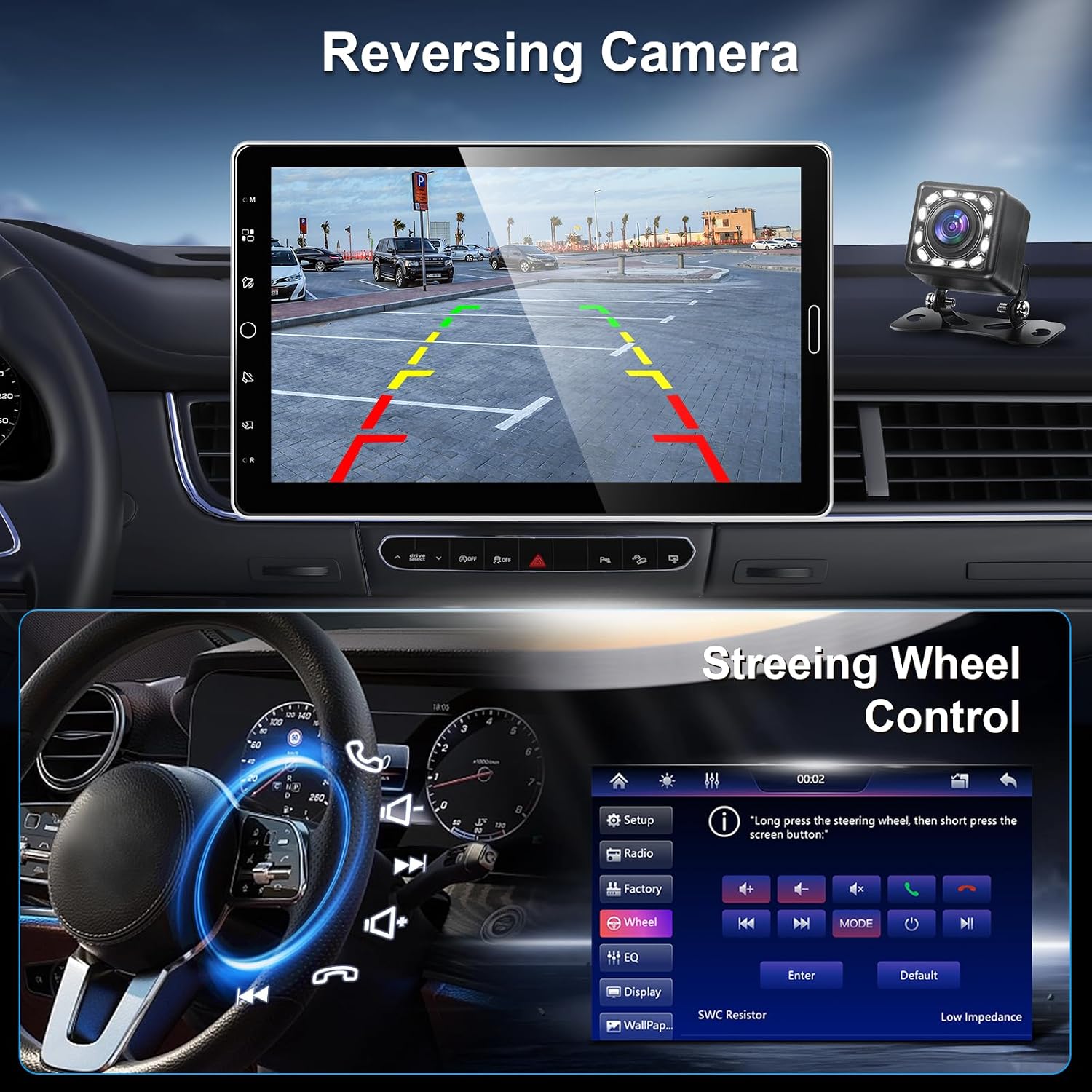
Image: The car stereo screen displaying the rear camera feed with parking guidelines, alongside an interface for configuring steering wheel controls.
Ohjauspyörän ohjaus
If your vehicle supports steering wheel controls and they are correctly wired, you can program the stereo to respond to these controls. This allows you to adjust volume, change tracks, or answer calls without taking your hands off the steering wheel.
Huolto
- Näytön puhdistus: Pyyhi kosketusnäyttö varovasti pehmeällä, nukkaamattomalla liinalla. Älä käytä hankaavia puhdistusaineita tai liuottimia.
- Yleinen puhdistus: Pidä laite puhtaana pölystä ja roskista. Puhdista runko kuivalla liinalla.
- Ohjelmistopäivitykset: Tarkista valmistajalta website periodically for any available software or firmware updates to ensure optimal performance and compatibility.
Vianetsintä
| Ongelma | Mahdollinen syy | Ratkaisu |
|---|---|---|
| Yksikkö ei käynnisty. | Väärä johdotus; Palanut sulake; Ajoneuvon akun ongelma. | Check power cable connections (ACC, B+, GND). Inspect vehicle fuses. Verify vehicle battery charge. |
| Ei ääntä. | Äänenvoimakkuus liian alhainen; Mykistys aktivoitu; Kaiuttimen johdotusongelma. | Lisää äänenvoimakkuutta. Tarkista, onko mykistys käytössä. Tarkista kaiuttimien liitännät. |
| Bluetooth-yhteyttä ei muodosteta. | Bluetooth not enabled on device/stereo; Device out of range; Interference. | Ensure Bluetooth is on for both devices. Move devices closer. Try re-pairing. |
| CarPlay/Android Auto not starting. | Incorrect phone settings; USB cable issue (for wired); Wi-Fi/Bluetooth issue (for wireless). | Check phone settings for CarPlay/Android Auto. Use a certified USB cable. Ensure Wi-Fi/Bluetooth are active and stable. |
| Takakamera ei näy. | Camera not connected; Incorrect wiring; Reverse trigger not detected. | Verify camera connection to CVBSIN. Check reverse trigger wire. Ensure camera is powered. |
Tekniset tiedot
| Ominaisuus | Yksityiskohta |
|---|---|
| Merkki | hodozzy |
| Mallinumero | A4077 |
| Näytön koko | 10.1 tuumaa |
| DIN koko | 1 DIN |
| Yhteystekniikka | Bluetooth, USB, AUX, TF-kortti |
| Erikoisominaisuudet | Wireless CarPlay, Android Auto, MirrorLink, FM/RDS Radio, EQ, Steering Wheel Control, Rear Camera Input |
| Mukana olevat komponentit | Car Stereo, User Manual, Power Cable, Horn Cable, D-BUS Cable, Mounting Brackets, Microphone, 12LED Rear Camera |
| Alkuperä | Kiina |
Takuu ja tuki
This product comes with a standard warranty. Please refer to the warranty card included in your package for specific terms and conditions. For technical support, troubleshooting assistance, or warranty claims, please contact Hodozzy customer service through the retailer where you purchased the product or visit the official Hodozzy websivustolta yhteystiedot.
Huomautus: Luvattomat muutokset tai virheellinen asennus voivat mitätöidä takuun.