
AOC XL2-211
AOC XL2-211 Smart Projector User Manual
Model: XL2-211
Johdanto
This manual provides essential information for the safe and efficient operation of your AOC XL2-211 Smart Projector. Please read it thoroughly before using the device and retain it for future reference.
The AOC XL2-211 is a portable 1080P Full HD smart projector featuring Android 12.0, Wi-Fi 6, Bluetooth 5.0, and a fully enclosed optical engine for dust protection. It offers a large projection screen size from 40 to 250 inches, integrated stereo speakers, and versatile connectivity options.
Turvallisuustiedot
Noudata seuraavia turvaohjeita projektorin vahingoittumisen estämiseksi ja käyttäjän turvallisuuden varmistamiseksi:
- Älä katso suoraan projektorin linssiin, kunamp on päällä.
- Varmista riittävä ilmanvaihto ylikuumenemisen estämiseksi. Älä tuki tuuletusaukkoja.
- Käytä ainoastaan projektorin mukana toimitettua virtalähdettä.
- Pidä projektori poissa vedestä tai muista nesteistä.
- Älä yritä purkaa tai korjata projektoria itse. Ota yhteyttä pätevään huoltohenkilöstöön.
- Aseta projektori vakaalle, tasaiselle alustalle.
Pakkauksen sisältö
Varmista, että pakkauksessa on kaikki tarvittavat osat:
- AOC XL2-211 Smart Projector
- Virtakaapeli
- HDMI kaapeli
- Kaukosäädin
- Käyttöopas (tämä asiakirja)

Image: The AOC XL2-211 Smart Projector and its included accessories, including the power cable, HDMI cable, and remote control.
Tuote loppuview
Projektorin komponentit
Familiarize yourself with the main components of your projector:
- Projektorilinssi: Lähettää kuvan.
- Virtapainike: Kytkee projektorin päälle/pois.
- Focus Sensor: Used for automatic focus adjustment.
- Ilmanvaihtoritilät: Varmista riittävä ilmanvaihto jäähdytykseen.
- Tuloportit: HDMI, USB, Audio Out (3.5mm jack).
- Tehon syöttö: Liitetään virtajohtoon.

Kuva: Takaosa view of the AOC XL2-211 projector, highlighting the HDMI, USB, and power input ports.
Asennus
1. Virtaliitäntä
- Liitä virtajohto projektorin virransyöttöporttiin.
- Kytke virtajohdon toinen pää pistorasiaan.
2. Alkuperäinen sijoittelu
- Place the projector on a stable surface or mount it on a tripod (not included).
- Varmista, että projektiopinta on tasainen eikä siinä ole esteitä.
- The projector supports flexible placement, including tabletop and tripod mounting.
3. Kytkeminen päälle/pois
- Paina projektorin tai kaukosäätimen virtapainiketta kytkeäksesi sen päälle.
- Katkaise virta painamalla virtapainiketta pitkään.
4. Tarkennus ja trapetsivääristymän korjaus
The projector features automatic focus and keystone correction for a clear, rectangular image.
- Automaattinen tarkennus: The projector will automatically adjust the focus upon startup or movement. You can enable/disable this in the settings.
- Automaattinen Keystone-korjaus: The projector automatically corrects image distortion caused by angled projection. This can also be adjusted in settings.
- Manuaalinen säätö: For fine-tuning, manual focus and keystone correction options are available in the Projection Settings menu.

Image: The AOC XL2-211 projector displaying its intelligent auto-focus and keystone correction capabilities, ensuring a clear image from various angles.
Käyttöohjeet
1. Navigointi ja käyttöliittymä
The projector runs on Android 12.0, providing a user-friendly interface. Use the remote control to navigate through menus and select options.
- Aloitusnäyttö: Access installed applications, settings, and media sources.
- Asetukset-valikko: Adjust network, Bluetooth, projection, language, and other system settings.
2. Yhteysasetukset
The projector offers multiple ways to connect and display content:
Wireless Connectivity (Wi-Fi 6 & Bluetooth 5.0)
- Wi-Fi: Yhdistä kotiverkkoosi käyttääksesi internetiä ja suoratoistoa. Siirry kohtaan Asetukset > Langaton yhdistääksesi.
- Näytön peilaus: Wirelessly cast content from your smartphone (iPhone, Android) or tablet. Ensure both devices are on the same Wi-Fi network.
- Bluetooth: Connect external Bluetooth speakers or headphones for enhanced audio. Go to Asetukset > Bluetooth laitteiden parittamiseen.

Image: The AOC XL2-211 projector displaying content mirrored from a smartphone, illustrating seamless wireless sharing.
Langallinen yhteys
- HDMI: Connect devices like laptops, gaming consoles, or TV decoders using an HDMI cable.
- USB: Liitä USB-asemat toistaaksesi mediaa files suoraan.
- Äänilähtö (3.5 mm:n liitin): Liitä langalliset kuulokkeet tai ulkoiset kaiuttimet.
Kuva: Yksityiskohtainen view of the AOC XL2-211 projector's input panel, showing HDMI, USB, and audio ports for versatile connections.
3. Median toisto
The projector supports various media formats and streaming applications.
- Suoratoistosovellukset: Access pre-installed apps like Netflix, Hulu, Disney+, Prime Video, and YouTube.
- Paikallinen media: Play videos, photos, and music from a connected USB drive.
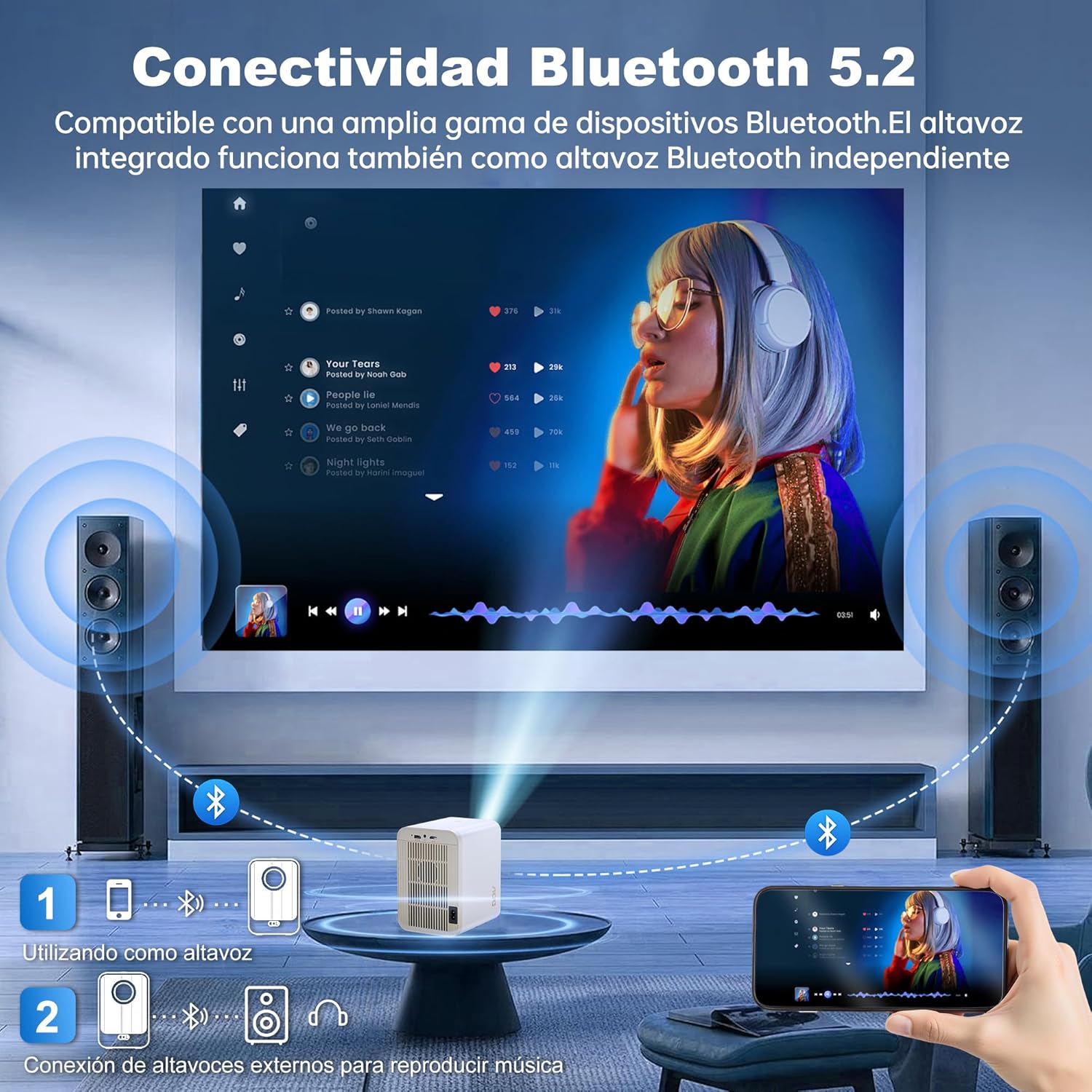
Image: The AOC XL2-211 projector displaying its smart interface with various streaming applications, ready for entertainment.
4. Äänilähtö
The projector includes built-in 2x12W stereo speakers. For alternative audio experiences:
- Connect Bluetooth speakers or headphones via Asetukset > Bluetooth.
- Use the 3.5mm audio jack for wired external speakers or headphones.

Image: The AOC XL2-211 projector wirelessly connected to external Bluetooth speakers, demonstrating enhanced audio capabilities.
Huolto
1. Projektorin puhdistaminen
- Varmista, että projektori on sammutettu ja irrotettu pistorasiasta ennen puhdistamista.
- Pyyhi projektorin ulkopinta pehmeällä, kuivalla liinalla.
- For the lens, use a lens cleaning cloth and specialized lens cleaning solution. Do not use abrasive materials.
- The fully enclosed optical engine minimizes dust accumulation, but regular external cleaning is recommended.
2. Varastointi
- Säilytä projektoria viileässä, kuivassa paikassa, poissa suorasta auringonvalosta ja äärimmäisistä lämpötiloista.
- If storing for an extended period, place it back in its original packaging or a protective case.
Vianetsintä
| Ongelma | Mahdollinen syy | Ratkaisu |
|---|---|---|
| Kuvaa ei näy | Virtajohto irti, väärä tulolähde, linssinsuojus paikallaan. | Check power connection, select correct input source (HDMI/USB), remove lens cap. |
| Kuva on epäselvä | Epätarkka, virheellinen trapetsivääristymän korjaus. | Allow auto-focus to adjust, or manually adjust focus/keystone in Projection Settings. |
| Ei ääntä | Volume too low, external audio device not connected/paired, internal speakers disabled. | Increase volume, ensure Bluetooth device is paired or wired audio is connected, check audio settings. |
| Ei voi muodostaa yhteyttä Wi-Fi-/Bluetooth-verkkoon | Incorrect password, device too far, interference. | Verify password, move device closer to router/projector, restart devices. |
| Kaukosäädin ei toimi | Low batteries, obstruction. | Replace batteries, ensure no obstruction between remote and projector. |
Tekniset tiedot
| Ominaisuus | Yksityiskohta |
|---|---|
| Merkki | AOC |
| Mallinumero | XL2-211 |
| Alkuperäinen resoluutio | 1280 x 800 pikseliä |
| Tuettu resoluutio | 1920 x 1080 pikseliä (Full HD) |
| Kirkkaus | 12000 lumenia (300 ANSI) |
| Kontrastisuhde | 12000:1 |
| Käyttöjärjestelmä | Android 12.0 |
| RAM | 1GB |
| ROM | 8GB |
| Langaton yhteys | Wi-Fi 6 (2.4G/5G), Bluetooth 5.0 |
| Tuloportit | HDMI, USB, Audio (3.5mm jack), TF Card |
| Lähtöportit | Audio (3.5mm jack) |
| Kaiutin | Built-in 2x12W Stereo Speakers |
| Projektion koko | 40-250 tuumaa |
| Muototekijä | Kannettava |
| Tuotteen mitat | 19 x 21 x 26 cm |
| Tuotteen paino | 750 grammaa |
| Virrankulutus | 40 wattia |
Takuu ja tuki
Takuutiedot
Your AOC XL2-211 Smart Projector comes with a yhden vuoden takuu ostopäivästä lukien, kattaa valmistusvirheet. Säilytä ostokuitti takuuvaatimuksia varten.
Asiakastuki
For technical assistance, troubleshooting, or warranty inquiries, please contact AOC customer support. Refer to the official AOC websivustolta ajantasaisimmat yhteystiedot.
Verkkoresurssit: Vieraile osoitteessa AOC Brand Store lisätietoja tuotteesta ja usein kysytyistä kysymyksistä.
Esittelyvideo
Watch this official video for a visual guide on setting up and using your AOC XL2-211 Smart Projector, including unboxing, connectivity, and key features.
Video: An official demonstration of the AOC XL2-211 Smart Projector, showcasing its unboxing, setup, and various functionalities.