
Johdanto
Welcome to the user manual for your Samsung QN65QN990FFXZA 65 Inch QN990F Neo QLED 8K TV. This document provides essential information for setting up, operating, maintaining, and troubleshooting your television. Please read these instructions carefully to ensure proper use and to maximize your viewkokemusta.

Kuva 1: Etuosa view of the Samsung QN65QN990FFXZA 65 Inch QN990F Neo QLED 8K TV.
Asennus
1. Pakkauksen purkaminen ja sijoittaminen
- Poista televisio ja kaikki lisävarusteet varovasti pakkauksesta.
- Place the TV on a stable, flat surface or mount it on a wall using a VESA 400mm x 300mm compatible mount. Ensure adequate ventilation around the TV.
2. Langattoman One Connect -boksin kytkeminen
The Samsung QN990F utilizes a Wireless One Connect Box to manage all external connections, reducing cable clutter around the TV. Connect all your devices to this box.

Figure 2: Wireless One Connect Box for streamlined connections.
3. Ulkoisten laitteiden liitännät
Connect your external devices (e.g., Blu-ray player, game console, soundbar) to the Wireless One Connect Box using the appropriate ports.

Figure 3: Detailed diagram of the Wireless One Connect Box ports.
- Kaapeli/ANT: Liitetään antenni- tai kaapelitelevisiosignaaleihin.
- USB-A: Vakiomuotoinen suorakaiteen muotoinen portti virransyöttöä tai mediatoistoa varten.
- EX-linkki: Samsungin huoltoportti ulkoista ohjausta ja diagnostiikkaa varten.
- HDMI 1, 2, 4: Transmits high-definition video and audio from external devices. Supports 8K@120Hz / 4K@240Hz for Gaming.
- HDMI 3 (eARC): Enhanced audio return for high-quality sound and advanced formats. Supports 8K@120Hz / 4K@240Hz for Gaming.
- Ethernet: Kiinteä internetyhteys suoratoistoa, päivityksiä ja älykkäitä ominaisuuksia varten.
- Äänilähtö (optinen): Toimittaa korkealaatuista digitaalista ääntä soundbar-kaiuttimiin tai vastaanottimiin.
- Teho: Connects the power cable to the Wireless One Connect Box.
4. Virtaliitäntä
- Connect the power cable to the Wireless One Connect Box, then plug it into a wall outlet.
- Ensure the TV is properly connected to the One Connect Box.
Käyttöohjeet
1. Alkuasetukset ja älykkäät ominaisuudet
Upon first power-on, the TV will guide you through the initial setup process, including network connection, channel scanning, and smart feature configuration. The TV runs on the One UI Tizen operating system.
- NQ8 AI Gen3 -prosessori: This processor optimizes content for enhanced viewing.
- 8K AI -skaalaus Pro: Lower resolution content is automatically upscaled to near 8K clarity.

Figure 4: 8K AI Upscaling Pro enhances content to near 8K resolution.
2. Kuvanlaadun parannukset
- Häikäisytön: This technology minimizes reflections on the screen, improving visibility in bright environments.
- Neo Quantum HDR 8K+: Experience enhanced contrast and color depth.
- Kvanttimatriisiteknologia Pro: Precise light control for detailed images.
- Ultra Viewkulma: Maintains picture quality from various viewasentoja.
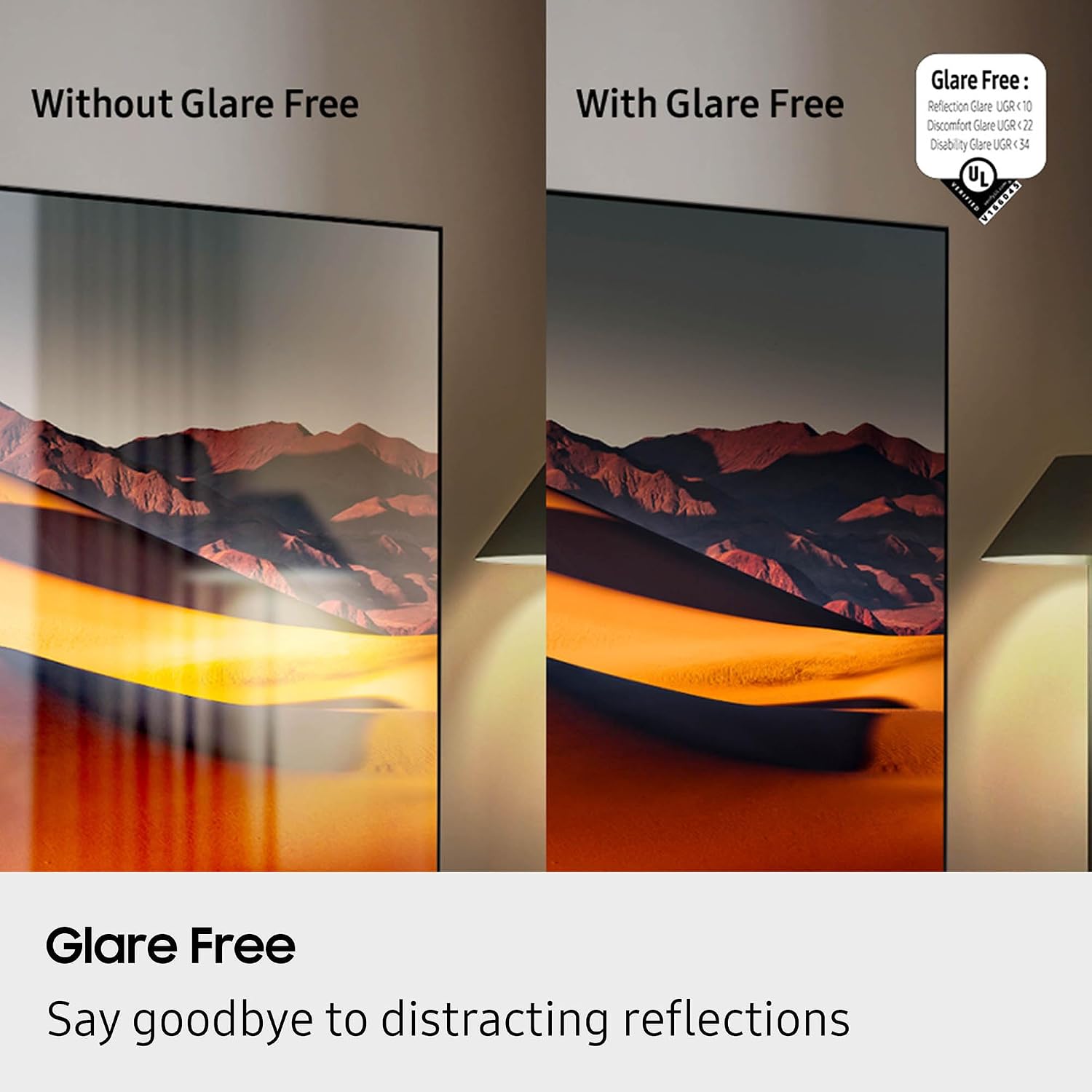
Figure 5: Glare Free technology reduces screen reflections.
3. Ääniominaisuudet
- Dolby Atmos: Tarjoaa mukaansatempaavan, moniulotteisen äänen.
- Q-sinfonia: Synchronizes TV speakers with compatible Samsung soundbars for a richer audio experience.
- AVA Pro (Active Voice Amplifier Pro): Parantaa dialogin selkeyttä meluisissa ympäristöissä.
- Adaptiivinen ääni Pro: Optimoi äänen sisällön ja huoneakustiikan perusteella.
- 6.2.4-kanavainen surround-ääni: Integrated speaker system for a comprehensive audio field.
4. Peliominaisuudet
- Pelikeskus: Access cloud gaming services and console games directly from your TV.
- 120Hz Refresh Rate & VRR FreeSync Premium Pro: Varmistaa sujuvan ja repeämättömän pelaamisen.

Figure 6: Samsung Gaming Hub for integrated gaming experience.
5. Virallinen tuotevideo
Video 1: An informational overview of the Samsung QN990F Series TV features and capabilities.
Huolto
1. Näytön puhdistus
To clean your TV screen, use a soft, lint-free cloth. For stubborn marks, a non-ammonia and alcohol-free screen cleaning solution is recommended.

Figure 7: Recommended screen cleaning solution for display screens.
- Apply cleaning solution to the cloth, not directly to the screen.
- Pyyhi näyttö varovasti pölyn, lian ja sormenjälkien poistamiseksi.
- Vältä voimakkaita kemikaaleja tai hankaavia materiaaleja.
2. Ohjelmistopäivitykset
Periodically check for and install software updates to ensure optimal performance and access to the latest features. This can usually be done through the TV's settings menu under "Support" or "Software Update."
Vianetsintä
If you encounter issues with your TV, refer to the following common troubleshooting steps.
No Power / No Picture
- Ensure the power cable is securely connected to both the One Connect Box and the wall outlet.
- Verify the One Connect Box is properly connected to the TV.
- Tarkista, toimiiko pistorasia kytkemällä siihen toinen laite.
- Paina kaukosäätimen tai itse television virtapainiketta.
Ei ääntä
- Check the volume level on both the TV and any connected audio devices (soundbar, receiver).
- Varmista, ettei televisio ole mykistetty.
- Verify audio cables are correctly connected to the One Connect Box.
- If using external audio, check the audio output settings on the TV.
Huono kuvanlaatu
- Check the source resolution. While 8K AI Upscaling Pro enhances content, native 8K content will provide the best quality.
- Säädä kuva-asetuksia (kirkkaus, kontrasti, terävyys, väri) television valikossa.
- Ensure all video cables are securely connected and not damaged.
- If using an antenna, check antenna positioning and signal strength.
Kaukosäädin ei toimi
- Vaihda kaukosäätimen paristot.
- Varmista, ettei kaukosäätimen ja television välissä ole esteitä.
- Try re-pairing the remote control with the TV if it's a Bluetooth remote (refer to the TV's on-screen guide for pairing instructions).
Tekniset tiedot
| Ominaisuus | Erittely |
|---|---|
| Mallin nimi | QN65QN990FFXZA |
| Näytön koko | 65 tuumaa |
| Näyttötekniikka | Neo QLED |
| Resoluutio | 8K |
| Päivitystaajuus | 120 Hz |
| Prosessori | NQ8 AI Gen3 prosessori |
| Skaalaustekniikka | 8K AI-skaalaus Pro |
| Käyttöjärjestelmä | Yksi käyttöliittymä Tizen |
| Yhteydet | HDMI x 5, USB-A x 3, USB-C x 1, Ethernet, RF, Wireless One Connect, Bluetooth, Wi-Fi |
| Äänilähtötila | Surround (6.2.4 channel) |
| Integrated Surround Sound | Dolby Atmos |
| Tuettu HDR-muotoa | HDR10+, HDR10 |
| Tuotteen mitat (S x L x K) | 10.5" S x 56.4" L x 35.1" K |
| Tuotteen paino | 66.6 puntaa |
| VESA-kiinnitysstandardi | 400mm x 300mm |
| Väri | Grafiitti musta |
Takuu ja tuki
Valmistajan takuu
Your Samsung QN65QN990FFXZA 65 Inch QN990F Neo QLED 8K TV comes with a full 1-year manufacturer's warranty. This warranty covers defects in materials and workmanship under normal use. Please retain your proof of purchase for warranty claims.
Asiakastuki
For technical assistance, troubleshooting beyond this manual, or warranty service, please contact Samsung Customer Support. Refer to the official Samsung website or your product registration documents for the most current contact information.
- Online-tuki: Käy Samsungin virallisella tukisivustolla websivusto.
- Puhelintuki: Contact the Samsung customer service hotline.