
1. Johdanto
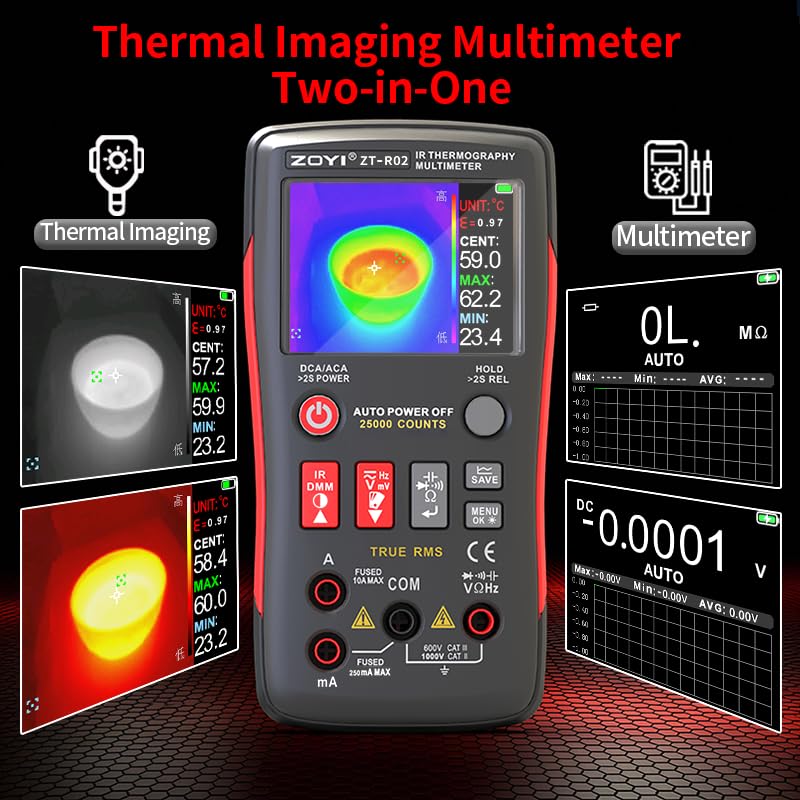
The ZOYI R02 is a versatile 2-in-1 device combining a high-resolution infrared thermal imaging camera with a 25,000-count True RMS digital multimeter. This compact tool is designed for professionals and hobbyists requiring precise measurements and thermal analysis in various applications, including electrical diagnostics, automotive inspections, HVAC, and home maintenance. It features a 2.4-inch color TFT display, adjustable thermal imaging settings, and comprehensive multimeter functions.
Kuva 1.1: The ZOYI R02 device, showcasing its dual thermal imaging and multimeter capabilities.
2. Turvallisuustiedot
Noudata aina seuraavia turvaohjeita henkilövahinkojen ja laitteen vaurioitumisen välttämiseksi:
- Read this manual thoroughly before operation.
- Do not use the device if it appears damaged or operates abnormally.
- Ensure proper input connections for multimeter measurements to avoid electrical shock or damage.
- Älä ylitä minkään toiminnon enimmäistulotehoa.
- Exercise caution when working with live circuits.
- Pidä laite poissa vedestä ja äärilämpötiloista.
- Käytä vain määritettyjä varaosia ja lisävarusteita.
- Do not attempt to modify or repair the device yourself. Refer to qualified service personnel.
3. Tuote ohiview
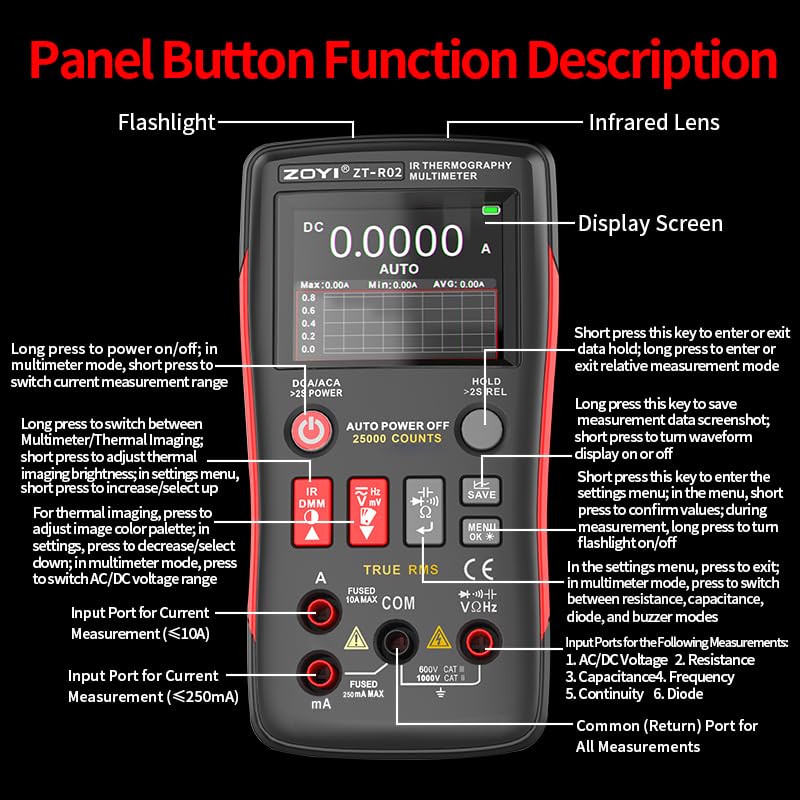
Familiarize yourself with the components and controls of your ZOYI R02 device.
Kuva 3.1: Front panel and button descriptions of the ZOYI R02.
Tärkeimmät komponentit:
- Infrapuna linssi: Captures thermal images.
- Taskulamppu: Tarjoaa valaistuksen pimeässä ympäristössä.
- Näyttö: 2.4-inch TFT touch LCD for viewing thermal images, multimeter readings, and menu options.
- Virtapainike: Long press to power on/off. Short press in multimeter mode to switch current measurement range.
- IR DMM Button: Long press to switch between Multimeter and Thermal Imaging modes. Short press to adjust thermal imaging brightness or select options in settings.
- Hz/mV Button: For frequency and millivolt measurements.
- Ω/Capacitance Button: For resistance and capacitance measurements.
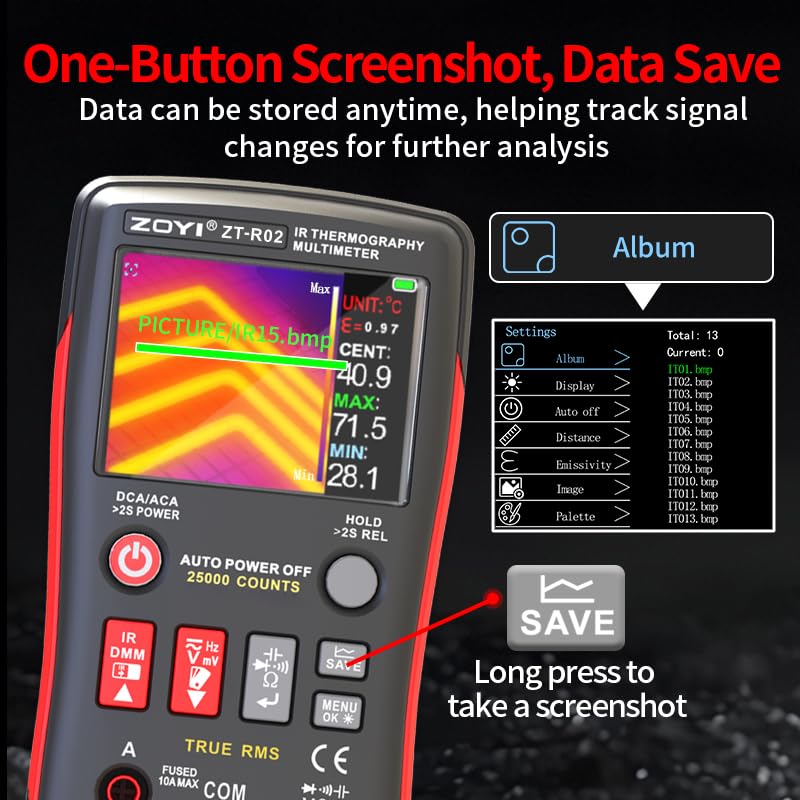
- TALLENNA-painike: Long press to save measurement data screenshot. Short press to turn waveform display on or off.
- MENU/OK-painike: Short press to enter settings menu. Long press to turn flashlight on/off.
- HOLD/>2S REL Button: Short press to save data hold. Long press to enter or exit relative measurement mode.
- Input Ports (A, mA, COM, VΩHz): For connecting test leads for various electrical measurements.
4. Asennus
4.1 Laitteen lataaminen
The ZOYI R02 is equipped with a built-in 2000mAh lithium battery. To charge the device, connect it to a standard USB power source using the provided Type-C cable. The charging port is located on the side of the device, accessible by opening the protective cover.
Kuva 4.1: The Type-C charging port and adjustable auto power-off duration feature.
4.2 Virran kytkeminen päälle/pois
Käynnistä laite painamalla pitkään Virtapainike. To power off, long press the Virtapainike uudelleen.
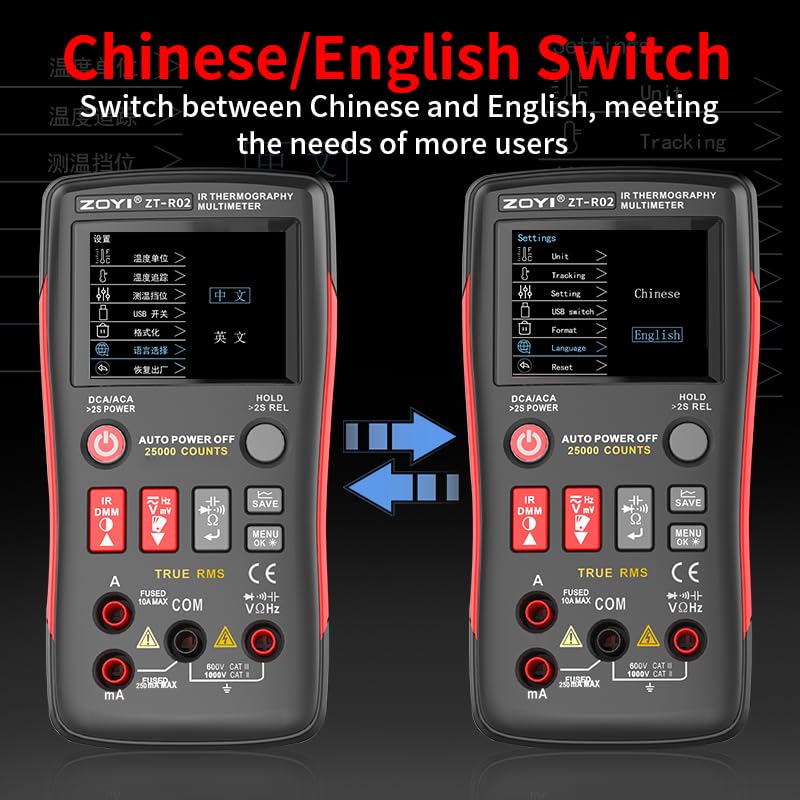
4.3 Kieliasetukset
The device supports multiple languages. To change the language, navigate to the settings menu using the MENU/OK-painike and select the desired language option (e.g., English or Chinese).
Kuva 4.2: Switching between Chinese and English language settings on the ZOYI R02.
5. Käyttöohjeet
5.1 Tilan vaihtaminen
Paina pitkään IR DMM Button to toggle between Thermal Imaging mode and Multimeter mode.
5.2 Lämpökuvaustila
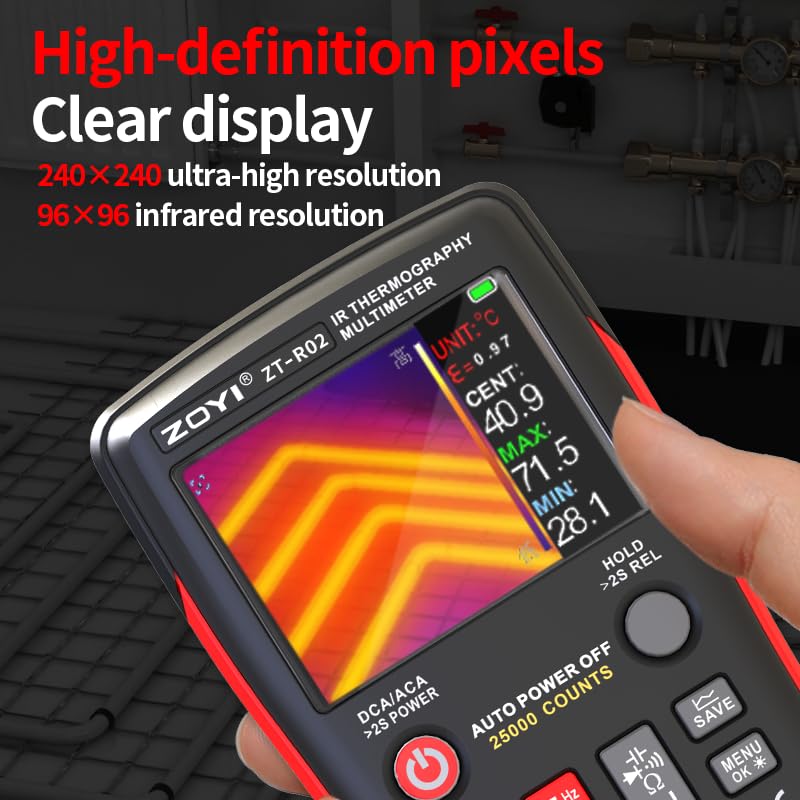
In Thermal Imaging mode, the device displays a thermal image with temperature readings. The 240x240 imaging resolution provides clear visualization of temperature variations.
Kuva 5.1: High-definition thermal display showing temperature distribution.
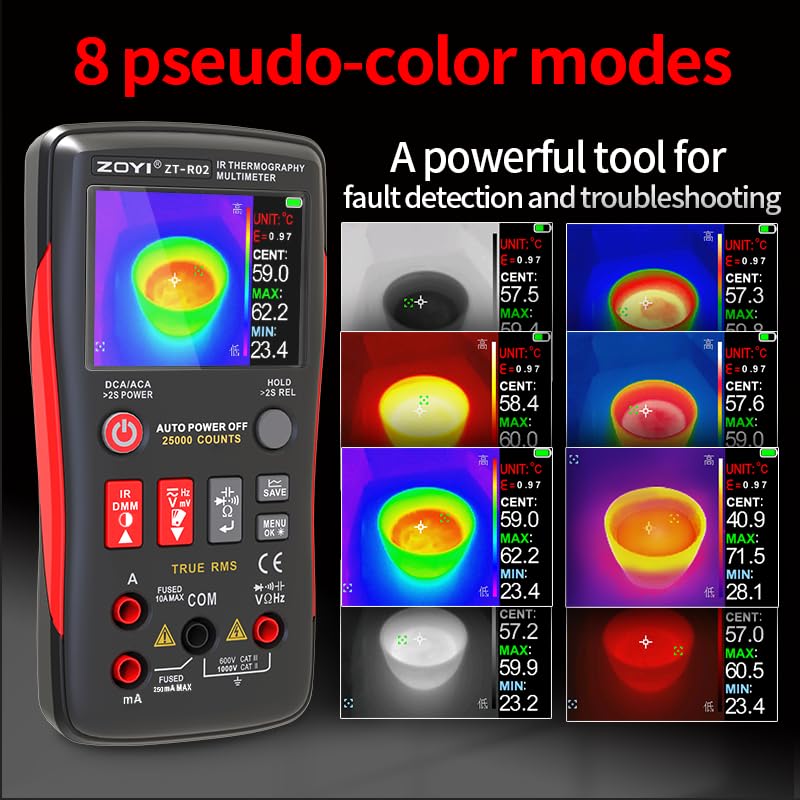
5.2.1 Thermal Palettes
The ZOYI R02 offers 8 pseudo-color modes (thermal palettes) to visualize temperature differences. These palettes help in identifying hot spots and cold spots more effectively. You can select different palettes from the settings menu.
Kuva 5.2: Examples of the 8 pseudo-color thermal palettes available on the ZOYI R02.
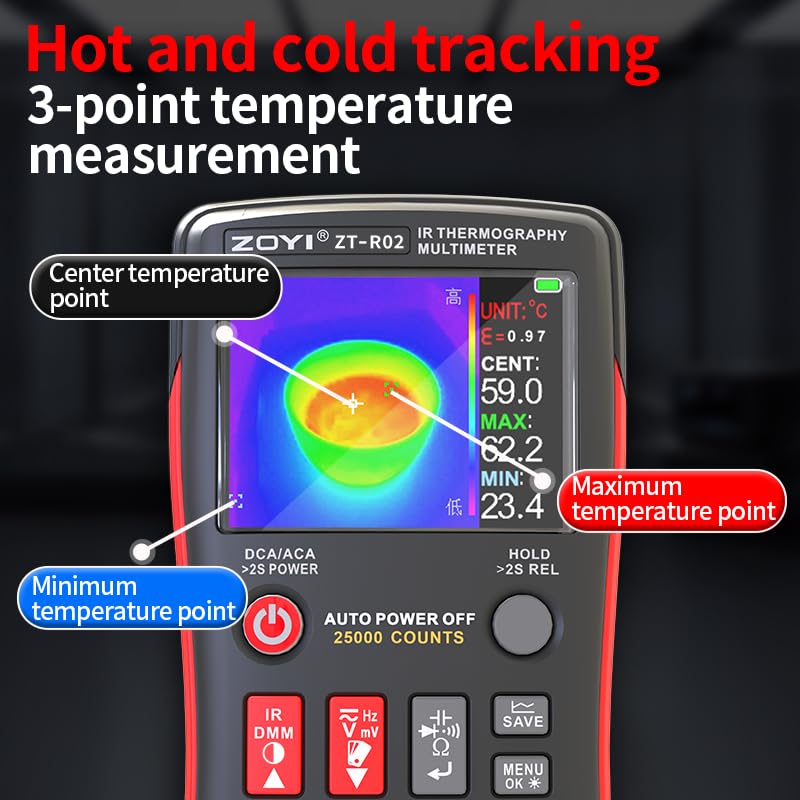
5.2.2 Hot and Cold Tracking
The device features 3-point temperature measurement, automatically tracking the maximum, minimum, and center temperature points on the screen. This helps in quickly identifying critical temperature areas.
Kuva 5.3: Display showing automatic tracking of maximum, minimum, and center temperature points.
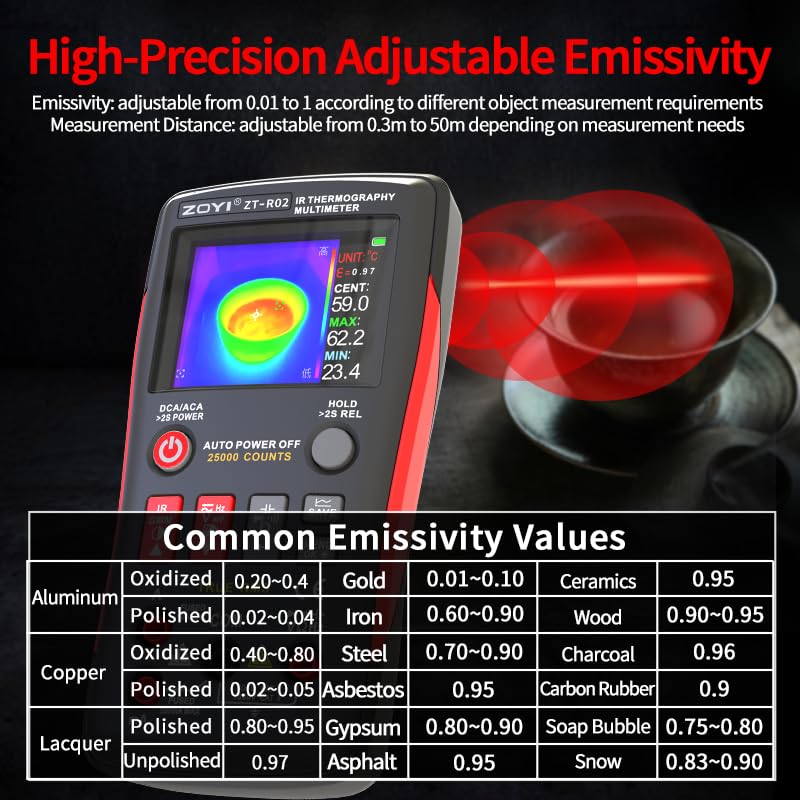
5.2.3 Säädettävä emissiivisyys
Emissivity is a crucial parameter for accurate temperature measurement. The ZOYI R02 allows for high-precision adjustable emissivity from 0.01 to 1.00, depending on the object being measured. Adjust this setting in the menu for optimal accuracy.
Kuva 5.4: Emissivity adjustment interface and a table of common emissivity values for various materials.
5.2.4 Screenshot and Data Saving
To capture a screenshot of the thermal image, long press the SAVE-painike. The device stores these images internally, allowing you to track signal changes and analyze data later. Saved images can be viewed in the Album section of the menu.
Kuva 5.5: Instructions for taking a screenshot and accessing the image album.
5.2.5 Sovellus Esimample: Underfloor Heating Pipe Leak Detection
The thermal imaging capability is highly effective for detecting hidden issues suchs as leaks in underfloor heating pipes. Follow these steps for detection:
- Pressurize each circuit of the underfloor heating system.
- Use thermal imaging to locate the leaking circuit or inject hot water.
- Check the underfloor heating condition after fifteen minutes.
- Use thermal imaging along the circuit to find abnormal points or leak points.
Kuva 5.6: Visual guide for detecting underfloor heating pipe leaks using the ZOYI R02.
5.3 Yleismittaritila
In Multimeter mode, the ZOYI R02 functions as a 25,000-count True RMS digital multimeter, capable of measuring various electrical parameters.
Kuva 5.7: The ZOYI R02 displaying both thermal imaging and multimeter functions.
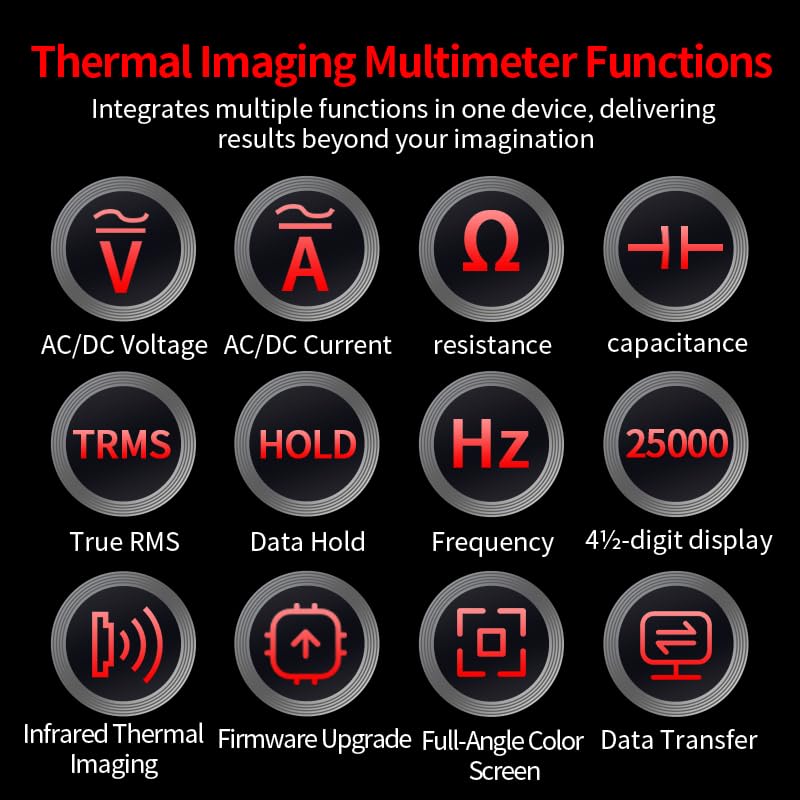
5.3.1 Yleismittarin toiminnot
The device supports the following measurements:
- AC/DC Voitage (V)
- AC/DC-virta (A)
- Vastus (Ω)
- Kapasitanssi (F)
- Taajuus (Hz)
- Jatkuvuus
- Dioditesti
- True RMS (TRMS) for accurate non-sinusoidal waveform measurements.
Kuva 5.8: Icons representing the various functions of the ZOYI R02 multimeter.
Connect the test leads to the appropriate input ports (A, mA, COM, VΩHz) based on the desired measurement. Refer to the "Panel Button Function Description" (Figure 3.1) for port details.
6. Huolto
6.1 Puhdistus
Käytä laitteen puhdistamiseen pehmeää, damp liinaa. Älä käytä hankaavia puhdistusaineita tai liuottimia. Varmista, että laite on sammutettu ja irrotettu kaikista virtalähteistä ennen puhdistamista.
6.2 Akun hoito
To prolong battery life, avoid fully discharging the battery frequently. Charge the device regularly, especially if it will be stored for an extended period. Store the device in a cool, dry place.
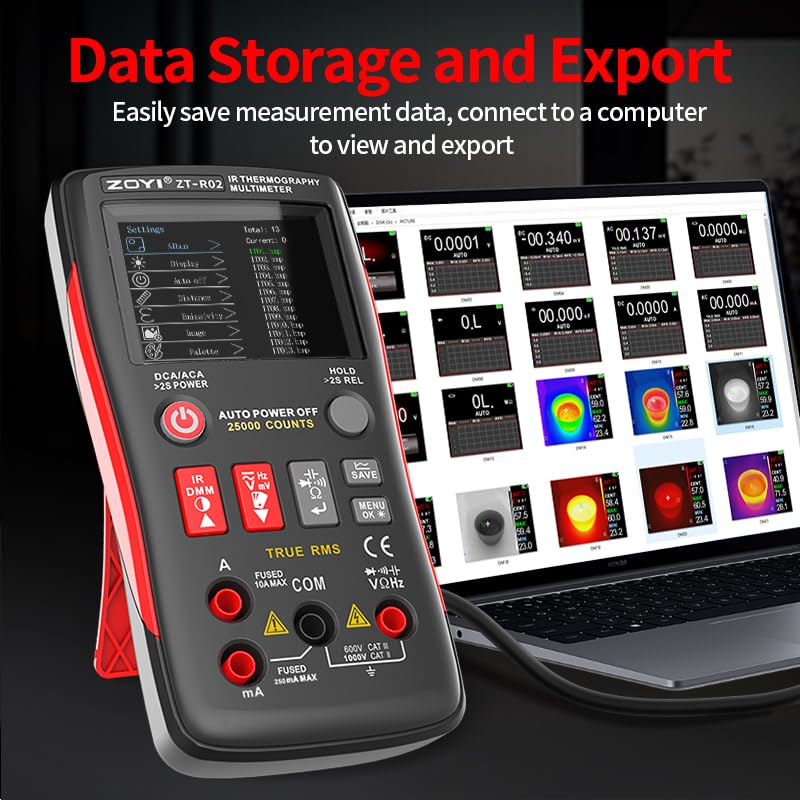
6.3 Tiedon tallennus ja vienti
The ZOYI R02 allows for easy saving of measurement data. To export data, connect the device to a computer using the Type-C USB cable. The device will appear as a removable storage device, allowing you to access and transfer saved images and data files.
Kuva 6.1: Connecting the ZOYI R02 to a computer for data storage and export.
7. Vianmääritys
If you encounter issues with your ZOYI R02, refer to the following common problems and solutions:
- Laite ei käynnisty: Varmista, että akku on ladattu. Liitä Type-C-laturiin ja yritä uudelleen.
- Epätarkat lämpötilalukemat: Check and adjust the emissivity setting for the material being measured (refer to Figure 5.4). Ensure the lens is clean.
- Yleismittarin lukemat ovat virheellisiä: Verify that the test leads are correctly connected to the appropriate input ports for the desired measurement. Check the battery level.
- Näyttö ei reagoi: Try restarting the device by long-pressing the power button. If the issue persists, contact customer support.
- Cannot transfer data to computer: Ensure the Type-C cable is securely connected to both the device and the computer. Check if the device is recognized as a storage device.
8. Tekniset tiedot
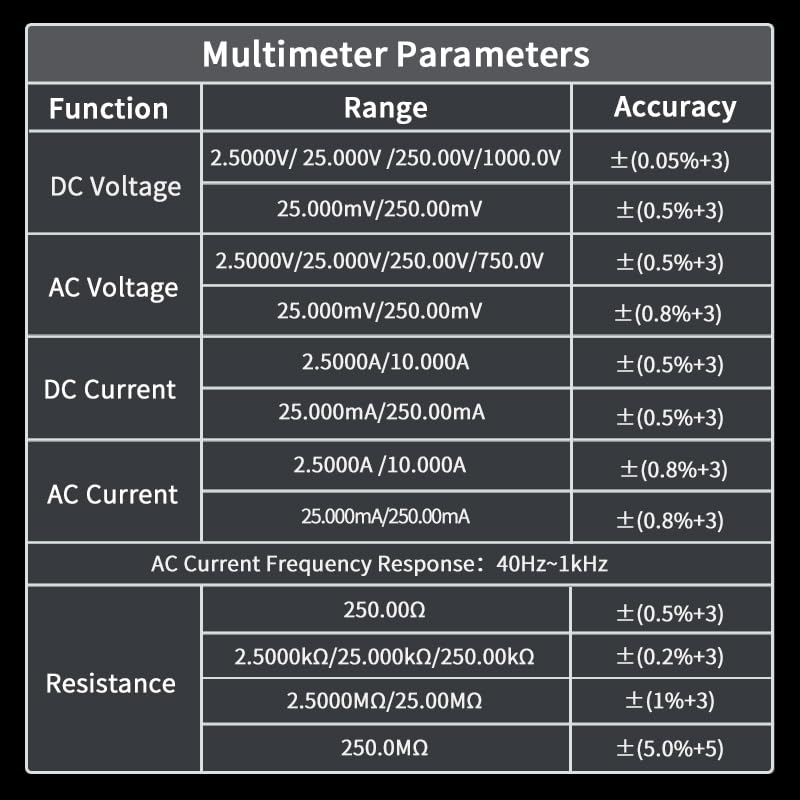
8.1 Yleismittarin parametrit

Kuva 8.1: Multimeter parameters including DC/AC Voltage, DC/AC Current, and Resistance ranges with accuracy.
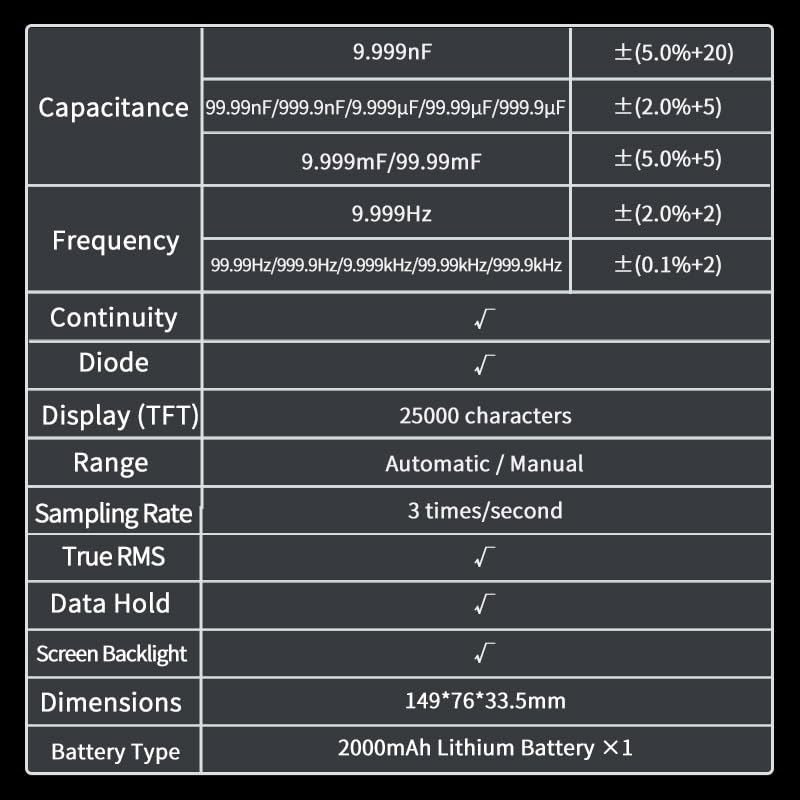
Additional multimeter specifications are detailed below:
| Toiminto | Alue | Tarkkuus |
|---|---|---|
| Kapasitanssi | 9.999nF | ±(5.0 %+20) |
| 99.99nF / 999.9nF / 9.999µF / 99.99µF / 999.9µF | ±(5.0 %+5) | |
| 9.999 mF / 99.99 mF | ±(5.0 %+5) | |
| Taajuus | 9.999 Hz | ±(2.0 %+2) |
| 99.99Hz / 999.9Hz / 9.999kHz / 99.99kHz / 999.9kHz | ±(0.1 %+2) | |
| Jatkuvuus | √ | |
| Diodi | √ | |
| Näyttö (TFT) | 25000 merkkiä | |
| Alue | Automaattinen / Manuaalinen | |
| Sampling korko | 3 kertaa sekunnissa | |
| Todellinen RMS | √ | |
| Tietojen säilytys | √ | |
| Näytön taustavalo | √ | |
| Mitat | 149 * 76 * 33.5 mm | |
| Akun tyyppi | 2000mAh Lithium Battery ×1 |
Kuva 8.2: Additional multimeter parameters and general device specifications.
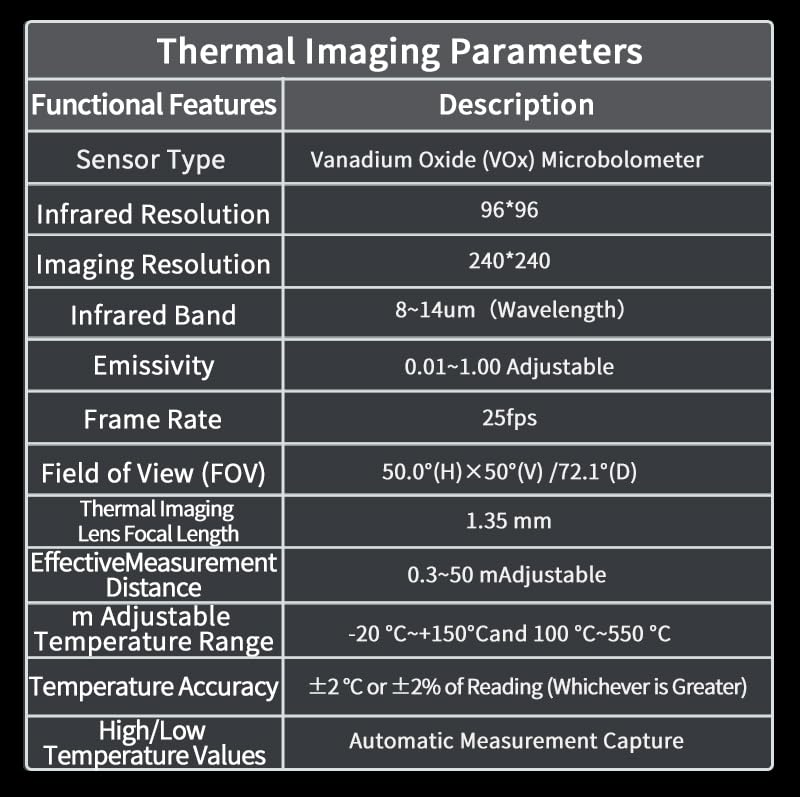
8.2 Lämpökuvausparametrit
| Toiminnalliset ominaisuudet | Kuvaus |
|---|---|
| Anturin tyyppi | Vanadium Oxide (VOx) Microbolometer |
| Infrapuna resoluutio | 96*96 |
| Imaging Resolution | 240*240 |
| Infrapuna nauha | 8~14 um (aallonpituus) |
| emissiokertoimen | 0.01–1.00 Säädettävä |
| Kuvataajuus | 25 fps |
| Kenttä View (FOV) | 50.0°(H)×50°(V) / 72.1°(D) |
| Thermal Imaging Lens Focal Length | 1.35 mm |
| Tehokas mittausetäisyys | 0.3~50 m Adjustable |
| Säädettävä lämpötila-alue | -20 °C~+150 °C and 100 °C~550 °C |
| Lämpötilan tarkkuus | ±2 °C or ±2% of Reading (Whichever is Greater) |
| High/Low Temperature Values | Automatic Measurement Capture |
| Lämpötilan mittauspiste | Keskipiste |
| Lämpötilan mittausalue | 3 Points (Max, Real-time, Min Temperature) |
| Näyttö | 2.4 tuuman TFT |
| Näytön resoluutio | 320*240 |
| Kuvantamistila | Infrapuna |
| Väripaletti | White Hot, Black Hot, Blue, Iron Red, Color, Red Hot, Fusion, Rainbow |
| Contrast & Brightness | Säädettävä |
| Kuvan muoto | bmp |
| Kuvakaappaus Viewing | Tuettu |
| USB-liitäntä | Tyyppi-C |
| Laiteohjelmiston päivitys | Tuettu |
| Virtalähde | 3.6–4.2 V litiumparisto |
| Lataus | USB Interface 5V |
Kuva 8.3: Detailed thermal imaging parameters and specifications.
9. Takuu ja tuki
For warranty information and technical support, please refer to the documentation included with your purchase or visit the official ZOYI websivusto. Säilytä ostokuitti ostotodistuksena takuuvaatimuksia varten.
Valmistaja: ZOYI
Mallinumero: R02