
1. Johdanto
Thank you for choosing the LOEWE Leo Wireless Headphones. These premium headphones are designed to deliver an exceptional audio experience with advanced features such as Hi-Res Audio, adaptive noise cancellation, and real-time voice translation. This manual provides essential information for setting up, operating, and maintaining your headphones to ensure optimal performance and longevity.
2. Pakkauksen sisältö
Ennen käyttöä varmista, että pakkauksessa on kaikki tarvittavat osat:
- LOEWE Leo Wireless Headphones
- USB-C latauskaapeli
- AUX to USB-C Audio Cable
- Nahkainen kantolaukku
- Kova kantolaukku
- Cable Pouch
- Käyttöopas (tämä asiakirja)
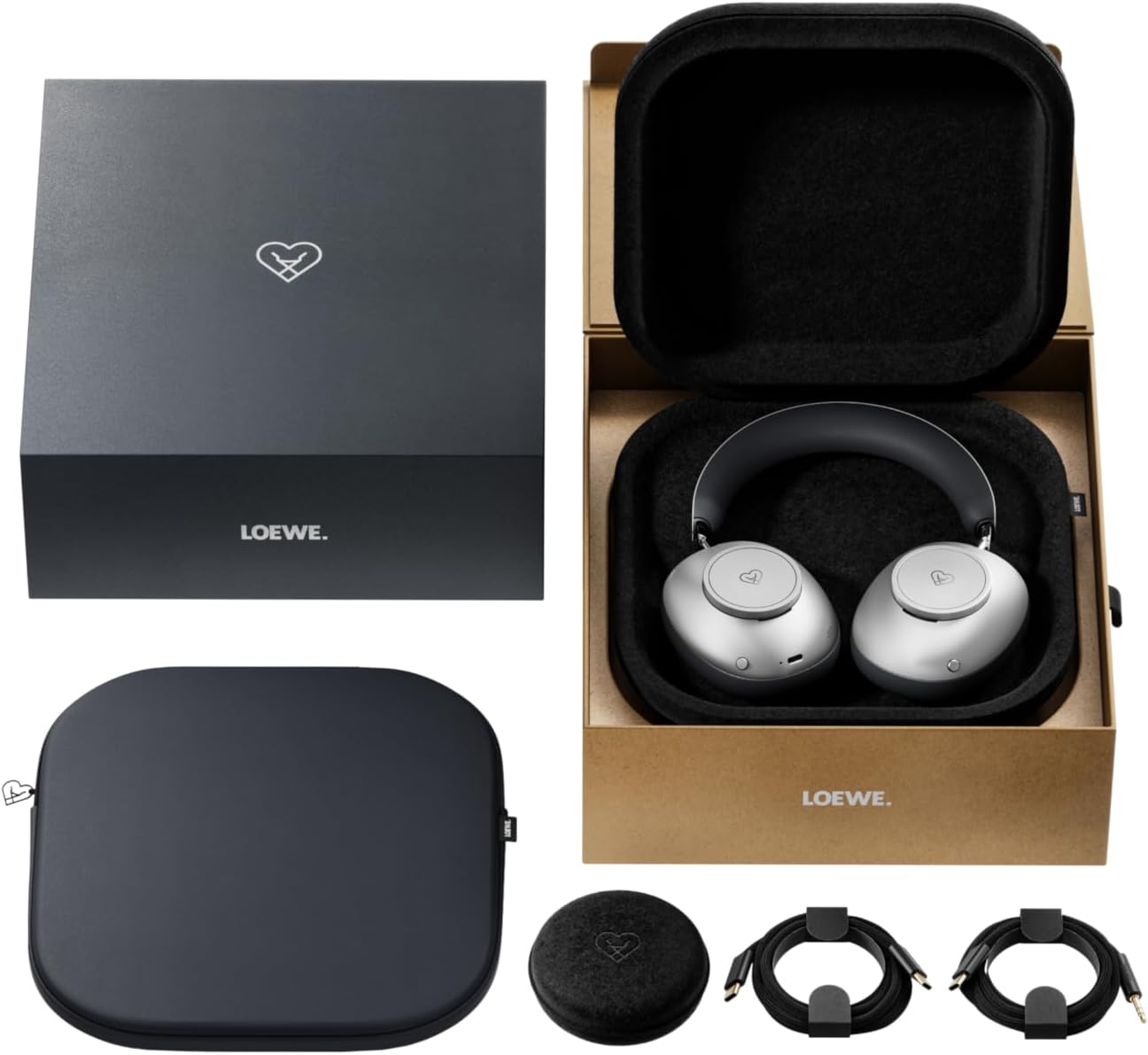
Image: The LOEWE Leo Wireless Headphones package contents, showing the headphones, USB-C cable, AUX cable, leather case, hard case, and cable pouch.
3. Tuote ohiview
Familiarize yourself with the physical components and controls of your LOEWE Leo headphones.

Kuva: Edessä view of the LOEWE Leo Wireless Headphones, showcasing korvakupit ja panta.
3.1. Ohjaimet ja portit
The headphones feature intuitive controls for easy operation:
- Ohjauskiekot: Two precision-crafted rotary wheels for volume adjustment and navigation.
- Toimintopainikkeet: Dedicated buttons for playback control, ANC modes, and voice translation activation.
- USB-C-portti: Lataukseen ja langalliseen ääniliitäntään.
- 3.5 mm liitin: For traditional wired audio connection.

Kuva: Yksityiskohtainen view of the earcup, highlighting the control dial, USB-C port, and 3.5mm audio jack.
4. Aloitus
4.1. Kuulokkeiden lataaminen
Before first use, fully charge your LOEWE Leo headphones. A full charge provides up to 65 hours of continuous playback.
- Liitä mukana toimitettu USB-C-latauskaapeli kuulokkeiden USB-C-porttiin.
- Liitä kaapelin toinen pää yhteensopivaan USB-virtalähteeseen (ei sisälly toimitukseen) tai tietokoneen USB-porttiin.
- Kuulokkeiden LED-merkkivalo näyttää lataustilan. Se sammuu yleensä tai vaihtaa väriä, kun kuulokkeet ovat täyteen latautuneet.
4.2. Virta päälle/pois
- Virran kytkeminen: Paina virtapainiketta ja pidä sitä painettuna noin 3 sekuntia, kunnes LED-merkkivalo syttyy.
- Virran sammuttaminen: Paina virtapainiketta ja pidä sitä painettuna noin 3 sekuntia, kunnes LED-merkkivalo sammuu.
4.3. Bluetooth-pariliitos
The LOEWE Leo headphones utilize Bluetooth Low Energy (BLE) for faster pairing and reduced power consumption.
- Varmista, että kuulokkeista on katkaistu virta.
- Paina virtapainiketta noin 5 sekuntia, kunnes LED-merkkivalo vilkkuu nopeasti osoittaen pariliitostilan.
- Ota Bluetooth käyttöön laitteellasi (älypuhelin, tabletti, tietokone) ja hae käytettävissä olevia laitteita.
- Select "LOEWE Leo" from the list of found devices.
- Kun yhteys on muodostettu, LED-merkkivalo lakkaa vilkkumasta ja pysyy tasaisena sinisenä.
4.4. Langallinen yhteys
For a wired audio experience, use the supplied AUX to USB-C cable.
- Connect the USB-C end of the AUX cable to the headphones.
- Connect the 3.5mm end of the AUX cable to your audio source's 3.5mm jack.
- Kuulokkeet siirtyvät automaattisesti langalliseen tilaan.
5. Kuulokkeiden käyttö
5.1. Äänentoisto ja äänenvoimakkuuden säätö
Use the control dials and action buttons for managing your audio:
- Äänenvoimakkuus ylös/alas: Rotate the designated control dial.
- Toista/tauko: Press the central action button once.
- Seuraava kappale: Double-press the central action button.
- Edellinen kappale: Triple-press the central action button.

Image: Close-up of the earcup's control dial, used for volume and navigation.
5.2. Adaptive Noise Cancellation (ANC)
The LOEWE Leo features advanced adaptive noise cancellation that continuously analyzes your environment and adjusts in real-time.
- ANC:n aktivointi/deaktivointi: Press the dedicated ANC button once.
- Läpinäkyvyystila: Press the ANC button twice to allow ambient sounds to pass through, enhancing situational awareness.

Image: Illustration of the adaptive noise cancellation feature, depicting sound wave management.
5.3. Real-time Voice Translation
Communicate across language barriers with the integrated real-time voice translation feature.
- Ensure your headphones are connected to a device with internet access and the LOEWE companion app installed.
- Activate the translation feature via the dedicated button or the companion app.
- Speak into the headphone's microphone. The translated audio will be played back in real-time.

Image: Earcup detail showing the microphone for voice input and the 'leo' icon, representing the real-time translation function.
5.4. Dolby Atmos and Spatial Audio
Experience immersive sound with Dolby Atmos and spatial audio support. This feature is automatically enabled when compatible content is played through a connected device that supports these audio technologies.
6. Huolto ja hoito
6.1. Puhdistus
- Pyyhi kuulokkeet pehmeällä, kuivalla ja nukkaamattomalla liinalla.
- Älä käytä hankaavia puhdistusaineita, alkoholia tai kemiallisia liuottimia.
- Keep moisture away from openings.
6.2. Akun hoito
- Vältä akun usein toistuvaa täydellistä tyhjentymistä.
- Store the headphones in a cool, dry place when not in use for extended periods.
- The battery is user-replaceable, contributing to the product's longevity.
6.3. Modulaarinen suunnittelu
The LOEWE Leo headphones feature a durable modular design with replaceable components, such as ear cushions and headbands. This design allows for easy replacement of worn parts, extending the product's lifespan.

Image: The modular construction of the LOEWE Leo headphones, showing detachable earcups and headband for maintenance or replacement.
7. Vianmääritys
If you encounter issues with your LOEWE Leo headphones, refer to the following common solutions:
- Ei virtaa: Varmista, että kuulokkeet ovat täyteen ladatut. Liitä ne virtalähteeseen USB-C-kaapelilla.
- Ei ääntä:
- Tarkista äänenvoimakkuus sekä kuulokkeista että yhdistetystä laitteesta.
- Ensure the headphones are properly paired via Bluetooth or the AUX cable is securely connected.
- Kokeile käynnistää sekä kuulokkeet että äänilähdelaite uudelleen.
- Bluetooth-yhteyden katkaisu:
- Ensure the headphones are within the Bluetooth range of your device (typically 10 meters).
- Disable and re-enable Bluetooth on your device, then attempt to re-pair.
- Clear the LOEWE Leo from your device's Bluetooth history and pair again.
- ANC ei toimi tehokkaasti:
- Varmista, että korvakupit istuvat tiiviisti korviesi ympärille. Säädä istuvuutta tarvittaessa.
- Varmista, että ANC on käytössä.
- Voice Translation Issues:
- Check your device's internet connection.
- Ensure the LOEWE companion app is up-to-date and configured correctly.
- Puhu selkeästi ja kohtuullisella vauhdilla.
If problems persist, please contact LOEWE customer support.
8. Tekniset tiedot
| Ominaisuus | Kuvaus |
|---|---|
| Mallin nimi | Leo |
| Mallinumero | 64641J10 |
| Yhteystekniikka | Langaton (Bluetooth), Langallinen |
| Langaton viestintä | Vähän energiaa kuluttava Bluetooth (BLE) |
| Ääniominaisuudet | Hi-Res Audio, Dolby Atmos, Spatial Audio |
| Melunvaimennus | Adaptive Noise Reduction (ANC) |
| Erikoisominaisuudet | Real-time Voice Translation, Modular Design with Replaceable Components |
| Akun kesto | Jopa 65 tuntia (noin) |
| Ohjaustyyppi | Button Control, Rotary Dials |
| Yhteensopivat laitteet | Cellular Phone, Tablet, Computer, Laptop |
| Paino | 3 Kilograms (product weight as listed, may include packaging) |
9. Takuu ja tuki
9.1. Valmistajan takuu
The LOEWE Leo Wireless Headphones come with a 2 vuoden valmistajan takuuTämä takuu kattaa materiaali- ja valmistusvirheet normaalissa käytössä. Säilytä ostokuitti takuuvaatimuksia varten.
For specific terms and conditions of the warranty, please refer to the warranty card included in your product packaging or visit the official LOEWE websivusto.
9.2. Asiakastuki
For technical assistance, troubleshooting, or warranty inquiries, please contact LOEWE customer support through their official websivustolla tai tuotedokumentaatiossa annetuissa yhteystiedoissa.
Verkkoresurssit: Visit the official LOEWE websivusto, josta löydät usein kysyttyjä kysymyksiä, ohjelmistopäivityksiä ja muita tukiresursseja.