
1. Johdanto
Thank you for choosing the Hodozzy Android 15 1-DIN Car Stereo. This device is designed to enhance your in-car entertainment and navigation experience with its advanced features, including a detachable 10-inch screen, wireless CarPlay and Android Auto, Bluetooth 5.0, DSP audio processing, and GPS navigation. This manual provides essential information for proper installation, operation, and maintenance to ensure optimal performance and longevity of your device.
2. Turvallisuustiedot
- Ammattimainen asennussuositus: Auton sähköjärjestelmien monimutkaisuuden vuoksi ammattimaisen asennuksen tekeminen on erittäin suositeltavaa, jotta laite tai ajoneuvo ei vahingoitu.
- Virtalähde: Varmista, että laite on kytketty 12 V:n tasavirtalähteeseen, jossa on negatiivinen maadoitus. Väärä äänenvoimakkuustagvoi aiheuttaa vahinkoa.
- Johdotus: Carefully follow all wiring diagrams. Incorrect wiring can lead to malfunctions or electrical hazards.
- Ajoturvallisuus: Älä käytä laitetta tavalla, joka häiritsee ajamista. Aseta aina liikenneturvallisuus etusijalle.
- Lämpötila: Vältä laitteen altistamista äärimmäisille lämpötiloille tai suoralle auringonvalolle pitkiä aikoja.
- Kosteus: Pidä laite poissa vedestä ja liiallisesta kosteudesta sähköiskun tai vaurioiden välttämiseksi.
3. Pakkauksen sisältö
Varmista, että pakkauksessasi on kaikki alla luetellut tuotteet:
- 1 x Android-soitin
- 1 x virtajohto
- 2 x USB-kaapelit
- 1 x GPS-antenni
- 1 x takakameran kaapeli
- 1 x RCA-kaapeli
- 1 x Käyttöohje
- 2 x kiinnityskiinnikkeet
- 1 x radioantenni
- 1 x peruutuskamera
- 1 x mikrofoni
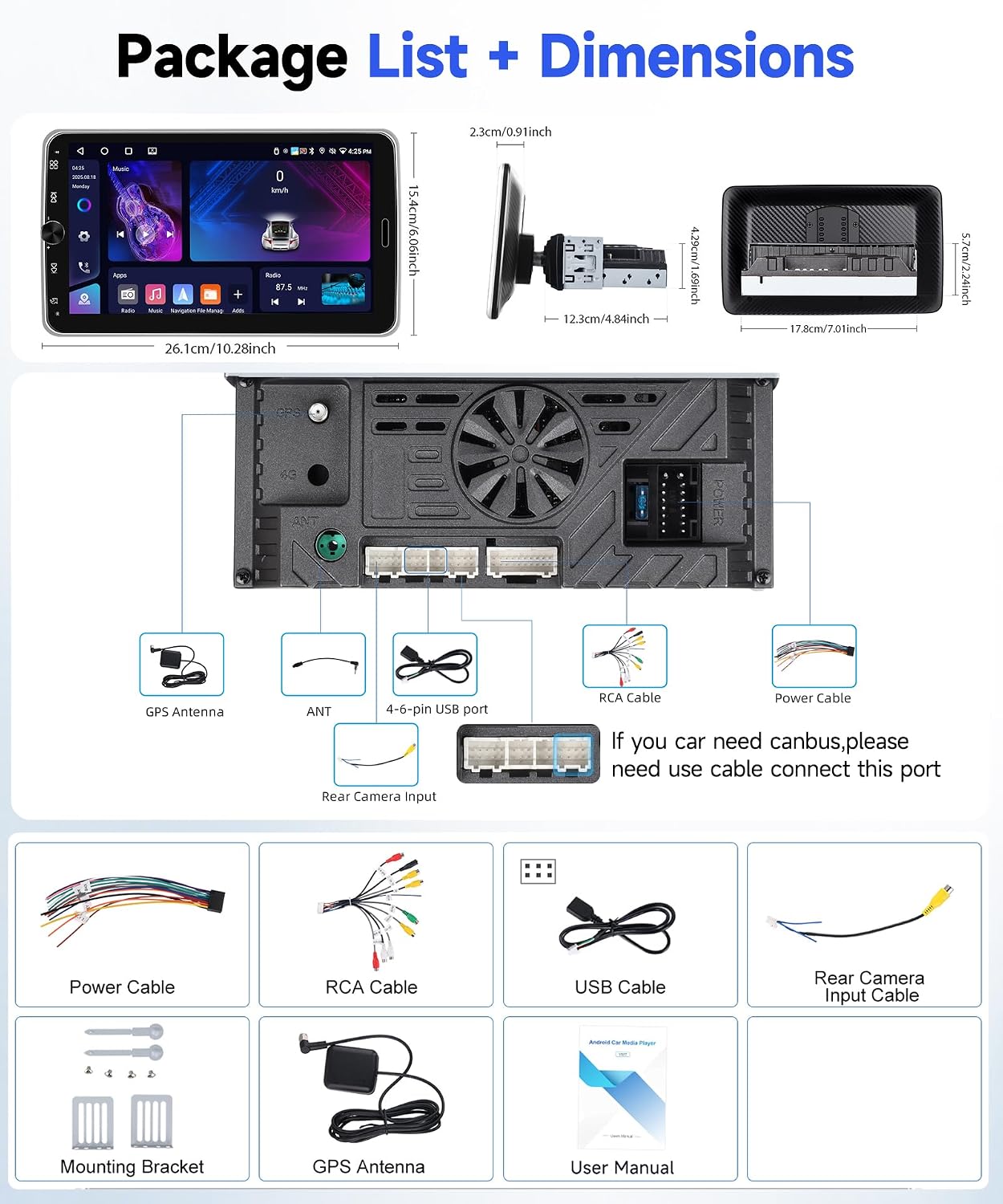
Kuva: Yliview of the Hodozzy Android 15 Car Stereo package contents and unit dimensions.
4. Tekniset tiedot
| Ominaisuus | Erittely |
|---|---|
| Järjestelmä | Android 15 |
| Prosessori | RK3326S, 4 ydintä |
| Näytön koko | 10.1 inches (Detachable, Rotatable) |
| Näytön materiaali | IPS HD -kosketusnäyttö |
| Muisti | 4GB RAM + 64GB ROM |
| Näytön resoluutio | 1024*600 |
| Lähtöteho | 4 * 45 W |
| Bluetooth-versio | 5.0 |
| Radio-yhtye | FM/RDS (87.5 MHz–107.5 MHz) |
| Yhteydet | WiFi, Bluetooth, USB (Dual Interface, Type-C & USB-A) |
| Navigointi | Built-in GPS, supports offline maps (Here We Go) and online maps |
| Älypuhelimen integrointi | Wireless CarPlay, Wireless Android Auto, Mirror Link (Wireless) |
| Äänenkäsittely | DSP, 32-band EQ |
| Erikoisominaisuudet | Detachable Screen, 360° Rotation, Landscape/Portrait Mode, Split Screen, Steering Wheel Control Support, Reversing Camera Input (AHD/CVBS), External Microphone Support, 7-Color Key Lighting |
| Tuetut äänimuodot | APE/FLAC/WAV/MP3/WMA jne. |
| Tuetut videomuodot | MKV/RMVB/AVI/MP4/MDV jne. |
| Tuetut kuvamuodot | PNG/JPEG/JPG/GIF/WBMP/BNP jne. |
| Käyttölämpötila | -20 ℃ - 75 ℃ |
| Paino | 1 kiloa |
5. Asennus
5.1 Asennus
The Hodozzy Android 15 Car Stereo is a 1-DIN unit with a detachable 10-inch screen. Ensure your vehicle's dashboard has a compatible 1-DIN slot. Due to the adjustable screen, consider the optimal viewing angle and clearance before final installation.
- Asennus: Use the provided mounting brackets to secure the main unit into the 1-DIN slot.
- Näytön liite: The screen features a snap-in design for quick attachment and detachment. Align the screen with the main unit's connector and press firmly until it clicks into place.
- Näytön säätö: The screen supports 360° rotation and adjustable angles. Adjust to your preferred orientation (landscape or portrait) and tilt for optimal visibility.

Image: Demonstrates the detachable screen feature, landscape/portrait mode support, and 360-degree rotation capability of the display.
5.2 Kytkentäkaavio
Refer to the following diagram for connecting the power, speakers, and accessories. It is crucial to connect all wires correctly to avoid damage.
- Sähköjohto: Connect the yellow wire to the constant 12V power, the red wire to the accessory (ACC) 12V power, and the black wire to ground.
- Kaiutinjohdot: Kytke kaiutinjohdot ajoneuvosi kaiuttimiin varmistaen oikea napaisuus.
- GPS-antenni: Connect the GPS antenna to the dedicated port and mount it in a location with a clear view taivaalta.
- Radioantenni: Liitä radioantenni.
- Peruutuskamera: Connect the rear camera cable to the unit's input. The camera's power wires (Cable ① and Cable ④) connect to the positive pole of the car's reversing light, and the ground wire (Cable ②) connects to the negative pole. The video signal cable (Cable ③ and Cable ⑤) connects to the unit.
- Ulkoinen mikrofoni: Liitä ulkoinen mikrofoni parantaaksesi puhelun laatua.
- USB-portit: Utilize the dual USB interfaces for data transfer, media playback, and phone charging.
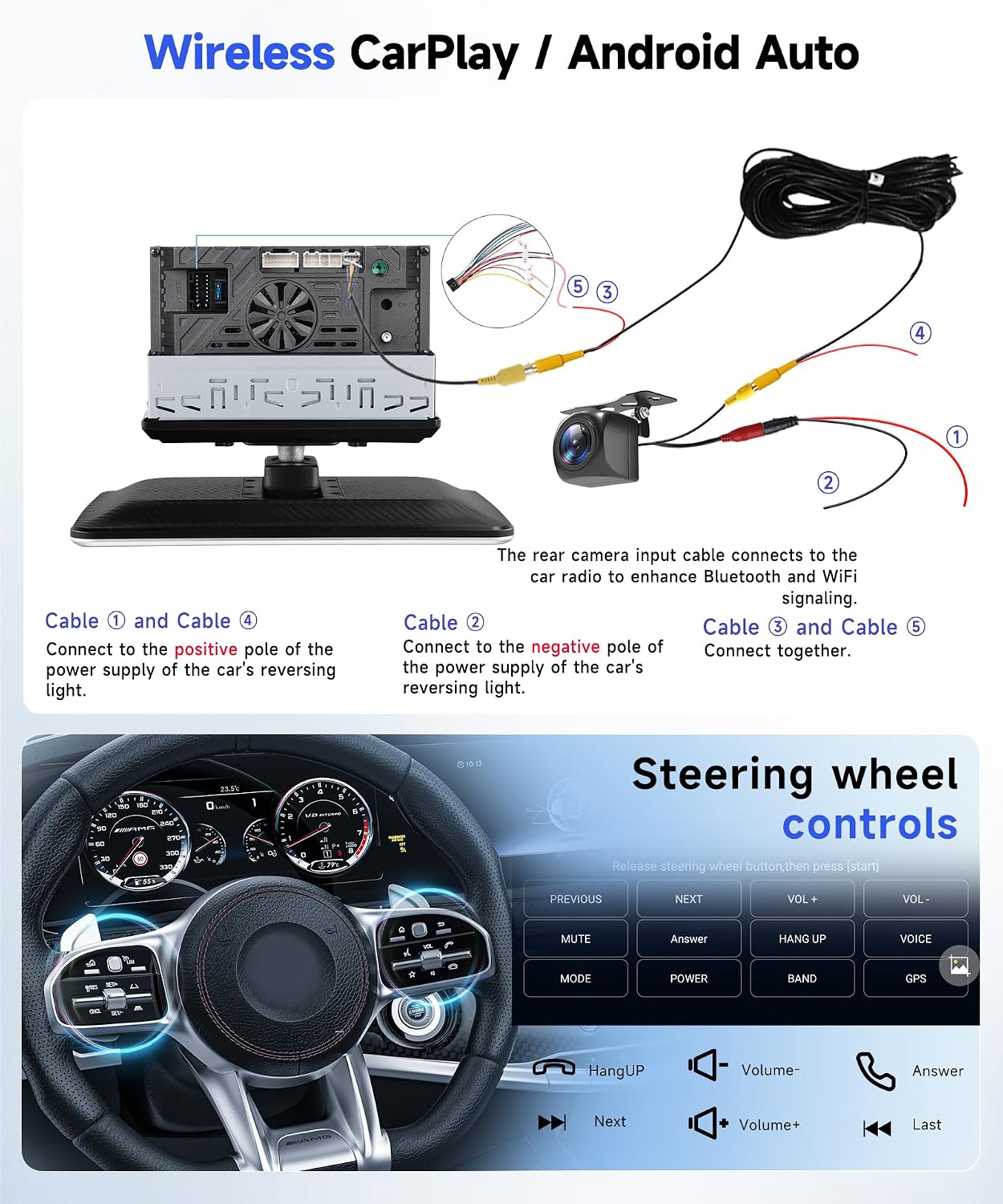
Image: Detailed wiring instructions for the reversing camera and an overview of steering wheel control button functions.
5.3 Ensimmäinen käynnistys
After completing all connections, turn on your vehicle's ignition. The car stereo should power on automatically. Follow the on-screen prompts for initial setup, including language selection and time zone settings.
6. Käyttöohjeet
6.1 Screen Features: Detachable, Rotation, Landscape/Portrait Modes
The 10.1-inch IPS HD touchscreen offers flexibility:
- Detachable Screen: Press the two buttons on the side of the screen to detach it from the main unit. This allows for secure storage when not in use.
- Landscape/Portrait Mode: After rotating the screen, you can switch between landscape and portrait display modes by tapping the 'Portrait' or 'Landscape' option in the menu bar.
- 360° kierto: The screen can be rotated 360 degrees and moved forward/backward to achieve the best viewkulma.
6.2 Langaton CarPlay ja Android Auto
Connect your smartphone wirelessly to access navigation, music, calls, and messages directly on the car stereo display.
- Ota Bluetooth ja Wi-Fi käyttöön: Varmista, että älypuhelimesi Bluetooth ja Wi-Fi ovat käytössä.
- Laitepari: On the car stereo, go to the CarPlay/Android Auto application. Etsi your phone via Bluetooth and pair them.
- Vahvista yhteys: Follow any on-screen prompts on both the stereo and your phone to establish the wireless connection.
Note: For Android phones, you may need to download the Android Auto app on your device. Compatible with iOS 6-18 and Android 4-14.

Image: Shows the wireless CarPlay/Android Auto interface displaying navigation, music, and voice assistant options.
6.3 Bluetooth 5.0
The integrated Bluetooth 5.0 module allows for hands-free calling and wireless audio streaming.
- Pariliitos: Go to the Bluetooth settings on the stereo, enable Bluetooth, and search for your phone. Select your phone from the list and confirm pairing.
- Handsfree-puhelut: Once paired, you can make and receive calls directly through the stereo. The built-in microphone ensures clear communication.
- Bluetooth-musiikki: Stream audio from your phone to the car stereo. Control playback (play/pause, skip tracks) from the stereo's interface.

Image: Illustrates Bluetooth 5.0 for calls and music, FM/RDS radio interface, and WiFi connectivity for various streaming apps.
6.4 FM/RDS-radio
Nauti suosikkiradioasemistasi sisäänrakennetulla FM/RDS-virittimellä.
- Automaattinen haku: Access the Radio application and select 'Auto Search' to scan and save available stations.
- Manuaalinen viritys: Viritä manuaalisesti tietyille taajuuksille.
- RDS-toiminto: The RDS (Radio Data System) feature displays station information, such as song titles or program names, where available.
6.5 GPS-navigointi
The unit comes with an integrated GPS receiver and supports both offline and online navigation.
- Offline-kartat: The unit includes pre-installed offline maps. To download map data, an internet connection is required. Access the 'Download Map' menu within the navigation app (e.g., Here We Go) to download regional maps.
- Online-kartat: Connect to WiFi/Hotspot to use other online navigation applications available on the Android system.
6.6 DSP and EQ Music
Customize your audio experience with the Digital Sound Processor (DSP) and 32-band Equalizer (EQ).
- EQ-asetukset: Access the EQ settings to adjust frequency bands, creating a personalized sound profile.
- DSP Features: The DSP allows for advanced sound adjustments, including sound field positioning, bass enhancement, and surround sound modes.

Image: Displays the DSP and EQ music settings interface, allowing for precise audio adjustments and sound field customization.
6.7 Jaettu näyttö ja peililinkki
- Jaettu näyttö: This feature allows you to run two applications simultaneously on the screen, such as navigation and music playback.
- Peililinkki: Synchronize your smartphone screen with the car stereo display. For Android phones, this provides two-way control. For iOS phones, it offers one-way control (display only). Connection can be wired (USB) or wireless (WLAN).
6.8 Ohjauspyörän säätimet
If your vehicle supports steering wheel controls, you can configure them to operate the car stereo for safer driving.
- Kokoonpano: Access the 'Steering Wheel Control' settings in the system menu. Follow the on-screen instructions to map your vehicle's steering wheel buttons to the stereo's functions (e.g., volume, track skip, mode).
6.9 Multimedia Input
The unit supports various multimedia inputs:
- USB/Type-C: Use the dual USB ports for playing media files (audio, video, images) from USB drives or for fast charging your mobile devices.
- AUX-tulo: Liitä ulkoiset äänilaitteet AUX-tulon kautta.
- Colorful Background Lights: Customize the button illumination with 7 different colors to match your vehicle's interior or your preference.

Image: Highlights multimedia input options including USB/Type-C charging, customizable background lights, and the IPS screen quality for video playback.
7. Huolto
- Puhdistus: Puhdista näyttö ja laite pehmeällä, kuivalla liinalla. Vältä hankaavia puhdistusaineita tai liuottimia.
- Ohjelmistopäivitykset: Tarkista säännöllisesti ohjelmistopäivitykset järjestelmäasetuksista tai valmistajan ohjeista. websivuston optimaalisen suorituskyvyn ja uusien ominaisuuksien saatavuuden varmistamiseksi.
- Näytön hoito: When detaching the screen, handle it carefully to avoid scratches or damage to the connectors.
8. Vianmääritys
Jos kohtaat ongelmia Hodozzy-autostereosi kanssa, tutustu seuraaviin yleisiin ongelmiin ja ratkaisuihin:
| Ongelma | Mahdollinen syy | Ratkaisu |
|---|---|---|
| Ei Virtaa | Väärä johdotus, palanut sulake, löysä liitäntä. | Check power cable connections (yellow, red, black). Inspect vehicle's fuse box and the unit's fuse. Ensure all connections are secure. |
| Ei ääntä | Kaiuttimen johdot irti, äänenvoimakkuus liian alhainen, mykistys aktivoitu, väärä äänilähde. | Check speaker wiring. Increase volume. Deactivate mute function. Select the correct audio input source. |
| Bluetooth Ei yhteyttä | Bluetooth ei ole käytössä, laite ei ole pariliitostilassa, häiriöitä. | Ensure Bluetooth is enabled on both devices. Put the stereo in pairing mode. Delete previous pairings and try again. Move closer to the unit. |
| GPS ei toimi | GPS antenna not connected, poor signal, map data not downloaded. | Varmista, että GPS-antenni on kytketty kunnolla ja asetettu esteettömälle paikalle. view of the sky. Download necessary offline map data or ensure internet connection for online maps. |
| Kosketusnäyttö ei reagoi | System crash, temporary software issue. | Restart the unit by turning off the vehicle's ignition and then restarting. If the issue persists, perform a factory reset (refer to system settings, note this will erase all user data). |
| Peruutuskamera ei näy | Incorrect wiring, camera malfunction, wrong input selected. | Verify the rear camera wiring (power and video signal). Ensure the camera is functioning. Check if the unit automatically switches to the camera input when reversing. |
9. Takuutiedot
Warranty information for this product should be obtained directly from the seller or the point of purchase. Please retain your proof of purchase for any warranty claims. Information regarding spare parts availability and software update guarantees is not available in the provided product details.
10. Tukea
For technical assistance, troubleshooting beyond this manual, or warranty inquiries, please contact the seller directly through the platform where you purchased the product. You can typically find seller contact information on your order details page or by navigating to the seller's profile.