
Johdanto
The Rapoo M308 is a versatile multi-mode wireless mouse designed for efficiency and comfort. It features an ambidextrous design, allowing comfortable use for both right-handed and left-handed individuals. With its dual connectivity options, Bluetooth 5.0 and 2.4 GHz wireless, you can seamlessly connect to up to three devices and switch between them with ease. The mouse is engineered for long-lasting performance, offering a battery life of up to 12 months.
Pakkauksen sisältö
- Rapoo M308 Multi-mode Wireless Mouse
- USB-vastaanotin (tallennettu hiiren sisään)
- 2 AA-paristoa
- Pikaopas (tämä käsikirja)
Tuote loppuview
Familiarize yourself with the components of your Rapoo M308 mouse.
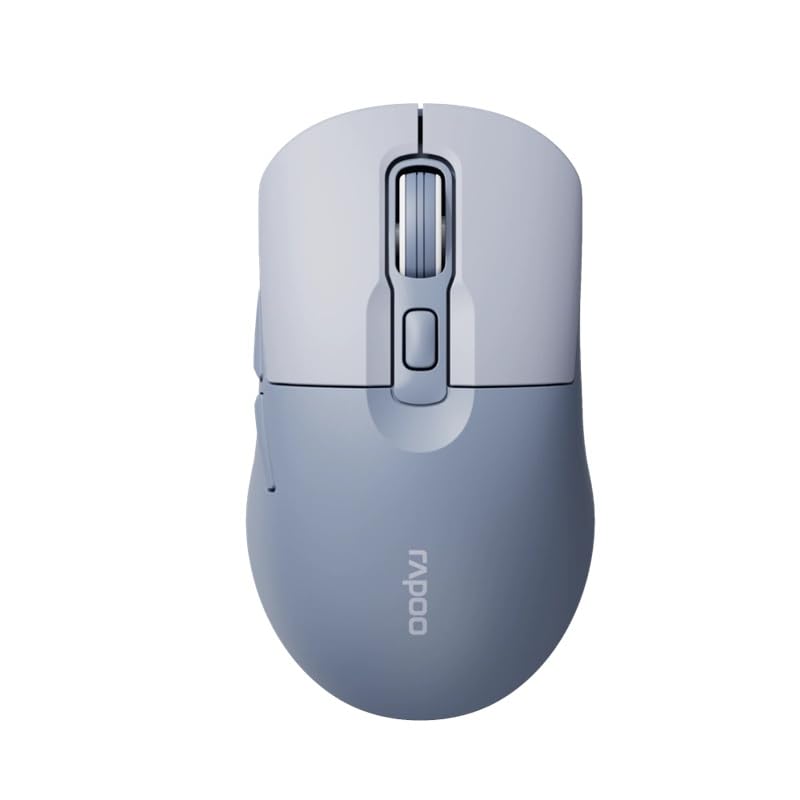
Image: The Rapoo M308 Multi-mode Wireless Mouse in blue, showcasing its ergonomic, ambidextrous design with a scroll wheel and multiple buttons.
- Vasen painike: Normaali vasemman painikkeen napsautustoiminto.
- Oikea painike: Normaali hiiren kakkospainikkeen toiminto.
- Vierityspyörä: Vieritys- ja keskipainikkeen napsautustoimintoa varten.
- DPI-painike: Säätää kohdistimen herkkyyttä (DPI).
- Mode Switch Button/Indicator: Switches between connected devices (2.4G, Bluetooth 1, Bluetooth 2) and indicates current mode.
- Sivupainikkeet: Forward/Backward navigation (programmable).
- Akkulokero: Located on the underside, holds 2 AA batteries.
- USB-vastaanottimen paikka: Located inside the battery compartment for storage.
Asennus
1. Akun asennus
- Avaa hiiren pohjassa olevan paristolokeron kansi.
- Aseta kaksi AA-paristoa paikoilleen varmistaen oikea napaisuus (+/-).
- Sulje paristolokeron kansi.
2. Yhdistäminen 2.4 GHz:n langattoman verkon kautta
- Remove the USB receiver from its storage slot inside the battery compartment.
- Liitä USB-vastaanotin tietokoneesi vapaaseen USB-porttiin.
- Turn on the mouse. The mouse should automatically connect to your computer. The mode indicator light will show a steady green light for a few seconds.
3. Yhdistäminen Bluetoothin kautta
The M308 mouse supports two Bluetooth connections (BT1 and BT2).
- Käynnistä hiiri.
- Press the mode switch button to select either Bluetooth 1 (blue light flashes slowly) or Bluetooth 2 (blue light flashes slowly).
- Press and hold the mode switch button for 3 seconds until the blue light starts flashing rapidly. This indicates the mouse is in pairing mode.
- Siirry tietokoneellasi tai laitteellasi Bluetooth-asetuksiin ja hae uusia laitteita.
- Select "Rapoo M308" from the list of available devices to pair.
- Once paired, the blue light will become steady for a few seconds and then turn off.
Käyttöohjeet
Vaihtaminen laitteiden välillä
The Rapoo M308 allows you to connect to up to three devices (one 2.4G wireless and two Bluetooth devices) and switch between them.
- Briefly press the mode switch button to cycle through the connected devices: 2.4G (green light), Bluetooth 1 (blue light), Bluetooth 2 (blue light).
- The indicator light will briefly illuminate in the corresponding color to confirm the selected mode.
DPI-säätö
Press the DPI button (usually located behind the scroll wheel) to cycle through different DPI settings. This changes the cursor speed and sensitivity. The indicator light may flash to show the current DPI level (e.g., one flash for low DPI, two for medium, etc.).
Huolto
- Puhdistus: Puhdista hiiri pehmeällä, kuivalla liinalla. Pinttyneeseen likaan käytä hieman kuivaa liinaa.amp liinaa voi käyttää, mutta varmista, ettei laitteeseen pääse kosteutta.
- Akun vaihto: When the mouse performance degrades or the indicator light signals low battery, replace the two AA batteries following the installation steps.
- Varastointi: When not in use for extended periods, turn off the mouse to conserve battery life. Store the USB receiver inside the mouse to prevent loss.
Vianetsintä
- Hiiri ei vastaa:
- Tarkista, onko hiiri päällä.
- Varmista, että paristot on asennettu oikein eivätkä ne ole tyhjentyneet. Vaihda tarvittaessa.
- 2.4G-yhteyttä varten varmista, että USB-vastaanotin on kytketty tukevasti toimivaan USB-porttiin. Kokeile toista USB-porttia.
- For Bluetooth connection, ensure the mouse is in the correct Bluetooth mode (BT1 or BT2) and successfully paired with your device. Re-pair if needed.
- Kohdistimen liike on epätasaista tai hidasta:
- Puhdista hiiren alapuolella oleva optinen anturi.
- Varmista, että käytät hiirtä sopivalla alustalla (heijastamattomalla, läpinäkymättömällä).
- Säädä DPI-asetusta DPI-painikkeella.
- Laitteiden välillä vaihtaminen ei onnistu:
- Ensure all devices are properly connected (2.4G receiver plugged in, Bluetooth devices paired).
- Briefly press the mode switch button to cycle through modes. A long press will initiate Bluetooth pairing mode.
Tekniset tiedot
| Tuotemerkki | Rapoo |
| Malli | M308 |
| Yhteystekniikka | Bluetooth 5.0, 2.4 GHz Radio Frequency |
| Erikoisominaisuudet | Kevyt |
| Liiketunnistus | Optinen |
| Painike Määrä | 4 |
| Käsien suuntautuminen | Molempikätinen |
| Suositellut käyttötavat | Toimisto |
| Yhteensopivat laitteet | Henkilökohtainen tietokone, kannettava tietokone |
| Tuotteen paino | 50 grammaa |
| Käyttöjärjestelmä | Linux, Mac, Windows |
| Akun kesto | 12 kuukautta |
| Paristojen lukumäärä | 2 AA (mukana) |
| Virtalähde | Paristokäyttöinen |
| Vähimmäiskäyttöjärjestelmä vaaditaan | Mac OS 14 Sonoma, Windows 11 |
| Materiaali | Muovi |
| Alkuperämaa | Kiina |
| Mukana olevat komponentit | Hiiri |
Takuu ja tuki
The Rapoo M308 Multi-mode Wireless Mouse comes with a 2 vuoden takuu ostopäivästä lukien. Tämä takuu kattaa valmistusvirheet ja normaalissa käytössä ilmenevät toimintahäiriöt.
For technical support, warranty claims, or further assistance, please refer to the contact information provided on the Rapoo official website or your local distributor's support channels. Please retain your proof of purchase for warranty validation.