
1. Tuote ohiview
The Baseus BS1 NC Semi-in-Ear Noise Cancelling Earbuds offer a blend of comfort and advanced audio technology. Featuring Adaptive Hybrid Active Noise Cancellation (ANC), Hi-Res Audio with LDAC support, and a lightweight design, these earbuds are engineered for extended listening and clear communication. They are also equipped with a 6-microphone AI system for clear calls and IP55 water and dust resistance.

Image: Baseus BS1 NC Semi-in-Ear Noise Cancelling Earbuds and their charging case in black.
2. Pakkauksen sisältö
Varmista, että pakkauksessa on kaikki tarvittavat osat:
- Baseus Bass BS1 NC Semi-in-Ear Earbuds (Left and Right)
- Latauskotelo
- USB-C latauskaapeli
- Pika-aloitusopas

Image: The complete retail package for the Baseus BS1 NC Earbuds, showing the earbuds, charging case, USB-C cable, and quick start guide.
3. Kuulokkeiden ja kotelon lataaminen
Parhaan suorituskyvyn saavuttamiseksi lataa nappikuulokkeet ja latauskotelo täyteen ennen ensimmäistä käyttökertaa.
3.1 Kuulokkeiden lataaminen
- Aseta nappikuulokkeet latauskoteloon. Varmista, että ne ovat oikein paikoillaan (L vasemmalle, R oikealle).
- Close the charging case. The earbuds will begin charging automatically.
3.2 Kotelon lataaminen
- Liitä mukana toimitettu USB-C-latauskaapeli kotelon latausporttiin.
- Liitä kaapelin toinen pää USB-virtalähteeseen (ei sisälly toimitukseen) tai tietokoneen USB-porttiin.
- The LED indicator on the case will show the charging status:
- Vihreä: 75–100 % ladattu
- Keltainen: 25–75 % ladattu
- Punainen: Below 25% charged
- A full charge for the case provides up to 40 hours of total playtime for the earbuds (with ANC off). A 10-minute charge can provide up to 2 hours of playback.

Image: The Baseus BS1 NC Earbuds resting in their open charging case, highlighting the 40-hour total playtime and rapid charging capabilities.
4. Pariliitos ja liitettävyys
4.1 Alkuperäinen pariliitos
- Avaa latauskotelo. Kuulokkeet siirtyvät automaattisesti pariliitostilaan.
- Ota Bluetooth käyttöön laitteellasi (älypuhelin, tabletti, tietokone).
- Etsi "Baseus Bass BS1 NC" in the list of available Bluetooth devices.
- Select "Baseus Bass BS1 NC" to connect. A voice prompt will confirm successful pairing.
4.2 Automaattinen uudelleenkytkentä
Once paired, the earbuds will automatically reconnect to the last connected device when removed from the charging case and within Bluetooth range.
4.3 Monipisteyhteys
The Baseus BS1 NC supports Baseus Smart-Connect (BSC) technology, allowing simultaneous connection to two devices. This enables seamless switching between audio sources without manual re-pairing.
To use multipoint connection:
- Yhdistä nappikuulokkeet ensimmäisen laitteesi kanssa.
- Irrota nappikuulokkeet ensimmäisen laitteen Bluetooth-asetuksista (älä pura pariliitosta).
- Yhdistä nappikuulokkeet toisen laitteesi kanssa.
- Reconnect the earbuds to the first device from its Bluetooth settings. The earbuds should now be connected to both devices.
Ääni siirtyy automaattisesti laitteeseen, joka toistaa sisältöä tai vastaanottaa puhelun.
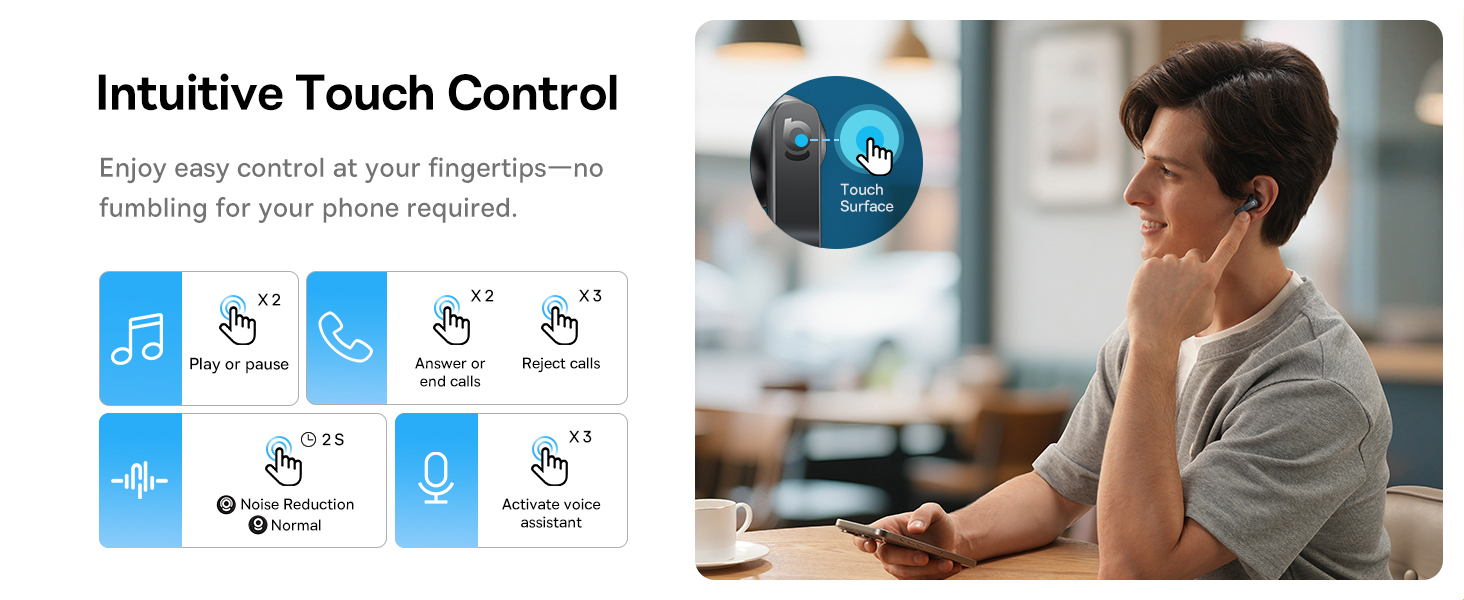
Image: A visual representation of the Baseus BS1 NC Earbuds connected to both a laptop and a smartphone, showcasing the instant multipoint connection feature.
5. Korvanappikuulokkeiden käyttö
The Baseus BS1 NC earbuds feature a semi-in-ear design for comfortable, pressure-free wear. For optimal sound quality and noise cancellation, ensure a proper fit.
- Tunnista vasen (L) ja oikea (R) nappikuuloke.
- Aseta jokainen korvanappi varovasti korvakäytävään.
- Adjust the earbud until it feels secure and comfortable. The stem should point slightly forward or downward.

Image: A person wearing the Baseus BS1 NC Earbuds, illustrating their ergonomic and lightweight design for all-day comfort.
6. Käyttöohjeet
6.1 Kosketusohjaimet
The earbuds feature intuitive touch controls on their stems. The following are default functions, which may be customizable via the Baseus app:
| Toiminta | Toiminto |
|---|---|
| Double-tap (Left or Right Earbud) | Toista/keskeytä musiikki, vastaa/lopeta puhelu |
| Triple-tap (Left or Right Earbud) | Reject call, Activate voice assistant |
| Pidä painettuna (2 sekuntia) | Switch Noise Control Mode (ANC/Normal/Transparency) |

Image: An illustration detailing the intuitive touch controls on the Baseus BS1 NC Earbuds for various functions like play/pause, call management, noise reduction, and voice assistant activation.
6.2 Melunvaimennustilat
The Baseus BS1 NC earbuds offer three noise control modes:
- Adaptive Hybrid ANC (Active Noise Cancellation): Reduces ambient noise for an immersive listening experience. Ideal for noisy environments.
- Läpinäkyvyystila: Allows you to hear your surroundings while still enjoying your audio. Useful for awareness in urban settings or conversations.
- Normaali tila: Normaali äänentoisto ilman aktiivista melunvaimennusta tai läpinäkyvyysominaisuuksia.
Switch between modes by pressing and holding the touch area on either earbud for 2 seconds.

Image: A cutaway diagram of a Baseus BS1 NC earbud in an ear, illustrating the semi-in-ear fit and the availability of Adaptive Noise Cancelling and Transparency Mode.
6.3 Hi-Res Audio with LDAC
These earbuds support LDAC technology, enabling high-resolution audio transmission for a detailed and rich sound experience. Ensure your device supports LDAC and activate it in your device's Bluetooth settings for the best audio quality.

Image: The Baseus BS1 NC Earbuds surrounded by sound waves, emphasizing features like Hi-Res Audio, SuperBass 2.0, and 13mm dynamic drivers for powerful sound.
6.4 6-Mic AI Clear Calls
The earbuds are equipped with 6 microphones and AI noise isolation technology to ensure your voice is clear during calls, even in noisy environments. Wind noise reduction further enhances call clarity outdoors.
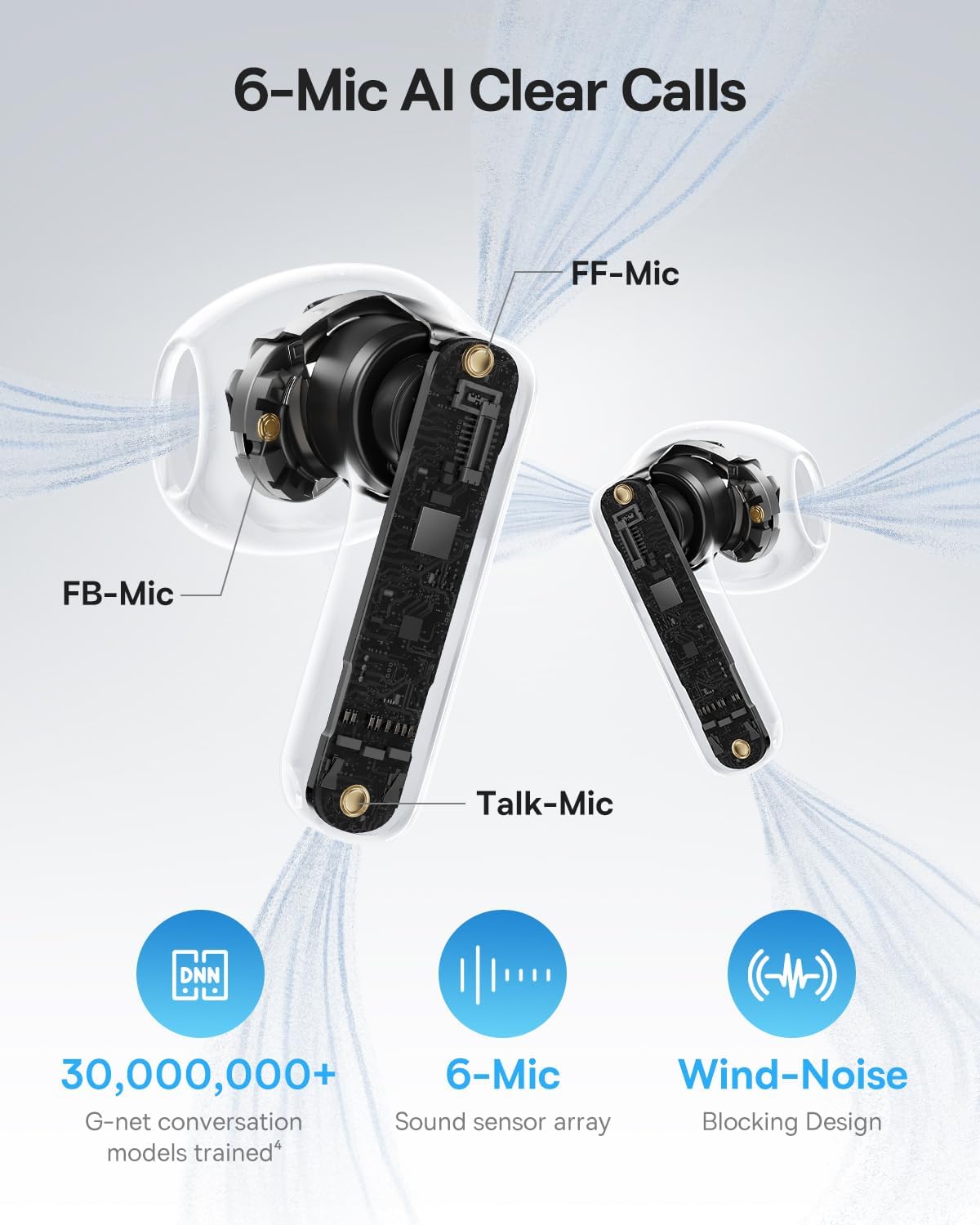
Image: A detailed diagram of the Baseus BS1 NC earbud, highlighting the placement of the FF-Mic, FB-Mic, and Talk-Mic, which contribute to the 6-Mic AI Clear Call technology and wind-noise blocking design.
6.5 Smart App Control
Download the dedicated Baseus app for enhanced control and customization options. The app allows you to:
- Adjust Bass Boost levels.
- Select from various EQ Modes.
- Control Spatial Acoustics settings.
- Use the "Find Your Earbuds" feature.
Huomautus: Vierastilassa ominaisuuksien mukauttaminen ei vaadi tilin luomista tai käyttöoikeuksia, mutta kadonneiden nappikuulokkeiden paikantamiseen tarvitaan GPS-yhteys.

Image: A smartphone displaying the Baseus app interface, which offers various sound control options including Bass Boost, EQ Modes, Spatial Acoustics, and a "Find Your Earbuds" function.
7. Huolto ja hoito
7.1 Puhdistus
- Puhdista nappikuulokkeet ja latauskotelo säännöllisesti pehmeällä, kuivalla ja nukkaamattomalla liinalla.
- Älä käytä vahvoja kemikaaleja, puhdistusliuottimia tai vahvoja pesuaineita.
- Gently remove any earwax or debris from the earbud mesh and charging contacts using a small, soft brush or cotton swab.
7.2 Veden- ja pölynkestävyys (IP55)
The earbuds are rated IP55, meaning they are protected against limited dust ingress and low-pressure water jets from any direction. This makes them suitable for workouts and light rain exposure.
- Älä upota nappikuulokkeita veteen.
- Varmista, että nappikuulokkeet ovat kuivat ennen kuin asetat ne takaisin latauskoteloon, jotta latauskontaktit eivät vahingoitu.
- Latauskotelo ei ole vesitiivis.

Image: The Baseus BS1 NC Earbuds shown with water droplets, signifying their IP55 rating for dust and water resistance.
7.3 Varastointi
Säilytä kuulokkeita latauskotelossaan, kun et käytä niitä, jotta ne suojaavat ja pitävät ne ladattuna.
8. Vianmääritys
If you encounter issues with your Baseus BS1 NC earbuds, refer to the following common solutions:
- Ei ääni-/yhteysongelmia:
- Varmista, että kuulokkeet on ladattu.
- Verify Bluetooth is enabled on your device and "Baseus Bass BS1 NC" is selected.
- Try placing earbuds back in the case, closing it, and then reopening to reset the connection.
- Unohda laite Bluetooth-asetuksista ja muodosta laitepari uudelleen.
- Yksi kuuloke ei toimi:
- Varmista, että molemmat kuulokkeet on ladattu.
- Place both earbuds back in the case, close, and reopen.
- Puhdista latauskoskettimet molemmissa nappikuulokkeissa ja kotelon sisällä.
- Huono äänenlaatu:
- Varmista, että kuulokkeet ovat kunnolla korvissasi.
- Puhdista korvanappien verkko mahdollisten tukosten poistamiseksi.
- Check your device's audio settings and ensure LDAC is enabled if supported.
- ANC ei ole tehokas:
- Ensure ANC mode is activated via touch control or the Baseus app.
- Adjust the earbuds for a better seal in your ears.
9. Tekniset tiedot
| Ominaisuus | Yksityiskohta |
|---|---|
| Mallin nimi | Baseus Bass BS1 NC |
| Melunhallinta | Adaptiivinen melunvaimennus, ympäristömelunvaimennus, hybridimelunvaimennus |
| Yhteystekniikka | Bluetooth 6.0, Langaton |
| Langaton viestintätekniikka | Bluetooth 6.0 |
| Bluetooth-alue | 10 metriä |
| Ääniohjaimen tyyppi | Dynaaminen ohjain |
| Ääniohjaimen koko | 13 millimetriä |
| Taajuusvaste | 40 kHz |
| Ääniviive | 60 millisekuntia |
| Akunkesto (nappikuulokkeet) | 7 tuntia (ANC pois päältä) |
| Kokonaispeliaika (kotelon kanssa) | 40 tuntia (ANC pois päältä) |
| Latausaika (pikalataus) | 10 minuuttia 2 tunnin toistoaikaa varten |
| Vedenkestävyystaso | IP55 (vain nappikuulokkeet) |
| Ohjaustyyppi | Kosketa Ohjaus |
| Materiaali | Akryylinitriilibutadieenistyreeni (ABS), polykarbonaatti (PC) |
| Tuotteen paino (nappikuulokkeet) | 4g per nappi |
| Product Dimensions (Earbuds) | 1.2 x 0.7 x 0.7 tuumaa |
| Yhteensopivat laitteet | Devices with Bluetooth Audio Capability, including iOS, Android, Windows, Mac OS and Switch. |
10. Virallinen tuotevideo
Watch the official product video for a visual guide on the Baseus BS1 NC Earbuds:
Video: An official product video from Baseus showcasing the features and usage of the Baseus BS1 NC Semi-in-Ear True Wireless Earbuds.
11. Takuu ja tuki
For warranty information, technical support, FAQs, and further assistance, please visit the official Baseus support center.
Refer to the Quick Start Guide included in your package for a direct link or visit the Baseus websivusto.
Note: Protection plans may be available for purchase separately.