
1. Johdanto
Thank you for choosing the New Bee Bluetooth Headset M54. This single-ear headset is designed for clear communication and comfortable wear, featuring advanced ENC environmental noise cancellation and CVC8.0 technology for superior call quality. With its long battery life and multi-device connectivity, it is an ideal companion for commuting, driving, office work, and business chats. Please read this manual carefully before use to ensure proper operation and to maximize your experience.
2. Pakkauksen sisältö
Tarkista pakkauksen sisältö varmistaaksesi, että kaikki osat ovat mukana:
- Bluetooth Headset x1
- C-tyypin latauskaapeli x1
- Eartips (S/M/L sizes) x3 pairs
- Latauskotelo x1
- Käyttöohje x1
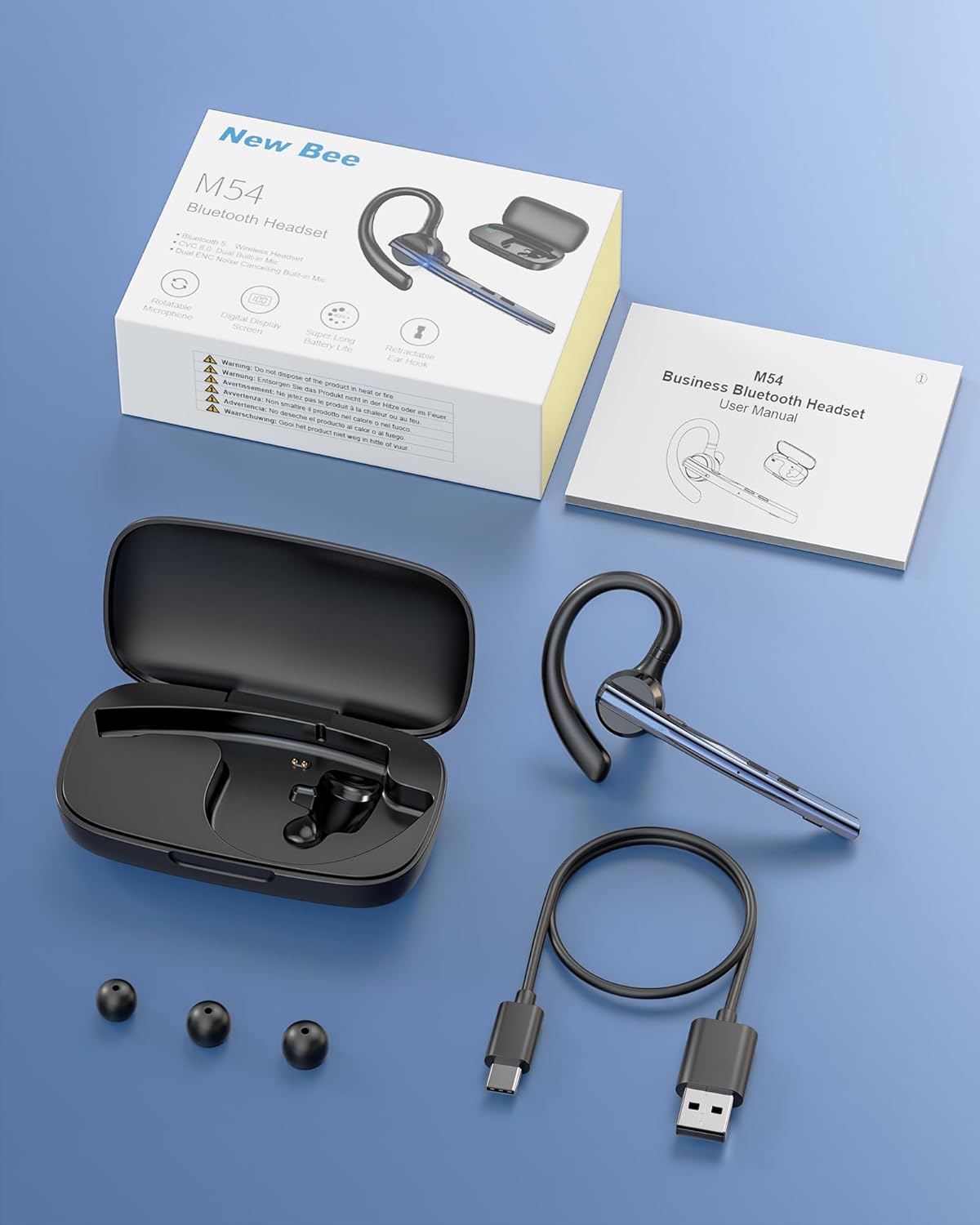
Image: Contents of the New Bee M54 Bluetooth Headset package.
3. Tuotteen ominaisuudet
ENC Dual Microphone for Clear Calls
The headset features a dual microphone array with ENC (Environmental Noise Cancellation) and CVC8.0 technology. The main microphone accurately captures your voice, while the sub-microphone collects ambient noise. The main control chip processes this information to enhance call effects by effectively canceling environmental noise and echoes. Enjoy HIFI sound quality and 360° surround sound for an immersive audio experience.

Image: Man using the headset in a car, highlighting ENC noise cancellation for clear calls.
Flexible Rotation & Comfortable Fit
An innovative balanced ear hook design prevents the headset from falling off and evenly distributes its weight for comfortable wear. The pivot points use elastic soft rubber material, combined with an in-ear design, ensuring comfort even during prolonged use. The microphone arm can rotate 270°, the ear hook rotates 180°, and the earcup front can move 30° left/right. Three sizes of eartips (S/M/L) are included for a customized fit.

Image: Woman wearing the headset, showcasing its lightweight and adjustable features.
Erittäin pitkä akunkesto
Equipped with a large-capacity charging case and a low-power consumption chip, the headset offers extended usage times. Enjoy up to 15 hours of music playback, 12 hours of talk time, and an impressive 6 months of standby time. The charging case provides 2-3 full charges for the headset, extending the total operating time to approximately 60 hours.

Image: Headset charging in its case, illustrating battery life and charging options.
Bluetooth 5.1 & Strong Compatibility
Featuring the latest QCC3020/Bluetooth 5.1 chip, the headset ensures low power consumption, fast transmission speed, and a stable, smooth signal. It offers a reliable connection distance of up to 15 meters, making it compatible with a wide range of devices including smartphones, tablets, laptops, and PCs.

Image: Man using the headset outdoors, showing the 15m Bluetooth range.
Multi-functional & Easy Operation
The headset includes a multi-function button and an independent mute button for convenient control. One-touch mic off protects your privacy. Double-click the mute button to activate your voice assistant. It supports simultaneous connection to two devices, allowing seamless switching between music and call functions. The unique ear hook design is freely extendable to fit various ear shapes, accommodating more users. It is suitable for diverse environments such as office work, driving, phone conferences, and delivery services.

Image: Headset connected to multiple devices, demonstrating dual device connectivity.
4. Asennus
4.1 Charging the Headset and Charging Case
Lataa kuulokkeet ja latauskotelo täyteen ennen ensimmäistä käyttökertaa.
- Kuulokkeen lataaminen: Place the headset into the charging case. Ensure the charging contacts align. The indicator light on the headset will show charging status.
- Kotelon lataus: Connect the provided Type-C USB cable to the charging port on the case and plug the other end into a USB power adapter (not included). The digital display on the case will show the battery percentage.
- A full charge for the headset takes approximately 1.5 hours. The charging case can fully charge the headset 2-3 times.
4.2 Virran kytkeminen päälle/pois
- Virta päälle: Press and hold the Multi-function Button for 3 seconds until the indicator light flashes blue.
- Virta pois: Press and hold the Multi-function Button for 5 seconds until the indicator light flashes red and then turns off.
4.3 Bluetooth -pariliitos
- Varmista, että kuulokkeista on katkaistu virta.
- Press and hold the Multi-function Button for approximately 5-7 seconds until the indicator light flashes red and blue alternately, indicating pairing mode.
- Ota Bluetooth käyttöön laitteellasi (älypuhelin, tabletti, tietokone) ja hae käytettävissä olevia laitteita.
- Valitse löydettyjen laitteiden luettelosta "M54".
- Once connected, the headset indicator light will flash blue slowly.
4.4 Kuulokkeiden käyttö
The M54 headset is designed for comfortable and secure wear on either ear.
- Choose the Right Eartip: Select the S, M, or L eartip that best fits your ear canal for optimal sound and comfort.
- Adjust the Ear Hook: Place the ear hook over your ear. The ear hook can rotate 180° to fit both left and right ears.
- Sijoita mikrofoni: Rotate the microphone arm up to 270° to position it towards your mouth for clear voice pickup. The earcup front can also be adjusted 30° left or right for fine-tuning.
- Ensure a snug fit without discomfort. An improper fit may affect call quality.

Image: Instructions for selecting eartips and wearing the headset.
5. Käyttöohjeet
5.1 Painikkeiden toiminnotview

Image: Detailed diagram of headset buttons and their functions.
5.2 Puheluiden hallinta
- Puhelun vastaaminen/lopetus: Single click the Multi-function Button.
- Hylkää puhelu: Paina monitoimipainiketta 2 sekunnin ajan.
- Uudelleenvalinta viimeinen numero: Double click the Multi-function Button.
- Mykistä mikrofoni/poista mykistys: Single click the Mute Button.
5.3 Musiikin toisto
- Toista/tauko: Single click the Multi-function Button.
- Seuraava kappale: Paina äänenvoimakkuuden lisäyspainiketta kahden sekunnin ajan.
- Edellinen kappale: Paina äänenvoimakkuuden vähennyspainiketta ja pidä sitä painettuna 3 sekuntia.
5.4 Äänenvoimakkuuden säätö
- Ääni kovemmalle: Single click the Volume Up button.
- Äänenvoimakkuutta pienemmälle: Single click the Volume Down button.
5.5 Voice Assistant (SIRI)
- Aktivoi Voice Assistant: Double click the Mute Button.
5.6 Monipisteliitäntä
The M54 headset can connect to two Bluetooth devices simultaneously.
- Yhdistä kuulokkeet ensimmäisen laitteen kanssa kohdassa 4.3 kuvatulla tavalla.
- Poista Bluetooth käytöstä ensimmäisessä laitteessa. Kuulokkeet siirtyvät takaisin pariliitostilaan.
- Yhdistä kuulokkeet toisen laitteen kanssa.
- Enable Bluetooth on the first device. The headset should automatically connect to both devices.
- You can now seamlessly switch between audio and calls from either connected device.
6. Huolto
Oikea huolto varmistaa kuulokkeiden pitkän käyttöiän ja optimaalisen suorituskyvyn.
- Puhdistus: Use a soft, dry cloth to clean the headset and charging case. Do not use harsh chemicals or abrasive materials. Regularly clean the eartips and charging contacts to prevent debris buildup.
- Varastointi: Store the headset in its charging case when not in use to protect it from dust and damage. Avoid storing in extreme temperatures or high humidity.
- Akun hoito: To preserve battery life, avoid fully discharging the battery frequently. Charge the headset regularly, even if not used for extended periods.
- Veden altistuminen: Kuulokkeet eivät ole vedenpitävät. Vältä altistumista vedelle, sateelle tai liialliselle kosteudelle.
7. Vianmääritys
Jos kohtaat ongelmia, tutustu seuraaviin yleisiin ongelmiin ja ratkaisuihin:
| Ongelma | Mahdollinen syy | Ratkaisu |
|---|---|---|
| Virtaa ei voi käynnistää | Akku vähissä | Lataa kuulokkeet ja latauskotelo täyteen. |
| Laitteen pariliitos ei onnistu. | Headset not in pairing mode; Bluetooth off on device; Device too far. | Ensure headset is in pairing mode (flashing red/blue). Turn on Bluetooth on your device. Move device closer to headset (within 15m). Try restarting both devices. |
| Ei ääntä tai matala äänenvoimakkuus | Volume too low; Headset not connected; Incorrect audio output selected. | Increase volume on both headset and connected device. Reconnect the headset. Check audio output settings on your device. |
| Huono puhelun laatu | Weak signal; Microphone obstructed; Improper fit. | Move closer to the connected device. Ensure microphone is clear and positioned correctly. Adjust headset fit and eartip size. |
| Kuulokkeiden yhteys katkeaa usein | Kantaman ulkopuolella; Häiriöt; Akun varaus vähissä. | Stay within 15m of the connected device. Avoid strong electromagnetic interference. Charge the headset. |
Jos ongelma jatkuu näiden ratkaisujen kokeilemisen jälkeen, ota yhteyttä asiakastukeen.
8. Tekniset tiedot
| Merkki | Uusi Bee |
| Malli | M54 |
| Väri | Sininen |
| Bluetooth-versio | 5.1 (QCC3020 Chip) |
| Melunhallinta | ENC Environmental Noise Cancellation, CVC8.0 Echo Cancellation |
| Lähetysetäisyys | Jopa 15 metriä |
| Musiikin toistoaika | Noin 15 tuntia |
| Puheaika | Noin 12 tuntia |
| Valmiusaika | Noin 6 kuukautta |
| Kokonaiskäyttöaika (kotelon kanssa) | Noin 60 tuntia |
| Latausaika | Approx. 1.5 hours (headset) |
| Paino | Noin 14.2 g |
| Alkuperä | Kiina |
9. Takuu ja tuki
9.1 Takuutiedot
The New Bee Bluetooth Headset M54 comes with a 1 vuoden valmistajan takuu ostopäivästä lukien. Tämä takuu kattaa valmistusvirheet ja normaalissa käytössä esiintyvät toimintahäiriöt. Se ei kata väärinkäytöstä, onnettomuuksista, luvattomista muutoksista tai normaalista kulumisesta aiheutuneita vahinkoja.
9.2 Asiakastuki
If you have any questions, require technical assistance, or need to claim warranty service, please contact New Bee customer support through the retailer where you purchased the product or visit the official New Bee website for contact information. Please have your purchase receipt and product model number (M54) ready when contacting support.