
1. Johdanto ja tuotekatsausview
Thank you for choosing the Qidoe 83W PD USB C Car Charger. This device is designed to provide efficient and versatile charging solutions for your electronic devices in a vehicle environment. Featuring a 65W Power Delivery (PD) USB-C port and an 18W Quick Charge 3.0 (QC3.0) USB-A port, it offers a combined output of up to 83W. The charger is compatible with 12V/24V vehicle power systems and includes an intuitive LED digital display for monitoring voltage and current, along with a physical on/off switch and a dustproof flip cover for enhanced durability.
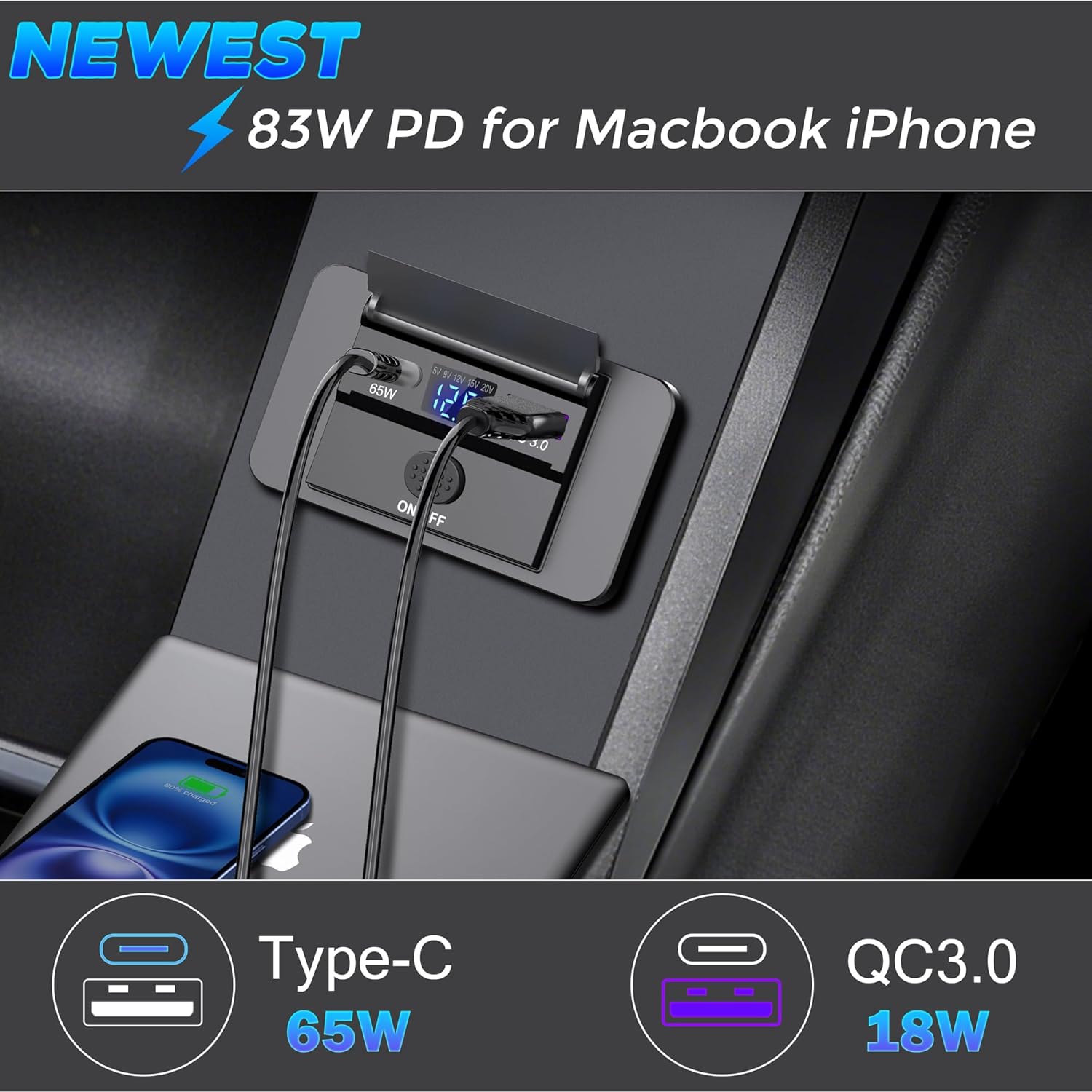
Kuva 1.1: The Qidoe 83W PD USB C Car Charger in use, demonstrating its dual charging capabilities for a MacBook and an iPhone.
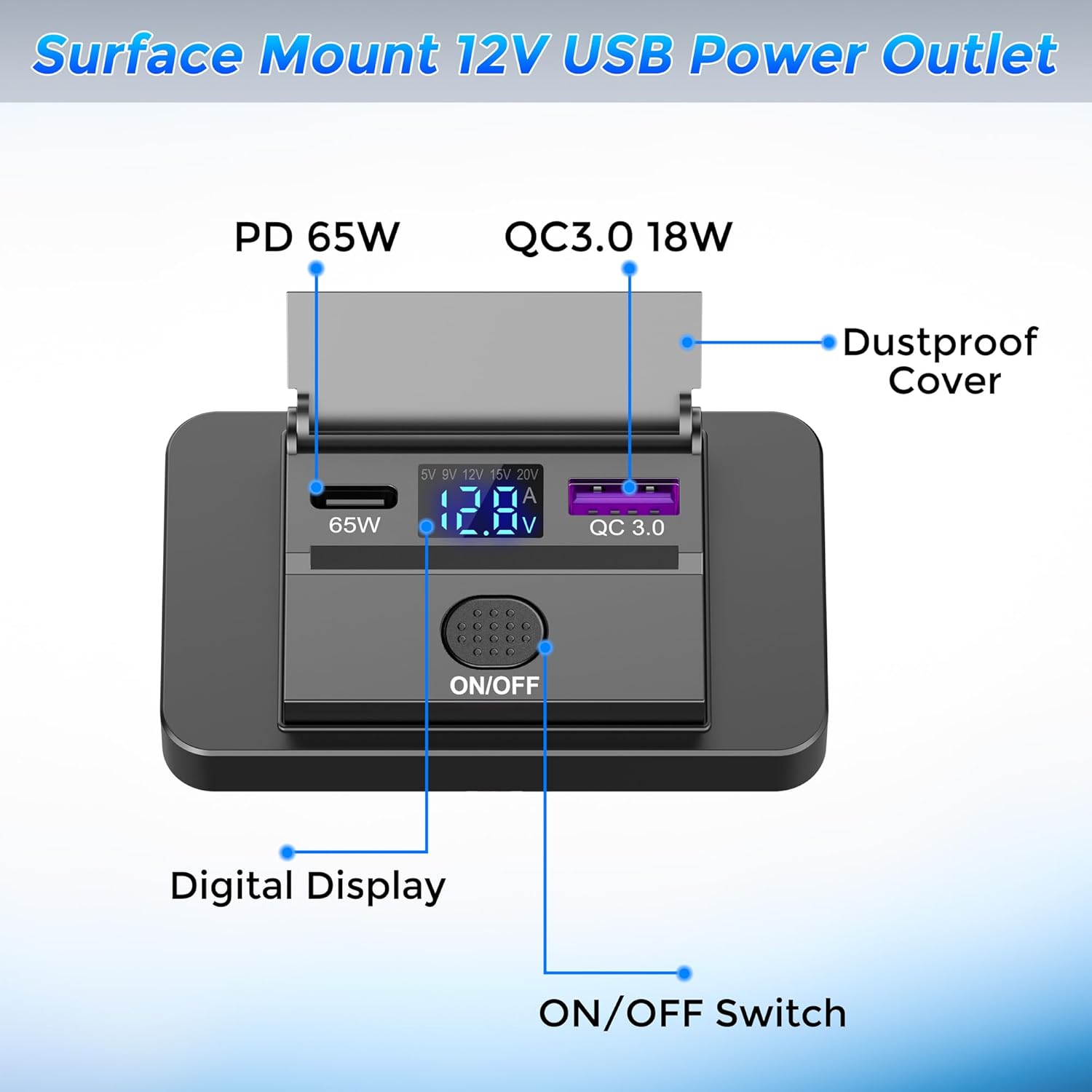
Kuva 1.2: Yksityiskohtainen view of the charger's components, including the ports, digital display, and control switch.
2. Asennus ja asennus
This charger is designed for surface mounting, requiring minimal modification to your vehicle's interior. Follow these steps for proper installation:
- Valmistele asennuspinta: Choose a flat, stable surface in your vehicle for installation.
- Avaa kansi: Carefully open the outer frame/cover of the charger unit.
- Drill Wiring Holes: Drill a small hole (approximately 1.8 cm in diameter, refer to dimensions in Section 5) through the chosen mounting surface to pass the power cables. Ensure the hole is only large enough for the wires, not the entire unit.
- Kytke johdotus:
- Yhdistä punainen lanka to the positive (+) terminal of your vehicle's 12V/24V power source.
- Yhdistä musta johto to the negative (-) terminal or a suitable ground point.
Tärkeää: Ensure correct polarity to prevent damage to the charger and your vehicle's electrical system. It is recommended to connect through a fuse (not included) for safety.
- Kiinnitä yksikkö: Place the main body of the charger onto the mounting surface, aligning the wiring through the drilled hole. Use the provided screws to firmly fix the unit to the surface.
- Sulje kansi: Reattach the outer frame/cover to the main unit. Ensure it snaps securely into place.

Kuva 2.1: Step-by-step guide for surface mount installation.
3. Käyttöohjeet
3.1 Virran kytkeminen päälle/pois
- The charger features a physical ON/OFF pressure switch. Press the switch to toggle the power to the USB ports and the digital display.
- When the charger is powered on, the LED digital display will illuminate.

Kuva 3.1: Demonstrating the ON/OFF function of the charger.
3.2 Using the Charging Ports
- USB-C (PD 65W) -portti: Connect your USB-C compatible laptops, tablets, or smartphones to this port for fast charging. The 65W PD3.0 port can boost voltage to 15V and 20V for optimal charging of larger devices.
- USB-A (QC3.0 18W) Port: Connect your Quick Charge 3.0 compatible devices or standard USB devices to this port for efficient charging.
- You can charge two devices simultaneously using both ports.
3.3 Digitaalisen näytön toiminnallisuus
- Akku Voltage Valvonta: In standby mode or when only the USB-A port is in use, the display shows the vehicle's battery voltage (V), allowing you to monitor its health.
- Real-time Charging Data: When a device is connected to the 65W USB-C port, the display automatically switches to show the real-time output voltage (V) and current (A) for the PD interface, providing immediate feedback on charging performance.

Kuva 3.2: The digital display showing vehicle battery voltage and real-time charging output for various devices.
4. Huolto
- Puhdistus: Use a soft, dry cloth to clean the surface of the charger. Avoid using abrasive cleaners or solvents.
- Pölytiivis kansi: Keep the flip cover closed when the ports are not in use to protect them from dust and moisture.
- Ympäristöolosuhteet: While designed for automotive use, avoid exposing the charger to extreme water or harsh weather conditions.
- Kaapelin tarkastus: Periodically check charging cables for any signs of wear or damage. Replace damaged cables immediately.
5. Vianmääritys
- Laturi ei käynnisty:
- Ensure the vehicle's ignition is on (if required by your vehicle's wiring).
- Check the ON/OFF switch to ensure it is pressed to the 'ON' position.
- Verify that the red and black wires are correctly connected to the positive and negative terminals, respectively.
- Check the vehicle's fuse for the circuit the charger is connected to. Replace if blown.
- Device Not Charging / Slow Charging:
- Varmista, että latauskaapeli on kytketty kunnolla sekä laturiin että laitteeseesi.
- Kokeile toista latauskaapelia sulkeaksesi pois kaapeliongelmat.
- Confirm your device supports PD (for USB-C) or QC3.0 (for USB-A) for fast charging.
- If charging multiple devices, note that total power output is shared.
- Check the digital display for output voltage and current. If values are unexpectedly low, there might be an issue with the power source or the device being charged.
- Epätarka Voltage Näyttö:
- Ensure the charger is properly connected to a stable 12V/24V power source.
- Fluctuations in vehicle battery voltage are normal, especially during engine start-up or heavy electrical load.
6. Tekniset tiedot
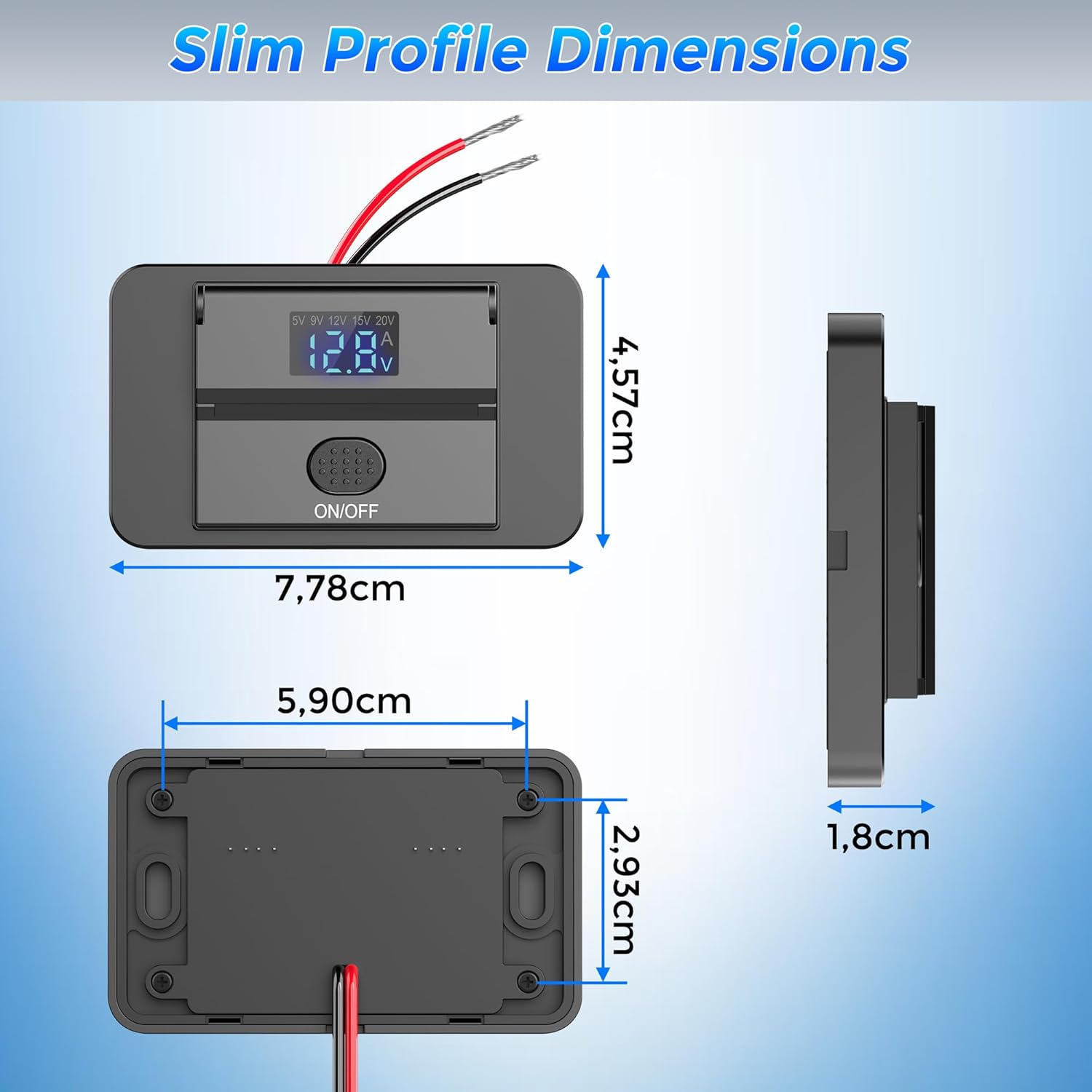
Kuva 6.1: Physical dimensions of the Qidoe 83W PD USB C Car Charger.
| Ominaisuus | Erittely |
|---|---|
| Mallin nimi | QD1009 |
| Merkki | qidoe |
| Kokonaisteho | 83 Watts (Max Combined) |
| USB-C-portin lähtö | 65W Power Delivery (PD3.0) |
| USB-A-portin lähtö | 18W Quick Charge (QC3.0) |
| Tulo Voltage | 12V / 24V DC |
| Lähtö Voltage (USB-C) | Up to 20 Volts DC |
| Lähtövirta (maks.) | 4.15 A |
| USB-portteja yhteensä | 2 (1 x USB-C, 1 x USB-A) |
| Liittimen tyyppi | USB Type C, USB Type A |
| Kiinnitystyyppi | Surface Mount (Dashboard Mount) |
| Erikoisominaisuus | Fast Charging, Digital Voltage/Current Display, ON/OFF Switch, Dustproof Cover |
| Yhteensopivat laitteet | Laptops, Tablets, Smartphones |
| Mukana olevat komponentit | 1 x 65W Surface Mount USB-C Outlet |
| Sertifikaatit | CE, FCC |
| Sisäinen materiaali | Muovi |
| Tuotteen mitat (noin) | 7.78 cm (P) x 5.90 cm (L) x 4.57 cm (K) |
| Pakkauksen mitat | 9.5 x 8.8 x 2.2 cm |
| Tuotteen paino | 51 grammaa |
7. Takuu ja tuki
The Qidoe 83W PD USB C Car Charger comes with a yhden vuoden valmistajan takuu.
For any questions, technical assistance, or warranty claims, please contact Qidoe customer service directly via email. Our support team is committed to providing a satisfactory resolution as quickly as possible.
Yhteystiedot: Please refer to the contact details provided on the product packaging or the official Qidoe websivustolta ajantasaisimmat tukitiedot.
8. Ajoneuvojen yhteensopivuus
This charger is designed to be compatible with a wide range of 12V-24V vehicles, including:
- Autot
- Pakettiautot
- Matkailuautot
- Kuorma-autot
- Bussit
- Veneitä
- Moottoripyörät

Kuva 8.1: Examples of compatible vehicles for the Qidoe car charger.