
1. Johdanto
This user manual provides detailed instructions for the installation, operation, and maintenance of your Cooler Master MasterLiquid Atmos II 360 VRM AIO CPU Liquid Cooler. Designed for high-performance computing, this liquid cooler features a 360mm radiator, three ARGB PWM fans, a dual-chamber pump, and an integrated VRM cooling fan to ensure optimal thermal management for your CPU and motherboard VRMs.
2. Pakkauksen sisältö
Carefully unpack the box and ensure all components are present. The package includes:
- MasterLiquid Atmos II 360 VRM AIO Unit (Radiator, Pump, and Pre-installed Fans)
- SickleFlow 2 360 Fans (Pre-installed)
- Dual Pump Covers (Standard and Mirror Effect)
- Mounting Hardware for AMD AM5/AM4 and Intel LGA 1851/1700 platforms
- Offset Brackets for LGA 1851
- Thermal Paste (CryoFuze)
- Cables (Power, ARGB)
- User Manual (QR code for digital version)
- Takuutiedot

Image: All components of the Cooler Master Atmos II 360 VRM AIO Liquid Cooler, including the radiator with fans, pump, mounting hardware, and accessories.
3. Tärkeimmät ominaisuudet
- Precision VRM Cooling: Features an integrated VRM fan designed to target motherboard hot zones, reducing temperatures and increasing stability under load. Lab tests indicate temperature reductions of up to 10.2°C across key components.
- Dual-Chamber Pump Design: Patented dual-chamber design enhances water pressure and flow to CPU hotspots, providing efficient and quiet cooling for high-performance processors like Ryzen 9 and Intel Ultra i9.
- Kestävä rakenne: Built with PPS (Polyphenylene Sulfide) and fiberglass, engineered to withstand extreme heat up to 70°C for 3,000 hours and 120°C for 12 hours, ensuring long-lasting performance.
- Nopea ja helppo asennus: Pre-installed customizable ARGB fans and a streamlined mounting system simplify setup across AMD AM5/AM4 and Intel LGA 1851/1700 platforms.
- Offset Brackets for LGA 1851: Includes offset brackets specifically for LGA 1851 sockets to optimize contact with CPU hotspots, potentially lowering core temperatures by up to 4°C.
- Streamlined Cabling: Cables are routed internally through the tubes, and all fans connect with a single cable for a cleaner and more organized build.
- Dual Cover Styles: Two decorative top covers are included and attach magnetically, allowing for quick aesthetic customization.
- Community Customization: Open-source mod files are available for users to download and 3D print their own pump covers, faceplates, or custom labels.

Image: Illustration of the precision VRM cooling fan directing airflow to critical motherboard components.

Image: Cross-section diagram of the patented dual-chamber pump, illustrating the optimized water flow path.

Image: The pump head showcasing the two included magnetic top covers for aesthetic customization.
4. Asennus ja asennus
Follow these general steps for installing your Cooler Master MasterLiquid Atmos II 360 VRM. Refer to the detailed manual (accessible via QR code in the package) for specific socket instructions.
- Valmistele emolevy: Ensure your motherboard is compatible with the cooler's mounting system (AMD AM5/AM4 or Intel LGA 1851/1700).
- Asenna takalevy (tarvittaessa): Attach the appropriate backplate to the rear of your motherboard.
- Levitä lämpötahnaa: Apply a small, pea-sized amount of the included CryoFuze thermal paste to the center of your CPU's IHS (Integrated Heat Spreader).
- Mount Pump/Cold Plate: Carefully align the pump/cold plate assembly with the CPU and secure it using the provided mounting brackets and screws. Ensure even pressure.
- Jäähdyttimen asennus: Install the 360mm radiator with its pre-installed fans to an available mounting location in your PC case (e.g., top, front). Ensure proper airflow direction.
- Kytke kaapelit:
- Kytke pumpun virtajohto emolevyn CPU_FAN- tai AIO_PUMP-liitäntään.
- Connect the ARGB cables from the fans and pump to your motherboard's ARGB header or a compatible ARGB controller.
- Connect the VRM fan cable to an available fan header on your motherboard.
- Kaapelin hallinta: Utilize the internal cable routing within the tubes and other cable management features for a clean build.

Image: Mounting brackets for Intel and AMD platforms, highlighting the quick and easy installation process.
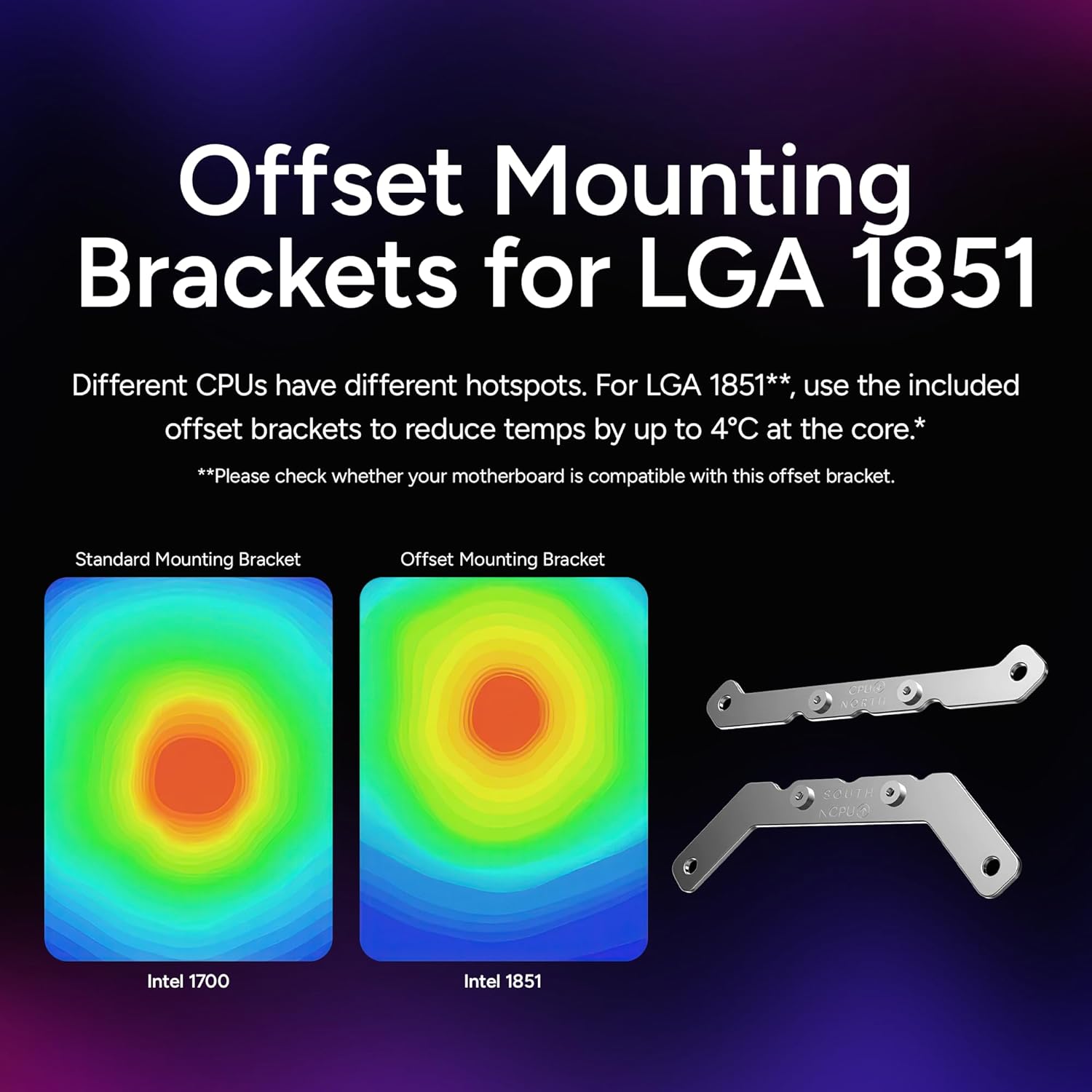
Image: The Cooler Master Atmos II 360 VRM AIO Liquid Cooler fully installed in a PC system, showcasinsen RGB-valaistus.
5. Käyttö ja suorituskyky
Once installed, the Cooler Master MasterLiquid Atmos II 360 VRM will automatically begin cooling your CPU. The ARGB lighting can be controlled via your motherboard's software or a dedicated controller, allowing for synchronization with other system components.
Performance benchmarks indicate significant temperature reductions compared to standard air coolers. For example, during heavy load tests, CPU temperatures were observed around 60°C, which is approximately 7°C lower than a 3DHP air cooler. During gaming, CPU temperatures were consistently around 41-47°C, demonstrating excellent thermal management.
Video: This video demonstrates the Flex-Kit Modularity of the Cooler Master MasterLiquid Atmos II, showcasing how different pump covers can be swapped for aesthetic customization.
Video: This video provides a closer look at the Cooler Master MasterLiquid Atmos II VRM, highlighting its design and features, including the integrated VRM fan.
6. Huolto
Regular maintenance ensures optimal performance and longevity of your AIO liquid cooler:
- Pölynpuhdistus: Puhdista jäähdyttimen rivat ja tuulettimen lavat säännöllisesti paineilmalla pölyn poistamiseksi. Pöly voi estää ilmavirtausta ja heikentää jäähdytystehoa.
- Tarkista letkut ja liitännät: Inspect the tubing for any kinks, leaks, or damage. Ensure all connections to the pump and radiator are secure.
- Jäähdytysnesteen tasojen valvonta: While AIOs are sealed systems, it's good practice to visually inspect the pump for any signs of low coolant over time (though this is rare).
- Lämpöpastan uudelleenkäyttö: If you ever remove the pump from the CPU, clean off the old thermal paste and reapply a fresh layer before reinstallation.
7. Vianmääritys
If you encounter issues with your liquid cooler, consider the following:
- Korkeat suorittimen lämpötilat:
- Ensure the pump is running and properly connected to the motherboard.
- Varmista, että tuulettimet pyörivät ja että ne on suunnattu oikein ilmavirran varmistamiseksi.
- Check if the cold plate is making proper contact with the CPU (reapply thermal paste if necessary).
- Puhdista jäähdyttimen rivoista mahdollinen pölykertymä.
- Unusual Noises (Pump/Fans):
- A gurgling sound might indicate air bubbles in the loop; gently tilt your PC case to help dislodge them.
- Excessive fan noise could mean fans are running at maximum RPM; adjust fan curves in BIOS/UEFI or software.
- Persistent grinding or buzzing from the pump may indicate a pump issue; contact support.
- ARGB-valaistusongelmat:
- Ensure ARGB cables are securely connected to the motherboard or controller.
- Check your motherboard's ARGB software or dedicated controller software for proper settings.
- Verify power supply to the ARGB components.
8. Tekniset tiedot
| Erittely | Arvo |
|---|---|
| Tuotteen mitat | 14.2 cm P x 4.8 cm L x 1 cm K |
| Merkki | Viileämpi mestari |
| Virtaliittimen tyyppi | 4-nastainen |
| Jäähdytysmenetelmä | Fan, Water |
| Yhteensopivat laitteet | CPU, Desktop |
| Melutaso | 38.5 desibeliä |
| Materiaali | Aluminum, Copper, Plastic |
| Suurin pyörimisnopeus | 2500 RPM |
| Ilmavirran kapasiteetti | 190 kuutiojalkaa minuutissa |
| Tuotteen paino | 3.1 puntaa |
| UPC | 884102131998 |
9. Takuu ja tuki
The Cooler Master MasterLiquid Atmos II 360 VRM AIO CPU Liquid Cooler comes with a 6 vuoden valmistajan takuu. For technical support, warranty claims, or further assistance, please visit the official Cooler Master website or contact their customer service department. Ensure you have your product model number and proof of purchase ready.