
Johdanto
This manual provides detailed instructions for the installation, operation, and maintenance of the ASUS B760M-AYW WiFi D4 II microATX motherboard. Please read this manual thoroughly before installing or using the product to ensure correct setup and optimal performance.
Turvallisuustiedot
- Irrota aina virtajohto pistorasiasta ennen kuin kosket mihinkään laitteen sisäisiin osiin.
- Wear an anti-static wrist strap or frequently touch a grounded object to prevent electrostatic discharge (ESD) damage to components.
- Käsittele komponentteja reunoista välttääksesi herkkien osien koskettamista.
- Varmista tietokoneen kotelon asianmukainen tuuletus ylikuumenemisen estämiseksi.
Asennus
1. Suorittimen asennus
The motherboard supports Intel LGA 1700 socket processors. Carefully align the CPU with the socket, ensuring the triangular mark on the CPU matches the mark on the socket. Lower the CPU gently into the socket, then close the load plate and secure the retention lever.
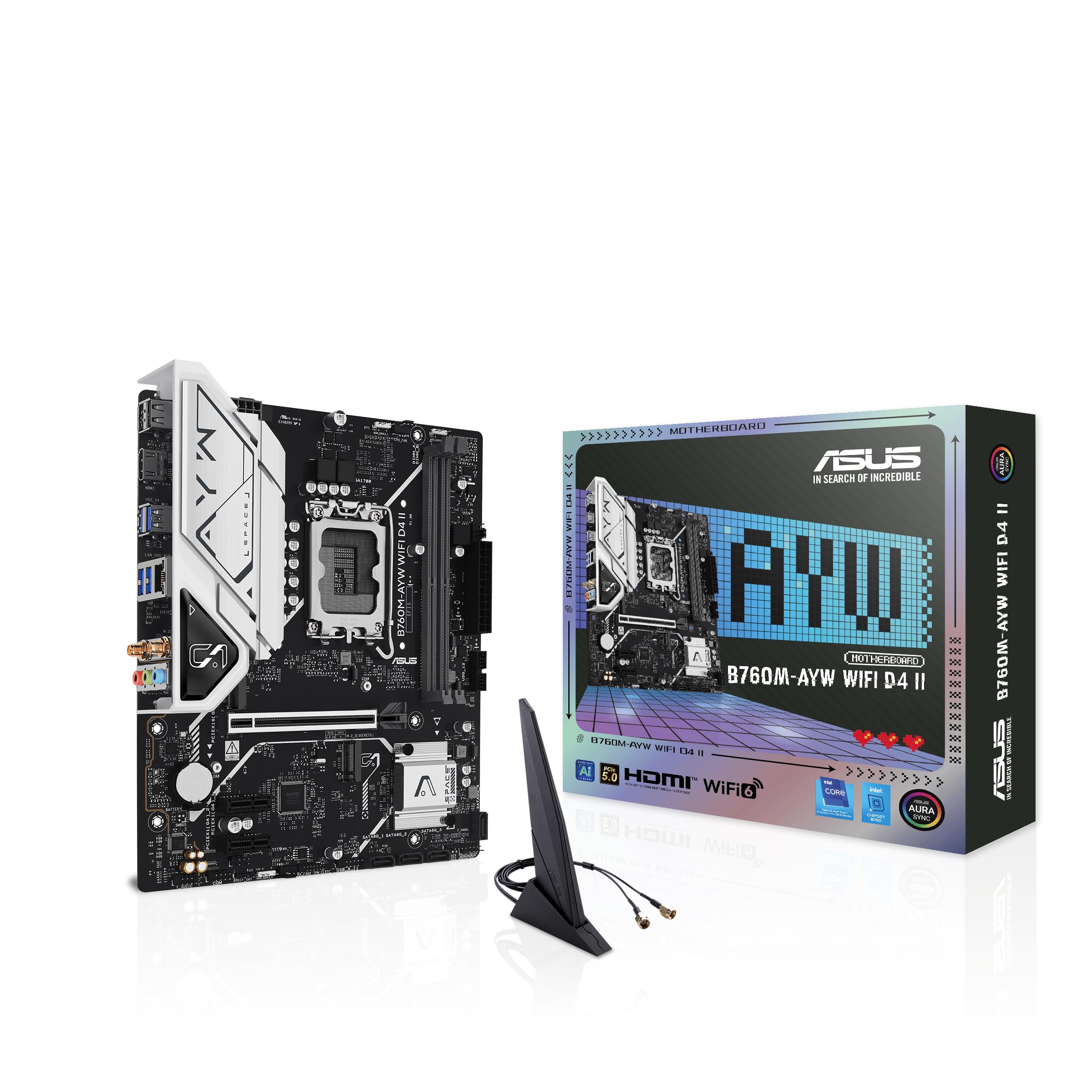
Kuva: Ylhäältä alas view of the ASUS B760M-AYW WiFi D4 II motherboard, highlighting the LGA 1700 CPU socket.
2. Muistin (RAM) asennus
This motherboard features two DDR4 DIMM slots. For optimal performance, install memory modules in a dual-channel configuration. Open the clips on both ends of the DIMM slot, align the memory module with the slot key, and press down firmly until the clips snap into place.
3. Tallennusaseman asennus (M.2 ja SATA)
The motherboard includes two M.2 slots for NVMe SSDs and four SATA 6 Gbps ports for traditional hard drives or SSDs.
- M.2 SSD: Insert the M.2 SSD into the slot at a 30-degree angle, then push it down and secure it with the provided M.2 screw package.
- SATA-asemat: Connect SATA data cables from your storage drives to the SATA ports on the motherboard. Connect power cables from your power supply to the drives.

Image: The ASUS B760M-AYW WiFi D4 II motherboard shown with its retail box, Wi-Fi antenna, SATA cables, and M.2 screw packages.
4. Laajennuskortin asennus (PCIe)
The motherboard features one PCIe 5.0 x16 slot for graphics cards and additional PCIe 4.0 x1 slots for other expansion cards. Insert the card firmly into the desired slot until it clicks into place and secure it with a case screw.
5. Virtaliitännät
Kytke virtalähteen 24-nastainen ATX-virtaliitin ja 8-nastainen CPU-virtaliitin emolevyn vastaaviin portteihin.
6. Etupaneelin liitännät
Connect your PC case's front panel cables (USB 5Gbps, audio, power switch, reset switch, power LED, HDD LED) to the corresponding headers on the motherboard. Refer to the motherboard layout for exact header locations.
7. Takaosan I/O-liitännät
Connect your peripherals to the rear I/O ports. These include HDMI, USB 5Gbps Type-A, Realtek 2.5Gb Ethernet, and audio jacks.
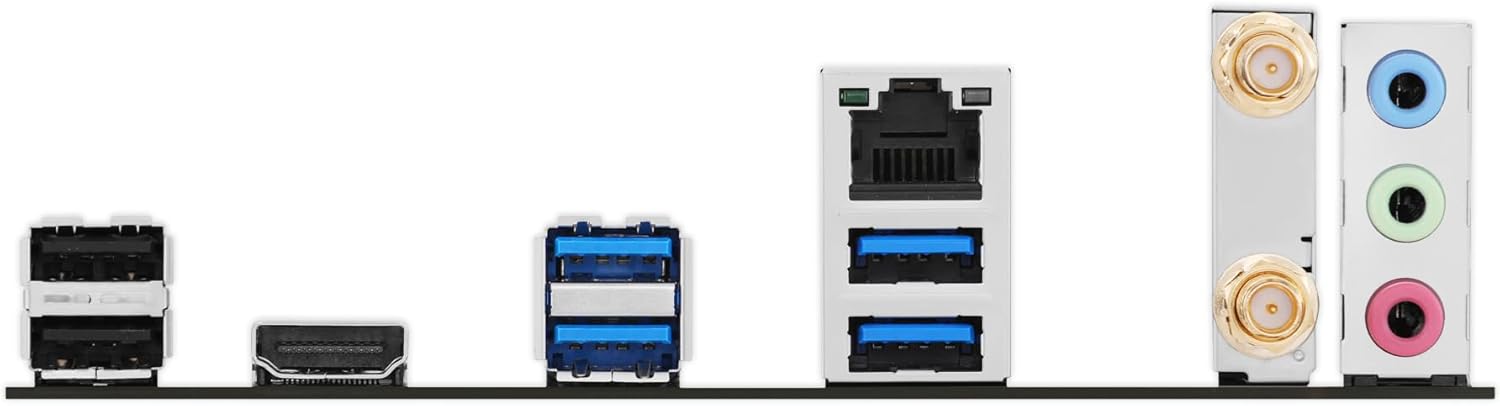
Kuva: Yksityiskohtainen view of the rear input/output panel of the ASUS B760M-AYW WiFi D4 II motherboard, showing USB ports, Ethernet, and audio jacks.
8. Wi-Fi-antennin asennus
Kiinnitä mukana tuleva Wi-Fi-antenni takapaneelin kahteen antenniliittimeen. Aseta antenni optimaalisen signaalin vastaanoton saavuttamiseksi.
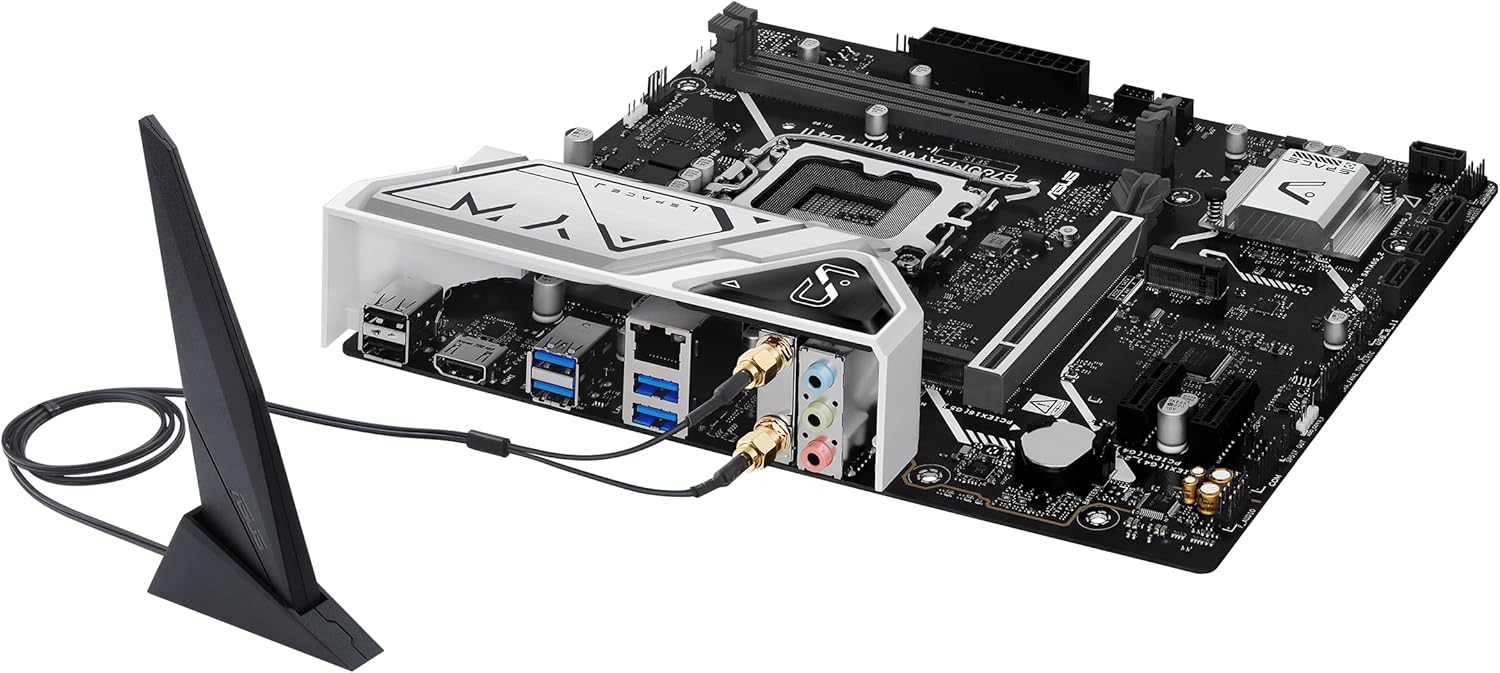
Image: The ASUS B760M-AYW WiFi D4 II motherboard with its external Wi-Fi antenna connected to the rear I/O ports.
Toiminnassa
1. BIOS/UEFI-määritys
Pääset BIOS/UEFI-asetusohjelmaan painamalla Poistaa key during the Power-On Self-Test (POST). Here you can configure boot order, enable XMP for memory, adjust fan speeds, and manage other system settings.
2. Ohjaimen asennus
After installing your operating system, install the necessary drivers for the motherboard's components. These include chipset drivers, LAN drivers, Wi-Fi drivers, and audio drivers. Drivers can be found on the ASUS support websivusto emolevysi mallille.
3. Ohjelmistoapuohjelmat
ASUS provides several utilities to enhance your system experience:
- Aura Sync: For controlling RGB lighting on compatible components.
- Fan Xpert 2+: Edistyneeseen tuulettimien ohjaukseen ja järjestelmän jäähdytyksen optimointiin.
- Asevarastolaatikko: A centralized software suite for system monitoring, driver updates, and utility management.
Huolto
1. BIOS-päivitykset
Tarkista ASUS-tuki säännöllisesti website for BIOS updates. BIOS updates can improve system stability, add support for new hardware, or fix bugs. Use the ASUS EZ Flash utility within the BIOS to perform updates, following the instructions carefully.
2. Ohjainpäivitykset
Keep your drivers updated to ensure optimal performance and compatibility. Regularly check the ASUS support website for the latest drivers for your motherboard.
3. Puhdistus
To maintain optimal performance and longevity, regularly clean dust from your PC case and motherboard components. Use compressed air to remove dust from heatsinks, fans, and slots. Ensure the system is powered off and unplugged before cleaning.
Vianetsintä
1. Q-LED Core Indicators
The motherboard features Q-LED Core indicators that light up to indicate the status of key components during POST. These LEDs can help diagnose issues:
- CPU-merkkivalo: Indicates CPU initialization status.
- DRAM-LED: Indicates memory detection status.
- VGA-LED-näyttö: Indicates graphics card detection status.
- KÄYNNISTYKSEN LED-VALO: Indicates boot device detection status.
If an LED remains lit, it suggests an issue with the corresponding component.
2. Yleisiä ongelmia
- Ei virtaa: Tarkista kaikki virtaliitännät (24-nastainen ATX, 8-nastainen CPU, GPU). Varmista, että virtalähde on päällä.
- Ei näyttöä: Verify the graphics card is properly seated and connected to power. Ensure the monitor cable is connected to the graphics card, not the motherboard (unless using integrated graphics).
- Järjestelmän epävakaus: Check memory seating, run memory diagnostic tools, ensure CPU cooler is properly installed, and verify BIOS settings.
- Oheislaitetta ei havaittu: Ensure the device is properly connected and its drivers are installed. Try a different port if available.
Tekniset tiedot
| Ominaisuus | Erittely |
|---|---|
| Merkki | ASUS |
| Mallin nimi | B760M-AYW WIFI D4 II |
| CPU-liitäntä | LGA 1700 |
| Yhteensopivat prosessorit | Intel Core 14th, 13th, 12th Gen, Pentium Gold, Celeron Processors |
| Piirisarjan tyyppi | Intel B760 |
| RAM-muistitekniikka | DDR4 |
| Muistipaikat saatavilla | 2 |
| Suurin muistikapasiteetti | 96 Gt |
| Grafiikkakortin käyttöliittymä | PCI Express 5.0 x16 |
| Total M.2 Slots | 2 |
| SATA-porttien kokonaismäärä | 4 |
| Ethernet | Realtek 2.5 Gb Ethernet |
| Wi-Fi | Wi-Fi 6 |
| HDMI-portit | 1 |
| Etu USB | USB 5Gbps support |
| Takana USB | USB 5Gbps Type-A |
| Muototekijä | microATX |
| Tuotteen mitat (P x L x K) | 9.6 cm P x 8.3 cm L x 1.4 cm K |
Takuutiedot
The ASUS B760M-AYW WiFi D4 II motherboard comes with a 3-year limited warranty. For detailed terms and conditions, please refer to the warranty card included with your product or visit the official ASUS support websivusto.
Tukea
Teknistä tukea, ajurilatauksia, BIOS-päivityksiä ja lisätietoja tuotteesta varten käy ASUSin virallisella tukisivustolla. websivusto:
You can also find FAQs and troubleshooting guides on the support portal.