
Johdanto
This manual provides detailed instructions for the installation, operation, maintenance, and troubleshooting of your HABCGYUR ME98RF Digital Thermostat. Designed for smart home heating systems, this wireless thermostat offers precise temperature control for gas boilers, enhancing comfort and energy efficiency in your home.
Asennus ja asennus
The HABCGYUR ME98RF thermostat is designed for easy integration with your gas boiler heating system. Ensure all power is disconnected before beginning installation.
Komponentit ohiview
The system typically consists of a main thermostat display unit and a receiver unit. The receiver unit connects to your gas boiler, while the display unit communicates wirelessly with the receiver.

Image: The main thermostat display unit (right) and its wireless receiver unit (left). The display shows current room temperature and set temperature, along with time and operational icons.
Vastaanotinyksikön asennus
- Mount the receiver unit near your gas boiler.
- Connect the receiver unit to your gas boiler's control terminals according to the boiler manufacturer's instructions.
- Connect the receiver unit to a suitable power supply.
Thermostat Display Unit Placement
Place the thermostat display unit in a central location within the room where temperature control is desired. Ensure it is within effective wireless range (up to 100m) of the receiver unit and away from direct sunlight, drafts, or heat sources that could affect temperature readings.

Image: An illustration showing the thermostat display unit positioned in a room, wirelessly communicating with the receiver unit connected to a gas boiler, indicating a typical wireless range of 100 meters.
Initial Power-Up and Pairing
Once both units are powered, they should automatically attempt to pair. Follow any on-screen prompts on the thermostat display for initial setup, including setting the current time and date.
Käyttöohjeet
The ME98RF thermostat features a digital LCD display and touch-sensitive keys for intuitive operation.
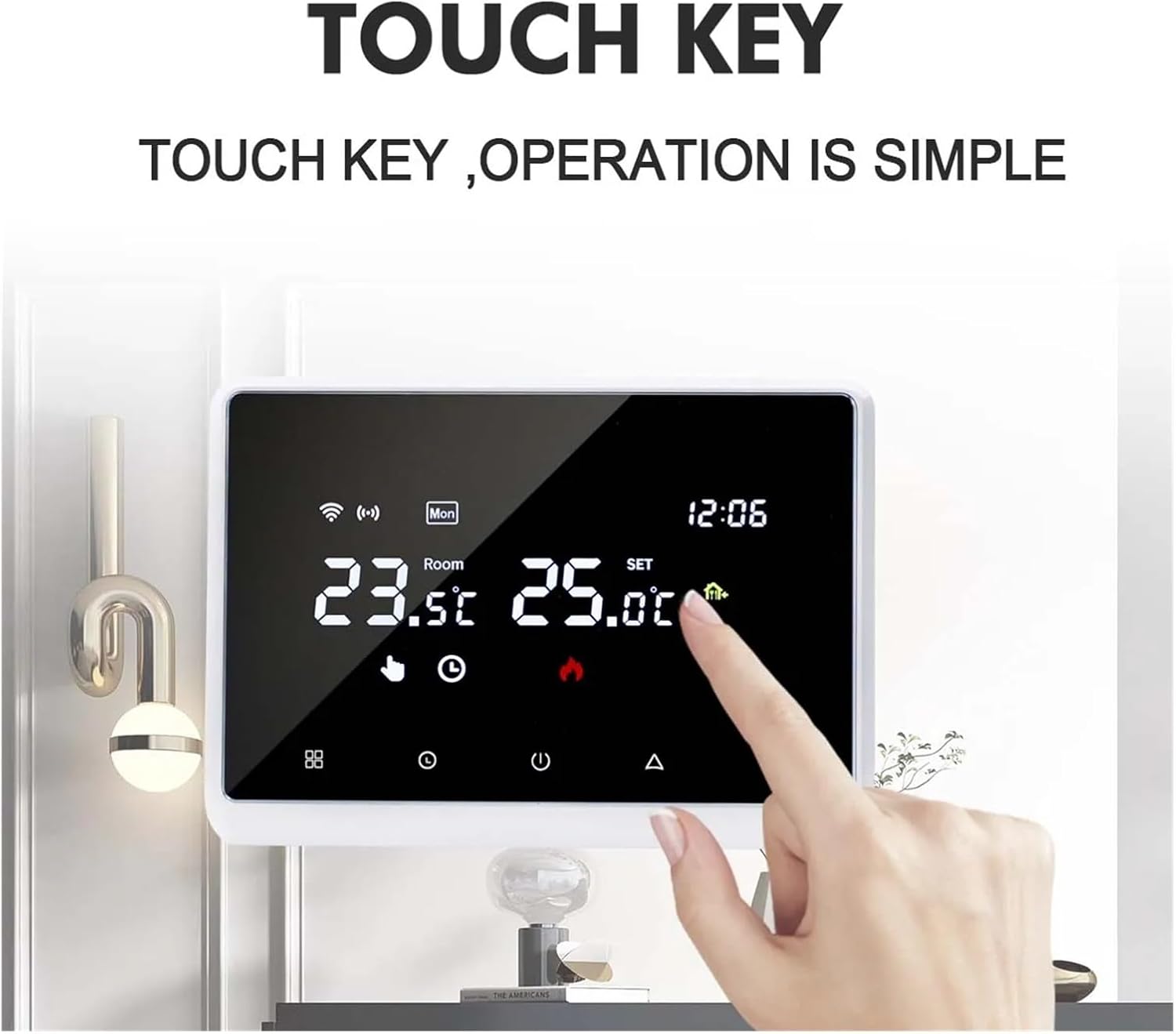
Kuva: Lähikuva view of the thermostat's digital display, highlighting the touch-sensitive control keys located below the screen for adjusting settings.
Lämpötilan asetus
- Käytä Up ja Alas arrow touch keys to adjust the desired set temperature. The display will show both the current room temperature and your set temperature.
- The temperature control range is from 5°C to 70°C, with an accuracy of ±0.5°C.
Toimintatilat
The thermostat typically supports various operating modes such as Manual, Programmed, and Holiday mode. Refer to the on-screen menu for selecting and configuring these modes.
WiFi Connectivity and Mobile App Control
The ME98RF thermostat can connect to your home WiFi network, allowing for remote control via a dedicated mobile application. This enables you to manage your home's heating environment from anywhere at any time.
- Download the official HABCGYUR smart home app from your device's app store.
- Follow the in-app instructions to connect your thermostat to your home WiFi network.
- Once connected, you can monitor real-time temperature updates and adjust settings remotely.

Image: A mobile phone screen showing the thermostat control application, positioned next to the physical thermostat unit, illustrating remote control capabilities via Wi-Fi.
Huolto
Säännöllinen huolto varmistaa termostaatin optimaalisen suorituskyvyn ja pitkän käyttöiän.
- Puhdistus: Gently wipe the thermostat display and receiver unit with a soft, dry cloth. Avoid using abrasive cleaners or solvents.
- Pölynpoisto: Ensure the vents (if any) on the receiver unit are free from dust accumulation to prevent overheating.
- Ohjelmistopäivitykset: Periodically check the mobile application for any available firmware updates for your thermostat to ensure you have the latest features and bug fixes.
Vianetsintä
If you encounter issues with your HABCGYUR ME98RF Digital Thermostat, refer to the following common solutions:
| Ongelma | Mahdollinen syy | Ratkaisu |
|---|---|---|
| Termostaatin näyttö on tyhjä. | No power to the display unit. | Check power connection to the display unit. Ensure it is properly plugged in or powered. |
| Lämmitysjärjestelmä ei reagoi. | Receiver unit not powered or not paired with display unit. Wiring issue with boiler. | Verify power to the receiver unit. Check pairing status. Inspect wiring connections to the gas boiler. |
| WiFi connection unstable or disconnected. | Heikko WiFi-signaali, väärä salasana tai reitittimen ongelma. | Ensure the thermostat is within WiFi range. Re-enter WiFi password in the app. Restart your home router. |
| Epätarkat lämpötilalukemat. | Thermostat placed near heat sources, drafts, or direct sunlight. | Relocate the thermostat to a more suitable, neutral location in the room. |
Jos ongelma jatkuu näiden ratkaisujen kokeilemisen jälkeen, ota yhteyttä asiakastukeen.
Tekniset tiedot
- Mallinumero: ME98RF (Item model number: 12983)
- Merkki: HABCGYUR
- Lämpötilan säätöalue: 5-70 °C
- Lämpötilan säätötarkkuus: ±0.5°C
- Näyttötyyppi: LCD
- Langaton yhteys: WiFi
- Virtalähde: Not battery required (main unit, check specific power requirements for receiver)
- Tuotteen paino: 1.1 paunaa (noin 0.5 kg)
- Paketin mitat: 0.39 x 0.39 x 0.39 tuumaa (noin 1 x 1 x 1 cm)
Huomautus: Tekniset tiedot voivat muuttua ilman ennakkoilmoitusta.
Takuu ja tuki
For warranty information, please refer to the documentation provided at the time of purchase or contact your retailer. HABCGYUR is committed to providing reliable products and customer support.
If you require technical assistance or have questions not covered in this manual, please visit the official HABCGYUR websivustolta tai ota yhteyttä suoraan heidän asiakaspalveluunsa. Yhteystiedot löytyvät yleensä tuotepakkauksesta tai valmistajan websivusto.