
1. Johdanto
Thank you for choosing the Antec VCX300 ARGB ATX/M-ATX PC Case. This manual provides detailed instructions for the installation, operation, and maintenance of your new computer chassis. Please read this manual thoroughly before installation to ensure proper setup and optimal performance.
2. Turvallisuustiedot
- Irrota aina virtalähde ennen minkään komponentin asentamista tai irrottamista.
- Handle components with care to avoid damage from electrostatic discharge. Use an anti-static wrist strap if available.
- Keep the case away from water, moisture, and direct heat sources.
- Varmista kotelon asianmukainen ilmanvaihto ylikuumenemisen estämiseksi.
- Do not attempt to open or repair the power supply unit inside the case. Refer to qualified service personnel.
3. Pakkauksen sisältö
Varmista, että pakkauksessasi on kaikki tarvittavat osat:
- Antec VCX300 ARGB ATX/M-ATX PC Case
- Accessory Box (Screws, standoffs, cable ties)
- Käyttöopas (tämä asiakirja)
4. Tuote ohiview
Familiarize yourself with the various parts of your Antec VCX300 ARGB PC Case.
4.1 Etupaneelin I/O
- Virtapainike
- Reset-painike
- USB 3.0 -portit
- USB 2.0 -portit
- Audio Jacks (Headphone/Microphone)
- LED Control Button (for ARGB lighting)
4.2 Internal Layout
The VCX300ARGB case supports ATX and Micro-ATX motherboards. It features multiple drive bays for storage and ample space for cooling solutions.
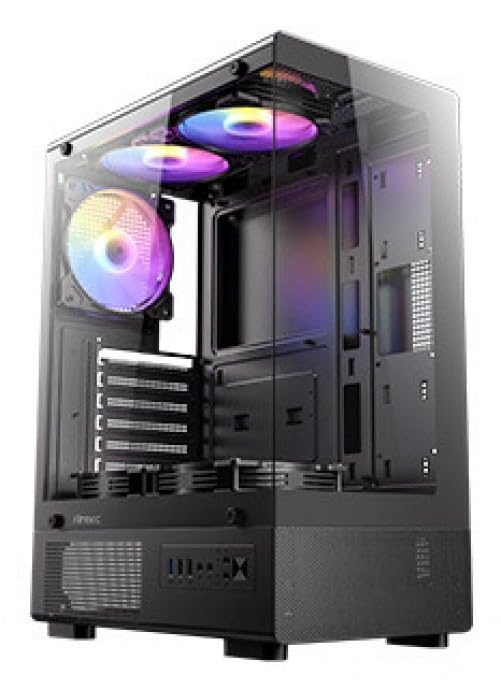
Kuva 1: Etuosa view of the Antec VCX300 ARGB PC Case, showcasing the ARGB lighting elements and front panel I/O ports.
5. Asennus ja asennus
Follow these steps to install your components into the Antec VCX300 ARGB PC Case.
5.1 Asian valmistelu
- Aseta kotelo tasaiselle ja vakaalle alustalle.
- Irrota sivupaneelit irrottamalla kotelon takaosassa olevat siipiruuvit ja liu'uttamalla paneeleja taaksepäin.
5.2 Emolevyn asennus
- Asenna I/O-suoja kotelon takaosaan.
- Kohdista emolevy esiasennettuihin tukiin. Varmista, että emolevyn ruuvinreiät vastaavat tukia.
- Kiinnitä emolevy lisävarustelaatikossa toimitetuilla ruuveilla.
5.3 Virtalähteen asennus
- Position the power supply unit (PSU) in the designated compartment at the bottom rear of the case.
- Kiinnitä virtalähde ruuveilla kotelon ulkopuolelta takapuolelta.
5.4 Tallennusaseman asennus (kiintolevy/SSD)
- Locate the drive bays. The VCX300ARGB typically features dedicated bays for 3.5" HDDs and 2.5" SSDs.
- For 3.5" HDDs, slide the drive into the bay and secure it with screws or tool-less clips if available.
- For 2.5" SSDs, mount the drive onto the designated brackets or trays and secure with screws.
5.5 Expansion Card Installation (GPU, etc.)
- Irrota tarvittavat laajennuspaikkojen suojat kotelon takaosasta.
- Insert the expansion card (e.g., graphics card) into the appropriate PCIe slot on the motherboard.
- Kiinnitä kortti ruuvilla.
5.6 Kaapelin hallinta
Hyödynnä emolevyn lokeron takana olevia kaapelien reititysaukkoja ja kiinnityspisteitä kaapeleiden hallintaan. Tämä parantaa ilmankiertoa ja ulkonäköä.
- Connect all power cables from the PSU to the motherboard and components.
- Connect front panel I/O cables (USB, audio, power/reset switches, LED) to the corresponding headers on the motherboard.
- Connect ARGB cables from the case fans/strips to the motherboard's ARGB header or the integrated ARGB controller.
6. Käyttö
6.1 Virran kytkeminen päälle
- Ensure all components are correctly installed and cables are connected.
- Sulje ja kiinnitä sivupaneelit.
- Kytke virtajohto virtalähteeseen ja pistorasiaan.
- Flip the power switch on the PSU to the "ON" position.
- Press the Power Button on the front panel of the case.
6.2 ARGB-valaistuksen ohjaus
The Antec VCX300 ARGB case features customizable ARGB lighting. You can control the lighting effects in two ways:
- LED-ohjauspainike: Press the dedicated LED control button on the front panel to cycle through various pre-set ARGB lighting modes and colors. Hold the button for a few seconds to turn off/on the lighting.
- Emolevyn ohjelmisto: If the ARGB cables are connected to a compatible motherboard ARGB header, you can synchronize and customize lighting effects using your motherboard's proprietary software (e.g., ASUS Aura Sync, MSI Mystic Light Sync, Gigabyte RGB Fusion, ASRock Polychrome Sync). Refer to your motherboard manual for specific instructions.
7. Huolto
Säännöllinen huolto auttaa varmistamaan tietokoneesi komponenttien optimaalisen suorituskyvyn ja pitkäikäisyyden.
- Pölysuodattimet: The VCX300ARGB includes dust filters. Regularly remove and clean these filters to prevent dust buildup inside the case, which can impede airflow and cooling performance. Use compressed air or a soft brush.
- Sisäinen puhdistus: Periodically open the case and use compressed air to remove dust from fans, heatsinks, and other components. Ensure the system is powered off and unplugged before cleaning.
- Ulkopuolen puhdistus: Pyyhi kotelon ulkopinta pehmeällä,amp liinalla. Vältä voimakkaita kemikaaleja tai hankaavia materiaaleja.
8. Vianmääritys
| Ongelma | Mahdollinen syy | Ratkaisu |
|---|---|---|
| Tietokone ei käynnisty. | Power cable disconnected, PSU switch off, front panel power button not connected, faulty PSU. | Check power cable connections. Ensure PSU switch is ON. Verify front panel power button cable is correctly connected to motherboard. Test PSU if possible. |
| ARGB lighting not working. | ARGB cables disconnected, incompatible motherboard header, LED control button issue. | Ensure ARGB cables are securely connected to the motherboard or controller. Try cycling modes with the LED control button. Verify motherboard ARGB header compatibility. |
| Huono ilmanvaihto/ylikuumeneminen. | Dust buildup, incorrect fan orientation, obstructed vents. | Clean dust filters and internal components. Ensure fans are oriented correctly for optimal airflow (intake/exhaust). Check for any obstructions. |
9. Tekniset tiedot
| Ominaisuus | Yksityiskohta |
|---|---|
| Mallin nimi | VCX300ARGB |
| Asian tyyppi | Mid Tower |
| Emolevyn tuki | ATX, Micro-ATX |
| Mitat (S x L x K) | 14.57"D x 8.07"W x 17.72"H (370mm x 205mm x 450mm approx.) |
| Tuotteen paino | 3.6 kiloa |
| Sisäiset asemapaikat | 5 (combination of 3.5" HDD and 2.5" SSD) |
| Edessä olevat I / O-portit | USB 3.0, USB 2.0, Audio In/Out, Power, Reset, LED Control Button |
| Erikoisominaisuudet | Built-In Fan, Dust Filter, LED Control Button, Noise Reduction Technology, Partition Plate Cooling Technology, ARGB Lighting |
| Väri | Musta |
10. Takuu ja tuki
Antec products come with a limited warranty. Please refer to the official Antec website or your regional distributor for specific warranty terms and conditions applicable to your product.
For technical support, product registration, or further inquiries, please visit the official Antec support page: www.antec.com/support
Importer Contact Information: Ariisto House, 5th Floor, Junction of N.S.Phadke Road, Telli Gali, Andheri (E), Mumbai- 400 069 Maharashtra, India