
Johdanto
Welcome to the user manual for your SWOFY D08 Android 13 MP3 Player. This device is designed to provide a versatile and high-quality portable audio and video experience. Featuring an Android 13 operating system, Bluetooth 5.0, dual-band Wi-Fi, and a 4-inch touchscreen, the D08 allows you to enjoy music, videos, and various applications with ease. Please read this manual carefully to ensure proper setup, operation, and maintenance of your device.
Pakkauksen sisältö
Ennen kuin aloitat, varmista, että pakkauksessa on kaikki tarvittavat osat:
- SWOFY D08 MP3 Player (160GB)
- C-tyypin USB-kaapeli
- Langalliset kuulokkeet
- Käyttöopas
Laite ohiview
Familiarize yourself with the physical components of your SWOFY D08 MP3 Player.

Kuva: Edestä ja sivulta view of the SWOFY D08 MP3 Player, showcasing its 4-inch touchscreen and physical buttons.
- 4-tuumainen HD-kosketusnäyttö: Pääkäyttöliittymä vuorovaikutusta varten.
- Virtapainike: Located on the side, used to power on/off and wake/sleep the device.
- Äänenvoimakkuuspainikkeet: Säädä äänen lähtötasoa.
- USB-C-portti: Lataamiseen ja tiedonsiirtoon.
- 3.5 mm: n kuulokeliitäntä: Langallista äänilähtöä varten.
- MicroSD -korttipaikka: Laajennettavaa tallennustilaa varten.
- Sisäänrakennettu kaiutin: Äänen toistoon ilman kuulokkeita.
Asennus
1. Laitteen lataaminen
Before first use, fully charge your SWOFY D08 MP3 Player. Connect the provided USB Type-C cable to the device's USB-C port and the other end to a USB power adapter (not included) or a computer's USB port. The battery indicator on the screen will show charging status.

Image: The SWOFY D08 MP3 Player displaying a 100% battery charge icon, indicating a full charge. The image also highlights the 2000mAh battery capacity and estimated usage times: 60 hours standby, 20 hours music, 6 hours video, and 3-4 hours charging time.
- Täysi lataus kestää yleensä 3-4 tuntia.
- The 2000mAh battery provides up to 35 hours of continuous music playback or 10 hours of 1080p video viewing.
2. Virta päälle / pois
- Virran kytkeminen: Pidä laitteen sivussa olevaa virtapainiketta painettuna, kunnes näyttö syttyy.
- Virran sammuttaminen: Pidä virtapainiketta painettuna ja valitse sitten näytön vaihtoehdoista "Virta pois".
- Nukkumaan/heräämään: Paina virtapainiketta lyhyesti asettaaksesi laitteen lepotilaan tai herättääksesi sen.
3. Alkuasetukset ja Wi-Fi-yhteys
Upon first power-on, follow the on-screen prompts to complete the initial setup, including language selection and Wi-Fi connection.
- Napauta aloitusnäytössä "Asetukset"-kuvaketta.
- Valitse "Verkko ja internet".
- Vaihda Wi-Fi-asetus tilaan "Päällä".
- Valitse haluamasi Wi-Fi-verkko luettelosta.
- Anna verkon salasana, jos sitä pyydetään, ja napauta sitten "Yhdistä".

Image: The SWOFY D08 MP3 Player's home screen, displaying a grid of application icons including Spotify, Pandora, Audible, FM Radio, Play Store, and Chrome, illustrating the Android 13 OS interface.
4. Expanding Storage with a MicroSD Card
The device comes with 32GB internal storage and a 128GB microSD card. You can expand storage further up to 1TB using an additional microSD card.
- Paikanna microSD-korttipaikka laitteen sivussa.
- Työnnä microSD-korttia varovasti korttipaikkaan, kunnes se napsahtaa paikalleen. Varmista, että kortti on oikein päin.
- Irrota kortti painamalla sitä varovasti sisäänpäin, kunnes se ponnahtaa ulos.
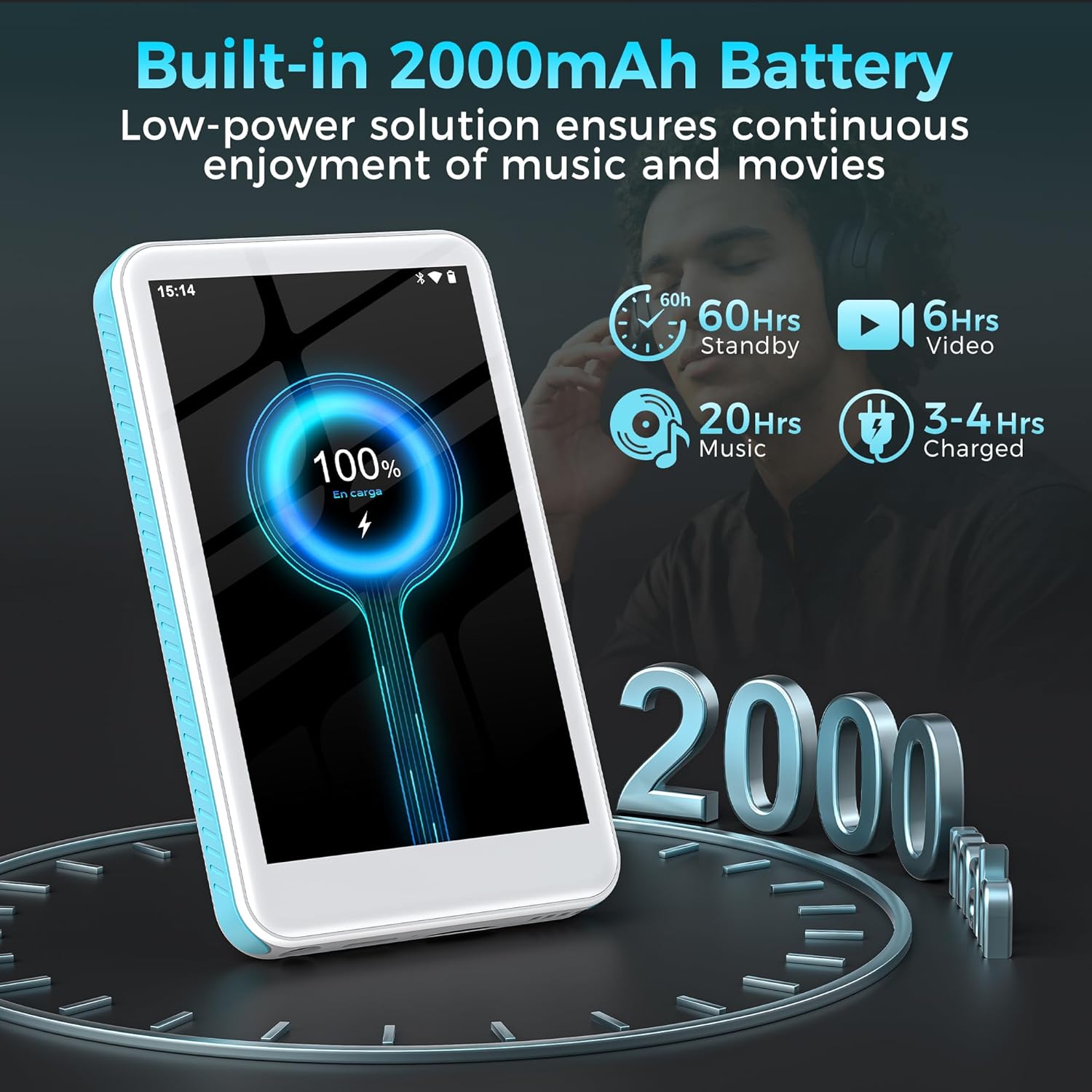
Image: The SWOFY D08 MP3 Player with a 1TB microSD card being inserted into its slot, illustrating the device's expandable storage capability. The image also highlights the 160GB total storage capacity.
Käyttöohjeet
1. Liikkuminen käyttöliittymässä
The SWOFY D08 uses an Android 13 operating system with a 4-inch touchscreen. Swipe left/right to navigate between home screens, tap icons to open apps, and swipe down from the top for quick settings and notifications.
2. Musiikin toisto
The device supports various audio formats including MP3, FLAC, WAV, AAC, APE, DSD, M4A, and OGG. Use the pre-installed music player app or download your preferred streaming apps from the Play Store.
- Musiikin lisääminen: Connect the player to your computer using the USB-C cable. The player will appear as a removable storage device. Drag and drop your music files "Musiikki"-kansioon.
- Musiikin toistaminen: Open the music player app. You can browse music by artist, album, genre, or create custom playlists.
- Taajuuskorjain: Access the built-in equalizer within the music app settings to customize bass and treble levels.

Image: The SWOFY D08 MP3 Player displaying a music playback screen with album art, song title "Crazy Dream", and playback controls. This illustrates the user interface for audio playback.
3. Videon toisto
The D08 supports 1080p HD video playback and is compatible with formats such as RM, AVI, RMVB, FLV, MP4, DAT, MKV, MPG, MOV, and TS. Use the pre-installed video player app.
- Adding Videos: Connect the player to your computer and transfer video files to the "Videos" folder.
- Playing Videos: Open the video player app and select your desired video.

Image: The SWOFY D08 MP3 Player displaying a video playback screen with a high-definition image from a movie, highlighting its 1080p HD video capabilities and 4.0-inch IPS screen.
4. Bluetooth-yhteys
Connect your D08 to Bluetooth headphones, speakers, or car stereos using Bluetooth 5.0 for wireless audio.
- Ensure Bluetooth is enabled on your D08 (Settings > Connected devices > Bluetooth).
- Aseta Bluetooth-lisälaitteesi pariliitostilaan.
- On the D08, tap "Pair new device" and select your accessory from the list.
- Vahvista pariliitos, jos sitä pyydetään.

Image: The SWOFY D08 MP3 Player displaying a music playback screen with icons indicating Bluetooth connectivity to headphones, a portable speaker, and a car audio system, demonstrating its versatile wireless pairing capabilities.
5. Muut ominaisuudet
- FM-radio: Käytä FM-radio-sovellusta kuunnellaksesi paikallisia radioasemia.
- Ääninauhuri: Käytä sisäänrakennettua ääninauhuria muistioihin tai luennoille.
- E-kirjan lukija: Lue e-kirjoja yhteensopivilla sovelluksilla.
- Play Kauppa: Download and install additional applications like Spotify, Pandora, Audible, and more.
Huolto
1. Laitteen puhdistaminen
- Use a soft, lint-free cloth to clean the screen and body of the player.
- Avoid using abrasive cleaners, alcohol, or solvents, as these can damage the finish.
- Pidä portit vapaina pölystä ja roskista.
2. Akun hoito
- Akun käyttöiän pidentämiseksi vältä laitteen altistamista äärimmäisille lämpötiloille (kuumalle tai kylmälle).
- Älä anna akun tyhjentyä kokonaan usein. Lataa se, kun akun varaustaso on alhainen.
- Jos laitetta säilytetään pitkään, lataa se noin 50 %:iin ennen säilytystä.
3. Ohjelmistopäivitykset
Periodically check for software updates to ensure optimal performance and access to new features. Go to Settings > System > System update.
Vianetsintä
Device Will Not Turn On
- Ensure the device is sufficiently charged. Connect it to a power source and wait a few minutes before attempting to power on.
- Pidä virtapainiketta painettuna vähintään 10–15 sekuntia suorittaaksesi pakotetun uudelleenkäynnistyksen.
Cannot Connect to Wi-Fi or Bluetooth
- Ensure Wi-Fi/Bluetooth is enabled in Settings.
- Käynnistä laite ja reititin/Bluetooth-lisälaite uudelleen.
- For Wi-Fi, verify the password. For Bluetooth, ensure the accessory is in pairing mode and within range.
- Unohda verkko/laite ja yritä muodostaa yhteys uudelleen.
Audio/Video Playback Issues
- Tarkista file format compatibility (refer to Specifications section).
- Varmista, ettei äänenvoimakkuutta ole mykistetty tai asetettu liian alhaiselle tasolle.
- Kokeile toista file to determine if the issue is with a specific file.
- If using headphones, ensure they are properly connected or paired.
Laite on hidas tai ei reagoi
- Sulje tarpeettomat taustasovellukset.
- Tyhjennä usein käytettyjen sovellusten välimuisti (Asetukset > Sovellukset > [Sovelluksen nimi] > Tallennustila ja välimuisti > Tyhjennä välimuisti).
- Käynnistä laite uudelleen.
- Jos ongelmat jatkuvat, harkitse tehdasasetusten palautusta (Note: This will erase all data. Back up important files ensimmäinen. Settings > System > Reset options > Erase all data (factory reset)).
Tekniset tiedot
| Mallin nimi | D08 |
| Käyttöjärjestelmä | Android 13 |
| Prosessori | 8-ytiminen 2.0 GHz |
| RAM | 3GB |
| Sisäinen tallennustila | 32GB (with included 128GB microSD card for 160GB total) |
| Laajennettava tallennustila | Jopa 1 Tt MicroSD-kortin kautta |
| Akku | 2000 mAh litiumpolymeeri |
| Näyttö | 4-inch HD Touchscreen, 480*800P Resolution, IPS |
| Yhteydet | Bluetooth 5.0, Dual-Band Wi-Fi, USB-C |
| Ääniformaatit | MP3, FLAC, WAV, AAC, APE, DSD, M4A, OGG |
| Videoformaatit | RM, AVI, RMVB, FLV, MP4, DAT, MKV, MPG, MOV, TS |
| Erikoisominaisuudet | Built-In Speaker, Equalizer, FM Radio, Voice Recorder, E-book Reader, Play Store support |
| Mitat | 5.83 x 5.83 x 0.75 tuumaa |
| Paino | 7.4 unssia |
Takuu ja tuki
Your SWOFY D08 MP3 Player comes with a standard manufacturer's warranty. Please refer to the warranty card included in your package for specific terms and conditions. For technical support, troubleshooting assistance, or warranty claims, please contact SWOFY customer service through the retailer where you purchased the product or visit the official SWOFY websivusto.
Lisätietoja ja usein kysyttyjä kysymyksiä varten voit käydä osoitteessa SWOFY Store on Amazon.
Tärkeitä turvallisuustietoja
- Älä pura, korjaa tai muuta laitetta itse.
- Vältä altistamasta laitetta vedelle, kosteudelle tai äärilämpötiloille.
- Käytä vain hyväksyttyjä latureita ja lisävarusteita.
- Hävitä laite ja sen akku vastuullisesti paikallisten määräysten mukaisesti.