1. Johdanto
This manual provides essential information for the safe and efficient installation, operation, and maintenance of your Fujitsu S26113-E567-V50-02 DPS-500XB A Server Power Supply. Please read this manual thoroughly before attempting to install or operate the unit. Retain this manual for future reference.
2. Turvallisuustiedot
VAROITUS: Improper installation or use can result in electric shock, fire, or damage to the equipment. Always follow these safety guidelines:
- Asennuksen saa suorittaa vain pätevä henkilöstö.
- Ensure the power supply is disconnected from the main power source before installation, removal, or maintenance.
- Älä avaa virtalähdettä casing. Sisällä ei ole käyttäjän huollettavia osia, ja vaarallinen tilavuustages ovat läsnä.
- Varmista riittävä ilmanvaihto virtalähteen ympärillä ylikuumenemisen estämiseksi.
- Älä altista laitetta kosteudelle tai äärimmäisille lämpötiloille.
- Use only compatible cables and connectors.
3. Tuote ohiview
The Fujitsu S26113-E567-V50-02 DPS-500XB A is a 500W server power supply designed for reliable power delivery in server environments. It features standard ATX connector types for broad compatibility.
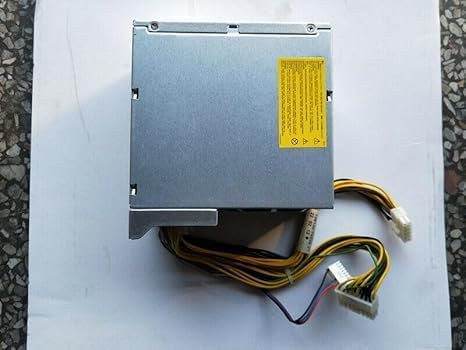
Kuva 3.1: Yläosa view of the power supply, showing the main casing and a yellow warning label indicating safety precautions and electrical hazards.
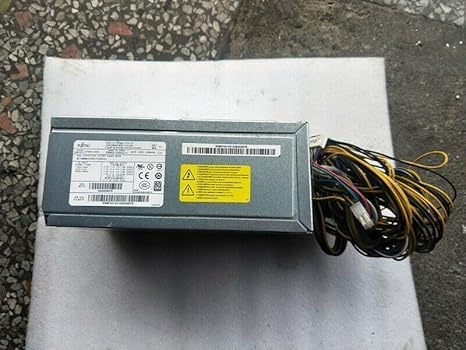
Kuva 3.2: Sivu view of the power supply, illustrating the integrated power cables with their respective connectors and a white label containing model and serial information.
4. Asennus ja asennus
This power supply is designed for integration into server systems. Professional installation is highly recommended.
- Valmistelu: Ensure the server system is completely powered off and disconnected from all power sources.
- Irrotus (jos vaihdetaan): Carefully remove the old power supply, noting the connections of all cables.
- Asennus: Position the new Fujitsu S26113-E567-V50-02 DPS-500XB A power supply into the designated bay within the server chassis. Secure it using the appropriate screws.
- Kaapeliliitäntä: Connect the ATX main power connector to the motherboard. Connect all necessary peripheral power cables (e.g., CPU, drives, expansion cards) to their respective components. Ensure all connections are firm and secure.
- Lopputarkastus: Double-check all connections and ensure no cables are obstructing airflow or cooling fans.
- Virta päälle: Reconnect the server to the main power source and power on the system.
5. Käyttöohjeet
Once properly installed, the power supply operates automatically with the server system. It provides stable power to all connected components.
- Virta päälle: The power supply will activate when the server system is powered on.
- Virta pois: The power supply will power down when the server system is properly shut down.
- Indikaattorit: Refer to your server's documentation for specific power indicator lights, as the power supply itself typically does not have external user-facing indicators.
6. Huolto
Regular maintenance helps ensure the longevity and stable operation of your power supply.
- Pölynpoisto: Periodically clean dust from the power supply's fan and vents using compressed air. Ensure the server is powered off and unplugged before cleaning.
- Ilmanvaihto: Ensure that the server chassis and the power supply's vents are not obstructed to allow for adequate airflow.
- Tarkastus: Occasionally inspect cables for any signs of wear, fraying, or damage.
7. Vianmääritys
Jos kohtaat ongelmia, harkitse seuraavia vianmäärityksen perusvaiheita:
- Ei virtaa:
- Check if the power cable is securely connected to both the power supply and the wall outlet.
- Varmista, että pistorasia toimii.
- Ensure the server's power switch is in the 'On' position.
- Järjestelmän epävakaus/satunnaiset sammutukset:
- Tarkista, että ilmanvaihto on riittävä, ja varmista, ettei virtalähde ylikuumene.
- Verify all internal power connections are secure.
- If issues persist, the power supply may be faulty or insufficient for the system's load. Consider professional diagnosis.
- Epätavalliset äänet:
- A loud fan might indicate dust buildup or a failing fan. Clean the fan or consider replacement if noise persists.
For complex issues, consult a qualified technician or the server manufacturer's support.
8. Tekniset tiedot
| Ominaisuus | Erittely |
|---|---|
| Mallinumero | S26113-E567-V50-02 DPS-500XB A |
| Merkki | Generic (Compatible with Fujitsu systems) |
| Lähtö wattage | 500W |
| Liittimen tyyppi | ATX |
| Yhteensopivat laitteet | Server Systems (also listed as Gaming Console, verify compatibility for specific use) |
| Tuotteen mitat (P x L x K) | 0.39 x 0.39 x 0.39 inches (Note: This dimension may refer to packaging or a component, actual PSU dimensions will be larger) |
| UPC | 776730300139 |
| Valmistaja | GEESONG |
9. Takuu ja tuki
Takuutietojen ja teknisen tuen osalta katso myyjän toimittamat asiakirjat tai ota yhteyttä suoraan valmistajaan. Säilytä ostokuitti ostotodistuksena.