
Johdanto
Kiitos ostoksestasiasing the UPERFECT 23.8-inch 120Hz Portable Touch Monitor. This device is designed to enhance your productivity and entertainment experience with its large display, high refresh rate, and versatile connectivity. Please read this manual carefully before use to ensure proper operation and to maximize the monitor's potential.
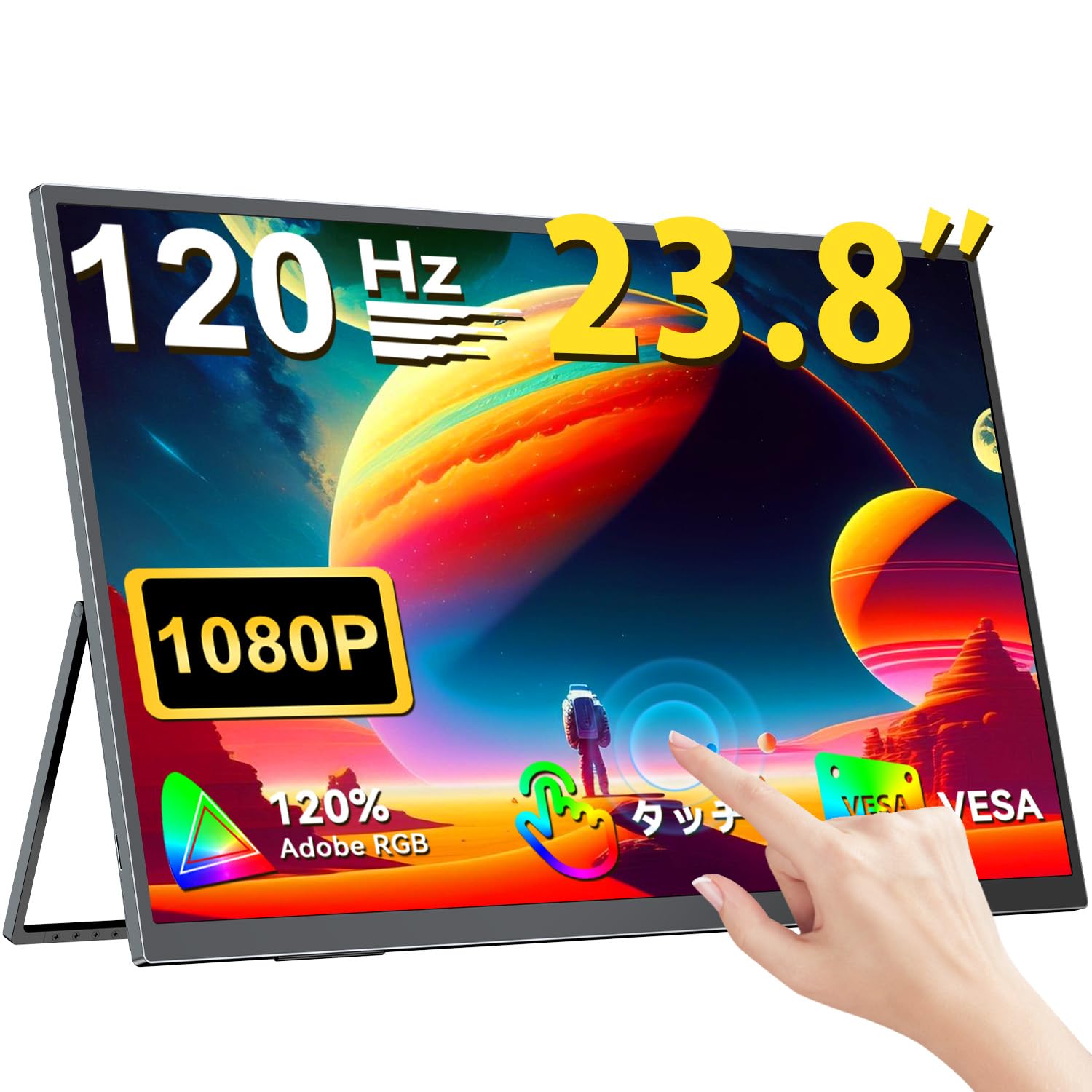
The UPERFECT 23.8-inch 120Hz Portable Touch Monitor.
Turvallisuustiedot
Vaurioiden välttämiseksi ja turvallisen käytön varmistamiseksi noudata seuraavia varotoimia:
- Älä altista näyttöä sateelle, kosteudelle tai äärimmäisille lämpötiloille.
- Vältä raskaiden esineiden asettamista näytön päälle.
- Käytä vain mukana toimitettua virtalähdettä ja kaapeleita.
- Älä yritä purkaa tai korjata näyttöä itse. Ota yhteyttä asiakastukeen saadaksesi apua.
- Varmista näytön ympärillä asianmukainen tuuletus ylikuumenemisen estämiseksi.
- When adjusting the stand, ensure the monitor is stable to prevent tipping.

Suositeltu ergonomia viewing angles for comfortable use. Avoid upward viewing angles to prevent tipping and eye strain.
Pakkauksen sisältö
Varmista, että pakkauksessa on kaikki tarvittavat osat:
- UPERFECT 23.8-inch Portable Touch Monitor
- Virtalähde
- USB Type-C Cable (Full-featured)
- Mini HDMI - HDMI-kaapeli
- USB-A to USB-C Cable (for power/OTG)
- Käyttöopas
Tuote loppuview
Näytön ominaisuudet
- 23.8 tuuman IPS-paneeli: Large display with 178° wide viewkulmat.
- 120Hz virkistystaajuus: Provides smooth visuals, ideal for gaming and fast-paced content.
- 10-pisteinen monikosketus: Intuitive interaction with supported devices.
- 120 % sRGB-värialue: Tarjoaa eloisat ja tarkat värit.
- Integroitu jalusta: Adjustable from 0° to 180° for flexible viewasentoja.
- Yhteensopiva VESA-kiinnikkeen kanssa: Supports 75x75mm VESA standard for alternative mounting options.
- Non-Glare Screen: Reduces reflections for comfortable long-term use.
- Sisäänrakennetut kaiuttimet: Äänilähtöön.
Portit ja painikkeet

Yliview näytön porteista ja ohjauspainikkeista.
- Kuulokepistoke: 3.5 mm audiolähtö.
- Valikkopainike: Avaa näyttövalikon (OSD).
- Plus/Minus Buttons: Navigate OSD menu, adjust volume/brightness.
- Virran ilmaisin: Näyttää virran tilan.
- Virta/paluupainike: Powers the monitor on/off, or returns to previous OSD menu.
- C-tyypin portit (x2): Full-featured USB-C for power, video, and touch signal.
- Mini HDMI-portti: Videotulo.
- Micro USB-B OTG Port: For connecting peripherals like mouse or keyboard.
Asennus
Yhdistetään laitteisiin
The monitor supports various devices including laptops, desktops, smartphones, and gaming consoles (PS4, PS5, Xbox, Nintendo Switch).

The monitor can be connected to various devices using a single Type-C cable for power and display, provided the device supports DP Alt Mode.
- USB Type-C -liitäntä: Connect a full-featured USB Type-C cable from your device (laptop, smartphone, Switch) to one of the monitor's Type-C ports. If your device supports DP Alt Mode, a single cable can transmit video, audio, touch, and power. If your device does not support DP Alt Mode, or for stable power delivery, connect the included power adapter to the other Type-C port.
- Mini-HDMI-liitäntä: Connect a Mini HDMI to HDMI cable from your device (PC, game console) to the monitor's Mini HDMI port. For power, connect the included power adapter to one of the monitor's Type-C ports.
- OTG-portti: Use the Micro USB-B OTG port to connect a mouse or keyboard for enhanced control, especially when using the monitor with a smartphone in desktop mode.
Tärkeä huomautus:
- For optimal performance, especially when increasing contrast, brightness, or color saturation, always connect the monitor to an external power source using the provided power adapter.
- If your device's USB-C port does not support DP Alt Mode, a Type-C cable alone cannot transmit video. Refer to your device's specifications for compatibility.
Stand Adjustment and VESA Mounting

The monitor features a smart integrated stand for flexible positioning and VESA compatibility for arm mounts.
- Integroitu jalusta: The monitor features a durable aluminum alloy integrated stand. Adjust the viewing angle freely within a 0° to 180° range. The base includes anti-slip rubber pads for stability.
- VESA-kiinnitys: The monitor is compatible with VESA 75x75mm mounts (M4*4mm screw holes). This allows for attachment to monitor arms or wall brackets for a customized setup.
Käyttöohjeet
Virta päälle/pois
Press the Power/Return button to turn the monitor on or off.
On-Screen Display (OSD) -valikko
Press the Menu button to access the OSD menu. Use the Plus/Minus buttons to navigate and adjust settings such as brightness, contrast, color temperature, and input source.
Kosketa Toiminnot

The monitor supports 10-point multi-touch gestures for intuitive control. For MacBook connections, 2-point gestures (pinch zoom/rotate) are supported.
The monitor supports 10-point multi-touch for Windows and Android devices. For MacBook connections, 2-point gestures (pinch zoom/rotate) are fully supported. This allows for direct interaction with the screen for tasks like sketching, document navigation, and presentations.
Näyttötilat

Easily switch between horizontal (landscape) and vertical (portrait) display modes to suit your content and workflow. Portrait mode settings are configured on your PC.
Näyttö tukee erilaisia näyttötiloja tarpeidesi mukaan:
- Laajennettu tila: Extend your PC desktop across both screens for increased workspace.
- Kopiointitila: Mirror your PC screen for presentations or shared viewing.
- Pystytila: Rotate the monitor vertically for document review or coding. (Settings for portrait mode are typically configured on the connected PC).
Peliominaisuudet

The monitor supports FreeSync technology to eliminate screen tearing and stuttering during gaming.
- 120Hz virkistystaajuus: Experience smoother gameplay and action sequences compared to standard 60Hz displays.
- FreeSync-tuki: Compatible with FreeSync technology to reduce screen tearing and stuttering, providing a more fluid gaming experience.
- Nopea vasteaika: Enjoy a quick response time of 1ms, minimizing motion blur.
Huolto
Follow these guidelines to maintain your monitor:
- Näytön puhdistaminen: Pyyhi näyttö varovasti pehmeällä, nukkaamattomalla liinalla. Pinttyneisiin tahroihin pyyhi kevyestiampKostuta liina vedellä tai näytönpuhdistusliuoksella. Älä suihkuta nestettä suoraan näytölle.
- C:n puhdistaminenasing: Puhdista näyttö pehmeällä, kuivalla liinalla.asing. Vältä hankaavia puhdistusaineita tai liuottimia.
- Varastointi: Kun näyttöä ei käytetä pitkään aikaan, säilytä sitä viileässä, kuivassa paikassa, poissa suorasta auringonvalosta ja äärimmäisistä lämpötiloista.
- Sormenjälkien kestävyys: The screen features an anti-fingerprint coating to help maintain cleanliness in business environments.
Vianetsintä
Jos kohtaat ongelmia, tutustu seuraaviin yleisiin ongelmiin ja ratkaisuihin:
| Ongelma | Mahdollinen syy | Ratkaisu |
|---|---|---|
| Ei näyttöä/Ei signaalia | Incorrect input source selected; Cable not connected properly; Device not outputting signal; Insufficient power. | Check cable connections; Select correct input source via OSD; Ensure device is powered on and configured to output to external display; Connect external power adapter to monitor. |
| Kosketustoiminto ei toimi | USB-C cable not full-featured; Device does not support touch output; Driver issue (Windows); Cable connection issue. | Ensure a full-featured USB-C cable is used; Verify device compatibility with touch output; Reconnect USB-C cable; For Windows, ensure touch drivers are installed (usually automatic). |
| Screen flickering/Unstable image | Cable issue; Graphics card issue; Refresh rate mismatch; Insufficient power. | Try a different cable; Update graphics drivers; Adjust refresh rate in device settings; Ensure external power is connected. |
| Ei ääntä näytön kaiuttimista | Äänenvoimakkuus liian alhainen; Mykistetty; Laitteessa on valittu väärä äänilähtö. | Adjust monitor volume via OSD; Check device's audio output settings. |
| Monitor keeps restarting | Teho ei riitä. | Ensure the monitor is connected to the provided power adapter for stable power delivery. |
Tekniset tiedot
| Ominaisuus | Erittely |
|---|---|
| Merkki | YLIMÄÄRÄINEN |
| Mallinumero | M238T02 |
| Näytön koko | 23.8 tuumaa |
| Resoluutio | FHD 1080p (1920 x 1080) |
| Kuvasuhde | 16:9 |
| Paneelin tyyppi | IPS LCD |
| Näytön pinta | Häikäisemätön |
| Kontrastisuhde | 1000:1 |
| Päivitystaajuus | 120 Hz |
| Vastausaika | 1 ms |
| Viewkulma | 178 astetta |
| Värivalikoiman arvo | 120 % sRGB |
| Yhteydet | 2x USB Type-C (Full-featured), 1x Mini HDMI, 1x Micro USB-B (OTG), 1x 3.5mm Audio Jack |
| VESA-yhteensopivuus | 75x75 mm (M4 * 4 mm ruuvit) |
| Mitat (S x L x K) | 1.7 x 54.5 x 32.7 cm |
| Mukautuva synkronointi | FreeSync |
Takuu ja tuki
UPERFECT provides comprehensive support for your product:
- Valmistajan takuu: Tällä tuotteella on 2 vuoden valmistajan takuu.
- 90 päivän tyytyväisyystakuu: If you are not completely satisfied within 90 days, a full refund is available.
- Omistettu tuki: Contact our dedicated support team for any questions or issues.
- Ilmainen lisävarusteiden vaihto: Genuine cables and adapters are provided free of charge for life.
- PSE-sertifioitu: The product is PSE certified, ensuring safety standards.
For any inquiries or if you encounter an initial defect within the warranty period, please contact us through your order history. We are committed to providing the best possible assistance.