
Johdanto
Welcome to the user manual for your new HP OMEN 16-ae0002TX Gaming Laptop. This document provides essential information to help you set up, operate, maintain, and troubleshoot your device. Designed for high-performance gaming and demanding tasks, this laptop features a 14th Gen Intel Core i7 processor, NVIDIA GeForce RTX 4060 graphics, 16GB DDR5 RAM, and a 1TB SSD, all presented on a vibrant 16.1-inch FHD 165Hz display.
1. Alkuasetukset
1.1 Unpacking Your Laptop
Poista kaikki osat varovasti pakkauksesta. Varmista, että seuraavat osat ovat mukana:
- HP OMEN 16-ae0002TX Gaming Laptop
- Virtalähde
- Virtajohto
- Käyttöopas (tämä asiakirja)
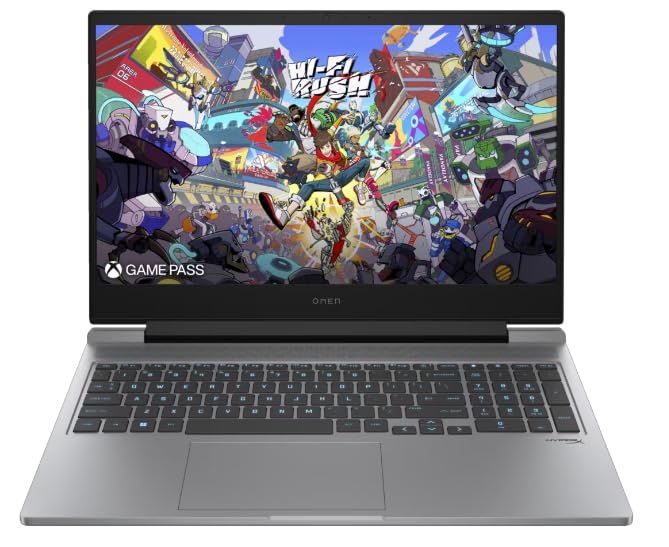
Figure 1: HP OMEN 16-ae0002TX Gaming Laptop overview.
1.2 Virtasovittimen kytkeminen
- Liitä virtajohto verkkolaitteeseen.
- Liitä verkkolaite pistorasiaan.
- Connect the adapter's output plug to the power port on your laptop.
On suositeltavaa ladata kannettava tietokone täyteen ennen ensimmäistä käyttökertaa.
1.3 Ensimmäinen käynnistys ja Windowsin asennus
Press the power button located on the laptop chassis. The laptop will boot up, and you will be guided through the Windows 11 Home setup process. Follow the on-screen instructions to configure your operating system, network settings, and user account.
1.4 Ulkoisten laitteiden liittäminen
Your HP OMEN laptop provides various ports for connecting external devices:
- USB-portit: For mice, keyboards, external storage, and other USB devices.
- HDMI-portti: Ulkoisten näyttöjen tai televisioiden liittämistä varten.
- Ääniliitäntä: Kuulokkeille tai ulkoisille kaiuttimille.
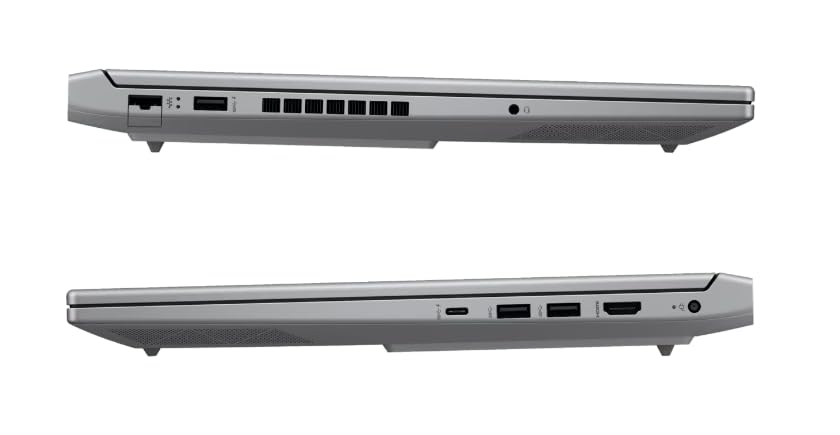
Kuva 2: Sivu view illustrating available ports.
2. Kannettavan tietokoneen käyttö
2.1 Virran kytkeminen päälle/pois ja lepotila
- Virta päälle: Paina virtapainiketta.
- Sammuta: Napsauta Windowsin Käynnistä-painiketta ja valitse sitten Virta > Sammuta.
- Nukkumismoodi: Sulje kansi tai valitse Käynnistä-valikosta Virta > Lepotila.
2.2 Näppäimistö ja kosketuslevy
The laptop features a 1-zone RGB backlit full-size keyboard with HyperX tactile feedback for an enhanced gaming and typing experience. The integrated touchpad supports multi-touch gestures for navigation.
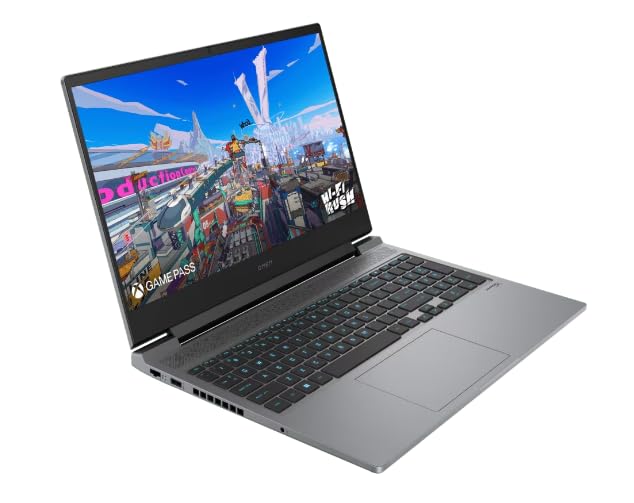
Kuva 3: Näppäimistön ja kosketuslevyn asettelu.
2.3 Näytön ominaisuudet
The 16.1-inch FHD (1920 x 1080) IPS display offers a 165Hz refresh rate and 7ms response time, providing smooth and responsive visuals for gaming and multimedia. Adjust brightness and display settings through Windows display options.
2.4 Verkko- ja langaton yhteys
- Wi-Fi: Yhdistä langattomiin verkkoihin Windowsin verkkoasetusten kautta.
- Bluetooth: Pair Bluetooth-enabled devices such as headphones, mice, or game controllers.
2.5 HP True Vision 1080p FHD Camera
The integrated 1080p FHD webcam is suitable for video calls, online meetings, and streaming. Ensure proper lighting for optimal image quality.
3. Huolto ja hoito
3.1 Yleinen puhdistus
- Näyttö: Käytä pehmeää, nukkaamatonta liinaa kevyesti dampvedellä tai näytönpuhdistusaineella. Vältä voimakkaita kemikaaleja.
- Näppäimistö ja runko: Use a soft cloth. For dust, use compressed air.
- Varmista, että kannettava tietokone on sammutettu ja irrotettu pistorasiasta ennen puhdistamista.
3.2 Akun hoito
The laptop is equipped with a Lithium Ion battery. To maximize battery lifespan:
- Vältä äärimmäisiä lämpötiloja.
- Do not let the battery completely discharge frequently.
- Jos kannettavaa tietokonetta säilytetään pitkään, varmista, että akun varaus on noin 50 %.
3.3 Ohjelmistopäivitykset
Regularly update your Windows operating system, drivers, and HP software to ensure optimal performance, security, and compatibility. These updates often include performance enhancements and bug fixes.
4. Yleisten ongelmien vianmääritys
Tässä osiossa käsitellään yleisiä ongelmia, joita saatat kohdata. Monimutkaisempien ongelmien osalta katso HP:n tukipalvelusta websivusto.
4.1 Virtaongelmat
- Kannettava tietokone ei käynnisty: Ensure the power adapter is securely connected to both the laptop and a working power outlet. Check if the power adapter's indicator light is on.
- Akku ei lataudu: Verify the power adapter connection. Try a different outlet.
4.2 Näyttöongelmat
- Ei kuvaa näytöllä: Varmista, että kannettava tietokone on päällä. Kokeile liittää ulkoinen näyttö tarkistaaksesi, onko ongelma kannettavan tietokoneen näytössä.
- Välkkyvä tai vääristynyt kuva: Päivitä näytönohjaimen ohjaimet. Säädä näytön virkistystaajuutta Windowsin asetuksissa.
4.3 Yhteysongelmat
- Wi-Fi-yhteyttä ei muodosteta: Tarkista Windowsin asetuksista, onko Wi-Fi käytössä. Käynnistä reititin ja kannettava tietokone uudelleen.
- Bluetooth-laite ei pariliitu: Varmista, että Bluetooth-laite on pariliitostilassa ja kantaman sisällä. Tarkista kannettavan tietokoneen Bluetooth-asetukset.
5. Tuotteen tekniset tiedot
| Ominaisuus | Erittely |
|---|---|
| Merkki | HP |
| Mallin nimi | HP laptopOMEN (ae0002tx) |
| Prosessori | 14th Gen Intel® Core™ i7-14650HX (up to 5.2 GHz) |
| RAM-muisti | 16 GB DDR5 (Max 32 GB) |
| Varastointi | 1 Tt:n SSD-levy (puolijohdeasema) |
| Näytönohjain | NVIDIA GeForce RTX 4060 (8 Gt:n erillinen GDDR6-muisti) |
| Näyttö | 16.1-inch FHD (1920 x 1080) IPS, 165Hz, 7ms, 300 nits |
| Käyttöjärjestelmä | Windows 11 Home |
| Näppäimistö | 1-zone RGB Backlit, HyperX tactile feedback |
| Webnokka | HP True Vision 1080p FHD |
| Yhteydet | Wi-Fi, Bluetooth |
| Portit | USB (Total: 1), HDMI (Total: 1) |
| Dimensions (L x W x Thickness) | 30P x 25L x 6S senttimetriä |
| Tuotteen paino | 1.9 kiloa |
| Akun tyyppi | Lithium Ion (2.6 Watt Hours) |
6. Takuutiedot
Your HP OMEN 16-ae0002TX Gaming Laptop comes with an onsite warranty. Please retain your proof of purchase for warranty claims. For detailed terms and conditions, refer to the warranty card included with your product or visit the official HP support websivusto.
7. Asiakastuki
For technical assistance, service, or further inquiries, please contact HP customer support:
- Valmistaja / maahantuoja: HP India Sales Pvt. Ltd., 24 Salarpuria Arena, Hosur Main Road, Adugodi, Bangalore-560030
- Online-tuki: Vieraile virkailijalla HP:n tuki Websivusto ajureita, käyttöoppaita ja vianmääritysoppaita varten.