
1. Johdanto
Thank you for choosing the MONODEAL CD401 Portable HiFi Stereo CD Player. This versatile device combines classic CD playback with modern connectivity options, including Bluetooth, FM radio, USB, and AUX input. Enjoy high-fidelity audio with built-in speakers, dynamic RGB lighting, and convenient remote control. This manual provides essential information for setup, operation, and maintenance to ensure optimal performance.
2. Mitä laatikossa on
- 1x MONODEAL CD401 CD Player
- 1x käyttöopas
- 1x kaukosäädin
- 1x 3.5 mm: n äänikaapeli
- 1x Charging Cable and Plug
3. Tuote ohiview
The MONODEAL CD401 is designed for both portability and desktop use, offering a blend of classic and contemporary audio features. Its compact design includes integrated speakers and a clear display for easy navigation.
Kuva 1: Etuosa view of the MONODEAL CD401 Portable CD Player, showcasing its compact design and central display.
Tärkeimmät ominaisuudet:
- Multi-Color RGB Lighting: Dynamic lighting effects that change color to the beat of the music, enhancing visual and auditory experience.
- Bluetooth 5.3: Functions as both a Bluetooth transmitter (to headphones/speakers) and receiver (from phones/tablets).
- Integrated 4*HIFI Speakers: Provides surround sound for an immersive listening experience.
- Useita toistotiloja: Easily switch between CD, Bluetooth, FM Radio, AUX, and USB modes via a large LCD screen.
- Wide CD Compatibility: Tukee CD-, CD-R-, CD-RW-, MP3- ja WMA-levyformaatteja.
- Äänitehosteet: Choose from five equalizer presets: Flat, Rock, Pop, Jazz, and Classic.
- FM-radio: Access FM frequencies from 76MHz to 108MHz.
- USB & AUX Connectivity: Play music from a USB flash drive or connect external devices via the 3.5mm AUX cable.
- Ladattava akku: Built-in 3000mAh battery offers up to 8 hours of continuous playback.
- Uniajastin: Customizable sleep timer from 10 to 90 minutes.

Figure 2: The MONODEAL CD401 displaying its multi-color RGB lighting effects, which synchronize with the music.
Ohjaimet ja portit:
The device features intuitive controls on its top panel and essential ports on the side for easy access.

Figure 3: Top panel of the CD player showing playback controls, mode selection, and display.

Figure 4: The side panel of the CD player, illustrating the AUX input, USB port, and charging port.
Virallinen tuotevideo:
Video 1: Official product video from MonoDeals showcasing the Desktop CD Player with Bluetooth and RGB Light features.
Video 2: Official product video from MonoDeals demonstrating the Desktop Player's Bluetooth functionality and colorful lighting effects.
4. Asennus
4.1 Laitteen lataaminen
- Connect the provided USB charging cable to the charging port on the side of the CD player.
- Plug the other end of the USB cable into a compatible USB power adapter (included) or a computer's USB port.
- The battery indicator on the LCD screen will show charging status. A full charge provides up to 8 hours of playback.
4.2 CD-levyn asettaminen
- Avaa CD-lokeron kansi varovasti.
- Place the CD with the label side facing up onto the spindle. Ensure it clicks into place.
- Close the CD compartment cover firmly until it latches.
4.3 Virran kytkeminen päälle/pois
- To power on, slide the ON/OFF switch to the 'ON' position. The LCD screen will light up.
- Sammuta virta liu'uttamalla ON/OFF-kytkin 'OFF'-asentoon.
5. Käyttöohjeet
5.1 Tilan valinta
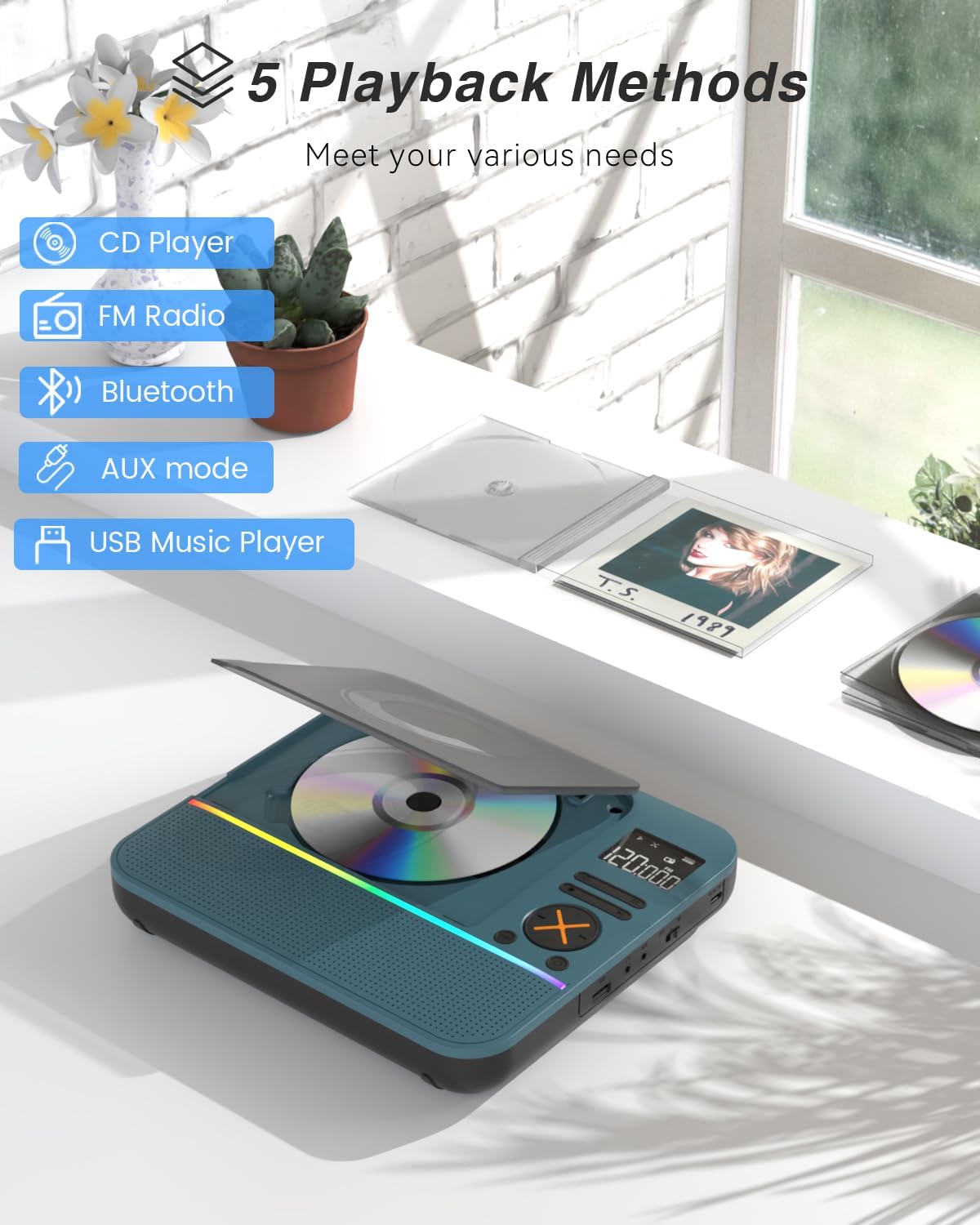
Paina MODE button on the device or remote control to cycle through the available modes: CD, Bluetooth, FM, AUX, and USB.

Figure 5: The CD player's display indicating the five available playback methods: CD, FM Radio, Bluetooth, AUX mode, and USB Music Player.
5.2 CD-toisto
- Insert a compatible CD (CD, CD-R, CD-RW, MP3, WMA).
- Select 'CD' mode. The player will automatically start reading the disc.
- Käytä Toista/Tauko, Seuraava kappale, ja Edellinen kappale painikkeita toiston ohjaamiseen.
- Paina TOISTAA button to cycle through repeat options (e.g., repeat one, repeat all).
- Paina EQ button to select desired sound effects (Flat, Rock, Pop, Jazz, Classic).
5.3 Bluetooth-tila
The CD401 supports both Bluetooth transmission (BT TX) and reception (BT RX).
- Bluetooth Receiver (BT RX): Select 'Bluetooth' mode. The device will enter pairing mode. On your phone/tablet, search for 'CD401' and connect. Audio from your device will play through the CD player's speakers.
- Bluetooth Transmitter (BT TX): Select 'Bluetooth' mode. Press and hold the BT TX button. The CD player will search for nearby Bluetooth headphones or speakers. Once connected, CD audio will transmit to the external Bluetooth device.

Figure 6: Illustration of the CD player's dual Bluetooth functionality, allowing it to receive audio from a phone (RX) or transmit to headphones (TX).
5.4 FM -radio
- Valitse FM-tila.
- Käytä Seuraava kappale ja Edellinen kappale painikkeita radioasemien skannaamiseksi.
- The FM frequency range is 76MHz to 108MHz.
5.5 AUX-tulo
- Select 'AUX' mode.
- Connect an external audio device (e.g., smartphone, computer) to the AUX IN port using the provided 3.5mm audio cable.
- The CD player will now act as a wired speaker for the connected device.
- Note: Bluetooth connectivity is not supported in cars; use the 3.5mm AUX cable for car audio.
5.6 USB-toisto
- Valitse USB-tila.
- Aseta MP3- tai WMA-ääntä sisältävä USB-muistitikku files USB-porttiin.
- The player will automatically detect and begin playing the audio files.
5.7 Äänenvoimakkuuden säätö
Adjust the volume using the dedicated volume buttons on the device or the remote control.
5.8 Uniajastin
- Paina NUKKUA kaukosäätimen painiketta.
- Cycle through the available sleep timer durations (10, 20, 30, 40, 50, 60, 70, 80, 90 minutes).
- The device will automatically power off after the selected time.

Figure 7: The CD player featuring its sleep timer function, allowing users to set automatic shutdown after a specified duration.
6. Huolto
6.1 Puhdistus
- Pyyhi laite pehmeällä, kuivalla liinalla. Älä käytä nestemäisiä puhdistusaineita tai hankaavia aineita.
- Keep the CD compartment clean and free of dust.
6.2 Varastointi
- Säilytä CD-soitinta viileässä, kuivassa paikassa, poissa suorasta auringonvalosta ja äärimmäisistä lämpötiloista.
- Remove any CDs or USB drives before storing for extended periods.
7. Vianmääritys
| Ongelma | Mahdollinen syy | Ratkaisu |
|---|---|---|
| Laite ei käynnisty | Akku on vähissä tai virtakytkin on pois päältä. | Lataa laite täyteen. Varmista, että virtakytkin on ON-asennossa. |
| Kaiuttimista ei kuulu ääntä | Volume is too low or incorrect mode selected. | Increase volume. Verify correct playback mode (CD, Bluetooth, FM, AUX, USB). |
| CD-levy ei soi | CD-levy on likainen, naarmuuntunut tai asetettu väärin. | Clean the CD. Check for scratches. Reinsert the CD correctly with the label side up. |
| Bluetooth-pariliitos epäonnistui | Device is not in pairing mode or too far from the source. | Ensure the CD player is in Bluetooth pairing mode. Move devices closer. Disconnect from other Bluetooth devices. |
8. Tekniset tiedot
| Ominaisuus | Yksityiskohta |
|---|---|
| Mallinumero | CD401 |
| Merkki | MONODEAL |
| Yhteystekniikka | Bluetooth 5.3 |
| Kaiuttimen tyyppi | 4*HIFI Stereo |
| Akun kapasiteetti | 3000 mAh (sisäänrakennettu) |
| Toistoaika | Jopa 8 tuntia (täydellä latauksella) |
| Tuetut levymuodot | CD, CD-R, CD-RW |
| Tuetut äänimuodot | MP3, WMA |
| FM-taajuusalue | 76MHz - 108MHz |
| Pakkauksen mitat | 10.83 x 9.13 x 1.93 tuumaa |
| Tuotteen paino | 2.48 kiloa |
9. Takuu ja tuki
For warranty information, technical support, or customer service inquiries, please refer to the contact details provided in your product packaging or visit the official MONODEAL websivusto. Säilytä ostokuitti takuuvaatimuksia varten.


