
Oakcastle IR200
Oakcastle IR200 -internetradion käyttöohje
Malli: IR200
1. Johdanto
Thank you for choosing the Oakcastle IR200 Internet Radio. This manual provides essential information for the safe and efficient operation of your device. Please read it thoroughly before use and retain it for future reference.
The Oakcastle IR200 is a versatile audio system offering multiple listening options, including Internet Radio, DAB+, FM, Bluetooth 5.3, and AUX input. It features a color display, remote control, and podcast support for a comprehensive audio experience.
2. Pakkauksen sisältö
Pura laatikko varovasti pakkauksesta ja varmista, että kaikki alla luetellut osat ovat mukana ja hyvässä kunnossa:
- Oakcastle IR200 Internet Radio Unit
- Virtakaapeli
- Kaukosäädin
- Käyttöopas (tämä asiakirja)
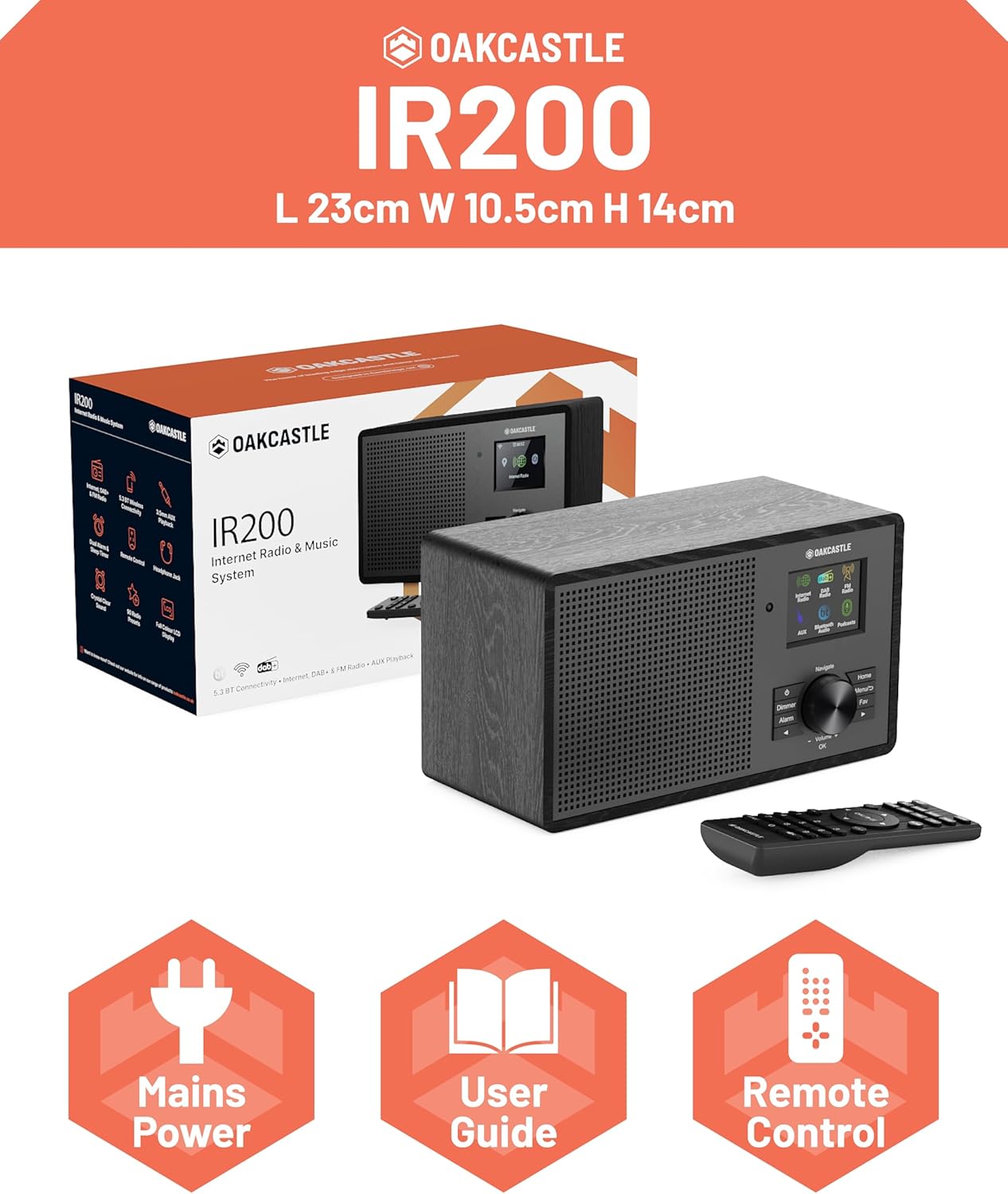
Image 2.1: Contents of the Oakcastle IR200 package, including the radio unit, its box, power cable, remote control, and user manual.
3. Tuote ohiview
Familiarize yourself with the main components and controls of your Oakcastle IR200 radio.
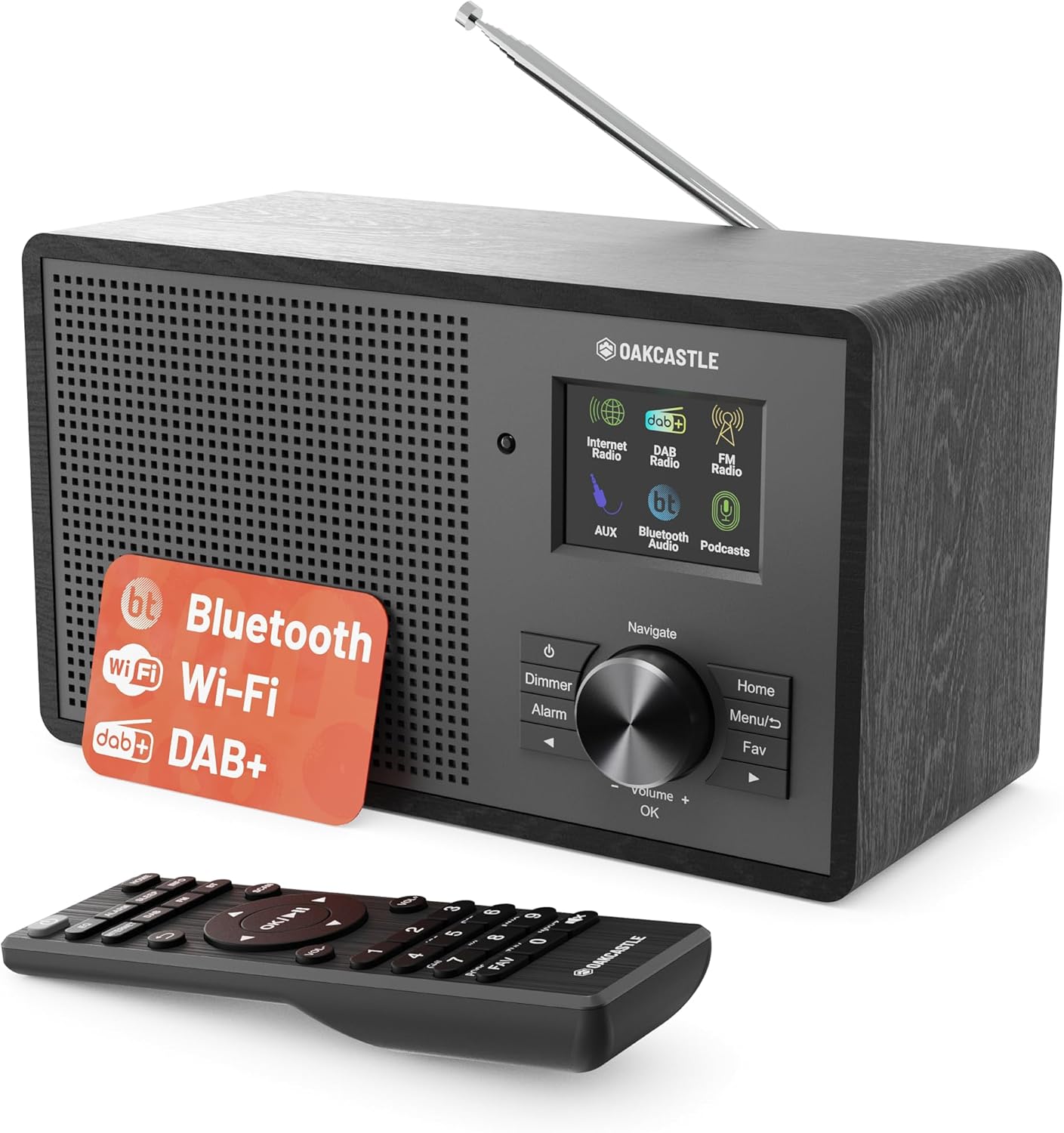
Kuva 3.1: Edessä view of the Oakcastle IR200 radio, showcasing the display, control knob, buttons, and the included remote control.
3.1 Etupaneelin säätimet
- Näyttö: Näyttää aseman tiedot, ajan ja valikkovaihtoehdot.
- Navigate/Volume/OK Knob: Rotate to navigate menus or adjust volume; press to confirm selections.
- Virtapainike: Kytkee laitteen päälle/pois tai asettaa sen valmiustilaan.
- Himmenninpainike: Säätää näytön kirkkautta.
- Hälytyspainike: Avaa hälytysasetukset.
- Koti näppäin: Palaa päävalikkoon.
- Valikkopainike: Accesses mode-specific menus.
- Suosikki-painike: Avaa suosikkiasemien esiasetukset.
3.2 Takapaneelin liitännät

Kuva 3.2: Takaosa view of the Oakcastle IR200, highlighting the headphone output and AUX input ports.
- Teleskooppiantenni: DAB+- ja FM-vastaanottoa varten.
- AUX-tulo: Liitä ulkoiset äänilaitteet.
- Kuulokkeiden lähtö: Liitä kuulokkeet yksityiseen kuunteluun.
- DC IN: Virtalähteen liitäntä.
4. Alkuasetukset
4.1 Virtaliitäntä
- Insert the power cable into the DC IN port on the rear of the radio.
- Plug the other end of the power cable into a wall socket.
- Käynnistä radio painamalla etupaneelin tai kaukosäätimen virtapainiketta.
4.2 Antennin säätö
For optimal DAB+ and FM reception, fully extend the telescopic antenna located at the rear of the unit.
4.3 Network Connection (for Internet Radio)
- Upon first power-on, the radio will guide you through the network setup.
- Valitse valikosta "Verkkotoiminto" tai "Wi-Fi-asetus".
- Radio etsii käytettävissä olevia Wi-Fi-verkkoja. Valitse verkkosi luettelosta.
- Enter your Wi-Fi password using the navigation knob and OK button.
- Kun yhteys on muodostettu, radio näyttää vahvistusviestin.
5. Toimintatilat
The Oakcastle IR200 offers several listening modes. Press the "Home" button to access the main menu and select your desired mode.
5.1 Internet-radio
Käytä tuhansia maailmanlaajuisia radioasemia Wi-Fi-yhteytesi kautta.

Image 5.1: The radio's display screen in Internet Radio mode, showing station information.
- From the main menu, select "Internet Radio".
- You can browse stations by location, genre, or search by name.
- Rotate the Navigate knob to scroll through options and press OK to select.
- To save a station as a favorite, press the "Fav" button during playback.
5.2 DAB+ -radio
Nauti korkealaatuisista digitaalisista radiolähetyksistä.

Image 5.2: The radio's display screen in DAB+ Radio mode, showing the current station.
- From the main menu, select "DAB+ Radio".
- Radio hakee automaattisesti saatavilla olevia DAB+-asemia.
- Use the Navigate knob to select a station from the list.
- To save a station as a favorite, press the "Fav" button during playback.
5.3 FM -radio
Viritä perinteisiä analogisia FM-lähetyksiä.
- Valitse päävalikosta "FM-radio".
- To auto-scan for stations, press and hold the OK button or use the scan function via the menu.
- To manually tune, rotate the Navigate knob.
- To save a station as a favorite, press the "Fav" button during playback.
5.4 Bluetooth-yhteys
Suoratoista ääntä langattomasti Bluetooth-laitteistasi.

Image 5.3: The radio's display screen in Bluetooth mode, indicating readiness for pairing.
- From the main menu, select "Bluetooth". The radio will enter pairing mode.
- On your external device (e.g., smartphone), enable Bluetooth and search for "Oakcastle IR200".
- Select "Oakcastle IR200" to pair. Once connected, you can stream audio.
5.5 AUX-tulo
Liitä ulkoiset äänilähteet 3.5 mm:n äänikaapelilla.
- Liitä 3.5 mm:n äänikaapelin toinen pää radion takana olevaan AUX IN -porttiin.
- Liitä toinen pää ulkoisen laitteen kuulokeliitäntään tai äänilähtöön.
- From the main menu, select "AUX".
- Ohjaa toistoa ulkoisesta laitteesta.
5.6 podcastia
Browse and listen to a wide range of podcasts.
- From the main menu, select "Podcasts".
- Browse podcasts by category or search for specific titles.
- Select a podcast to start listening.
6. Asetukset ja ominaisuudet
6.1 Järjestelmäasetukset
Access general system settings via the main menu to configure time, language, display, and more.
- Aika/päivämäärä: Set time format, synchronize time.
- Kieli: Select your preferred language for the menu.
- Näyttö: Adjust backlight, color scheme.
- Verkko: Määritä Wi-Fi-asetukset uudelleen.
- Ohjelmistopäivitys: Tarkista ja asenna laiteohjelmistopäivitykset.
6.2 Taajuuskorjain (EQ)
Customize the audio output to your preference using the equalizer settings, accessible via the remote control or system menu.
6.3 esiasetusta
The radio supports over 90 presets for your favorite Internet, DAB+, and FM stations. To recall a preset, press the "Fav" button and select from the list.
6.4 Hälytykset
Set alarms to wake up to your favorite radio station or a buzzer sound. Access alarm settings via the "Alarm" button on the front panel or remote.
7. Kaukosäädin
The included remote control provides convenient access to all radio functions from a distance.
Ensure batteries are correctly inserted. Point the remote control towards the front of the radio for optimal response.
7.1 Kaukosäätimen toiminnot
- Teho: On/Off/Standby.
- Äänenvoimakkuus +/-: Säädä äänenvoimakkuutta.
- Navigointipainikkeet (ylös/alas/vasemmalle/oikealle): Navigoi valikoissa.
- OK: Vahvista valinta.
- Mode Buttons (Internet, DAB, FM, Bluetooth, AUX): Vaihda tilojen välillä.
- Esiasetuspainikkeet (1-90+): Directly select saved favorite stations.
- EQ: Käytä taajuuskorjaimen asetuksia.
- Menu: Access mode-specific menus.
- Suosikki: Access favorite station list.
8. Huolto
8.1 Puhdistus
To clean the radio, use a soft, dry cloth. Do not use abrasive cleaners, waxes, or solvents as these may damage the finish.
8.2 Yleishoito
- Pidä laite poissa suorasta auringonvalosta, lämmönlähteistä ja kosteudesta.
- Vältä laitteen pudottamista tai sen altistamista voimakkaille iskuille.
- Varmista asianmukainen ilmanvaihto laitteen ympärillä.
9. Vianmääritys
| Ongelma | Mahdollinen syy | Ratkaisu |
|---|---|---|
| Ei virtaa | Power cable not connected; wall socket not active. | Check power cable connection; try a different wall socket. |
| Ei ääntä | Äänenvoimakkuus liian alhainen; Mykistys aktivoitu; Väärä lähde valittu. | Increase volume; Check mute status; Select correct input mode. |
| Internetradio ei muodosta yhteyttä | Incorrect Wi-Fi password; Weak Wi-Fi signal; Router issue. | Re-enter Wi-Fi password; Move radio closer to router; Restart router. |
| Huono DAB+/FM-vastaanotto | Antenna not extended; Poor signal area. | Fully extend antenna; Reposition radio for better signal. |
| Bluetooth ei muodosta pariliitosta | Radio not in pairing mode; Device too far; Device already paired. | Ensure radio is in Bluetooth mode; Move device closer; Unpair from other devices. |
10. Tekniset tiedot
| Ominaisuus | Yksityiskohta |
|---|---|
| Merkki | Oakcastle |
| Malli | IR200 |
| Väri | Musta |
| Yhteystekniikka | Wi-Fi, Bluetooth 5.3, AUX |
| Viritystekniikka | Internet-radio, DAB+, FM |
| Erikoisominaisuudet | Bluetooth, EQ, Podcasts, Internet Radio, Remote Control |
| Virtalähde | Electric Cable (Mains) |
| Tuotteen mitat (K x L x S) | 14 cm x 10.5 cm x 23 cm (noin) |
| Tuotteen paino | 0.94 kg |
| Yhteensopivat laitteet | MP3-soitin, älypuhelin, tabletti |
11. Takuu ja tuki
11.1 Takuutiedot
The Oakcastle IR200 comes with a standard warranty. An extended 3-year warranty is available upon product registration on the manufacturer's website. Please refer to the warranty card included in your package or visit the official Oakcastle websivustolta lisätietoja.
11.2 Asiakastuki
For technical assistance, troubleshooting, or further inquiries, please contact Oakcastle customer support. Contact details can typically be found on the official Oakcastle websivustolla tai takuukortissa.
Ask a question about this manual
Ask about setup, troubleshooting, compatibility, parts, safety, or missing instructions. Manuals+ will review the question and use this page’s manual context to help answer it.