
1. Tuote ohiview
The TONGOU SA1 WiFi Smart Current Transformer is designed for energy monitoring in smart home systems. This device allows for real-time tracking of current, voltage, and power consumption. It integrates with Tuya/Smart Life applications for comprehensive data analysis and alarm functions. The SA1 is a window-type current transformer and does not cut off circuits. It requires a 2.4GHz Wi-Fi connection for pairing.

Figure 1: TONGOU SA1 WiFi Smart Current Transformer
2. Komponentit ja mitat
Familiarize yourself with the components and dimensions of the SA1 device before installation.
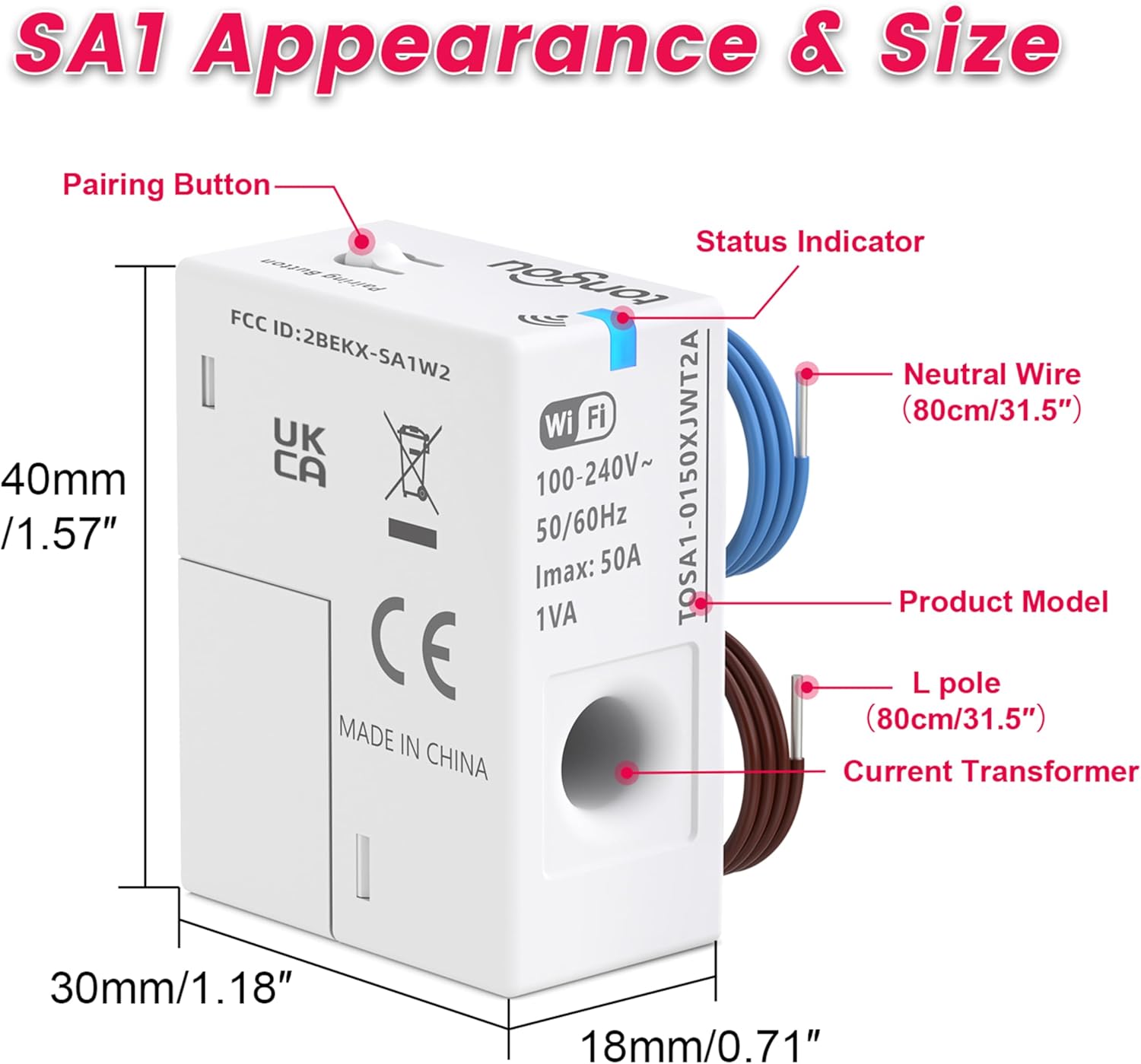
Figure 2: SA1 Component Identification and Dimensions (Pairing Button, Status Indicator, Neutral Wire, L pole, Current Transformer)
- Pariliitospainike: Used to initiate the device pairing process.
- Tilan ilmaisin: LED light indicating device status (pairing, network loss, successful connection).
- Neutral Wire (80cm/31.5"): Blue wire for neutral connection.
- L pole (80cm/31.5"): Brown wire for live connection.
- Virtamuuntaja: Sensing hole for collecting energy data from a single circuit.
3. Asennus
The SA1 is designed for easy installation and is compatible with most U.S. household circuit panels, including Plug-in and DIN Rail types. Ensure power is off before beginning installation.
3.1 Kytkentäohjeet
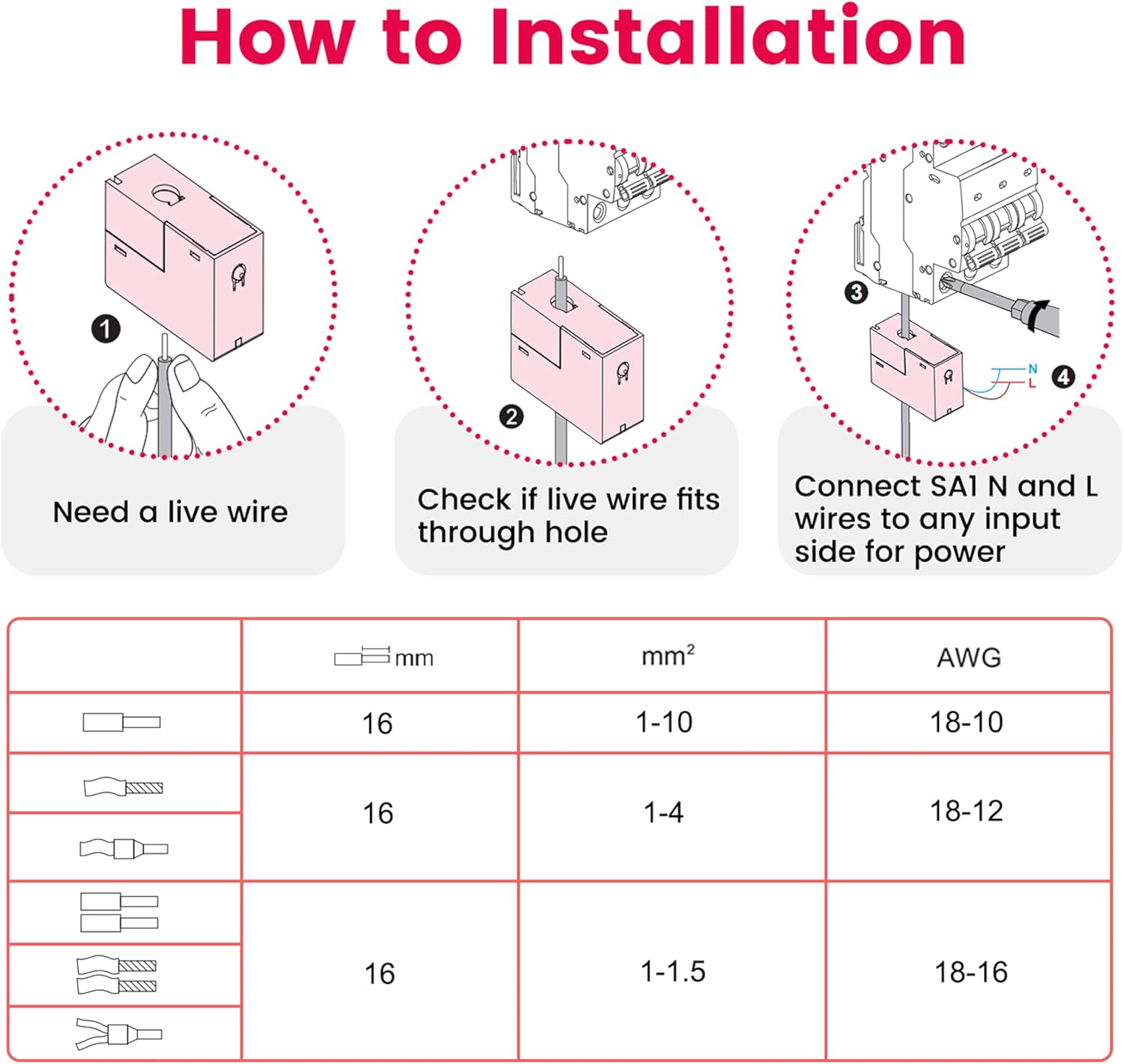
Figure 3: Wiring Steps for SA1
- Prepare Live Wire: Ensure the live wire is ready for connection.
- Check Wire Fit: Verify that the live wire fits through the sensing hole of the current transformer.
- Connect SA1 Wires: Connect the SA1's neutral (N) and live (L) wires to any input side for power.
The SA1 uses its sensing hole to collect energy data from any single circuit within its 31.5-inch range, offering flexible placement without space limitations.
3.2 Asennuspaikka
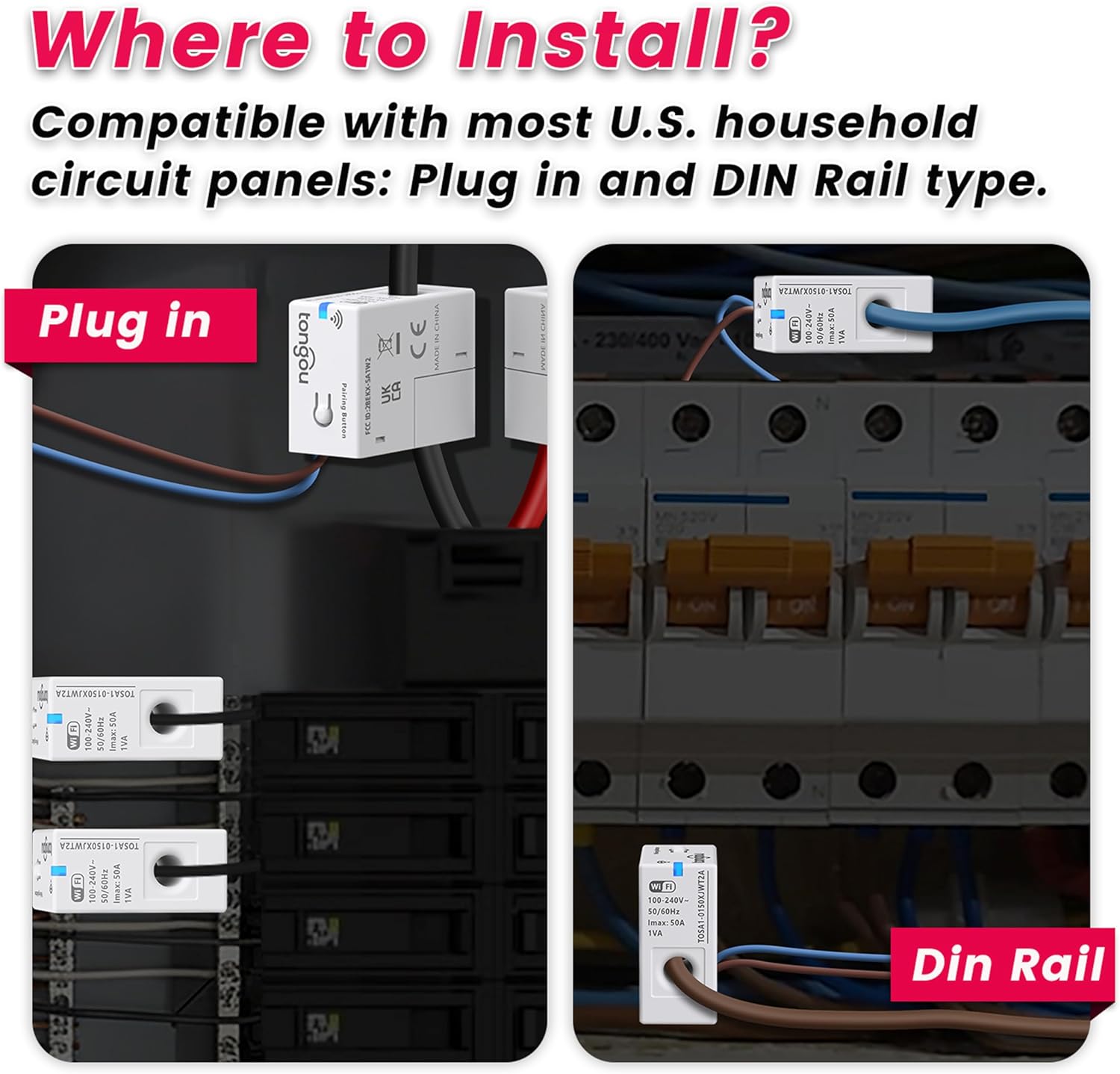
Kuva 4: Asennus Examples (Plug-in and DIN Rail)
The SA1 can be installed in both Plug-in and DIN Rail type circuit panels. Choose a location that allows for easy access to the circuit you wish to monitor.
3.3 Verkkoasetukset
After physical installation, configure the device with your Wi-Fi network using the Tuya/Smart Life app. The device only requires a 2.4GHz Wi-Fi frequency band during the pairing process.
Video 1: TONGOU SA1 WiFi Smart CT Installation and Network Configuration Guide
This video demonstrates the step-by-step process for installing the TONGOU SA1 WiFi Smart Current Transformer and configuring it with your network using the mobile application. It covers physical wiring and the app-based pairing procedure.
Pariliitostilan ilmaisin:
- The blue indicator light flashing continuously indicates the device is entering pairing mode.
- Siirry pariliitostilaan painamalla pariliitospainiketta ja pitämällä sitä painettuna 5 sekunnin ajan.
- The blue indicator light flashing once every 2 seconds indicates network loss.
- The blue indicator light staying on indicates successful pairing.
- The blue indicator light turning off indicates pairing failure.
4. Käyttöohjeet
The SA1 provides comprehensive energy monitoring and management through the Tuya/Smart Life application.
4.1 Real-Time Power Tracking

Figure 5: Real-Time Power Tracking in App
- Monitor current, voltage, forward power, forward power consumption, and CPU temperature via the Tuya/Smart Life app.
- The device is designed to measure AC active power only.
- It is not designed to measure reverse electricity. If detected, the app will display the sum of absolute values (forward and reverse electricity).
4.2 Energy Management and Analysis

Figure 6: Energy Management and Analysis Features
- Class 1.0 accuracy ensures reliable monitoring with detailed historical data (view by hour, day, month, or year).
- Track usage trends to optimize electricity consumption.
- Export historical data via email for deeper analysis.
- Clear electricity data with one click in the app.
4.3 Smart Alarms

Figure 7: Multiple Alarm Functions
- Supports customizable alarms for over/undervoltage, overcurrent, overpower, CPU temperature, and balance.
- Receive immediate alarms when thresholds are exceeded, enabling quick response to potential hazards or inefficient usage.
4.4 Prepaid Electricity Management

Figure 8: Prepaid Electricity Management
- Supports prepaid power recharge.
- Real-time current remaining electricity tracking per room and balance alarm.
- Promotes conscious electricity consumption and cost control.
5. Tekniset tiedot
| Ominaisuus | Yksityiskohta |
|---|---|
| Valmistaja | Changyou Technology (Zhejiang) Co., Ltd. |
| Osanumero | TOSA1-0150XJWT2A-1 |
| Tuotteen paino | 1.76 unssia |
| Tuotteen mitat | 1.18 x 1.57 x 0.71 tuumaa |
| Tuotteen mallinumero | TOSA1-0150XJWT2A-1 |
| Väri | Valkoinen |
| Mukana olevat komponentit | Device x 1, User Manual x 1 |
| Tarvitaanko paristoja? | Ei |
| Wi-Fi-taajuus | 2.4GHz (for pairing) |
| Nykyinen alue | 1-50A |
| Voitage Alue | 100-240 VAC |
| Yhteensopivuus | Tuya/Smart Life App, 120VAC single phase, 240VAC split phase systems |
6. Vianmääritys
- Laite ei pariliity: Ensure your Wi-Fi network is 2.4GHz. Press and hold the pairing button for 5 seconds until the blue indicator light flashes continuously. Check your Wi-Fi password in the app.
- Ei tietoja sovelluksessa: Verify the device is correctly wired and powered. Check the blue indicator light for network connectivity (should be solid blue). Ensure the current transformer is properly placed around the live wire.
- Virheelliset lukemat: Confirm the current transformer is installed on the correct live wire and not on a neutral wire or multiple wires.
- Hälytykset eivät toimi: Check alarm settings within the Tuya/Smart Life app to ensure thresholds are configured correctly and notifications are enabled.
- Sovelluksen yhteysongelmat: Ensure your smartphone has a stable internet connection. Restart the app or re-pair the device if necessary.
7. Huolto
The TONGOU SA1 WiFi Smart Current Transformer requires minimal maintenance. Keep the device clean and free from dust. Ensure all wiring connections remain secure. No user-serviceable parts are inside the device. Do not attempt to open or repair the unit yourself.
8. Takuu ja tuki
For warranty information and technical support, please refer to the documentation included with your purchase or contact TONGOU customer service. Keep your purchase receipt for warranty claims.
Valmistaja: Changyou Technology (Zhejiang) Co., Ltd.