
MOZOTER SP9i
MOZOTER SP9i Langattomat nappikuulokkeet Käyttöohje
Model: SP9i
Johdanto
Thank you for choosing the MOZOTER SP9i Wireless Earbuds. These earbuds are designed to provide a comfortable and stable audio experience with advanced Bluetooth 5.3 technology, deep bass sound, and extended playtime. This manual will guide you through the setup, operation, and maintenance of your new earbuds to ensure optimal performance.
Mitä laatikossa on
- MOZOTER SP9i Wireless Earbuds (Left and Right)
- Latauskotelo
- USB-C latauskaapeli
- Korvatyynyt (koot S, M, L)
- Käyttöopas
Tuote loppuview
The MOZOTER SP9i earbuds feature an over-ear hook design for secure fit and comfort. Each earbud is equipped with intuitive touch controls for easy management of audio and calls. The compact charging case provides additional battery life and convenient storage.

Image: The MOZOTER SP9i Wireless Earbuds resting in their open charging case, showcasing the over-ear hook design and the charging contacts.
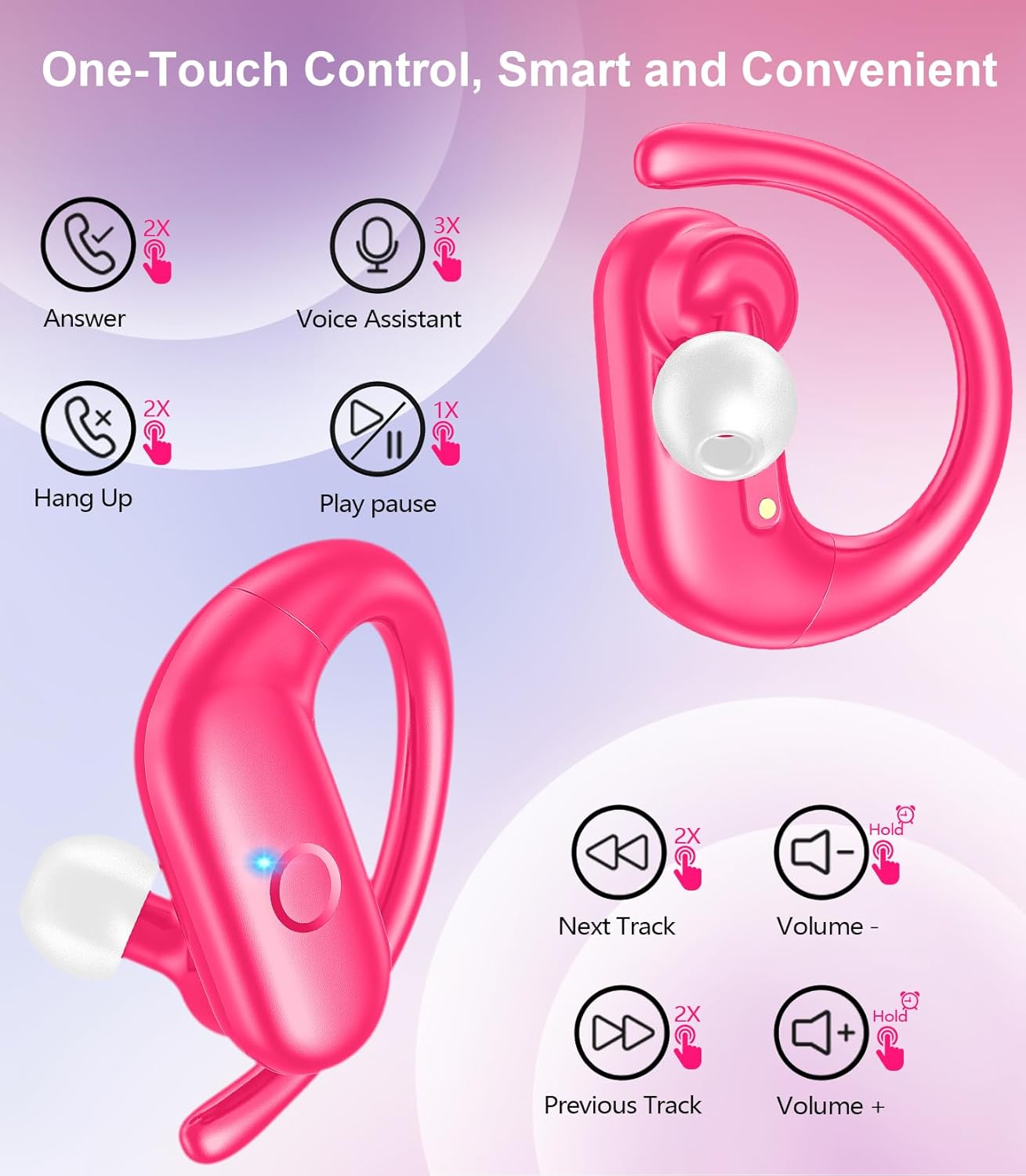
Kuva: Yksityiskohtainen view of an earbud highlighting the integrated Bluetooth 5.3 technology for stable and efficient wireless connectivity.
Asennus
1. Kuulokkeiden ja kotelon lataaminen
Before first use, fully charge the earbuds and the charging case. Connect the provided USB-C cable to the charging port on the case and a power source. The indicator lights on the case will show the charging status.
- Latausaika: Noin 1.5 tuntia täydellä latauksella.
- Kuulokkeiden soittoaika: Jopa 12 tuntia yhdellä latauksella.
- Kokonaispeliaika kotelon kanssa: Jopa 60 tuntia.

Image: The charging case with earbuds inside, illustrating the 60-hour total playtime, 12-hour single charge, and 48-hour case capacity, along with the USB-C charging port.
2. Pariliitoksen muodostaminen laitteesi kanssa
- Ensure the charging case has power and the earbuds are inside.
- Avaa latauskotelo. Kuulokkeet käynnistyvät automaattisesti ja siirtyvät pariliitostilaan.
- Ota Bluetooth käyttöön laitteellasi (älypuhelin, tabletti, kannettava tietokone).
- Etsi käytettävissä olevat Bluetooth-laitteet ja valitse "SP9i" luettelosta.
- Once connected, you will hear a confirmation tone, and the earbuds' indicator lights will turn off or flash slowly.
Kuulokkeet muodostavat automaattisesti yhteyden viimeksi pariliitettyyn laitteeseen, kun ne poistetaan kotelosta, jos Bluetooth on käytössä laitteessa.

Image: An illustration showing the MOZOTER SP9i earbuds in their open case, with a smartphone screen displaying a successful Bluetooth connection to "SP9i".
Käyttöohjeet
For optimal sound quality and comfort, it is important to wear the earbuds correctly and choose the appropriate eartip size.
1. Korvatyynyjen valinta
The earbuds come with small (S), medium (M), and large (L) eartips. Experiment with different sizes to find the pair that provides the best seal and comfort for your ears. A good seal enhances bass response and passive noise cancellation.
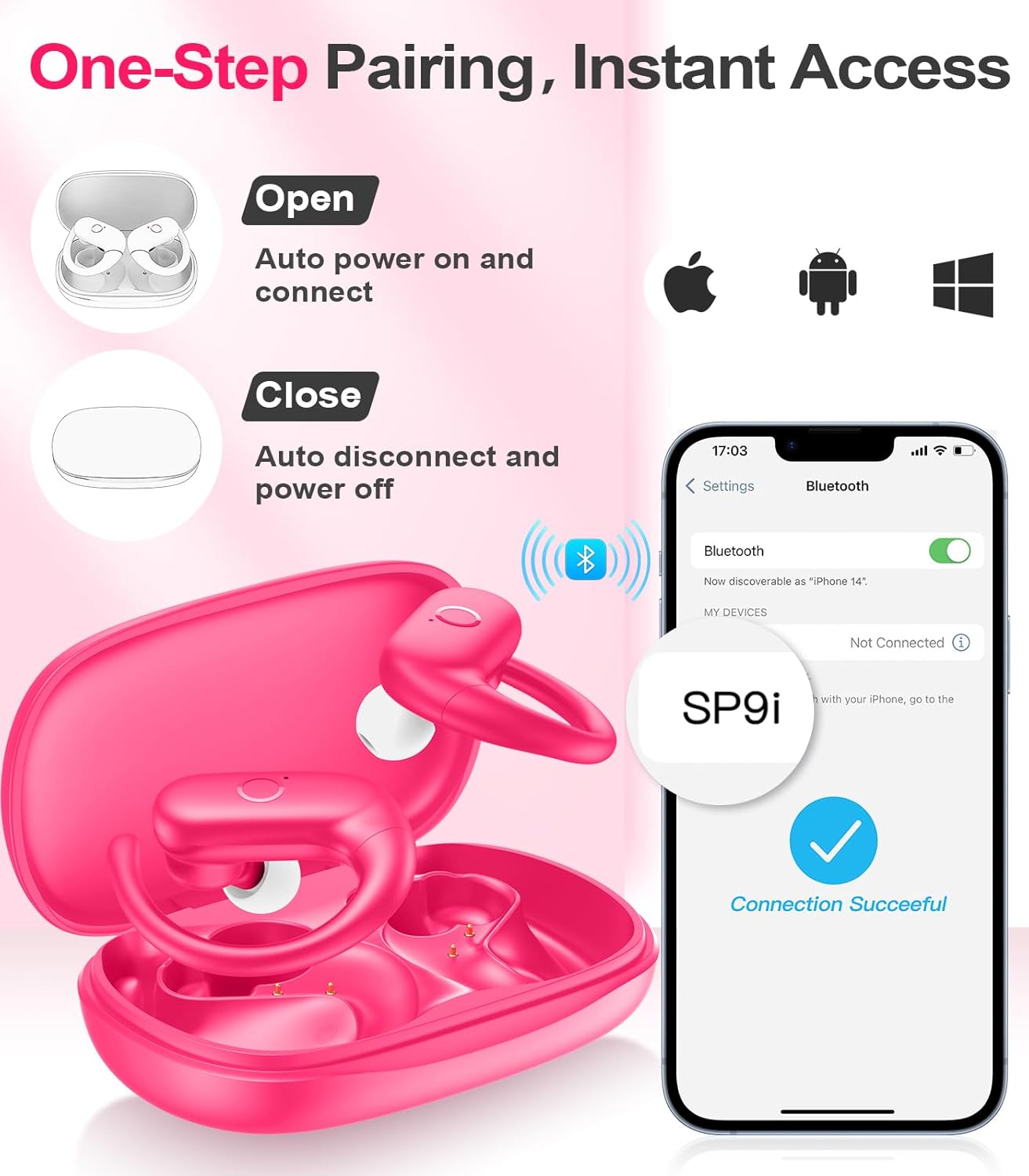
Image: A woman wearing an earbud, with an inset showing the three available eartip sizes (S, M, L) for a customized and comfortable fit.
2. Turvallisen istuvuuden saavuttaminen
- Vaihe 1: Aseta korvakoukku korvasi päälle.
- Vaihe 2: Aseta kuuloke varovasti korvakäytävään.
- Vaihe 3: Rotate the earbud slightly to find a comfortable and secure angle. The flexible ear hooks ensure a stable fit, ideal for sports and active use.

Image: A three-step diagram illustrating the correct method to wear the MOZOTER SP9i earbuds, ensuring a secure and comfortable fit with the ear hook.

Image: A woman wearing the MOZOTER SP9i earbuds, demonstrating the ergonomic design that rests comfortably and securely on the ear.
Käyttöohjeet
The MOZOTER SP9i earbuds feature intuitive touch controls on each earbud. The following table outlines the functions:
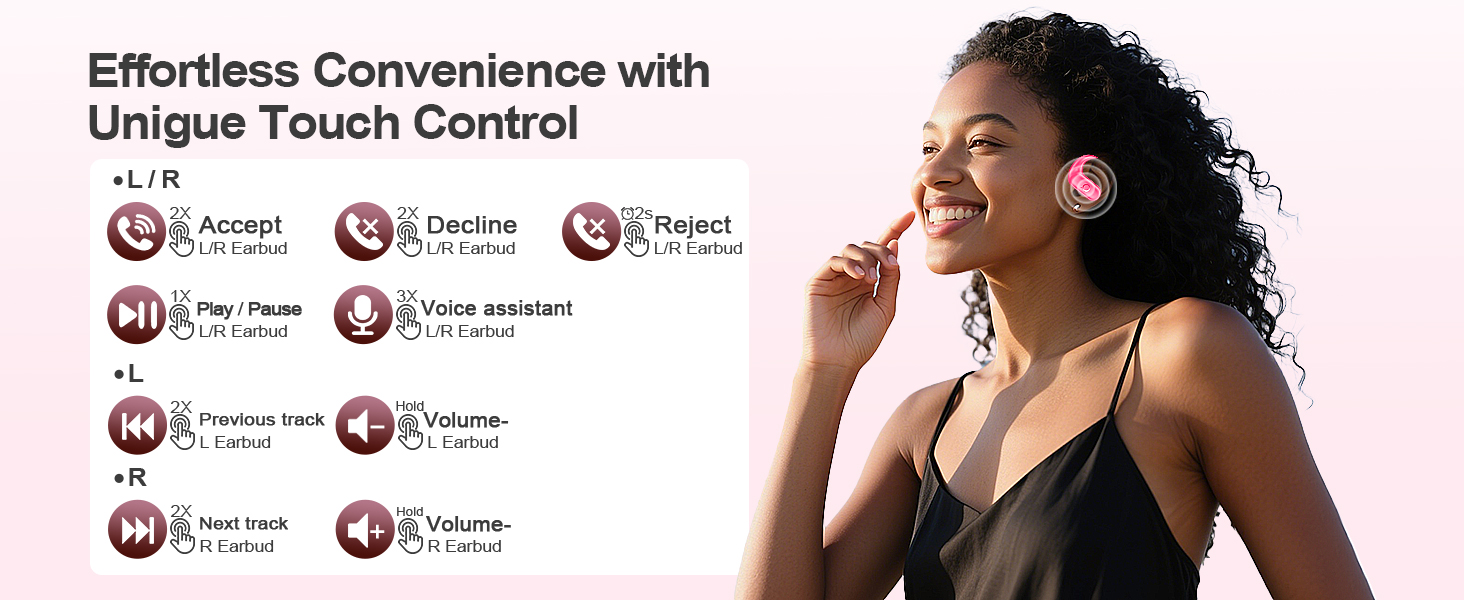
Image: A visual guide detailing the various touch control gestures for the MOZOTER SP9i earbuds, including call management, music playback, and volume adjustments.
| Toiminta | Ele (V/O-nappikuulokkeet) |
|---|---|
| Vastaa puheluun | Double-tap (2X) |
| Katkaise puhelu | Double-tap (2X) |
| Hylkää puhelu | Triple-tap (3X) |
| Toista/keskeytä musiikki | Single-tap (1X) |
| Aktivoi Voice Assistant | Triple-tap (3X) |
| Seuraava kappale | Double-tap (2X) on Oikein nappikuulokkeet |
| Edellinen kappale | Double-tap (2X) on Vasen nappikuulokkeet |
| Äänenvoimakkuuden lisääminen | Odota Oikein nappikuulokkeet |
| Äänenvoimakkuuden vähentäminen | Odota Vasen nappikuulokkeet |
Huolto
Kuulokkeiden asianmukainen huolto varmistaa niiden pitkän käyttöiän ja suorituskyvyn.
- Puhdistus: Regularly clean the eartips and the charging contacts on both the earbuds and the case with a soft, dry, lint-free cloth. Avoid using harsh chemicals or abrasive materials.
- Varastointi: Kun nappikuulokkeita ei käytetä, säilytä niitä latauskotelossa suojataksesi niitä pölyltä ja vaurioilta.
- Veden altistuminen: Vaikka ne on suunniteltu urheiluun, vältä nappikuulokkeiden upottamista veteen. Pyyhi hiki tai kosteus pois heti käytön jälkeen.
Vianetsintä
If you encounter any issues with your MOZOTER SP9i earbuds, please refer to the following common solutions:
- Kuulokkeet eivät muodosta pariliitosta: Ensure both earbuds are charged and removed from the case. Turn off and on your device's Bluetooth. If issues persist, try resetting the earbuds (refer to manufacturer's web(sivustolta löydät tarkemmat nollausohjeet, jos niitä ei ole käyttöoppaassa).
- Vain yksi kuuloke toimii: Place both earbuds back into the charging case, close the lid, wait a few seconds, then open the lid and remove them. This often resynchronizes them.
- Huono äänenlaatu: Ensure the eartips provide a good seal in your ear. Clean any debris from the earbud speakers. Check your device's volume and audio settings.
- Latausongelmat: Varmista, että latauskaapeli on kytketty kunnolla sekä koteloon että virtalähteeseen. Puhdista nappikuulokkeiden ja kotelon sisäpuolen latauskoskettimet.
- Kuulokkeiden putoaminen: Experiment with different eartip sizes and adjust the ear hooks for a more secure fit as described in the Wearing Instructions section.
Tekniset tiedot
| Ominaisuus | Yksityiskohta |
|---|---|
| Mallin nimi | SP9i |
| Yhteystekniikka | Langaton (Bluetooth 5.3) |
| Melunhallinta | Passiivinen melunvaimennus |
| Impedanssi | 4 ohmia |
| Korvanapin paino | Noin 8 g nappikuuloketta kohden |
| Kuulokkeiden soittoaika | Jopa 12 tuntia |
| Kokonaispeliaika (kotelon kanssa) | Jopa 60 tuntia |
| Latausportti | USB-C |
| Mukana olevat komponentit | Nappikuulokkeet, Latauskotelo, Korvatyynyt, Käyttöohje |
Takuu ja tuki
MOZOTER products are designed and manufactured to the highest quality standards. For warranty information and customer support, please refer to the documentation included with your purchase or visit the official MOZOTER website. If you require further assistance, please contact our customer service team.
Ask a question about this manual
Ask about setup, troubleshooting, compatibility, parts, safety, or missing instructions. Manuals+ will review the question and use this page’s manual context to help answer it.