
Johdanto
This manual provides essential information for setting up, operating, maintaining, and troubleshooting your XIAOMI Redmi 15C smartphone. Please read it carefully to ensure proper use and to maximize the device's performance and longevity.
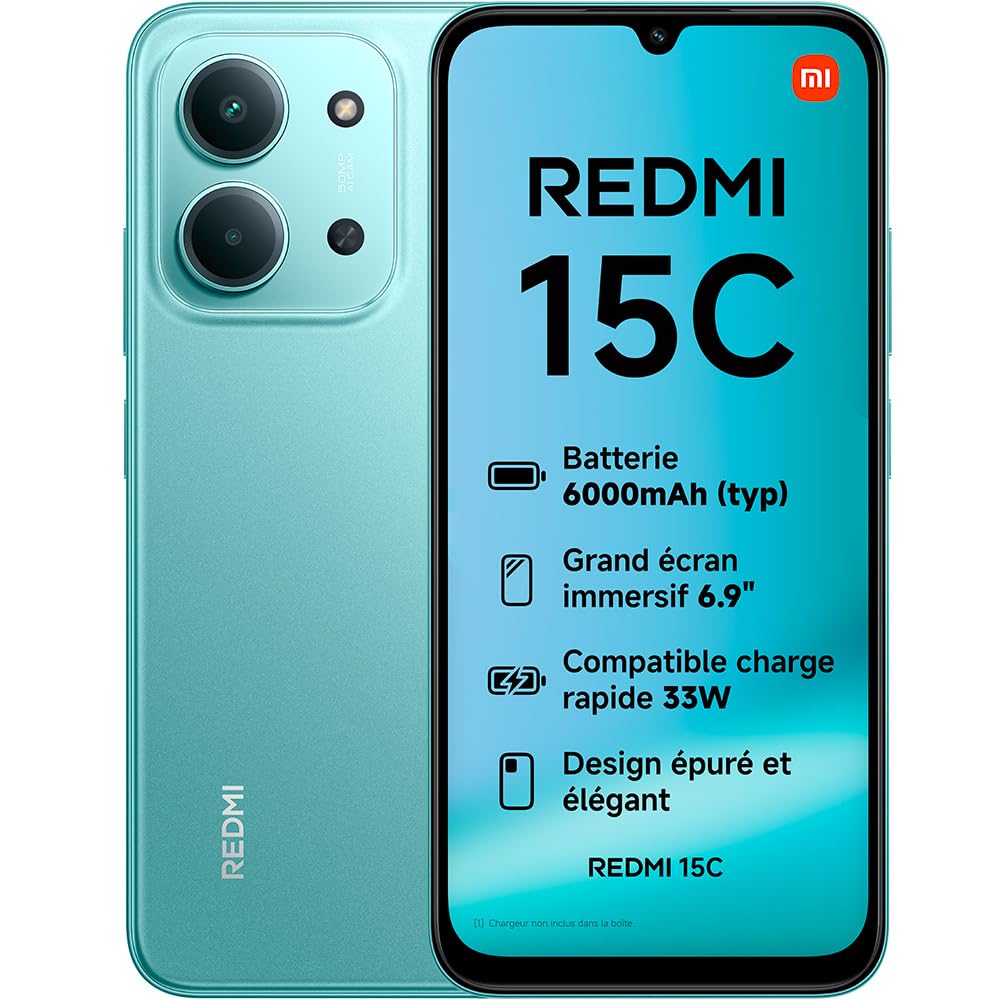
Image: The XIAOMI Redmi 15C smartphone, showcasinsen tyylikkään muotoilun ja suuren näytön ansiosta.
The Redmi 15C features a long-lasting 6000 mAh battery, an immersive 6.9-inch 120Hz display, and a powerful MediaTek Helio G81-Ultra octa-core processor. It is equipped with a 50 MP AI dual camera system and boasts IP64 dust and water resistance.
Asennus
1. Mitä laatikossa on
- XIAOMI Redmi 15C -älypuhelin
- USB-kaapeli (C-tyyppi)
- SIM-kortin poistotyökalu
Note: A charger is not included and must be purchased separately.

Image: Illustration of the items included in the Redmi 15C packaging: the smartphone, a USB-C cable, and a SIM ejection tool.
2. SIM-kortin asettaminen
- Etsi SIM-kortin alusta laitteen sivusta.
- Aseta SIM-kortin poistotyökalu pieneen reikään alustan vieressä ja paina sitä lujasti, kunnes alusta ponnahtaa ulos.
- Place your Nano-SIM card(s) into the tray with the gold contacts facing down. Ensure they are correctly aligned.
- Työnnä lokero varovasti takaisin lokeroon, kunnes se napsahtaa paikalleen.
3. Ensimmäinen lataus ja virran kytkeminen
- Connect the USB Type-C cable to your Redmi 15C and to a compatible power adapter (not included).
- Allow the device to charge for at least 30 minutes before first use.
- To power on, press and hold the power button until the XIAOMI logo appears.
Laitteen käyttäminen
Näyttö ja vuorovaikutus
The Redmi 15C features a large 6.9-inch immersive display with an AdaptiveSync refresh rate of up to 120Hz, providing a smooth visual experience for browsing and media consumption. The display also holds TÜV Rheinland certifications for Low Blue Light, Flicker Free, and Circadian Friendly, designed for optimal visual comfort.

Image: The immersive 6.9-inch display of the Redmi 15C, highlighting its visual quality.
Suorituskyky
Powered by the MediaTek Helio G81-Ultra octa-core processor, the Redmi 15C delivers consistent and fluid performance for daily tasks and extended use. It supports up to 16GB of RAM with memory extension for enhanced multitasking.

Image: A visual representation of the smartphone's RAM, indicating memory extension capabilities.
Kamerajärjestelmä
The device features a 50 MP AI dual camera system on the rear, capable of capturing fine details and vibrant colors. The front camera allows for high-quality selfies with a dedicated beauty mode.
- Ultra HD -tila: Captures exceptionally clear and detailed photos.
- Pystytila: Enhances portraits with artistic depth effects.
- Selfie Beauty Mode: Refines selfies for a naturally polished look.

Kuva: Yksityiskohtainen view of the 50 MP AI dual camera system on the back of the Redmi 15C.
Akku ja lataus
Equipped with a 6000 mAh battery, the Redmi 15C offers extended usage, providing up to 2.14 days of battery life, 22 hours of video playback, or 82 hours of music playback. It supports 33W turbo charging, allowing for rapid power replenishment.

Image: The Redmi 15C connected to a charger, displaying the 33W turbo charging status.
The device also supports reverse charging, allowing it to act as a portable power bank for other compatible devices.

Image: The Redmi 15C connected via cable to another smartphone, demonstrating its reverse charging capability.
Käyttöjärjestelmä
The Redmi 15C runs on Xiaomi HyperOS 2, offering a fluid user experience and enhanced interconnectivity with other Xiaomi devices. It comes with pre-installed Google applications for immediate functionality.

Image: The logo for Xiaomi HyperOS 2, indicating the device's operating system.
Huolto
Pölyn- ja vedenkestävyys
The Redmi 15C features an IP64 rating for dust and water resistance, providing protection against dust ingress and splashes of water. This rating does not imply full waterproofing; avoid submerging the device in water.
Yleinen hoito
- Keep your device clean using a soft, dry cloth.
- Vältä puhelimen altistamista äärimmäisille lämpötiloille tai suoralle auringonvalolle pitkiä aikoja.
- Suojaa näyttö näytönsuojalla ja käytä suojakoteloa fyysisten vaurioiden estämiseksi.
Vianetsintä
Yleisiä ongelmia ja ratkaisuja
| Antaa | Mahdollinen ratkaisu |
|---|---|
| Laite ei käynnisty | Varmista, että akku on ladattu. Paina virtapainiketta vähintään 10 sekuntia. |
| Näyttö ei reagoi | Käynnistä laite uudelleen. Jos laite ei reagoi, pakota uudelleenkäynnistys pitämällä virtapainiketta pohjassa. |
| Huono akun kesto | Close background applications, reduce screen brightness, disable unnecessary features like GPS or Bluetooth when not in use. |
| Network connectivity problems | Check SIM card insertion. Toggle Airplane Mode on and off. Restart the device. Contact your network provider if issues persist. |
| Sovellukset kaatuvat tai jumiutuvat | Clear app cache and data. Update the app to the latest version. Restart the device. |
Tekniset tiedot
| Ominaisuus | Yksityiskohta |
|---|---|
| Merkki | XIAOMI |
| Mallin nimi | Redmi 15C |
| Käyttöjärjestelmä | Hyper-käyttöjärjestelmä |
| RAM | 4 Gt (laajennettavissa 16 Gt asti) |
| Tallennuskapasiteetti | 256 Gt |
| Näytön koko | 6.9 tuumaa |
| Näytön resoluutio | 1080 x 2400 |
| Päivitystaajuus | 120 Hz |
| CPU malli | MediaTek Helio G81-Ultra |
| Takakameran resoluutio | 50 Megapixels (Dual AI Camera) |
| Front Camera Count | 1 |
| Akun kapasiteetti | 6000 mAh |
| Lataus | 33 W:n pikalataus, käänteinen lataus |
| Vedenkestävyystaso | IP64 (pöly- ja roiskevesitiivis) |
| SIM-korttipaikat | Single SIM (Nano) |
| Yhteydet | 4G, Bluetooth, LTE, Wi-Fi |
| Biometrinen turvallisuus | Sormenjälkien tunnistus |
| Kuulokeliitäntä | 3.5 mm |
Takuu ja tuki
Takuutiedot
The XIAOMI Redmi 15C comes with a 2 vuoden valmistajan takuuSäilytä ostokuitti takuuvaatimuksia varten. Takuu kattaa valmistusvirheet normaaleissa käyttöolosuhteissa.
Varaosien saatavuus
Spare parts for the Redmi 15C are available for a period of 2 vuotta ostopäivästä alkaen.
Asiakastuki
For further assistance, technical support, or warranty service, please visit the official XIAOMI support website or contact their customer service directly. Refer to the packaging or official XIAOMI websivusto, josta löydät alueesi yhteystiedot.