
EDUP AX600M
EDUP USB WiFi 6 -sovitin AX600M Käyttöohje
Model: AX600M
Tuote loppuview
The EDUP USB WiFi 6 Adapter AX600M is a compact, dual-band wireless network adapter designed to provide high-speed Wi-Fi 6 connectivity for your PC, laptop, or desktop. It supports the latest 802.11ax standard, offering enhanced performance for streaming, gaming, and video conferencing.

Image: The EDUP USB WiFi 6 Adapter AX600M, a compact black dongle with a gold USB connector and a blue Wi-Fi signal icon.
Tärkeimmät ominaisuudet:
- Next-Gen WiFi 6 Speed: Up to 286Mbps on 5.8GHz and 286Mbps on 2.4GHz for smooth performance.
- Kompakti muotoilu: Built-in antenna, ideal for portable use and tight spaces.
- Plug & Play: Easy driver installation, compatible with Windows 11/10/7.
- Parannettu suojaus: Supports WEP, WPA-PSK, WPA2-PSK, and WPA3-PSK encryption.
- Monipuoliset tilat: Supports Ad-Hoc and Infrastructure modes.
Pakkauksen sisältö
Varmista, että pakkauksessasi on kaikki tarvittavat osat:
- 1x EDUP WiFi Adapter (AX600M)
Jos jokin tuote puuttuu tai on vaurioitunut, ota yhteyttä asiakaspalveluun.
Asennusopas
Follow these steps to install and set up your EDUP USB WiFi 6 Adapter AX600M:
- Step 1: Insert the WiFi Adapter
Insert the EDUP USB WiFi adapter into an available USB port on your desktop or laptop computer. Ensure it is fully seated in the port.
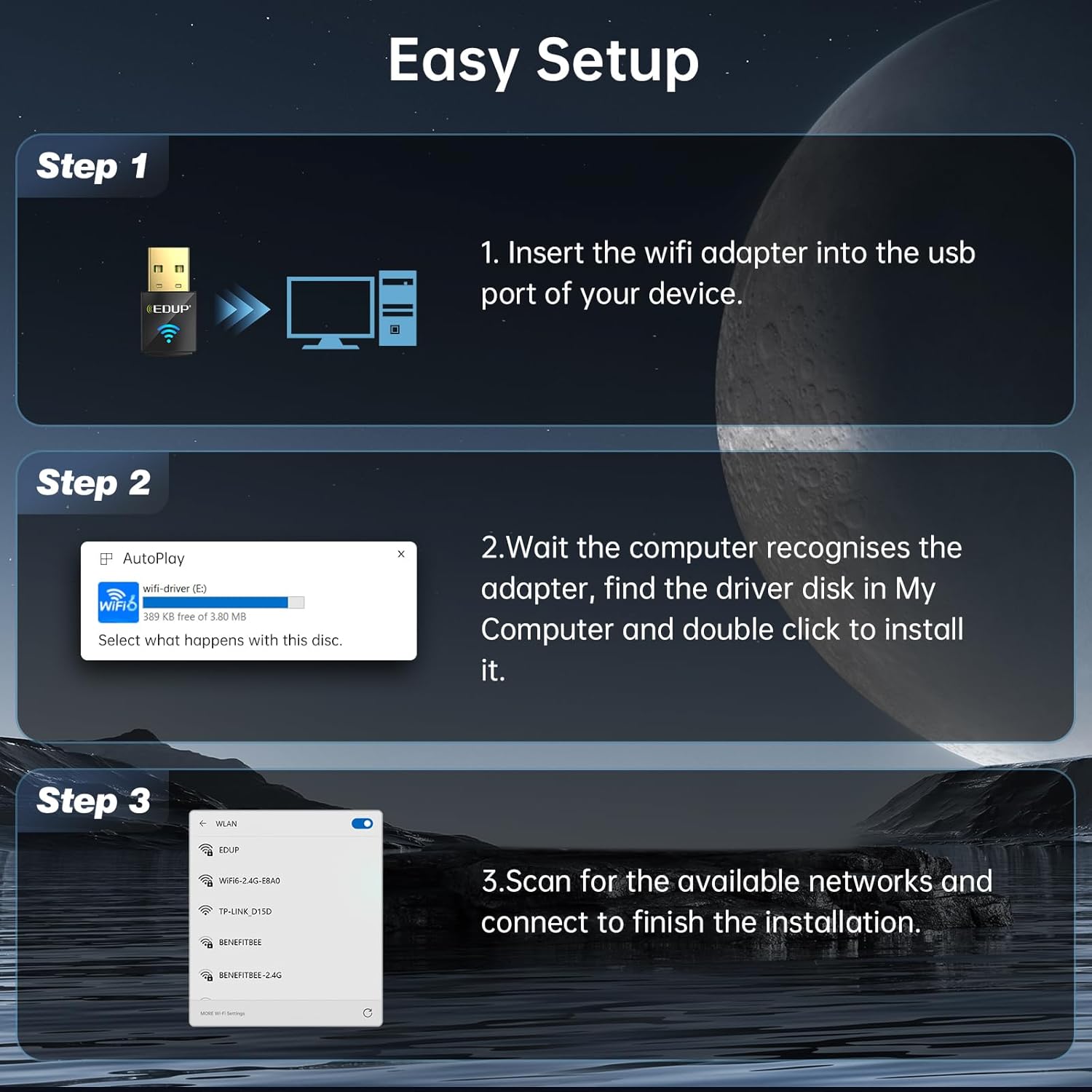
Image: Diagram showing the EDUP USB WiFi adapter being inserted into a computer's USB port.
- Vaihe 2: Ohjaimen asennus
Most Windows 11/10/7 systems will automatically detect the adapter and install the necessary drivers. If an auto-play prompt appears, follow the on-screen instructions to install the driver from the adapter's virtual disk. If no prompt appears, navigate to "My Computer" or "This PC", locate the new drive (often labeled "wifi-driver" or similar), and double-click to run the installer.

Image: Screenshot of a Windows auto-play prompt for driver installation, indicating compatibility with Windows 7, 10, and 11.
- Vaihe 3: Yhdistä verkkoon
Once the driver is installed, your computer will recognize the adapter. Scan for available wireless networks, select your desired network, and enter the password to connect. The adapter supports both 2.4GHz and 5GHz bands.

Image: Graphic illustrating the dual-band capabilities of the adapter, showing 5GHz (286Mbps) and 2.4GHz (286Mbps) coverage.
Käyttöohjeet
Wi-Fi Receive Mode
In Wi-Fi Receive Mode, the adapter allows your computer to connect to existing wireless networks, providing internet access and network connectivity. This is the primary mode of operation for most users.
Wi-Fi Hotspot Mode (Soft AP)
The adapter can also function as a Wi-Fi Hotspot (Soft AP), allowing your computer to share its internet connection with other devices. This is useful for creating a personal Wi-Fi network when only a wired connection is available on your computer.
- To enable Hotspot Mode, refer to your operating system's network settings (e.g., Mobile hotspot settings in Windows).
- Ensure your computer has an active internet connection (e.g., Ethernet) to share.

Image: Graphic illustrating the adapter's capability to function in both Wi-Fi Receive Mode (connecting to a network) and Wi-Fi Hotspot Mode (sharing internet).
MU-MIMO-tekniikka
The EDUP AX600M adapter supports MU-MIMO (Multi-User, Multiple-Input, Multiple-Output) technology. When paired with a MU-MIMO compatible router, this technology allows the router to communicate with multiple devices simultaneously, improving network efficiency and reducing latency, especially in environments with many connected devices.

Image: Diagram comparing MU-MIMO router communication with the EP-AX600 adapter versus a regular adapter, showing improved simultaneous data flow.
Huolto
To ensure optimal performance and longevity of your EDUP USB WiFi 6 Adapter AX600M, follow these simple maintenance guidelines:
- Pidä puhtaana: Periodically clean the adapter's exterior with a soft, dry cloth. Avoid using liquid cleaners or solvents.
- Oikea säilytys: Kun et käytä sovitinta, säilytä sitä viileässä, kuivassa paikassa, poissa suorasta auringonvalosta ja äärimmäisistä lämpötiloista.
- Vältä fyysisiä vaurioita: Do not drop, bend, or expose the adapter to excessive force.
- Ohjaimen päivitykset: Regularly check for updated drivers on the EDUP official websivuston yhteensopivuuden ja suorituskyvyn parannusten varmistamiseksi.
Vianetsintä
If you encounter issues with your EDUP USB WiFi 6 Adapter AX600M, refer to the following common troubleshooting steps:
| Ongelma | Mahdollinen ratkaisu |
|---|---|
| Tietokone ei tunnista sovitinta. |
|
| Wi-Fi-verkkoon ei voida muodostaa yhteyttä. |
|
| Hidas Wi-Fi-yhteys. |
|
| Driver installation failed. |
|
If the problem persists, please contact EDUP customer support for further assistance.
Tekniset tiedot
| Ominaisuus | Yksityiskohta |
|---|---|
| Malli | AX600M |
| Langaton standardi | IEEE 802.11ax (Wi-Fi 6) |
| Taajuuskaista | Dual Band (2.4 GHz & 5.8 GHz) |
| Tiedonsiirtonopeus | Jopa 286 Mbps (2.4 GHz), jopa 286 Mbps (5.8 GHz) |
| Laitteistorajapinta | USB 2.0 |
| Yhteensopivat laitteet | Pöytätietokone, kannettava tietokone |
| Käyttöjärjestelmän yhteensopivuus | Windows 11/10/7 |
| Suojaussalaus | WEP, WPA-PSK, WPA2-PSK, WPA3-PSK |
| Tuotteen mitat | 0.64 x 0.3 x 1.22 tuumaa (16.26 x 7.62 x 30.99 mm) |
| Tuotteen paino | 0.705 unssia (20 grammaa) |
| Käyttölämpötila | 0 °C - 70 °C (32 °F - 158 °F) |
| Varastointilämpötila | -40 °C - 70 °C (-40 °F - 158 °F) |
Takuu ja asiakastuki
EDUP provides a 3-year manufacturer replacement warranty for the USB WiFi 6 Adapter AX600M. Additionally, a 90 päivän kysymysten vastainen palautusoikeus tarjotaan.
For any issues, questions, or support needs, please contact EDUP customer support via Amazon message. Our team is committed to providing prompt assistance and solutions.
You can also visit the official EDUP store on Amazon for more information and products: EDUP Amazon Store
Aiheeseen liittyvät asiakirjat - AX600M
 |
Quick Installation Guide for zhaixingtiantuo 1200Mbps WiFi Adapter A concise guide to installing and setting up the zhaixingtiantuo 1200Mbps dual-band WiFi adapter. Covers hardware installation, driver setup for Windows 10/11, and network connection. |
 |
AX900 WiFi 6 & Bluetooth 5.4 USB Adapter User Manual User manual for the AX900 Driver-Free Dual Band 2.4/5GHz Wireless Network Card. Learn how to install and use this WiFi 6 and Bluetooth 5.4 USB adapter. |
 |
WAVLINK AC1900 Langaton Dual Band USB 3.0 -sovitin: Pikaopas ja asennus Get your WAVLINK AC1900 AC1900 Wireless Dual Band USB 3.0 Adapter (WN693A5) up and running quickly. This guide covers installation, driver setup for Windows and macOS, Wi-Fi connection, and AP mode. |
 |
UGREEN AC1300 High-Gain Dual-Band Langattoman Sovittimen Käyttöohje UGREEN AC1300 High-Gain Dual-Band -langattoman sovittimen (malli CM493) käyttöohje. Tarjoaa tuotteen yliview, pakkauksen sisältö, ajurin asennusvaiheet Windowsille, Wi-Fi-yhteyden muodostamisopas, tekniset tiedot ja turvallisuustiedot. |
 |
BrosTrend AX1800 USB WiFi 6 -sovittimen pika-asennusopas Ytimekäs opas BrosTrend AX1800 USB WiFi 6 -sovittimen (mallit AX1, AX4) asentamiseen Windows-tietokoneisiin. Kattaa asennuksen, ajurin asennuksen, yhteyden muodostamisen, asennuksen poistamisen, työpöytäkuvakkeen mukauttamisen, usein kysytyt kysymykset ja teknisen tuen. |
 |
Kaksikaistainen langaton USB-sovitin Pika-asennusopas Kattava opas Dual Band Wireless USB -sovittimen asentamiseen ja käyttöönottoon sekä Windows- että Mac-käyttöjärjestelmissä. Opi muodostamaan yhteys Wi-Fi-verkkoihin ja hyödyntämään tukiasematilaa. |
Ask a question about this manual
Ask about setup, troubleshooting, compatibility, parts, safety, or missing instructions. Manuals+ will review the question and use this page’s manual context to help answer it.