
1. Johdanto
Thank you for choosing the INNOCN 27D1U 27-inch 4K UHD IPS Monitor. This manual provides essential information for the safe and efficient use of your new monitor. Please read it thoroughly before installation and operation, and keep it for future reference.
The INNOCN 27D1U offers a 27-inch 4K UHD (3840 x 2160) IPS display with HDR400 support, 100% sRGB color gamut, and blue light reduction technology. It features versatile connectivity including Type-C with 65W power delivery, DisplayPort, and HDMI 2.0, along with an adjustable stand for optimal viewmukavuutta.
2. Turvallisuustiedot
- Aseta näyttö aina vakaalle ja tasaiselle alustalle, jotta se ei putoa.
- Älä altista näyttöä sateelle tai kosteudelle sähköiskun tai tulipalon välttämiseksi.
- Pidä näyttö poissa suorasta auringonvalosta, lämmönlähteistä tai äärimmäisistä lämpötiloista.
- Varmista näytön ympärillä oleva asianmukainen ilmanvaihto. Älä tuki tuuletusaukkoja.
- Käytä ainoastaan näytön mukana toimitettua virtalähdettä.
- Irrota näyttö pistorasiasta ennen puhdistamista.
- Älä yritä korjata näyttöä itse. Jätä kaikki huoltotyöt pätevän huoltohenkilöstön tehtäväksi.
3. Pakkauksen sisältö
Tarkista pakkauksen sisältö purkamisen yhteydessä. Jos jokin puuttuu tai on vaurioitunut, ota yhteyttä jälleenmyyjään.
- INNOCN 27D1U Monitor
- Näytön jalusta (jalusta ja kaula)
- Virtalähde
- Virtakaapeli
- HDMI kaapeli
- USB-kaapeli
- Käyttöopas
4. Asennus
4.1. Näytön kokoonpano
Jalustan kokoonpano:
- Poista näytön ja jalustan osat varovasti pakkauksesta.
- Kiinnitä jalustan kaula näyttöpaneeliin. Varmista, että se napsahtaa tukevasti paikalleen.
- Kiinnitä jalustan pohja jalustan kaulaan ja kiristä jalustan pohjassa oleva ruuvi.
VESA-kiinnityksen asennus (valinnainen):
The monitor supports VESA 100x100mm mounting. If you wish to use a VESA-compatible wall mount or desk arm, remove the stand from the monitor by pressing the quick-release button (if available) or unscrewing it. Attach your VESA mount using appropriate screws.

Image: Monitor stand adjustments and VESA mount points.
4.2. Yhteyden muodostaminen laitteisiin
Connect your computer or other devices to the monitor using the appropriate cables. The monitor supports HDMI 2.0, DisplayPort 1.4, and USB Type-C connections.
- HDMI-liitäntä: Connect one end of the HDMI cable to your computer's HDMI port and the other end to the monitor's HDMI 2.0 port.
- DisplayPort-liitäntä: Connect one end of the DisplayPort cable to your computer's DisplayPort and the other end to the monitor's DisplayPort 1.4.
- USB Type-C -liitäntä: Connect one end of the USB-C cable to your computer's USB-C port and the other end to the monitor's USB-C port. This connection supports video, data transfer, and up to 65W power delivery to your laptop.
- Äänilähtö: Liitä ulkoiset kaiuttimet tai kuulokkeet 3.5 mm:n äänilähtöporttiin ääntä varten.
- Virtaliitäntä: Connect the power adapter to the monitor's DC Power In port, then plug the power cable into a power outlet.

Image: Monitor ports and button descriptions.
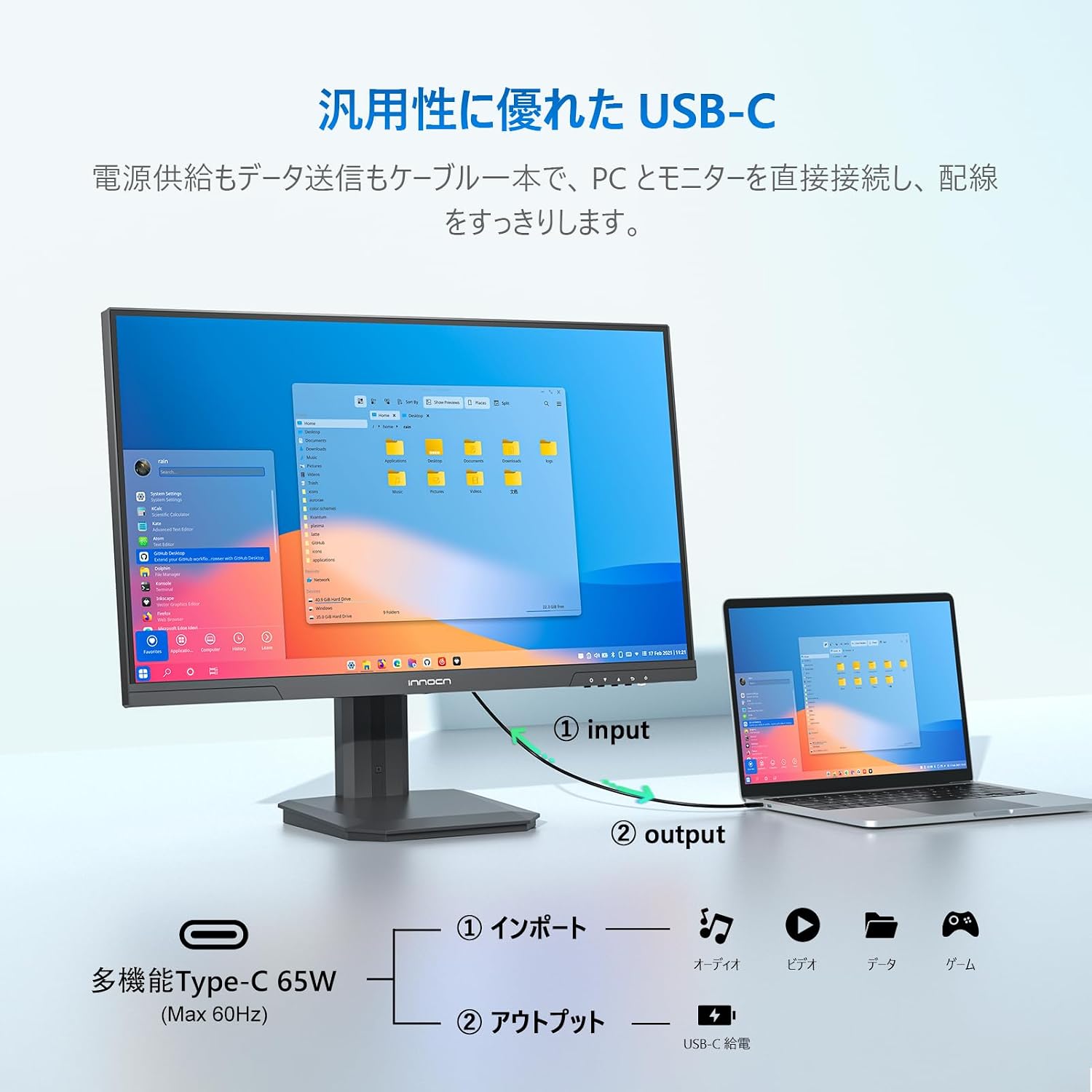
Image: USB-C connection for power and data.
5. Käyttöohjeet
5.1. Virta päälle/pois
Käynnistä tai sammuta näyttö painamalla sen takana olevaa virtapainiketta.
5.2. OSD-valikon navigointi
The On-Screen Display (OSD) menu allows you to adjust various monitor settings. Use the control buttons on the back of the monitor to navigate the menu:
- Virtapainike: Paina kytkeäksesi näytön päälle/pois päältä.
- Exit/Hot Key: Press to return to the previous menu or quickly switch input signals.
- Yläpainike: Press to move up in the menu or quickly adjust volume.
- Alas-painike: Press to move down in the menu or quickly adjust brightness.
- Valikkopainike: Press to enter sub-menus or enter the main menu.
5.3. Näyttöasetukset
- Kirkkaus/kontrasti: Säädä näitä asetuksia kuvan näkyvyyden optimoimiseksi.
- Väriasetukset: Fine-tune color temperature, hue, and saturation. The monitor offers 100% sRGB and 95% DCI-P3 color gamut for accurate color reproduction, ideal for photo and video editing.
- HDR400: Enable HDR400 for enhanced contrast and vibrant colors in compatible content.
- Sinisen valon vähennys: Aktivoi tämä ominaisuus vähentääksesi sinisen valon säteilyä ja minimoiksesi silmien rasituksen pitkäaikaisen käytön aikana.
- M.BOOK Mode: This mode is optimized for Mac devices, providing natural and consistent colors.

Image: High color accuracy for creative work.
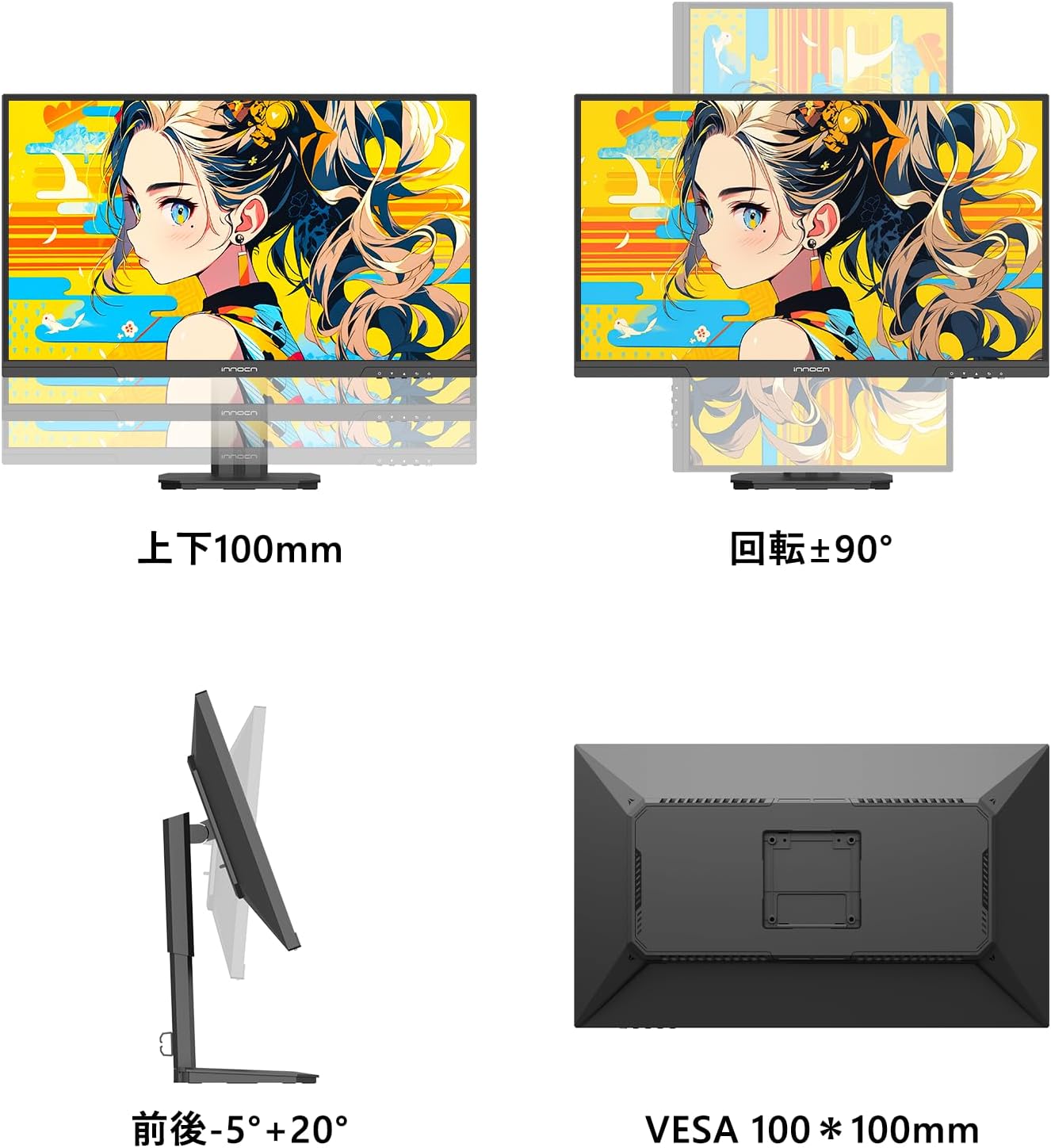
Image: HDR 400 effect comparison.

Image: M.BOOK Mode for Mac compatibility.
5.4. Monitor Adjustments
The monitor stand allows for various adjustments to achieve an ergonomic viewasemointiasento:
- Korkeuden säätö: Adjust the monitor height up to 100mm.
- Kallistaa: Kallista näyttöä -5° - +20° optimaalisen viewkulmat.
- Pivot (Rotation): Käännä näyttöä 90° pystyasentoon viewing.
6. Huolto
- Näytön puhdistaminen: Pyyhi näyttö varovasti pehmeällä, nukkaamattomalla liinalla. Pinttyneisiin tahroihin käytä näyttökohtaista puhdistusliuosta, jota levität liinaan, älä suoraan näyttöön.
- C:n puhdistaminenasing: Pyyhi näyttö pehmeällä, kuivalla liinalla.asing. Vältä hankaavien puhdistusaineiden tai liuottimien käyttöä.
- Varastointi: If storing the monitor for an extended period, unplug it and cover it to protect it from dust. Store in a cool, dry place.
7. Vianmääritys
Jos kohtaat ongelmia näytön kanssa, katso seuraavat yleiset ongelmat ja ratkaisut:
| Ongelma | Mahdollinen syy | Ratkaisu |
|---|---|---|
| Ei kuvaa näytöllä | No power; Incorrect input selected; Loose video cable | Check power connection; Select correct input source via OSD; Reconnect video cable securely. |
| Kuva on epäselvä tai vääristynyt | Incorrect resolution; Faulty video cable | Aseta näytön resoluutio arvoon 3840x2160; Kokeile eri videokaapelia. |
| Ei ääntä ulkoisista kaiuttimista/kuulokkeista | Äänenvoimakkuus liian alhainen; Väärä äänilähtö valittu | Adjust volume via OSD or connected device; Ensure audio output is selected correctly on your device. |
| Monitor not charging laptop via USB-C | Laptop not compatible with USB-C PD; Cable issue | Ensure laptop supports USB-C Power Delivery; Use the provided USB-C cable or a certified alternative. |
8. Tekniset tiedot
| Ominaisuus | Erittely |
|---|---|
| Merkki | INNOCN |
| Mallinumero | 27D1U |
| Näytön koko | 27 tuumaa |
| Resoluutio | 4K UHD (3840 x 2160 pikseliä) |
| Näytön tyyppi | IPS |
| Kuvasuhde | 16:9 |
| Päivitystaajuus | 60 Hz |
| Vastausaika | 6 ms |
| Kirkkaus | 350 cd/m² |
| Viewkulma | 178° (H/V) |
| Värivalikoima | 100 % sRGB |
| HDR-tuki | HDR400 |
| Yhteydet | 1x HDMI 2.0, 1x DisplayPort 1.4, 1x USB Type-C (65W PD), 1x Audio Out |
| VESA-teline | 100 x 100 mm |
| Säädöt | Korkeus, kallistus, kääntö |
| Tuotteen mitat (S x L x K) | 19.5 x 61.4 x 51.3 cm |
| Tuotteen paino | 3.95 kg |
9. Takuu ja tuki
This INNOCN monitor comes with a 12 kuukauden valmistajan takuu ostopäivästä lukien. Tämä takuu kattaa valmistusvirheet ja normaalissa käytössä ilmenevät toimintahäiriöt.
Takuu ei kata vaurioita, jotka ovat aiheutuneet:
- Virheellinen asennus tai käyttö.
- Accidents, abuse, or neglect.
- Luvattomat korjaukset tai muutokset.
- Jännitepiikit tai väärä äänenvoimakkuustage.
For warranty claims, technical support, or any inquiries regarding your INNOCN 27D1U monitor, please contact our customer service team via email. Please have your purchase receipt and product model number ready when contacting support.